Buckme Money App 1.2 Withdraw Fees + Stock Market Edition


370
10
370
10
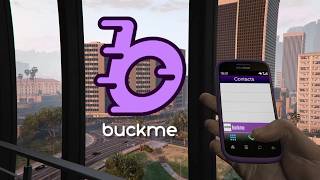
Buckme App inspired by GTA VI
Fleeca Bank is expanding its financial services with the launch of a new mobile money app, Buckme.
Buckme brings a simple mobile money financial system to Los Santos. Manage your personal and business accounts, invest your money, request loans, and trade cryptocurrency through a fully integrated banking experience.
Backed by Fleeca Bank, Buckme puts your finances right at your fingertips.
FEATURES
1. Personal and Business Banking
- Manage separate Personal and Business Accounts.
- Deposit and withdraw funds whenever you need.
- Choose the exact amount for every transaction.
- View your live account balances.
2. Loans and Credit
- Request loans based on 50 percent of your combined account balances.
- Loan interest rates fluctuate.
- Monitor your outstanding loan balance.
- Repay your loans whenever you choose.
3. Credit Pool
- Invest funds from your Business Account.
- Earn interest on your investment.
- Receive your principal and interest when the investment matures.
- Configure interest rates and maturity through the INI file.
4. Crypto Wallet
- Explore five different cryptocurrencies.
- Buy coins through the Coin Markets.
- Manage your Crypto Assets.
- Check holdings, market value and profit or loss.
- Sell your coins and receive proceeds in your Business Account.
- Monitor market fluctuations and receive market updates.
5. Transaction History
- Keep track of deposits and withdrawals.
- Monitor loans and repayments.
- View cryptocurrency purchases and sales.
- All financial activity is recorded in one Banking History menu.
CUSTOMIZATION
- Configure account names, interest rates, loan settings and market settings through the INI file.
- Your banking data and financial progression are saved between game sessions.
BUSINESS ACCOUNT GUIDE
Your Business Account is the primary account used by Buckme's financial services.
- Credit Pool investments are funded from your Business Account.
- Approved loan funds are deposited into your GTA Cash Wallet.
- Loan eligibility is calculated using your combined Personal and Business Account balances.
- Cryptocurrency purchases are funded from your Business Account.
- Cryptocurrency sales proceeds are paid into your Business Account.
- Credit Pool maturity payouts are deposited into your Business Account.
Keep your Business Account funded to access these financial services.
INSTALLATION
1. Script Setup:
- Extract the downloaded archive.
- Open the Scripts folder inside the archive.
- Copy all its contents into your GTA V scripts folder.
2. Menu Banner DLC Setup (bank banner):
- Copy the "bank banner" folder into: Grand Theft Auto V\mods\update\x64\dlcpacks\
- Open OpenIV and enable Edit Mode.
- Navigate to: mods\update\update.rpf\common\data\dlclist.xml
- Right-click "dlclist.xml" and select Edit.
- Add bank banner to your dlc.xml
- Save the file and launch GTA V.
REQUIREMENTS
- LemonUI
- iFruitAddon2
All required script dependencies are included in the mod archive. No separate downloads are necessary.
CREATIVE CREDIT
Developed by XMikasa
Changelog
1.0 XMikasa Branding
1.1 Buckme Branding Update
1.2 Withdraw Fees & Stock Market Update
Poprvé nahráno: 04. Listopad 2026
Poslední aktulizace: před jedním dnem
Last Downloaded: před 8 minutami
1 Komentář
More mods by XMikasa:

- Mission
- Gameplay
- .Net
4.6
1.588
36
2.0 Hayes Autos Business Edition
By nytoniaz

- Mission
- Gameplay
- .Net
5.0
619
18
1.2 Pacific Data Heist Edition
By nytoniaz

- Mission
- Gameplay
- .Net
5.0
645
17
1.3 MOC Side Quest Edition
By nytoniaz

- Mission
- Gameplay
- .Net
4.75
1.166
35
2.0.0 Lester's Military Heist
By nytoniaz
Buckme App inspired by GTA VI
Fleeca Bank is expanding its financial services with the launch of a new mobile money app, Buckme.
Buckme brings a simple mobile money financial system to Los Santos. Manage your personal and business accounts, invest your money, request loans, and trade cryptocurrency through a fully integrated banking experience.
Backed by Fleeca Bank, Buckme puts your finances right at your fingertips.
FEATURES
1. Personal and Business Banking
- Manage separate Personal and Business Accounts.
- Deposit and withdraw funds whenever you need.
- Choose the exact amount for every transaction.
- View your live account balances.
2. Loans and Credit
- Request loans based on 50 percent of your combined account balances.
- Loan interest rates fluctuate.
- Monitor your outstanding loan balance.
- Repay your loans whenever you choose.
3. Credit Pool
- Invest funds from your Business Account.
- Earn interest on your investment.
- Receive your principal and interest when the investment matures.
- Configure interest rates and maturity through the INI file.
4. Crypto Wallet
- Explore five different cryptocurrencies.
- Buy coins through the Coin Markets.
- Manage your Crypto Assets.
- Check holdings, market value and profit or loss.
- Sell your coins and receive proceeds in your Business Account.
- Monitor market fluctuations and receive market updates.
5. Transaction History
- Keep track of deposits and withdrawals.
- Monitor loans and repayments.
- View cryptocurrency purchases and sales.
- All financial activity is recorded in one Banking History menu.
CUSTOMIZATION
- Configure account names, interest rates, loan settings and market settings through the INI file.
- Your banking data and financial progression are saved between game sessions.
BUSINESS ACCOUNT GUIDE
Your Business Account is the primary account used by Buckme's financial services.
- Credit Pool investments are funded from your Business Account.
- Approved loan funds are deposited into your GTA Cash Wallet.
- Loan eligibility is calculated using your combined Personal and Business Account balances.
- Cryptocurrency purchases are funded from your Business Account.
- Cryptocurrency sales proceeds are paid into your Business Account.
- Credit Pool maturity payouts are deposited into your Business Account.
Keep your Business Account funded to access these financial services.
INSTALLATION
1. Script Setup:
- Extract the downloaded archive.
- Open the Scripts folder inside the archive.
- Copy all its contents into your GTA V scripts folder.
2. Menu Banner DLC Setup (bank banner):
- Copy the "bank banner" folder into: Grand Theft Auto V\mods\update\x64\dlcpacks\
- Open OpenIV and enable Edit Mode.
- Navigate to: mods\update\update.rpf\common\data\dlclist.xml
- Right-click "dlclist.xml" and select Edit.
- Add bank banner to your dlc.xml
- Save the file and launch GTA V.
REQUIREMENTS
- LemonUI
- iFruitAddon2
All required script dependencies are included in the mod archive. No separate downloads are necessary.
CREATIVE CREDIT
Developed by XMikasa
Changelog
1.0 XMikasa Branding
1.1 Buckme Branding Update
1.2 Withdraw Fees & Stock Market Update
Poprvé nahráno: 04. Listopad 2026
Poslední aktulizace: před jedním dnem
Last Downloaded: před 8 minutami
 5mods on Discord

This file has been approved automatically. If you think this file should not be here for any reason please report it.