XMikasa Mobile Money 1.0 Mobile Banking Edition


194
5
194
5
XMikasa Mobile Money - Simple Mobile Banking
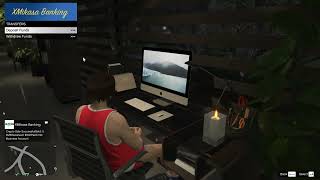
Fleeca Bank is expanding its financial services with the launch of a new mobile money subsidiary, XMikasa Banking.
XMikasa Banking brings a simple mobile money financial system to Los Santos. Manage your personal and business accounts, invest your money, request loans, and trade cryptocurrency through a fully integrated banking experience.
Backed by Fleeca Bank, XMikasa Banking puts your finances right at your fingertips.
FEATURES
1. Personal and Business Banking
- Manage separate Personal and Business Accounts.
- Deposit and withdraw funds whenever you need.
- Choose the exact amount for every transaction.
- View your live account balances.
2. Loans and Credit
- Request loans based on 50 percent of your combined account balances.
- Loan interest rates fluctuate.
- Monitor your outstanding loan balance.
- Repay your loans whenever you choose.
3. Credit Pool
- Invest funds from your Business Account.
- Earn interest on your investment.
- Receive your principal and interest when the investment matures.
- Configure interest rates and maturity through the INI file.
4. Crypto Wallet
- Explore five different cryptocurrencies.
- Buy coins through the Coin Markets.
- Manage your Crypto Assets.
- Check holdings, market value and profit or loss.
- Sell your coins and receive proceeds in your Business Account.
- Monitor market fluctuations and receive market updates.
5. Transaction History
- Keep track of deposits and withdrawals.
- Monitor loans and repayments.
- View cryptocurrency purchases and sales.
- All financial activity is recorded in one Banking History menu.
CUSTOMIZATION
- Configure account names, interest rates, loan settings and market settings through the INI file.
- Your banking data and financial progression are saved between game sessions.
BUSINESS ACCOUNT GUIDE
Your Business Account is the primary account used by XMikasa Banking's financial services.
- Credit Pool investments are funded from your Business Account.
- Approved loan funds are deposited into your GTA Cash Wallet.
- Loan eligibility is calculated using your combined Personal and Business Account balances.
- Cryptocurrency purchases are funded from your Business Account.
- Cryptocurrency sales proceeds are paid into your Business Account.
- Credit Pool maturity payouts are deposited into your Business Account.
Keep your Business Account funded to access these financial services.
INSTALLATION
1. Extract the downloaded archive.
2. Open the Scripts folder inside the archive.
3. Copy all its contents into your GTA V scripts folder.
4. Launch GTA V and enjoy XMikasa Banking.
REQUIREMENTS
- LemonUI
- iFruitAddon2
All required dependencies are included in the mod archive. No separate downloads are necessary.
CREATIVE CREDIT
Developed by XMikasa Studios
Fleeca Bank is expanding its financial services with the launch of a new mobile money subsidiary, XMikasa Banking.
XMikasa Banking brings a simple mobile money financial system to Los Santos. Manage your personal and business accounts, invest your money, request loans, and trade cryptocurrency through a fully integrated banking experience.
Backed by Fleeca Bank, XMikasa Banking puts your finances right at your fingertips.
FEATURES
1. Personal and Business Banking
- Manage separate Personal and Business Accounts.
- Deposit and withdraw funds whenever you need.
- Choose the exact amount for every transaction.
- View your live account balances.
2. Loans and Credit
- Request loans based on 50 percent of your combined account balances.
- Loan interest rates fluctuate.
- Monitor your outstanding loan balance.
- Repay your loans whenever you choose.
3. Credit Pool
- Invest funds from your Business Account.
- Earn interest on your investment.
- Receive your principal and interest when the investment matures.
- Configure interest rates and maturity through the INI file.
4. Crypto Wallet
- Explore five different cryptocurrencies.
- Buy coins through the Coin Markets.
- Manage your Crypto Assets.
- Check holdings, market value and profit or loss.
- Sell your coins and receive proceeds in your Business Account.
- Monitor market fluctuations and receive market updates.
5. Transaction History
- Keep track of deposits and withdrawals.
- Monitor loans and repayments.
- View cryptocurrency purchases and sales.
- All financial activity is recorded in one Banking History menu.
CUSTOMIZATION
- Configure account names, interest rates, loan settings and market settings through the INI file.
- Your banking data and financial progression are saved between game sessions.
BUSINESS ACCOUNT GUIDE
Your Business Account is the primary account used by XMikasa Banking's financial services.
- Credit Pool investments are funded from your Business Account.
- Approved loan funds are deposited into your GTA Cash Wallet.
- Loan eligibility is calculated using your combined Personal and Business Account balances.
- Cryptocurrency purchases are funded from your Business Account.
- Cryptocurrency sales proceeds are paid into your Business Account.
- Credit Pool maturity payouts are deposited into your Business Account.
Keep your Business Account funded to access these financial services.
INSTALLATION
1. Extract the downloaded archive.
2. Open the Scripts folder inside the archive.
3. Copy all its contents into your GTA V scripts folder.
4. Launch GTA V and enjoy XMikasa Banking.
REQUIREMENTS
- LemonUI
- iFruitAddon2
All required dependencies are included in the mod archive. No separate downloads are necessary.
CREATIVE CREDIT
Developed by XMikasa Studios
Dodano: 9 dni temu
Ostatnia aktualizacja: 9 dni temu
Last Downloaded: 4 hours ago
1 Komentarz
More mods by Mikasa:

- Rozgrywka
- .Net
4.5
353
15
1.0 Invest in Los Santos
By nytoniaz

- Misje
- Rozgrywka
- .Net
4.6
1 538
33
2.0 Hayes Autos Business Edition
By nytoniaz

- Misje
- Rozgrywka
- .Net
5.0
621
17
1.2 Landing Tech Edition
By nytoniaz

- Misje
- Rozgrywka
- .Net
4.25
1 384
23
3.0 Edit Payout + QOL Improvements
By nytoniaz
XMikasa Mobile Money - Simple Mobile Banking
Fleeca Bank is expanding its financial services with the launch of a new mobile money subsidiary, XMikasa Banking.
XMikasa Banking brings a simple mobile money financial system to Los Santos. Manage your personal and business accounts, invest your money, request loans, and trade cryptocurrency through a fully integrated banking experience.
Backed by Fleeca Bank, XMikasa Banking puts your finances right at your fingertips.
FEATURES
1. Personal and Business Banking
- Manage separate Personal and Business Accounts.
- Deposit and withdraw funds whenever you need.
- Choose the exact amount for every transaction.
- View your live account balances.
2. Loans and Credit
- Request loans based on 50 percent of your combined account balances.
- Loan interest rates fluctuate.
- Monitor your outstanding loan balance.
- Repay your loans whenever you choose.
3. Credit Pool
- Invest funds from your Business Account.
- Earn interest on your investment.
- Receive your principal and interest when the investment matures.
- Configure interest rates and maturity through the INI file.
4. Crypto Wallet
- Explore five different cryptocurrencies.
- Buy coins through the Coin Markets.
- Manage your Crypto Assets.
- Check holdings, market value and profit or loss.
- Sell your coins and receive proceeds in your Business Account.
- Monitor market fluctuations and receive market updates.
5. Transaction History
- Keep track of deposits and withdrawals.
- Monitor loans and repayments.
- View cryptocurrency purchases and sales.
- All financial activity is recorded in one Banking History menu.
CUSTOMIZATION
- Configure account names, interest rates, loan settings and market settings through the INI file.
- Your banking data and financial progression are saved between game sessions.
BUSINESS ACCOUNT GUIDE
Your Business Account is the primary account used by XMikasa Banking's financial services.
- Credit Pool investments are funded from your Business Account.
- Approved loan funds are deposited into your GTA Cash Wallet.
- Loan eligibility is calculated using your combined Personal and Business Account balances.
- Cryptocurrency purchases are funded from your Business Account.
- Cryptocurrency sales proceeds are paid into your Business Account.
- Credit Pool maturity payouts are deposited into your Business Account.
Keep your Business Account funded to access these financial services.
INSTALLATION
1. Extract the downloaded archive.
2. Open the Scripts folder inside the archive.
3. Copy all its contents into your GTA V scripts folder.
4. Launch GTA V and enjoy XMikasa Banking.
REQUIREMENTS
- LemonUI
- iFruitAddon2
All required dependencies are included in the mod archive. No separate downloads are necessary.
CREATIVE CREDIT
Developed by XMikasa Studios
Fleeca Bank is expanding its financial services with the launch of a new mobile money subsidiary, XMikasa Banking.
XMikasa Banking brings a simple mobile money financial system to Los Santos. Manage your personal and business accounts, invest your money, request loans, and trade cryptocurrency through a fully integrated banking experience.
Backed by Fleeca Bank, XMikasa Banking puts your finances right at your fingertips.
FEATURES
1. Personal and Business Banking
- Manage separate Personal and Business Accounts.
- Deposit and withdraw funds whenever you need.
- Choose the exact amount for every transaction.
- View your live account balances.
2. Loans and Credit
- Request loans based on 50 percent of your combined account balances.
- Loan interest rates fluctuate.
- Monitor your outstanding loan balance.
- Repay your loans whenever you choose.
3. Credit Pool
- Invest funds from your Business Account.
- Earn interest on your investment.
- Receive your principal and interest when the investment matures.
- Configure interest rates and maturity through the INI file.
4. Crypto Wallet
- Explore five different cryptocurrencies.
- Buy coins through the Coin Markets.
- Manage your Crypto Assets.
- Check holdings, market value and profit or loss.
- Sell your coins and receive proceeds in your Business Account.
- Monitor market fluctuations and receive market updates.
5. Transaction History
- Keep track of deposits and withdrawals.
- Monitor loans and repayments.
- View cryptocurrency purchases and sales.
- All financial activity is recorded in one Banking History menu.
CUSTOMIZATION
- Configure account names, interest rates, loan settings and market settings through the INI file.
- Your banking data and financial progression are saved between game sessions.
BUSINESS ACCOUNT GUIDE
Your Business Account is the primary account used by XMikasa Banking's financial services.
- Credit Pool investments are funded from your Business Account.
- Approved loan funds are deposited into your GTA Cash Wallet.
- Loan eligibility is calculated using your combined Personal and Business Account balances.
- Cryptocurrency purchases are funded from your Business Account.
- Cryptocurrency sales proceeds are paid into your Business Account.
- Credit Pool maturity payouts are deposited into your Business Account.
Keep your Business Account funded to access these financial services.
INSTALLATION
1. Extract the downloaded archive.
2. Open the Scripts folder inside the archive.
3. Copy all its contents into your GTA V scripts folder.
4. Launch GTA V and enjoy XMikasa Banking.
REQUIREMENTS
- LemonUI
- iFruitAddon2
All required dependencies are included in the mod archive. No separate downloads are necessary.
CREATIVE CREDIT
Developed by XMikasa Studios
Dodano: 9 dni temu
Ostatnia aktualizacja: 9 dni temu
Last Downloaded: 4 hours ago
 5mods on Discord

This file has been approved automatically. If you think this file should not be here for any reason please report it.