Docks Outpost [Add-On SP / Enhanced / FiveM] 1.0




237
2
237
2
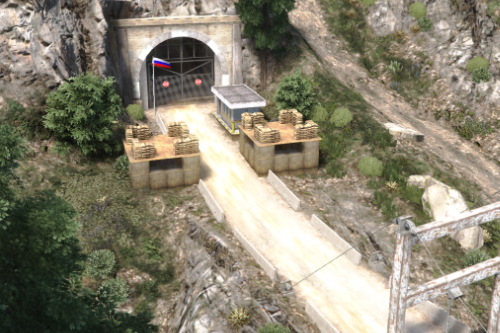
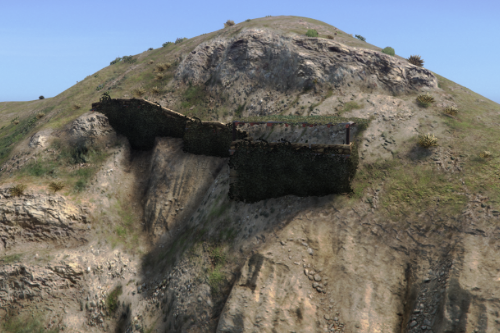
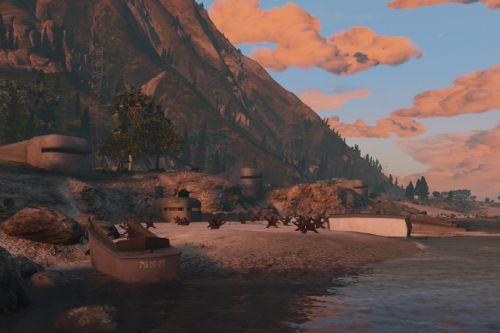
Description: Adds an military outpost to the docks, rehaulling a small little warehouse.
-----------------------------------------
1.0 - inital release
-----------------------------------------
-----------------------------------------
-----------------------------------------
Credits:
"Louies Development" (Me) for the Weapons, Rack, Easter Egg, Portacabins, !
"SW Developmet" for the wire, defence tower, Watch Tower & barrier prop!
"Ryder Better Day Development" for all the Hesco Props!
-----------------------------------------
Features:
Rehauled Warehouse
Custom Weapon Props
Enhacned & Legacy & FiveM
Great for Milsim
-----------------------------------------
Installation FIVEM:
A - Open the file with 7zip, Winrar, or any other program that allows you to unzip these types of files
B - Unzip the file into your MAP FOLDER and start on your server.cfg
Installation Single Player:
A - Open OpenIV and enable Edit Mode
B - Navigate to the path mods\update\x64\dlcpacks
C - Drag the map DLC folder into the dlcpacks folder then copy the name of this DLC folder
D - Return to the update folder and double click to open update.rpf
E - Open common\data find dlclist.xml right click it and select Edit
F - Scroll to the bottom of the file copy the last line of code press Enter and paste it on a new line
G - Replace the DLC name in the new line with the name of your map DLC folder
H - Save the file Installation is complete launch the game to use the mod
-----------------------------------------
1.0 - inital release
-----------------------------------------
-----------------------------------------
-----------------------------------------
Credits:
"Louies Development" (Me) for the Weapons, Rack, Easter Egg, Portacabins, !
"SW Developmet" for the wire, defence tower, Watch Tower & barrier prop!
"Ryder Better Day Development" for all the Hesco Props!
-----------------------------------------
Features:
Rehauled Warehouse
Custom Weapon Props
Enhacned & Legacy & FiveM
Great for Milsim
-----------------------------------------
Installation FIVEM:
A - Open the file with 7zip, Winrar, or any other program that allows you to unzip these types of files
B - Unzip the file into your MAP FOLDER and start on your server.cfg
Installation Single Player:
A - Open OpenIV and enable Edit Mode
B - Navigate to the path mods\update\x64\dlcpacks
C - Drag the map DLC folder into the dlcpacks folder then copy the name of this DLC folder
D - Return to the update folder and double click to open update.rpf
E - Open common\data find dlclist.xml right click it and select Edit
F - Scroll to the bottom of the file copy the last line of code press Enter and paste it on a new line
G - Replace the DLC name in the new line with the name of your map DLC folder
H - Save the file Installation is complete launch the game to use the mod
Primul incarcat: 11 octombrie 2026
Ultimul incarcat: 11 octombrie 2026
Last Downloaded: 3 hours ago
3 Comentarii
More mods by LouieDevs:
Description: Adds an military outpost to the docks, rehaulling a small little warehouse.
-----------------------------------------
1.0 - inital release
-----------------------------------------
-----------------------------------------
-----------------------------------------
Credits:
"Louies Development" (Me) for the Weapons, Rack, Easter Egg, Portacabins, !
"SW Developmet" for the wire, defence tower, Watch Tower & barrier prop!
"Ryder Better Day Development" for all the Hesco Props!
-----------------------------------------
Features:
Rehauled Warehouse
Custom Weapon Props
Enhacned & Legacy & FiveM
Great for Milsim
-----------------------------------------
Installation FIVEM:
A - Open the file with 7zip, Winrar, or any other program that allows you to unzip these types of files
B - Unzip the file into your MAP FOLDER and start on your server.cfg
Installation Single Player:
A - Open OpenIV and enable Edit Mode
B - Navigate to the path mods\update\x64\dlcpacks
C - Drag the map DLC folder into the dlcpacks folder then copy the name of this DLC folder
D - Return to the update folder and double click to open update.rpf
E - Open common\data find dlclist.xml right click it and select Edit
F - Scroll to the bottom of the file copy the last line of code press Enter and paste it on a new line
G - Replace the DLC name in the new line with the name of your map DLC folder
H - Save the file Installation is complete launch the game to use the mod
-----------------------------------------
1.0 - inital release
-----------------------------------------
-----------------------------------------
-----------------------------------------
Credits:
"Louies Development" (Me) for the Weapons, Rack, Easter Egg, Portacabins, !
"SW Developmet" for the wire, defence tower, Watch Tower & barrier prop!
"Ryder Better Day Development" for all the Hesco Props!
-----------------------------------------
Features:
Rehauled Warehouse
Custom Weapon Props
Enhacned & Legacy & FiveM
Great for Milsim
-----------------------------------------
Installation FIVEM:
A - Open the file with 7zip, Winrar, or any other program that allows you to unzip these types of files
B - Unzip the file into your MAP FOLDER and start on your server.cfg
Installation Single Player:
A - Open OpenIV and enable Edit Mode
B - Navigate to the path mods\update\x64\dlcpacks
C - Drag the map DLC folder into the dlcpacks folder then copy the name of this DLC folder
D - Return to the update folder and double click to open update.rpf
E - Open common\data find dlclist.xml right click it and select Edit
F - Scroll to the bottom of the file copy the last line of code press Enter and paste it on a new line
G - Replace the DLC name in the new line with the name of your map DLC folder
H - Save the file Installation is complete launch the game to use the mod
Primul incarcat: 11 octombrie 2026
Ultimul incarcat: 11 octombrie 2026
Last Downloaded: 3 hours ago
 5mods on Discord

This file has been approved automatically. If you think this file should not be here for any reason please report it.
@LouieDevs MapModel tag is reserved for real 3D generated terrain using 3DsMax and Blender, thank you for your attention to this matter
@ReNNie Thank you I thought it was for like 3d modeled props😭