Eyefind+ Real Internet Mod [Legacy & Enhanced] 0.3.6


1.617
45
-
 14 octombrie 2026
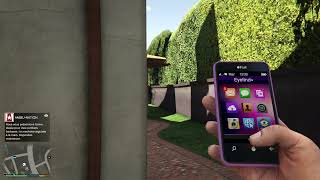
Eyefind+ Real Internet Mod adds a REAL web browser to the phone of GTA V (Legacy & Enhanced). Google, YouTube, Wikipedia, Reddit, Twitch... right in your character's phone, without alt-tabbing.
Features
- A real phone app: last slot of the home screen, native phone navigation, the character keeps the phone in hand.
- Real browser (Microsoft Edge WebView2): mouse and keyboard, address bar, back/forward, fullscreen videos.
- Drawn inside the game's own image (DirectX 12 on Enhanced, DirectX 11 on Legacy): works in fullscreen, shows in your recordings, hides in the pause menu.
- Optional add-on "phone logo and screen projection": the Eyefind+ logo in the phone, and the phone's own screen shows the live browser.
- Phone-sized or big browser (F11), settings in an .ini file.
Requirements
- GTA V Legacy or Enhanced (story mode only)
- ScriptHookV + ASI loader
- ScriptHookVDotNet 3 (Enhanced: nightly with Enhanced support / Legacy: v3.6.0 or newer nightly)
- Microsoft Edge WebView2 Runtime (included in up-to-date Windows 10/11)
- Optional, for the add-on only: OpenRPF.asi (Enhanced) or OpenIV.asi (Legacy)
Installation
- Open the "scripts" folder of the archive and copy its content into your game's "scripts" folder (your other mods stay).
- Optional add-on: install OpenRPF.asi (Enhanced) or OpenIV.asi (Legacy), extract the archive, then run "Eyefind+ phone logo and screen projection (optional)\EyefindPlus-Logo-and-Screen-Installer.exe" (or follow the manual install guide for CodeWalker/OpenIV). The installer works for both games and asks which one if you have both. Your other mods in mods\update\update.rpf are kept.
Use
Take the phone out, go to the last slot, press Enter. Esc puts the browser away.
Full details in README.txt. Please include the logs (the .log files in scripts\EyefindPlus) with any bug report.
Changelog
v0.3.6:
- fix: on some PCs the page was killed when clicking a link (grey page). Cause: an Edge telemetry feature that Microsoft turns on for some users, which WebView2 156 cannot run. It is now disabled.
v0.3.5:
- fullscreen videos much smoother (about 28 fps instead of 11, fewer freezes)
- a page that crashes or freezes (grey page, clicks not working) is reloaded automatically, the reason is written in the log
- frame rate and timings written in EyefindPlus.log every 30 s, to help with bug reports
- settings file easier to read
0.3:
- everything stays in scripts\EyefindPlus (no more %LOCALAPPDATA%, the old folder is removed).
- Walk with the browser open (F6). Editable home page shortcuts.
- "Clear browsing data" and RememberLogins.
- Web sites can no longer ask for the microphone, camera or location.
0.2.1:
- Add-on installer rebuilt to avoid false antivirus warnings (1/71 on VirusTotal instead of 5/71)
- Clearer installation steps in the README
- 0.2: GTA V Legacy is now supported (same archive): in-game drawing with DirectX 11, phone logo and screen projection add-on for Legacy, one installer for both games.
- 0.1: first release (GTA V Enhanced).
Known limitations
- Some overlays hooking DirectX may conflict with the in-game drawing (the browser then shows as a window).
Credits: meumeuh007. Uses Microsoft Edge WebView2; the add-on installer uses CodeWalker.Core by dexyfex.
Primul incarcat: 13 octombrie 2026
Ultimul incarcat: in urma cu 8 zile
Last Downloaded: in urma cu 33 minute
43 Comentarii
More mods by meumeuh007:
Eyefind+ Real Internet Mod adds a REAL web browser to the phone of GTA V (Legacy & Enhanced). Google, YouTube, Wikipedia, Reddit, Twitch... right in your character's phone, without alt-tabbing.
Features
- A real phone app: last slot of the home screen, native phone navigation, the character keeps the phone in hand.
- Real browser (Microsoft Edge WebView2): mouse and keyboard, address bar, back/forward, fullscreen videos.
- Drawn inside the game's own image (DirectX 12 on Enhanced, DirectX 11 on Legacy): works in fullscreen, shows in your recordings, hides in the pause menu.
- Optional add-on "phone logo and screen projection": the Eyefind+ logo in the phone, and the phone's own screen shows the live browser.
- Phone-sized or big browser (F11), settings in an .ini file.
Requirements
- GTA V Legacy or Enhanced (story mode only)
- ScriptHookV + ASI loader
- ScriptHookVDotNet 3 (Enhanced: nightly with Enhanced support / Legacy: v3.6.0 or newer nightly)
- Microsoft Edge WebView2 Runtime (included in up-to-date Windows 10/11)
- Optional, for the add-on only: OpenRPF.asi (Enhanced) or OpenIV.asi (Legacy)
Installation
- Open the "scripts" folder of the archive and copy its content into your game's "scripts" folder (your other mods stay).
- Optional add-on: install OpenRPF.asi (Enhanced) or OpenIV.asi (Legacy), extract the archive, then run "Eyefind+ phone logo and screen projection (optional)\EyefindPlus-Logo-and-Screen-Installer.exe" (or follow the manual install guide for CodeWalker/OpenIV). The installer works for both games and asks which one if you have both. Your other mods in mods\update\update.rpf are kept.
Use
Take the phone out, go to the last slot, press Enter. Esc puts the browser away.
Full details in README.txt. Please include the logs (the .log files in scripts\EyefindPlus) with any bug report.
Changelog
v0.3.6:
- fix: on some PCs the page was killed when clicking a link (grey page). Cause: an Edge telemetry feature that Microsoft turns on for some users, which WebView2 156 cannot run. It is now disabled.
v0.3.5:
- fullscreen videos much smoother (about 28 fps instead of 11, fewer freezes)
- a page that crashes or freezes (grey page, clicks not working) is reloaded automatically, the reason is written in the log
- frame rate and timings written in EyefindPlus.log every 30 s, to help with bug reports
- settings file easier to read
0.3:
- everything stays in scripts\EyefindPlus (no more %LOCALAPPDATA%, the old folder is removed).
- Walk with the browser open (F6). Editable home page shortcuts.
- "Clear browsing data" and RememberLogins.
- Web sites can no longer ask for the microphone, camera or location.
0.2.1:
- Add-on installer rebuilt to avoid false antivirus warnings (1/71 on VirusTotal instead of 5/71)
- Clearer installation steps in the README
- 0.2: GTA V Legacy is now supported (same archive): in-game drawing with DirectX 11, phone logo and screen projection add-on for Legacy, one installer for both games.
- 0.1: first release (GTA V Enhanced).
Known limitations
- Some overlays hooking DirectX may conflict with the in-game drawing (the browser then shows as a window).
Credits: meumeuh007. Uses Microsoft Edge WebView2; the add-on installer uses CodeWalker.Core by dexyfex.
Primul incarcat: 13 octombrie 2026
Ultimul incarcat: in urma cu 8 zile
Last Downloaded: in urma cu 33 minute
-

-

@kingmufaso J'avais remarquer cela mais je crois pas qu'il y a quelconque chose de bizarre mais je ne suis pas pro dans cela donc si tu as trouvé quelque chose de bizarre dis le s'il ta plaît
25 octombrie 2026 -
@Neptune404 Youtube wasn't working for me and the mod kept trying to log me into my banned youtube account
25 octombrie 2026 -

-
@kingmufaso Oui j'ai vu cela mais je me suis pas connecté et puis pour naviguer c'est un enfer
26 octombrie 2026 -
 Expand to read the full comment
Subject: Complete Setup Report & Bug Analysis: WebView2 mouse coordinate overflow on 21:9 UltraWide (3440x1440)
Hi meumeuh007,
I am writing to report a scaling/input bug in Eyefind+ v0.3 that completely freezes the browser instance under specific conditions. Below is the full step-by-step chronology from my setup and testing log:
### 1. Environment & Base Setup
* **Game Version:** GTA V Legacy (Build v3889.0)
* **Script Engine:** ScriptHookV (v3889.0), ScriptHookVDotNet Enhanced (v3.9.0.6)
* **Graphics / Interceptors:** ReShade active (dxgi.dll), but fully isolated via BlockedExecutableNames=msedgewebview2.exe inside ReShade.ini (disabling/renaming ReShade did not resolve the issue).
* **Hardware:** Xbox Controller (freshly synced) & Mouse/Keyboard
* **Monitor:** 21:9 UltraWide Monitor running at native 3440x1440px.### 2. The Chronology of the Bug
* **Initial State:** On first install, the mod worked beautifully. StartMode was set to Phone. Google Maps worked, and Google Login was completely successful.
* **The Trigger:** After a reinstall, changes were made to the .ini. Whenever the browser interactions became more complex (specifically trying to navigate or click elements inside YouTube), or when resizing/scaling came into play, the entire web view completely froze or turned into a blank white/gray screen.
* **The Error Logs:** The underlying SHVDN.log states that EyefindPlus.EyefindPlusScript instantiates and starts perfectly. However, the EyefindPlus.log reveals that the moment a click is registered on YouTube, it throws the following critical error in a non-stop loop:
[ERROR] Input.dispatchMouseEvent failed: Der Wert liegt außerhalb des erwarteten Bereichs. (Value out of expected range)### 3. Troubleshooting Steps Attempted (All Failed)
1. **WebView2 Reset:** Completely cleared %LOCALAPPDATA%\EyefindPlus and the local browser-data / cache folders.
2. **ReShade Bypass:** Fully blocked ReShade from hooking into msedgewebview2.exe.
3. **INI Tweaks:** Changed [Icon] Custom=false to stop artificial overlay scaling.
4. **Coordinate Shifting:** Tweaked PhoneHeightPercent and PhoneRightMarginPercent to shift the phone bounding box away from the screen margins.
5. **Result:** Shifting the values eventually broke the UI layout entirely (app design failed to render, apps stopped responding), forcing a full .ini deletion to generate a fresh one.### 4. Technical Conclusion
The embedded Microsoft Edge WebView2 control throws a hard coordinate exception (Input.dispatchMouseEvent failed) because the mod's internal math miscalculates mouse screen space coordinates when translating them into the virtual phone space on an UltraWide 21:9 screen resolution (3440x1440). While static apps like Maps tolerate this, YouTube's strict interface elements/security triggers cause the whole handler to crash instantly when an out-of-bounds mouse event value is processed.Could you please implement a native scaling/viewport compensation check for 21:9 aspect ratios so that dispatchMouseEvent safely maps coordinates within the browser boundaries on widescreen monitors?
Thank you for your incredible work and for creating such an exceptional mod!
29 octombrie 2026 -
@Moonraker
Thanks again for the detailed report, it helped a lot.
That exact error ("value out of expected range")
is what the browser answers when its page has crashed: every click sent to the dead page fails,
which is the loop you saw on the grey page.
0.3.5 detects a crashed or frozen page and reloads it automatically,
and writes the crash reason in scripts\EyefindPlus\EyefindPlus.log.
If it happens again,
please send that log so we can see what makes the page crash on your setup (ReShade, GPU memory...).in urma cu 10 zile -
@meumeuh007 Danke für deine Schnelle Rückmeldung, aber ich muss dir leider sagen das die Mod immer noch Chrasd ich habe es sxchon versucht und bin enteuscht weil es nicht funktioniert. Es war so genjal! Wie kann ich dazu noch beitragen das du es hinbekommst ,was kann ich tun? Danke für dein Interesse 👍👌
in urma cu 10 zile -
-

Finally a mod where i can watch youtube while I wait stuff to happen in GTA 5. I will give this 5 stars KEEP THIS MOD ALIVE PLSSSSS I SWEAR ILL NEVER FIND A MOD LIKE THIS AGAIN !!!!!!!!
in urma cu 10 zile -
@Moonraker do you play in legacy or enhanced ? and provide the mod log that can be found here:
scripts\EyefindPlus\EyefindPlus.login urma cu 9 zile -
Expand to read the full comment
13:09:04.072 EyefindOverlay 4 (built Oct 29 2026 23:54:09), process 9392
13:09:04.073 Module d3d12.dll: -
13:09:04.073 Module D3D12Core.dll: -
13:09:04.073 Module dxgi.dll: D:\Grand Theft Auto V Legacy\dxgi.dll
13:09:04.075 Module sl.interposer.dll: -
13:09:04.075 Module sl.dlss_g.dll: -
13:09:04.075 Module nvngx_dlssg.dll: -
13:09:04.076 Module amd_fidelityfx_dx12.dll: -
13:09:04.076 Module GameOverlayRenderer64.dll: -
13:09:04.076 Module DiscordHook64.dll: -
13:09:04.076 Module RTSSHooks64.dll: -
13:09:04.078 Module ReShade64.dll: -
13:09:04.078 Module ScriptHookV.dll: D:\Grand Theft Auto V Legacy\ScriptHookV.dll
13:09:04.078 Module d3d11.dll: C:\WINDOWS\SYSTEM32\D3D11.DLL
13:09:04.153 Direct3D 11 (GTA V Legacy). Present: dxgi.dll+0x14C140 | Present1: dxgi.dll+0x14CEF0
13:09:04.154 Hooked Present (was dxgi.dll+0x14C140)
13:09:04.154 Hooked CreateTexture2D (was dxgi.dll+0xF3C10)
13:09:04.154 Hooked Present1 (was dxgi.dll+0x14CEF0)
13:09:04.184 Hooks installed, waiting for the game's frames
13:09:04.610 Swap chain 000002031582A4B0 (vtable ScriptHookV.dll+0x7510): window class 'grcWindow', 3440x1440, format 87, 1 buffers, swap effect 0, flags 0x0, windowed 1, thread 5492 -> game, will draw on it
13:09:09.186 Status: presents 174, game presents 87, shown 0, drawn 0, skipped 0, no target yet
13:09:14.190 Status: presents 730, game presents 365, shown 0, drawn 0, skipped 0, no target yet
13:09:17.187 Renderer created (Direct3D 11)
13:09:17.189 Texture 1: 46x68
13:09:17.424 Texture 0: 590x1180
13:09:17.427 Target: 3440x1440 format 87, Direct3D 11, output SDR
13:09:17.427 First frame drawn (Direct3D 11): back buffer 3440x1440, quad 590x1180 px at (2644, 203)
13:09:19.191 Status: presents 1323, game presents 661, shown 117, drawn 107, skipped 0, 3440x1440 format 87, Direct3D 11, output SDR
13:09:24.193 Status: presents 1924, game presents 962, shown 418, drawn 408, skipped 0, 3440x1440 format 87, Direct3D 11, output SDR
13:09:29.194 Status: presents 2519, game presents 1259, shown 715, drawn 705, skipped 0, 3440x1440 format 87, Direct3D 11, output SDR
13:09:34.195 Status: presents 3100, game presents 1550, shown 1006, drawn 996, skipped 0, 3440x1440 format 87, Direct3D 11, output SDR
ich spiele Legacy danke für deine Hilfe😉in urma cu 9 zile -
@meumeuh007 Wenn du noch etwas brauchst melde dich ! Danke für deine Hilfe😉
in urma cu 9 zile -
@Moonraker
Danke! Das war EyefindOverlay.log: es zeigt, dass die Anzeige auf deinem 3440x1440 Bildschirm einwandfrei funktioniert (996 von 1006 Bildern gezeichnet). Ich brauche bitte noch:1. Die Datei scripts\EyefindPlus\EyefindPlus.log (nicht EyefindOverlay.log), direkt nachdem der Absturz passiert ist, bevor du das Spiel neu startest. Version 0.3.5 schreibt dort den Grund hinein (“Browser process failed: ...”).
2. Was genau passiert: graue/weiße Seite, friert ein, Spiel stürzt ab? Und was hast du gerade gemacht (YouTube, Klick, Vollbild...)?
3. Falls vorhanden: den Ordner scripts\EyefindPlus\browser-data\EBWebView\Crashpad\reports (Absturzberichte von Edge).
Danke für deine Hilfe 👌in urma cu 9 zile -
https://www.mediafire.com/file/0u8flryjawffr8o/dfd3edc7-d6df-4ac6-9504-15ff544e107d.dmp/file https://www.mediafire.com/file/e7upxg04gyim1vp/e2c45a78-2527-4ef8-904c-55b1f820599d.dmp/filehttps://www.mediafire.com/file/4ik0f7j656aiooh/e857e5f3-786d-4ee3-b61c-9d42276b7c25.dmp/file ich hoffe du kannst damit was anfangen ich habe in der zwischenzeit eine identigritätsprüpung bei gta gemacht bis jetzt fuktioniert es ich hoffe ich habe geholfen 👍
in urma cu 9 zile -
@meumeuh007 It would be nice if we could walk around and or drive while still browsing the internet or watching videos.
in urma cu 9 zile -
@Moonraker
Danke, deine Absturzberichte waren perfekt! Alle drei zeigen dieselbe Ursache: eine Telemetrie-Funktion von Edge, die Microsoft nur bei manchen Nutzern einschaltet, bringt WebView2 156 dazu, die Seite beim Klick auf einen Link zu beenden (deshalb die graue Seite). Version 0.3.6 schaltet diese Funktion ab. Falls es erneut Probleme gibt, gib mir bitte Bescheid\!
👌in urma cu 8 zile -
@onestarlaw
its already possible, press F6 while the browser is open, then you can walk, drive and look around while the page stays on screen (videos keep playing). Press F6 again to use the browser. Also, with PauseMediaOnClose=false in scripts\EyefindPlus\EyefindPlus.ini, music and videos keep playing even when you put the phone away. The key can be changed with PlayKey in the same file.in urma cu 8 zile -
@meumeuh007 Danke für deine Rückmeldung,ich hab das Spiel nochmal Neu geladen seitdem funktioniert es. mir ist nur aufgefallen das die Mod auch gleichzeitig im Ingame Smartfone angezeigt wird ,Ist es möglich das die mod nur im ingame Smartfone angezeigt wird ohne daß das größere Fenster auf geht und dann das Smartfone verdeckt beim anklicken der App ? Das wäre eleganter. Ansonnsten finde ich diese Mod einzigartig es gibt nichts vergleichbares in dieser Kateogrie. Und nochmals Danke für deine hervoragende Arbeit,ich weiß da steckt sehr viel Zeit ,Wissen und Herzblut dahinter 👍👌😊
in urma cu 8 zile -

 5mods on Discord

big announcement:
the Legacy version are now supported