Buckme Money App Buckme Edition


201
5
201
5
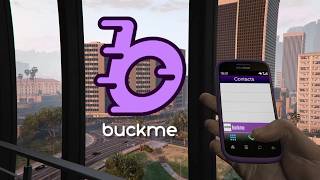
Buckme App inspired by GTA VI
Fleeca Bank is expanding its financial services with the launch of a new mobile money app, Buckme.
Buckme brings a simple mobile money financial system to Los Santos. Manage your personal and business accounts, invest your money, request loans, and trade cryptocurrency through a fully integrated banking experience.
Backed by Fleeca Bank, Buckme puts your finances right at your fingertips.
FEATURES
1. Personal and Business Banking
- Manage separate Personal and Business Accounts.
- Deposit and withdraw funds whenever you need.
- Choose the exact amount for every transaction.
- View your live account balances.
2. Loans and Credit
- Request loans based on 50 percent of your combined account balances.
- Loan interest rates fluctuate.
- Monitor your outstanding loan balance.
- Repay your loans whenever you choose.
3. Credit Pool
- Invest funds from your Business Account.
- Earn interest on your investment.
- Receive your principal and interest when the investment matures.
- Configure interest rates and maturity through the INI file.
4. Crypto Wallet
- Explore five different cryptocurrencies.
- Buy coins through the Coin Markets.
- Manage your Crypto Assets.
- Check holdings, market value and profit or loss.
- Sell your coins and receive proceeds in your Business Account.
- Monitor market fluctuations and receive market updates.
5. Transaction History
- Keep track of deposits and withdrawals.
- Monitor loans and repayments.
- View cryptocurrency purchases and sales.
- All financial activity is recorded in one Banking History menu.
CUSTOMIZATION
- Configure account names, interest rates, loan settings and market settings through the INI file.
- Your banking data and financial progression are saved between game sessions.
BUSINESS ACCOUNT GUIDE
Your Business Account is the primary account used by Buckme's financial services.
- Credit Pool investments are funded from your Business Account.
- Approved loan funds are deposited into your GTA Cash Wallet.
- Loan eligibility is calculated using your combined Personal and Business Account balances.
- Cryptocurrency purchases are funded from your Business Account.
- Cryptocurrency sales proceeds are paid into your Business Account.
- Credit Pool maturity payouts are deposited into your Business Account.
Keep your Business Account funded to access these financial services.
INSTALLATION
1. Script Setup:
- Extract the downloaded archive.
- Open the Scripts folder inside the archive.
- Copy all its contents into your GTA V scripts folder.
2. Menu Banner DLC Setup (bank banner):
- Copy the "bank banner" folder into: Grand Theft Auto V\mods\update\x64\dlcpacks\
- Open OpenIV and enable Edit Mode.
- Navigate to: mods\update\update.rpf\common\data\dlclist.xml
- Right-click "dlclist.xml" and select Edit.
- Add bank banner to your dlc.xml
- Save the file and launch GTA V.
REQUIREMENTS
- LemonUI
- iFruitAddon2
All required script dependencies are included in the mod archive. No separate downloads are necessary.
CREATIVE CREDIT
Developed by XMikasa
Primul incarcat: 04 noiembrie 2026
Ultimul incarcat: in urma cu 17 minute
Last Downloaded: in urma cu 9 minute
1 Comentariu
More mods by Mikasa:

- Mission
- Gameplay
- .Net
4.33
404
13
Gato Cartel Edition
By nytoniaz

- Mission
- Gameplay
- .Net
5.0
279
6
1.0 Find Kinzy Edition
By nytoniaz

- Gameplay
- .Net
5.0
500
23
16 Gunners Edition
By nytoniaz

- Mission
- Gameplay
- .Net
4.25
1.398
24
3.0 Edit Payout + QOL Improvements
By nytoniaz
Buckme App inspired by GTA VI
Fleeca Bank is expanding its financial services with the launch of a new mobile money app, Buckme.
Buckme brings a simple mobile money financial system to Los Santos. Manage your personal and business accounts, invest your money, request loans, and trade cryptocurrency through a fully integrated banking experience.
Backed by Fleeca Bank, Buckme puts your finances right at your fingertips.
FEATURES
1. Personal and Business Banking
- Manage separate Personal and Business Accounts.
- Deposit and withdraw funds whenever you need.
- Choose the exact amount for every transaction.
- View your live account balances.
2. Loans and Credit
- Request loans based on 50 percent of your combined account balances.
- Loan interest rates fluctuate.
- Monitor your outstanding loan balance.
- Repay your loans whenever you choose.
3. Credit Pool
- Invest funds from your Business Account.
- Earn interest on your investment.
- Receive your principal and interest when the investment matures.
- Configure interest rates and maturity through the INI file.
4. Crypto Wallet
- Explore five different cryptocurrencies.
- Buy coins through the Coin Markets.
- Manage your Crypto Assets.
- Check holdings, market value and profit or loss.
- Sell your coins and receive proceeds in your Business Account.
- Monitor market fluctuations and receive market updates.
5. Transaction History
- Keep track of deposits and withdrawals.
- Monitor loans and repayments.
- View cryptocurrency purchases and sales.
- All financial activity is recorded in one Banking History menu.
CUSTOMIZATION
- Configure account names, interest rates, loan settings and market settings through the INI file.
- Your banking data and financial progression are saved between game sessions.
BUSINESS ACCOUNT GUIDE
Your Business Account is the primary account used by Buckme's financial services.
- Credit Pool investments are funded from your Business Account.
- Approved loan funds are deposited into your GTA Cash Wallet.
- Loan eligibility is calculated using your combined Personal and Business Account balances.
- Cryptocurrency purchases are funded from your Business Account.
- Cryptocurrency sales proceeds are paid into your Business Account.
- Credit Pool maturity payouts are deposited into your Business Account.
Keep your Business Account funded to access these financial services.
INSTALLATION
1. Script Setup:
- Extract the downloaded archive.
- Open the Scripts folder inside the archive.
- Copy all its contents into your GTA V scripts folder.
2. Menu Banner DLC Setup (bank banner):
- Copy the "bank banner" folder into: Grand Theft Auto V\mods\update\x64\dlcpacks\
- Open OpenIV and enable Edit Mode.
- Navigate to: mods\update\update.rpf\common\data\dlclist.xml
- Right-click "dlclist.xml" and select Edit.
- Add bank banner to your dlc.xml
- Save the file and launch GTA V.
REQUIREMENTS
- LemonUI
- iFruitAddon2
All required script dependencies are included in the mod archive. No separate downloads are necessary.
CREATIVE CREDIT
Developed by XMikasa
Primul incarcat: 04 noiembrie 2026
Ultimul incarcat: in urma cu 17 minute
Last Downloaded: in urma cu 9 minute
 5mods on Discord

This file has been approved automatically. If you think this file should not be here for any reason please report it.