Job Creator Premium Deluxe + Postal Deliveries + TaxiUber V1.2


601
6
-
 3 октября 2026
Overview
Premium Deluxe Motorsport Legacy Job System is a complete Job creation and management system for GTA V Story Mode.
This version adds Postal Deliveries, new Jobs Taxi Missions Uber Jobs, Job Editor and an additional menu.
Players can create, configure, save, start, complete, edit and delete custom Jobs.
Features
Complete Job System
F5 Main Menu
F6 Additional Menu
F11 Job Editor
Create New Jobs
Edit existing Jobs
Delete Jobs
Configure Job names
Configure mission names
Configure vehicle models
Configure vehicle positions
Configure passenger locations
Configure destinations
Configure payment
Configure XP
Configure time limits
Add enemies
Add armed guards
Postal Deliveries
New Delivery Jobs
Taxi Missions
Uber Jobs
Vehicle Delivery
Special Delivery
Special Transport
Rescue Jobs
Convoy Jobs
Package Delivery
Cargo Transport
Save Jobs
Start saved Jobs
Edit saved Jobs
Delete Jobs
Complete Jobs
Mission objectives
Mission HUD
Mission timer
NPCs
Vehicles
Mission cleanup
Postal Deliveries
Postal Deliveries allow the player to transport packages to a configured destination.
A Postal Delivery can include:
Delivery vehicle
Pickup location
Delivery destination
Payment
XP
Time limit
Mission timer
NPCs
Enemies
Armed guards
The player must reach the configured destination and complete the delivery objective.
Example Postal Delivery
Job Name: Postal Delivery
Mission Name: Package Delivery
Vehicle Model: Speedo
Payment: 15000
XP: 350
Time Limit: 300 seconds
New Jobs
The new version adds new Job possibilities.
Postal Delivery
Vehicle Delivery
Special Delivery
Special Transport
Rescue
Convoy
Package Delivery
Cargo Transport
Each Job can use different vehicles, destinations, payments, XP, time limits, enemies and armed guards.
Taxi Missions
The system includes Taxi Missions.
The player can receive passengers, pick up the passenger, drive to the destination and complete the mission.
Taxi notification:
Character: CHAR TAXI
Name: TAXI
Uber Jobs
The system includes Uber Jobs.
The player can receive a request, pick up the passenger, drive to the destination and complete the Job.
The system allows the following options to be configured:
Vehicle
Passenger location
Destination
Payment
XP
Time limit
Notifications
Objectives
Premium Deluxe Motorsport
The system includes Jobs related to Premium Deluxe Motorsport.
Notifications use:
Character: CHAR SIMEON
Name: PREMIUM DELUXE MOTORSPORT
Character:
Simeon Yetarian
Model:
ig siemonyetarian
Opening the Menu
Press F5.
The Main Job System Menu will open.
New F6 Menu
Press F6.
The Additional Menu will open.
F6 provides additional options for the Job System.
Job Editor F11
Press F11.
The Job Editor will open.
F11 is used exclusively for the Job Editor.
F11 does not open all menus.
The Job Editor allows players to create, edit, configure, save and delete Jobs.
Editor Settings
The Editor includes settings for:
Language
Editor Key
Confirmation
Show HUD
Show XP
Show Payment
The Editor key can be configured.
Language
The system supports English.
Menu options, settings, notifications and messages can be displayed in English.
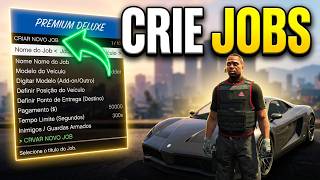
Creating a Job
Open F5 or the F11 Job Editor.
Select Create New Job.
Configure:
Job Name
Mission Name
Vehicle Model
Vehicle Position
Passenger Location
Delivery Point
Destination
Payment
XP
Time Limit
Enemies
Armed Guards
When the configuration is complete, select Save Job.
Vehicles
Each Job can use a specific vehicle.
Example:
Vehicle Model: Sultan
The vehicle will be created when the Job starts.
Vehicle Position
The Editor allows the vehicle position to be configured.
The following can be configured:
Position X
Position Y
Position Z
Rotation
This allows the exact vehicle spawn location to be configured.
Passenger Location
Taxi and Uber Jobs can use a specific passenger location.
The player must reach the configured location to start the transport.
Destination
Each Job can have a specific destination.
The destination indicates where the player needs to go to complete the mission objective.
Payment
Each Job can have its own payment.
Example:
Payment: 25000
The configured payment will be awarded after completing the Job.
XP System
Each Job can have a custom XP amount.
Example:
XP: 500
After completing the Job:
XP RECEIVED: 500
Time Limit
Each Job can have a time limit.
Example:
Time Limit: 300 seconds
The remaining time will be displayed on the HUD during the mission.
Enemies and Armed Guards
Special Jobs can include enemy NPCs and armed guards.
Example:
Enemies: 4
Armed Guards: 2
The configured NPCs will be created when the mission starts.
Saved Jobs
Created Jobs can be saved and accessed later.
Examples:
Postal Delivery
Vehicle Delivery
Special Delivery
Special Transport
Rescue
Convoy
Taxi Mission
Uber Job
Saved Jobs remain available until manually deleted.
Starting a Job
Open F5.
Select Saved Jobs.
Select the desired Job.
Select Start Job.
The system will configure the mission and activate the objectives.
During the Job
The mission can include:
Mission vehicle
Enemy NPCs
Armed guards
Passenger
Destination
Markers
HUD
Mission timer
Active objectives
Delivery objectives
The player must complete the configured objective.
Job Completion
After completing the main objective, the system will display:
JOB IS DONE
Payment: 25000
XP: 500
Deleting Jobs
Saved Jobs can be deleted from F5 or the F11 Job Editor.
Open F5.
Select Saved Jobs.
Select Delete Job.
Select the desired Job.
Confirm the deletion.
Confirmation System
Important actions use a confirmation system.
Y Confirm
N Cancel
The confirmation system can be used for:
Creating Jobs
Saving Jobs
Deleting Jobs
Starting Jobs
Changing settings
HUD
The HUD displays important mission information.
Example:
JOB: POSTAL DELIVERY
TIME: 04:35
PAYMENT: 15000
XP: 350
DESTINATION ACTIVE
The HUD will close when the Job ends.
Mission Cleanup
When a Job is completed, cancelled or failed, the mission elements will be removed.
NPCs
Guards
Vehicles
Markers
HUD
Timer
Active objectives
Saved Jobs are not deleted when a mission is completed or cancelled.
Example Special Delivery
Name: Special Delivery
Vehicle: Sultan
Payment: 30000
XP: 750
Time: 420 seconds
Enemies: 5
Guards: 2
After saving the Job:
F5
Saved Jobs
Special Delivery
Start
The vehicle and NPCs will be created.
The destination will be activated.
The mission timer will start.
Controls
F5
Open and Close Main Menu
F6
Open and Close Additional Menu
F11
Open and Close Job Editor
ENTER
Select
BACKSPACE
Back
ESC
Close
Y
Confirm
N
Cancel
Arrow Keys
Navigate the menu
Requirements
GTA V Story Mode
ScriptHookV
ScriptHookVDotNet
No framework is required.
No external database is required.
No jobs.json is required.
No jobs.log is required.
No config.ini is required.
Installation
Install a compatible ScriptHookV and ScriptHookVDotNet environment.
Copy the following files to the scripts folder:
Menu.dll
PremiumDeluxeMotorsport.dll
PremiumDeluxeMotorsport.ini
JobEditorConfig.ini
TaxiUberConfig.ini
After installation:
1. Launch GTA V
2. Enter Story Mode
3. Press F5
4. Open the Job System
5. Create your first Job
6. Test the new Postal Deliveries
7. Test the Taxi Missions
8. Test the Uber Jobs
9. Open the Job Editor with F11
Compatibility
Game: Grand Theft Auto V
Mode: Story Mode
Framework: Not required
Database: Not required
Main Menu: F5
Additional Menu: F6
Job Editor: F11
Files
JobEditorConfig.ini
Menu.dll
PremiumDeluxeMotorsport.dll
PremiumDeluxeMotorsport.ini
TaxiUberConfig.ini
Credits
Premium Deluxe Motorsport Legacy - Job System
Developed by:
Abrisola Gamer Pro
For custom GTA V Story Mode projects, contact me through the 5Mods chat.
YouTube
Follow Abrisola Gamer Pro for new GTA V Story Mode projects, updates, tutorials and future releases.
Video
A demonstration video will showcase Premium Deluxe Motorsport Legacy - Job System.
The video will include:
Main Menu
Job Creation
Job Editor
Postal Deliveries
Taxi Missions
Uber Jobs
Vehicle configuration
Destination configuration
Payment
XP
Time limits
Enemies
Guards
Saving Jobs
Starting missions
Completing Jobs
Video coming soon.
Notice
This project is intended for use with a legitimate copy of Grand Theft Auto V.
Premium Deluxe Motorsport Legacy -Job System is a GTA V Story Mode mod.
The project may receive future updates, bug fixes, optimizations, new Jobs, new Postal Deliveries, new Taxi Missions, new Uber Jobs and new features.
Do not remove the author's credits.
Do not redistribute this project as your own.
Enjoy Premium Deluxe Motorsport Legacy Job System mais Taxi Missions
Первая загрузка: 24 сентября 2026
Последнее обновление: 5 октября 2026
Последнее скачивание: 3 часа назад
9 комментариев
More mods by abrisolaGameroficial:
Overview
Premium Deluxe Motorsport Legacy Job System is a complete Job creation and management system for GTA V Story Mode.
This version adds Postal Deliveries, new Jobs Taxi Missions Uber Jobs, Job Editor and an additional menu.
Players can create, configure, save, start, complete, edit and delete custom Jobs.
Features
Complete Job System
F5 Main Menu
F6 Additional Menu
F11 Job Editor
Create New Jobs
Edit existing Jobs
Delete Jobs
Configure Job names
Configure mission names
Configure vehicle models
Configure vehicle positions
Configure passenger locations
Configure destinations
Configure payment
Configure XP
Configure time limits
Add enemies
Add armed guards
Postal Deliveries
New Delivery Jobs
Taxi Missions
Uber Jobs
Vehicle Delivery
Special Delivery
Special Transport
Rescue Jobs
Convoy Jobs
Package Delivery
Cargo Transport
Save Jobs
Start saved Jobs
Edit saved Jobs
Delete Jobs
Complete Jobs
Mission objectives
Mission HUD
Mission timer
NPCs
Vehicles
Mission cleanup
Postal Deliveries
Postal Deliveries allow the player to transport packages to a configured destination.
A Postal Delivery can include:
Delivery vehicle
Pickup location
Delivery destination
Payment
XP
Time limit
Mission timer
NPCs
Enemies
Armed guards
The player must reach the configured destination and complete the delivery objective.
Example Postal Delivery
Job Name: Postal Delivery
Mission Name: Package Delivery
Vehicle Model: Speedo
Payment: 15000
XP: 350
Time Limit: 300 seconds
New Jobs
The new version adds new Job possibilities.
Postal Delivery
Vehicle Delivery
Special Delivery
Special Transport
Rescue
Convoy
Package Delivery
Cargo Transport
Each Job can use different vehicles, destinations, payments, XP, time limits, enemies and armed guards.
Taxi Missions
The system includes Taxi Missions.
The player can receive passengers, pick up the passenger, drive to the destination and complete the mission.
Taxi notification:
Character: CHAR TAXI
Name: TAXI
Uber Jobs
The system includes Uber Jobs.
The player can receive a request, pick up the passenger, drive to the destination and complete the Job.
The system allows the following options to be configured:
Vehicle
Passenger location
Destination
Payment
XP
Time limit
Notifications
Objectives
Premium Deluxe Motorsport
The system includes Jobs related to Premium Deluxe Motorsport.
Notifications use:
Character: CHAR SIMEON
Name: PREMIUM DELUXE MOTORSPORT
Character:
Simeon Yetarian
Model:
ig siemonyetarian
Opening the Menu
Press F5.
The Main Job System Menu will open.
New F6 Menu
Press F6.
The Additional Menu will open.
F6 provides additional options for the Job System.
Job Editor F11
Press F11.
The Job Editor will open.
F11 is used exclusively for the Job Editor.
F11 does not open all menus.
The Job Editor allows players to create, edit, configure, save and delete Jobs.
Editor Settings
The Editor includes settings for:
Language
Editor Key
Confirmation
Show HUD
Show XP
Show Payment
The Editor key can be configured.
Language
The system supports English.
Menu options, settings, notifications and messages can be displayed in English.
Creating a Job
Open F5 or the F11 Job Editor.
Select Create New Job.
Configure:
Job Name
Mission Name
Vehicle Model
Vehicle Position
Passenger Location
Delivery Point
Destination
Payment
XP
Time Limit
Enemies
Armed Guards
When the configuration is complete, select Save Job.
Vehicles
Each Job can use a specific vehicle.
Example:
Vehicle Model: Sultan
The vehicle will be created when the Job starts.
Vehicle Position
The Editor allows the vehicle position to be configured.
The following can be configured:
Position X
Position Y
Position Z
Rotation
This allows the exact vehicle spawn location to be configured.
Passenger Location
Taxi and Uber Jobs can use a specific passenger location.
The player must reach the configured location to start the transport.
Destination
Each Job can have a specific destination.
The destination indicates where the player needs to go to complete the mission objective.
Payment
Each Job can have its own payment.
Example:
Payment: 25000
The configured payment will be awarded after completing the Job.
XP System
Each Job can have a custom XP amount.
Example:
XP: 500
After completing the Job:
XP RECEIVED: 500
Time Limit
Each Job can have a time limit.
Example:
Time Limit: 300 seconds
The remaining time will be displayed on the HUD during the mission.
Enemies and Armed Guards
Special Jobs can include enemy NPCs and armed guards.
Example:
Enemies: 4
Armed Guards: 2
The configured NPCs will be created when the mission starts.
Saved Jobs
Created Jobs can be saved and accessed later.
Examples:
Postal Delivery
Vehicle Delivery
Special Delivery
Special Transport
Rescue
Convoy
Taxi Mission
Uber Job
Saved Jobs remain available until manually deleted.
Starting a Job
Open F5.
Select Saved Jobs.
Select the desired Job.
Select Start Job.
The system will configure the mission and activate the objectives.
During the Job
The mission can include:
Mission vehicle
Enemy NPCs
Armed guards
Passenger
Destination
Markers
HUD
Mission timer
Active objectives
Delivery objectives
The player must complete the configured objective.
Job Completion
After completing the main objective, the system will display:
JOB IS DONE
Payment: 25000
XP: 500
Deleting Jobs
Saved Jobs can be deleted from F5 or the F11 Job Editor.
Open F5.
Select Saved Jobs.
Select Delete Job.
Select the desired Job.
Confirm the deletion.
Confirmation System
Important actions use a confirmation system.
Y Confirm
N Cancel
The confirmation system can be used for:
Creating Jobs
Saving Jobs
Deleting Jobs
Starting Jobs
Changing settings
HUD
The HUD displays important mission information.
Example:
JOB: POSTAL DELIVERY
TIME: 04:35
PAYMENT: 15000
XP: 350
DESTINATION ACTIVE
The HUD will close when the Job ends.
Mission Cleanup
When a Job is completed, cancelled or failed, the mission elements will be removed.
NPCs
Guards
Vehicles
Markers
HUD
Timer
Active objectives
Saved Jobs are not deleted when a mission is completed or cancelled.
Example Special Delivery
Name: Special Delivery
Vehicle: Sultan
Payment: 30000
XP: 750
Time: 420 seconds
Enemies: 5
Guards: 2
After saving the Job:
F5
Saved Jobs
Special Delivery
Start
The vehicle and NPCs will be created.
The destination will be activated.
The mission timer will start.
Controls
F5
Open and Close Main Menu
F6
Open and Close Additional Menu
F11
Open and Close Job Editor
ENTER
Select
BACKSPACE
Back
ESC
Close
Y
Confirm
N
Cancel
Arrow Keys
Navigate the menu
Requirements
GTA V Story Mode
ScriptHookV
ScriptHookVDotNet
No framework is required.
No external database is required.
No jobs.json is required.
No jobs.log is required.
No config.ini is required.
Installation
Install a compatible ScriptHookV and ScriptHookVDotNet environment.
Copy the following files to the scripts folder:
Menu.dll
PremiumDeluxeMotorsport.dll
PremiumDeluxeMotorsport.ini
JobEditorConfig.ini
TaxiUberConfig.ini
After installation:
1. Launch GTA V
2. Enter Story Mode
3. Press F5
4. Open the Job System
5. Create your first Job
6. Test the new Postal Deliveries
7. Test the Taxi Missions
8. Test the Uber Jobs
9. Open the Job Editor with F11
Compatibility
Game: Grand Theft Auto V
Mode: Story Mode
Framework: Not required
Database: Not required
Main Menu: F5
Additional Menu: F6
Job Editor: F11
Files
JobEditorConfig.ini
Menu.dll
PremiumDeluxeMotorsport.dll
PremiumDeluxeMotorsport.ini
TaxiUberConfig.ini
Credits
Premium Deluxe Motorsport Legacy - Job System
Developed by:
Abrisola Gamer Pro
For custom GTA V Story Mode projects, contact me through the 5Mods chat.
YouTube
Follow Abrisola Gamer Pro for new GTA V Story Mode projects, updates, tutorials and future releases.
Video
A demonstration video will showcase Premium Deluxe Motorsport Legacy - Job System.
The video will include:
Main Menu
Job Creation
Job Editor
Postal Deliveries
Taxi Missions
Uber Jobs
Vehicle configuration
Destination configuration
Payment
XP
Time limits
Enemies
Guards
Saving Jobs
Starting missions
Completing Jobs
Video coming soon.
Notice
This project is intended for use with a legitimate copy of Grand Theft Auto V.
Premium Deluxe Motorsport Legacy -Job System is a GTA V Story Mode mod.
The project may receive future updates, bug fixes, optimizations, new Jobs, new Postal Deliveries, new Taxi Missions, new Uber Jobs and new features.
Do not remove the author's credits.
Do not redistribute this project as your own.
Enjoy Premium Deluxe Motorsport Legacy Job System mais Taxi Missions
Первая загрузка: 24 сентября 2026
Последнее обновление: 5 октября 2026
Последнее скачивание: 3 часа назад
-
ENGLISH
Thanks for downloading and checking out my new mod!
Premium Deluxe Motorsport Legacy - Job System was released today for GTA V Story Mode.
I hope you enjoy creating and playing your own Jobs.
If you find any bugs or have suggestions for improvements, feel free to leave a comment.
Thank you for the support!
BR-PT
Obrigado por baixar e conferir meu novo mod!
Premium Deluxe Motorsport Legacy - Job System foi lançado hoje para GTA V Story Mode.
Espero que voces gostem de criar e jogar seus proprios Jobs.
Se encontrar algum bug ou tiver sugestoes de melhorias, deixe um comentario.
Obrigado pelo apoio!
26 сентября 2026 -

I have a few suggestions like add support for configurable checkpoint sequences within a mission, so a delivery mission say, with a Speedo, so i can have multiple checkpoints, each with its own percentage chance of appearing, so the route feels different each time, that way I could also set up 3, 4, or 5 stops if I want a longer run. The same system should work for boat missions and for truck with trailer missions too same checkpoint logic, just a different vehicle, or a Cargobob with Dynamic objects like a Box or a Cargobob, Helicopters dropzones, Planes with dropzones too,
And one more thing, it'd be great to have a dedicated folder where you can just drop in mission XML files one file per mission. That way you don't end up with a single 100,000-line XML file, instead you could have 100 separate XML files, each with around 100 lines, each with its own name and its own mission defined. It keeps things organized and makes it way easier to add, remove, or edit individual missions without touching the rest
28 сентября 2026 -
-
-

-
-
-
 5mods on Discord

JOB CREATOR PREMIUM DELUXE + POSTAL DELIVERIES
🇧🇷 PT-BR — AVISO DE ATUALIZAÇÃO
NOVAS ATUALIZAÇÕES EM BREVE
Uma nova versão do Job Creator Premium Deluxe + Postal Deliveries está em desenvolvimento para o GTA V — Story Mode.
A próxima atualização contará com novos Jobs e melhorias no sistema, incluindo:
- Job de Uber
- Job de Táxi
- Novos tipos de Jobs
- Novos recursos e melhorias
Mais informações serão divulgadas em breve.
Abrisola Gamer Pro
GTA V — Story Mode
━━━━━━━━━━━━━━━━━━━━
🇺🇸 ENGLISH — UPDATE NOTICE
NEW UPDATES COMING SOON
A new version of Job Creator Premium Deluxe + Postal Deliveries is currently in development for GTA V — Story Mode.
The upcoming update will introduce new Jobs and system improvements, including:
- Uber Job
- Taxi Job
- New Job Types
- New features and improvements
More information will be announced soon.
Abrisola Gamer Pro
GTA V — Story Mode