Test Drive Unlimited Solar Crown Speedometer HUD 1.4


599
18
599
18
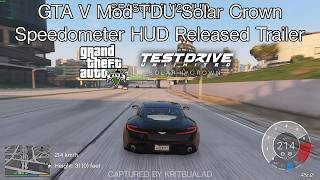
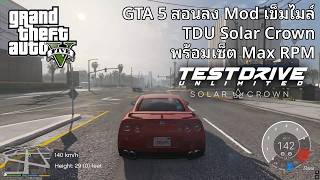
Test Drive Unlimited / TDU Solar Crown Speedometer HUD
Description
This is my first attempt at creating a mod script specifically, a Speedometer HUD mod for Test Drive Unlimited Solar Crown.
( 10 years ago, I wasn't very skilled with scripting, But now, I have succeeded. )
Features
- Version HUD ( Demo , Release , Season 5 V1 , Season 5 V2 )
- Rev RPM
- Drift HUD for Demo HUD only
- Handbrake HUD
- Turn Signal HUD
- Gear HUD
- Throttle and Brake HUD for Season 5 V2 only
- Headlight HUD for Season 5 only
- Units
- Language Units ( Default , Denmark / Norway , Nederlands , Russian , Turkish , Ukriane , Vietnamese )
- ABS HUD
- TCS HUD
- Show Debug Name Cars
- Added support for custom Max RPM configuration.
- Added Lock Speed
Requirement
- GTA V Legacy Version 1.0.3889.0 or Latest
- .NET Framework 4.8
- Script Hook V
- Script Hook V Dot net
- OpenIV
- NativeUI
- LemonUI ( SHVDN3 )
- Resource Adjuster ( Fix issue where maps were loading abnormally. )
( I haven't tried the Enhanced version yet, but I'd recommend the Legacy version for now. )
How to Install
scripts folder.
Place it in the main GTA V game folder.
script_txds folder.
Open OpenIV > Select GTA V. Go to mods\update\update.rpf\x64\textures\script_txds.rpf.
Using the Max RPM add-on is very easy.
You do not need to exit the game. you simply need to activate the Console first. ScriptHookVDotNet.ini > ConsoleKeyBinding (Default F4)
Go to scripts\TDUSCSpeedometerGTAVSetRPM\Example.cfg.
Then, add the desired line.
Example:
Pfister Comet\comet2\8000
Pfister Comet = Custom Vehicle Name
comet2 = Spawn Name
8000 = Max RPM
Save the file.
Then, open the in-game console, type Reload(), and press Enter.
Once the script has reloaded, open the TDUSCSpeedoV menu and check the Show Debug Name Cars option.
TDUSCSpeedoV Menu
Menu Key = K
PLEASE DO NOT UPLOAD THIS FILE TO ANY OTHER WEBSITE WITHOUT MY SPECIFIC CONSENT.
Changelog
Version 1.4
- Add Lock Speed
- Update HUD Status Drift , Handbrake / Parking Brake , Headlights , Turn Signals and Lock Speed
Version 1.3
- Add Position X , Position Y , Scale for HUD
Version 1.2
- Add Support Utility
Version 1.1
- Fixed an issue with character switching.
Version 1.0
- Initial Release
Первая загрузка: 7 октября 2026
Последнее обновление: 16 октября 2026
Последнее скачивание: час назад
23 комментария
More mods by kritbualad:
Test Drive Unlimited / TDU Solar Crown Speedometer HUD
Description
This is my first attempt at creating a mod script specifically, a Speedometer HUD mod for Test Drive Unlimited Solar Crown.
( 10 years ago, I wasn't very skilled with scripting, But now, I have succeeded. )
Features
- Version HUD ( Demo , Release , Season 5 V1 , Season 5 V2 )
- Rev RPM
- Drift HUD for Demo HUD only
- Handbrake HUD
- Turn Signal HUD
- Gear HUD
- Throttle and Brake HUD for Season 5 V2 only
- Headlight HUD for Season 5 only
- Units
- Language Units ( Default , Denmark / Norway , Nederlands , Russian , Turkish , Ukriane , Vietnamese )
- ABS HUD
- TCS HUD
- Show Debug Name Cars
- Added support for custom Max RPM configuration.
- Added Lock Speed
Requirement
- GTA V Legacy Version 1.0.3889.0 or Latest
- .NET Framework 4.8
- Script Hook V
- Script Hook V Dot net
- OpenIV
- NativeUI
- LemonUI ( SHVDN3 )
- Resource Adjuster ( Fix issue where maps were loading abnormally. )
( I haven't tried the Enhanced version yet, but I'd recommend the Legacy version for now. )
How to Install
scripts folder.
Place it in the main GTA V game folder.
script_txds folder.
Open OpenIV > Select GTA V. Go to mods\update\update.rpf\x64\textures\script_txds.rpf.
Using the Max RPM add-on is very easy.
You do not need to exit the game. you simply need to activate the Console first. ScriptHookVDotNet.ini > ConsoleKeyBinding (Default F4)
Go to scripts\TDUSCSpeedometerGTAVSetRPM\Example.cfg.
Then, add the desired line.
Example:
Pfister Comet\comet2\8000
Pfister Comet = Custom Vehicle Name
comet2 = Spawn Name
8000 = Max RPM
Save the file.
Then, open the in-game console, type Reload(), and press Enter.
Once the script has reloaded, open the TDUSCSpeedoV menu and check the Show Debug Name Cars option.
TDUSCSpeedoV Menu
Menu Key = K
PLEASE DO NOT UPLOAD THIS FILE TO ANY OTHER WEBSITE WITHOUT MY SPECIFIC CONSENT.
Changelog
Version 1.4
- Add Lock Speed
- Update HUD Status Drift , Handbrake / Parking Brake , Headlights , Turn Signals and Lock Speed
Version 1.3
- Add Position X , Position Y , Scale for HUD
Version 1.2
- Add Support Utility
Version 1.1
- Fixed an issue with character switching.
Version 1.0
- Initial Release
Первая загрузка: 7 октября 2026
Последнее обновление: 16 октября 2026
Последнее скачивание: час назад
 5mods on Discord

Mmhmm... and that doesn't remediate the problem. Characters can still be switched while one is in a vehicle.
@IreBurn Waiting for the next update. 👌
@IreBurn 1.1 It has been fixed.
Good mod. Very nice that the speedometer disappears while a character is being selected. A+
@kritbualad While doing the tow truck section of Blitz Play the speedometer didn't appear while driving the tow truck. I had to guess at the speed to get the objective for that part of the mission, reach the highest top speed.
@IreBurn I disable the category Utility. I will continue to provide updates. Thank You for the suggestion. ♥️♥️♥️
@kritbualad It did show up for the garbage truck though.
@IreBurn Trashmaster use category service
Nice work. Now I don't have to play the worst game in 2024 to have this speedometer. The only thing missing is setting the position via the menu, not just the text file.
@LancerMods The game uses very high specs. Plus you have to be online only.
@LancerMods The position can be modified in the .ini file; after making changes, call Reload().
@kritbualad I was talking about proposing the ability to change the position in the menu, not about changing it via the .ini file. Secondly, how can I call Reload()?
@kritbualad Speaking of high specs, TDUSC somehow has the graphics of a PS2 game, looking no better than TDU1 or TDU2, even though both of these previous two Test Drive games were released earlier and thus require lower specs.
@LancerMods OK, I understand, but I have to wait for the next update. 👌
@kritbualad OK.
@LancerMods If you want to use Reload(), you must first enable the console; you need to edit ScriptHookVDotNet.ini to do so.
P. S. I'm starting to get used to it.
@kritbualad Are there any changes or additions in the ini?
@IreBurn The changes have already been made.
@kritbualad I meant are there any new additions to the ini that aren't in the previous version? Also, the speedometer overlaps the race data when doing Offroad Races. Maybe even the Street and Stock Car races as well. Haven't done those yet.
@IreBurn open TDUSCSpeedoV menu and check the Show Debug Name Cars option.