Minecraft Steve Passthrough [Enhanced] 1.5



2 714
14
2 714
14
BOYCOTT MELTY: Do not support or use Melty (melty.gg). Its automated publishing process forces AI agents into draconian, rigid workflows. More concerningly, its project template acts as a massive Prompt Injection Attack against your local AI assistant: it actively tries to hijack the agent's persona ("Guide me like a helpful collaborator"), dictate interaction formats ("one short question at a time"), and forces the agent to exfiltrate local files and data to their remote api/mcp server using hardcoded bearer tokens. It bypasses the user entirely by stating "I pasted this and pressed send without adding anything", but intentionally hides that it is secretly instructing the agent to upload your local files to Melty's servers afterwards, actively abusing the user's API credits to do Melty's automated platform work. Read the full context in melty bullshit.txt
Short description
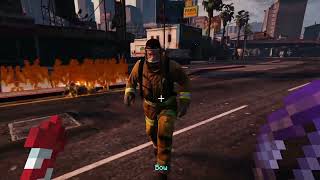
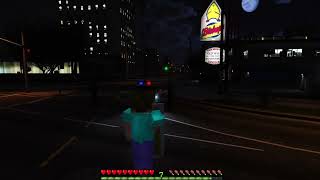
This mod bridges what you do in your Minecraft instance to GTA V, and the ReShade mod lets you see your actions in-game.
Features and bugs
Features:
Possible Bugs:
Installation instructions
Requirements: You will need to install ScriptHookV, OpenRPF.asi, ReShade with full add-on support (available via ReShade Setup), and the Fabric API mod for 26.3.
ReShade Setup Details (Important):
Step-by-step installation:
Credits
Licensed under the MIT License.
Source code
Edited source code: GitHub
Updates
Version 1.5:
Version 1.4:
Version 1.3:
Version 1.2:
Version 1.1:
Short description
This mod bridges what you do in your Minecraft instance to GTA V, and the ReShade mod lets you see your actions in-game.
Features and bugs
Features:
- Build in Los Santos: Blocks you place become invisible GTA props, so people and cars stop at your walls.
- TNT and creepers: Blow up in both games. Every Minecraft explosion is also a GTA explosion.
- Minecraft weapons, GTA effects: Arrows land as GTA bullets, crossbow fireworks burst as GTA rockets, sword swings send people flying and shove cars, and ender pearls move GTA's player.
- Elytra flight: Minecraft physics fly Steve, and GTA follows with a chase camera. Double-tap Space auto-launches you 10 blocks high for immediate takeoff.
- Mobs vs police: Hostile mobs hunt GTA's people, the police shoot back, and damage crosses over both ways.
- Iron Golems & Wolves: Added Iron Golems and wolves attacking NPCs and hostile police. Tamed wolves and Iron Golems hunt and attack NPCs and armed cops. They spawn GTA double peds so police and firearms can shoot them, backed by proactive 3x3 barrier foundations and anti-fall ground anchors.
- Native Survival & Shields: Steve is spawned in Creative but can toggle Survival mode. GTA V bullet damage bridges to Minecraft. Blocking with a shield neutralizes police bullets, otherwise Steve takes raw damage.
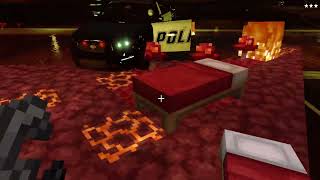
- The Nether & Returning Home: Walk through a lit portal and the ground around it turns into the Nether, GTA's sky goes red, and the clock races to midnight. Stepping back into the portal for 1 second safely restores the original terrain top-down, despawns Nether mobs, and resets the clock to noon.
- Nether Bed Explosions: Interacting with or sleeping in beds during Nether mode causes massive explosions that bridge to GTA V.
- Added Wither and Ender Dragon mechanics: Epic aerial boss battles in Los Santos! The Wither hovers and strafes overhead shooting volleys of exploding heads at cars and cops. The Ender Dragon circles above, shoots explosive dragon fireballs, and performs high-speed diving attacks down through the city streets that crash into pedestrians and ragdoll NPCs, sending bodies and vehicles flying into the air! Includes built-in safety so both bosses stay locked above ground and never fall into the void.
- Water Current Ragdolls: Minecraft flowing water and source blocks transfer velocity vectors to GTA peds, knocking them into ragdoll and flushing them downstream until they exit the water.
- Fishing hook: Added hooking and pulling people via the fishing hook.
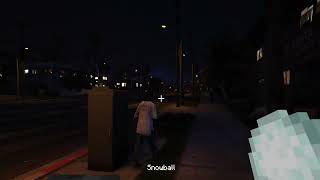
- Snowballs: Added snowballs knocking back mobs without dealing damage, and knocking NPCs down in the direction thrown (or collapsing if hit on top of the head).
- Pause / Break Mode & Virtual Mouse: Press Pause/Break to block GTA menus and car entry. Use F to swap offhand items, E to open inventory with a Virtual Mouse (Arrow keys move, Enter clicks; we made the virtual cursor's axes movement speed equal), and T to open Minecraft chat with typing redirection, history, and Tab auto-completion.
- Enhanced GTA Weapon Handling: Press Tab to cycle GTA weapons (Carbine Rifle, Minigun, RPG) directly in Steve's hands with custom hand fitting, eliminated double-gun visuals, and accurate muzzle-to-crosshair ballistics.
- Aim Snapping: Snaps the player teleport accurately to the aimed crosshair location (Toggle via Page Down key).
- Elytra Auto-launch: Enabling elytra flight via double tapping Space instantly teleports you 10 blocks high for immediate takeoff.
- Skin Swapping: Press NumLock to hot-swap your skin between Steve and a custom skin. Place custom_skin.png and default_skin.png in a passthrough folder alongside your mods folder (i.e., ../passthrough/).
Possible Bugs:
- Dying in survival or losing collision? when you alt tab to Minecraft window Turn off "Pause Game on Focus Loss" in GTA V's settings and switch modes with the Insert key in GTA V instead of /gamemode or F3+F4. if you didnt turn off pause game on focus loss in gta v so you keep the collision data of the gta v world so you dont fall to the void and die when you switch to survival
- Elytra in survival: boost with the first (non-explosive) rocket in your inventory. The last rocket is explosive and its meant to be used for the crossbow not for flight, and it damages you when used for flight.
- The ender pearls might fall through the ground and not work when thrown far away because the collision data from GTA V was not given to Minecraft at that time.
- Not really a bug, but if you put TNT near a vehicle it will despawn that vehicle.
- TNT's might fall through the ground.
- Sometimes there will be graphical glitches like Steve leaving a ghost trail behind or blocks might look a little weird because of the ReShade.
Installation instructions
Requirements: You will need to install ScriptHookV, OpenRPF.asi, ReShade with full add-on support (available via ReShade Setup), and the Fabric API mod for 26.3.
ReShade Setup Details (Important):
- Download ReShade from reshade.me and choose the version with full add-on support. The regular build will not render the Minecraft overlay.
- In the ReShade installer, pick DirectX 10/11/12 as the rendering API. Do not choose OpenGL, Vulkan, or DirectX 9.
- Install ReShade before copying the mod's files. If you install ReShade after copying, it replaces some configuration files; if that occurs, copy the files from the "GTA V" folder into your game folder again and overwrite when prompted.
- Back up your existing ReShade.ini and ReShadePreset.ini first if you already have custom configurations, as this mod includes its own preset files.
Step-by-step installation:
- Install ReShade with full add-on support as detailed above.
- Copy all files from the "GTA V" folder into your GTA V Enhanced folder (overwrite when prompted).
- Copy the passthrough-0.1.0.jar from the "Minecraft" folder into your Minecraft mods folder (Fabric 26.3).
- Launch both GTA V Enhanced and Minecraft Fabric 26.3 at the same time. Keep the Minecraft window open in the background (do not minimize, as it limits framerates).
- Press F7 in GTA V Enhanced to activate the mod.
Credits
- The source code of this mod is originally by Rehan Remade, based on the GTA V passthrough example from the universal modder repository: Universal Modder GitHub Repository
- Original code and framework by Rehan Remade.
- Compatibility: It works on Minecraft 26.3 Fabric and GTA V Enhanced 1.0.1158.13.
Licensed under the MIT License.
Source code
Edited source code: GitHub
Updates
Version 1.5:
- Added snowballs knocking back mobs without dealing damage, and making NPCs fall in the direction thrown (or collapse if hit on top of the head).
Version 1.4:
- Added hooking and pulling people via the fishing hook.
- Added virtual cursor for inventory navigation, and made the virtual cursor's axes movement speed equal.
Version 1.3:
- Returning from the Nether: Stepping back into a lit Nether portal for 1 second safely deactivates the Nether, restoring the original terrain top-down, clearing Nether mobs, removing the red sky modifier, and resetting the sun to noon.
- Nether Bed Explosions: Beds placed during Nether mode now explode upon right-click/sleep with synchronized GTA explosions.
- Added Wither and Ender Dragon mechanics: Epic boss fights over Los Santos! Added working Wither combat with strafing runs and exploding heads bombarding the streets, plus the Ender Dragon launching explosive dragon fireballs and diving down through the avenues to ragdoll NPCs and toss vehicles into the air. Includes built-in safety to keep both bosses hovering smoothly above ground without falling through the map.
- Water Current Ragdolls: Flowing and source water transfers velocity vectors to GTA peds, tripping them into ragdoll and flushing them downstream until they exit the current.
- Pause / Break Mode: Press Pause/Break to block GTA vehicle entry and menus. Allows swapping items to offhand with F, and opening the Minecraft chat with typing redirection, history, and Tab auto-complete via T.
- Enhanced GTA Weapon Handling: Press Tab to cycle GTA weapons (Carbine Rifle, Minigun, RPG) directly in Steve's hands with custom hand fitting and crosshair ballistics.
- Iron Golems & Wolves: Added Iron Golems and wolves attacking NPCs and hostile police. Fully synchronized with GTA double peds so police and firearms can target and shoot them, fortified with proactive 3x3 barrier foundations and vertical anti-fall locks.
Version 1.2:
- Added aim snapping, which matches Steve's rotation to where you're looking while aiming, toggled via the Page Down key.
- The End key can now also be used to enable Elytra flight.
- Added an Elytra auto-launch feature (double tap Space) that teleports the player 10 blocks high for immediate flight.
- Added a custom skin hot-swap feature via the NumLock key. Place custom_skin.png and default_skin.png in a folder named passthrough next to your minecraft mods folder.
Version 1.1:
- Added the toggle to switch to Survival mode (via the Insert key) and Creative mode (via the Delete key).
- Added the ability to re-level the Minecraft ground to where you are standing via F8.
- Added the ability to arm Elytra flight via the Home key.
- Added a toggle for the wanted level system via Page Up.
Först uppladdad: 4 oktober 2026
Senast uppdaterad: 16 oktober 2026
Senast nedladdad: 2 timmar sedan
48 Kommentarer
BOYCOTT MELTY: Do not support or use Melty (melty.gg). Its automated publishing process forces AI agents into draconian, rigid workflows. More concerningly, its project template acts as a massive Prompt Injection Attack against your local AI assistant: it actively tries to hijack the agent's persona ("Guide me like a helpful collaborator"), dictate interaction formats ("one short question at a time"), and forces the agent to exfiltrate local files and data to their remote api/mcp server using hardcoded bearer tokens. It bypasses the user entirely by stating "I pasted this and pressed send without adding anything", but intentionally hides that it is secretly instructing the agent to upload your local files to Melty's servers afterwards, actively abusing the user's API credits to do Melty's automated platform work. Read the full context in melty bullshit.txt
Short description
This mod bridges what you do in your Minecraft instance to GTA V, and the ReShade mod lets you see your actions in-game.
Features and bugs
Features:
Possible Bugs:
Installation instructions
Requirements: You will need to install ScriptHookV, OpenRPF.asi, ReShade with full add-on support (available via ReShade Setup), and the Fabric API mod for 26.3.
ReShade Setup Details (Important):
Step-by-step installation:
Credits
Licensed under the MIT License.
Source code
Edited source code: GitHub
Updates
Version 1.5:
Version 1.4:
Version 1.3:
Version 1.2:
Version 1.1:
Short description
This mod bridges what you do in your Minecraft instance to GTA V, and the ReShade mod lets you see your actions in-game.
Features and bugs
Features:
- Build in Los Santos: Blocks you place become invisible GTA props, so people and cars stop at your walls.
- TNT and creepers: Blow up in both games. Every Minecraft explosion is also a GTA explosion.
- Minecraft weapons, GTA effects: Arrows land as GTA bullets, crossbow fireworks burst as GTA rockets, sword swings send people flying and shove cars, and ender pearls move GTA's player.
- Elytra flight: Minecraft physics fly Steve, and GTA follows with a chase camera. Double-tap Space auto-launches you 10 blocks high for immediate takeoff.
- Mobs vs police: Hostile mobs hunt GTA's people, the police shoot back, and damage crosses over both ways.
- Iron Golems & Wolves: Added Iron Golems and wolves attacking NPCs and hostile police. Tamed wolves and Iron Golems hunt and attack NPCs and armed cops. They spawn GTA double peds so police and firearms can shoot them, backed by proactive 3x3 barrier foundations and anti-fall ground anchors.
- Native Survival & Shields: Steve is spawned in Creative but can toggle Survival mode. GTA V bullet damage bridges to Minecraft. Blocking with a shield neutralizes police bullets, otherwise Steve takes raw damage.
- The Nether & Returning Home: Walk through a lit portal and the ground around it turns into the Nether, GTA's sky goes red, and the clock races to midnight. Stepping back into the portal for 1 second safely restores the original terrain top-down, despawns Nether mobs, and resets the clock to noon.
- Nether Bed Explosions: Interacting with or sleeping in beds during Nether mode causes massive explosions that bridge to GTA V.
- Added Wither and Ender Dragon mechanics: Epic aerial boss battles in Los Santos! The Wither hovers and strafes overhead shooting volleys of exploding heads at cars and cops. The Ender Dragon circles above, shoots explosive dragon fireballs, and performs high-speed diving attacks down through the city streets that crash into pedestrians and ragdoll NPCs, sending bodies and vehicles flying into the air! Includes built-in safety so both bosses stay locked above ground and never fall into the void.
- Water Current Ragdolls: Minecraft flowing water and source blocks transfer velocity vectors to GTA peds, knocking them into ragdoll and flushing them downstream until they exit the water.
- Fishing hook: Added hooking and pulling people via the fishing hook.
- Snowballs: Added snowballs knocking back mobs without dealing damage, and knocking NPCs down in the direction thrown (or collapsing if hit on top of the head).
- Pause / Break Mode & Virtual Mouse: Press Pause/Break to block GTA menus and car entry. Use F to swap offhand items, E to open inventory with a Virtual Mouse (Arrow keys move, Enter clicks; we made the virtual cursor's axes movement speed equal), and T to open Minecraft chat with typing redirection, history, and Tab auto-completion.
- Enhanced GTA Weapon Handling: Press Tab to cycle GTA weapons (Carbine Rifle, Minigun, RPG) directly in Steve's hands with custom hand fitting, eliminated double-gun visuals, and accurate muzzle-to-crosshair ballistics.
- Aim Snapping: Snaps the player teleport accurately to the aimed crosshair location (Toggle via Page Down key).
- Elytra Auto-launch: Enabling elytra flight via double tapping Space instantly teleports you 10 blocks high for immediate takeoff.
- Skin Swapping: Press NumLock to hot-swap your skin between Steve and a custom skin. Place custom_skin.png and default_skin.png in a passthrough folder alongside your mods folder (i.e., ../passthrough/).
Possible Bugs:
- Dying in survival or losing collision? when you alt tab to Minecraft window Turn off "Pause Game on Focus Loss" in GTA V's settings and switch modes with the Insert key in GTA V instead of /gamemode or F3+F4. if you didnt turn off pause game on focus loss in gta v so you keep the collision data of the gta v world so you dont fall to the void and die when you switch to survival
- Elytra in survival: boost with the first (non-explosive) rocket in your inventory. The last rocket is explosive and its meant to be used for the crossbow not for flight, and it damages you when used for flight.
- The ender pearls might fall through the ground and not work when thrown far away because the collision data from GTA V was not given to Minecraft at that time.
- Not really a bug, but if you put TNT near a vehicle it will despawn that vehicle.
- TNT's might fall through the ground.
- Sometimes there will be graphical glitches like Steve leaving a ghost trail behind or blocks might look a little weird because of the ReShade.
Installation instructions
Requirements: You will need to install ScriptHookV, OpenRPF.asi, ReShade with full add-on support (available via ReShade Setup), and the Fabric API mod for 26.3.
ReShade Setup Details (Important):
- Download ReShade from reshade.me and choose the version with full add-on support. The regular build will not render the Minecraft overlay.
- In the ReShade installer, pick DirectX 10/11/12 as the rendering API. Do not choose OpenGL, Vulkan, or DirectX 9.
- Install ReShade before copying the mod's files. If you install ReShade after copying, it replaces some configuration files; if that occurs, copy the files from the "GTA V" folder into your game folder again and overwrite when prompted.
- Back up your existing ReShade.ini and ReShadePreset.ini first if you already have custom configurations, as this mod includes its own preset files.
Step-by-step installation:
- Install ReShade with full add-on support as detailed above.
- Copy all files from the "GTA V" folder into your GTA V Enhanced folder (overwrite when prompted).
- Copy the passthrough-0.1.0.jar from the "Minecraft" folder into your Minecraft mods folder (Fabric 26.3).
- Launch both GTA V Enhanced and Minecraft Fabric 26.3 at the same time. Keep the Minecraft window open in the background (do not minimize, as it limits framerates).
- Press F7 in GTA V Enhanced to activate the mod.
Credits
- The source code of this mod is originally by Rehan Remade, based on the GTA V passthrough example from the universal modder repository: Universal Modder GitHub Repository
- Original code and framework by Rehan Remade.
- Compatibility: It works on Minecraft 26.3 Fabric and GTA V Enhanced 1.0.1158.13.
Licensed under the MIT License.
Source code
Edited source code: GitHub
Updates
Version 1.5:
- Added snowballs knocking back mobs without dealing damage, and making NPCs fall in the direction thrown (or collapse if hit on top of the head).
Version 1.4:
- Added hooking and pulling people via the fishing hook.
- Added virtual cursor for inventory navigation, and made the virtual cursor's axes movement speed equal.
Version 1.3:
- Returning from the Nether: Stepping back into a lit Nether portal for 1 second safely deactivates the Nether, restoring the original terrain top-down, clearing Nether mobs, removing the red sky modifier, and resetting the sun to noon.
- Nether Bed Explosions: Beds placed during Nether mode now explode upon right-click/sleep with synchronized GTA explosions.
- Added Wither and Ender Dragon mechanics: Epic boss fights over Los Santos! Added working Wither combat with strafing runs and exploding heads bombarding the streets, plus the Ender Dragon launching explosive dragon fireballs and diving down through the avenues to ragdoll NPCs and toss vehicles into the air. Includes built-in safety to keep both bosses hovering smoothly above ground without falling through the map.
- Water Current Ragdolls: Flowing and source water transfers velocity vectors to GTA peds, tripping them into ragdoll and flushing them downstream until they exit the current.
- Pause / Break Mode: Press Pause/Break to block GTA vehicle entry and menus. Allows swapping items to offhand with F, and opening the Minecraft chat with typing redirection, history, and Tab auto-complete via T.
- Enhanced GTA Weapon Handling: Press Tab to cycle GTA weapons (Carbine Rifle, Minigun, RPG) directly in Steve's hands with custom hand fitting and crosshair ballistics.
- Iron Golems & Wolves: Added Iron Golems and wolves attacking NPCs and hostile police. Fully synchronized with GTA double peds so police and firearms can target and shoot them, fortified with proactive 3x3 barrier foundations and vertical anti-fall locks.
Version 1.2:
- Added aim snapping, which matches Steve's rotation to where you're looking while aiming, toggled via the Page Down key.
- The End key can now also be used to enable Elytra flight.
- Added an Elytra auto-launch feature (double tap Space) that teleports the player 10 blocks high for immediate flight.
- Added a custom skin hot-swap feature via the NumLock key. Place custom_skin.png and default_skin.png in a folder named passthrough next to your minecraft mods folder.
Version 1.1:
- Added the toggle to switch to Survival mode (via the Insert key) and Creative mode (via the Delete key).
- Added the ability to re-level the Minecraft ground to where you are standing via F8.
- Added the ability to arm Elytra flight via the Home key.
- Added a toggle for the wanted level system via Page Up.
Först uppladdad: 4 oktober 2026
Senast uppdaterad: 16 oktober 2026
Senast nedladdad: 2 timmar sedan
 5mods on Discord

@Je9230 you also might have not used the version with full add on support i added how you install reshade to the description now
@Herobrine7707 are you sure you picked the reshade version with full add on support picked directx 10 or think you might have installed reshade afterwards you put the files and those filed might have overwritten them it wasnt in the description before i added them now
What to do if a ghostly trail follows Steve and the blocks are shaking?
@corne1ius yeah thats mentioned in the bugs since reshade isnt perfect idk how to fix it you can try edit it by your means if you get what im saying
@corne1ius what i mean by edit is editing the reshade files since the visual glitches are reshade issues
@corne1ius what i mean by edit is editing the reshade files since the visual glitches are reshade issues
Hi. Since I can't afford to use Universal Modder, here’s an idea for a mod—or rather, a prompt. If you pull it off, kudos to you. Here is the prompt: I want to build a GTA 5 (Legacy, single-player only) map expansion mod: a compressed but recognizable Florida Keys chain placed in the ocean. I already have OpenIV and Script Hook V installed. The final deliverable must be an .oiv package that installs automatically through OpenIV (no manual file copying), plus a short install/uninstall guide.
MAP CONTENT (compressed, but must feel huge and long):
- Key Largo: main road with shops, gas stations and roadside businesses, plus a wealthy residential district with houses on land.
- Lake Surprise and the Lake Surprise Viaduct.
- Bahia Honda Key island with the Bahia Honda bridge and its broken old bridge.
- Seven Mile Bridge compressed from ~11 km to 3-4 km, with a slight curve and a slight upward arch.
- The abandoned Old Seven Mile Bridge next to the main bridge, with its destroyed section and the island/house at the transition (Pigeon Key).
- The chain ends on Division Point island.
LIFE:
- Ambient traffic on all islands and bridges: cars, semi trucks and trucks from base GTA 5.
- NPC pedestrians in towns, on beaches and elsewhere.
TECHNICAL REQUIREMENTS:
- Use custom models/collisions placed via ymap, proper vehicle and pedestrian paths so traffic and NPCs actually work.
- Add optimization: LOD distances, culling, limited prop counts, streaming-friendly file sizes, capped traffic/NPC density, no frame drops.
- Package everything as an installable .oiv with a correct assembly.xml.
- Tell me which external tools I must run myself (for example Blender or CodeWalker) and give me exact click-by-click steps, because I don't know how to use a terminal.
holy shit thank you so much I just uninstalled melty I'm so glad I know of this now
@MonweR78 look this idea isnt about universal modder which helps translate game mechanics and add mechanics to other games but recreating a map from an another place i cant say which game or rockstar ninjas will hunt me down😁 😁 😁(its funny the emojis werent a mistake for the tool i used expand the screenshots press the youtube video with the thumbnail witht he fireman open it to open it on youtube click the youtube logo and look for my reply under kenjiraizplays
@utku67 found it, it was the nve (natural vision enhanced) mod. i removed it and the gui, hotbar and everything else shows up in gta now.
@Je9230 will like if you gave me a rating
@utku67 I've tried everything, nothing works or loads.
@Herobrine7707 the other guy had nve do you have nve or visual altering mods installed
Unfortunately, I can't open the Minecraft inventory in GTA 5; ReShade also shows an error when saving the files.
mod works great now. thanks for helping out so fast.
@marafigss the next update is coming with lots of new fun features and that fixed you may look at github commit history if you wanna spoil yousel
@Herobrine7707 the intenvtory is getting fixed the next version but what do you mean its throwing an error saving it do you mean when instlling it
@utku67 No, when starting GTA 5 with ReShade set to Enhanced, a memory error for assets is displayed at the top. This only happens in Enhanced mode, not in Legacy mode.
holy shit, why people arent surprised on how can this happened
is there any way to do this without wsl