Modern Car Dealership [Legacy] 1.1


3 359
45
3 359
45
Modern Car Dealership
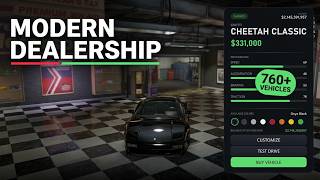
A complete car dealership for GTA V Single Player at Premium Deluxe Motorsport
Walk to the sales counter and step into the marker
Press E and the showroom opens
Pick a car from the list and see it as a real 3D vehicle in the showroom
Tune it and sign the contract by hand
Your new car is delivered outside
Features
Modern mouse controlled menu with smooth animations
768 vehicles in 16 categories including DLC cars and motorcycles
Live 3D preview where you can rotate the car with your mouse
Speed acceleration braking and traction bars for every car
Live colour selection on the car
Full tuning studio with Performance Exterior Wheels Paint Lights and Extras
The car reacts while you tune it with the hood opening and the lights switching on
Live price counter and a preview of the performance boost
Real purchase contract on paper with an animated pen signature
Test drive with the tuned car
Interface colour menu with 12 presets and a free colour slider
Prices balanced for a normal story mode player
Add your own addon cars in the config file with one simple line for each car
Prices for cars and tuning parts can be changed with two settings in the config
Map blip and floor marker at the dealership
Clean camera work with smooth transitions
Runs light on performance with textures loaded in the background
Supports every resolution and screen ratio
Written for Single Player only
NEW - Premium Deluxe Addon Manager
Brand new Addon Manager app with a clean modern design
Drag and drop a car (.zip .rar .7z dlc.rpf or a folder) and it is installed automatically, no OpenIV work needed
The car is registered in dlclist.xml for you and added to the dealership
Load your global.gxt2 or global.txt and the app translates the placeholder names from vehicles.meta
Example: gameName T998 becomes SF90 XX Spider and vehicleMakeName GROTTI becomes Ferrari
Load several label files at once, your own entries extend or override the game texts
Label files are remembered, you only load them once
Live log shows exactly what was translated for every car
Editable car table with price, category and brand, invalid rows are marked
Search box to find cars quickly
Brand emblems are created automatically and shown as a live preview
Cars show up in the dealership with the translated name and brand after a game restart
Requirements
Grand Theft Auto V Single Player
ScriptHookV
ScriptHookVDotNet 3
The interior of Premium Deluxe Motorsport must be loaded in your game because the showroom is inside the building so you need an interior enabler mod such as Enable All Interiors or any other mod that opens the building
Installation
Simply drag the dll file and the ModernDealership folder from the download into the scripts folder of your GTA V directory next to GTA5 exe
Confirm any replace question with yes
Start the game and walk to Premium Deluxe Motorsport in Little Seoul
Stand in the marker and press E
Adding your own cars
Open the config file in the ModernDealership folder in Notepad
Scroll to the bottom
Write one line for each car in this style
comet7 = Comet 7 Pfister 650000 Sports
Save and press Insert in game to reload
Good to know
Your bought car stays in the world until you restart the game and is not saved
Zwei Anmerkungen
Först uppladdad: 20 september 2026
Senast uppdaterad: 15 oktober 2026
Senast nedladdad: 14 minuter sen
39 Kommentarer
Modern Car Dealership
A complete car dealership for GTA V Single Player at Premium Deluxe Motorsport
Walk to the sales counter and step into the marker
Press E and the showroom opens
Pick a car from the list and see it as a real 3D vehicle in the showroom
Tune it and sign the contract by hand
Your new car is delivered outside
Features
Modern mouse controlled menu with smooth animations
768 vehicles in 16 categories including DLC cars and motorcycles
Live 3D preview where you can rotate the car with your mouse
Speed acceleration braking and traction bars for every car
Live colour selection on the car
Full tuning studio with Performance Exterior Wheels Paint Lights and Extras
The car reacts while you tune it with the hood opening and the lights switching on
Live price counter and a preview of the performance boost
Real purchase contract on paper with an animated pen signature
Test drive with the tuned car
Interface colour menu with 12 presets and a free colour slider
Prices balanced for a normal story mode player
Add your own addon cars in the config file with one simple line for each car
Prices for cars and tuning parts can be changed with two settings in the config
Map blip and floor marker at the dealership
Clean camera work with smooth transitions
Runs light on performance with textures loaded in the background
Supports every resolution and screen ratio
Written for Single Player only
NEW - Premium Deluxe Addon Manager
Brand new Addon Manager app with a clean modern design
Drag and drop a car (.zip .rar .7z dlc.rpf or a folder) and it is installed automatically, no OpenIV work needed
The car is registered in dlclist.xml for you and added to the dealership
Load your global.gxt2 or global.txt and the app translates the placeholder names from vehicles.meta
Example: gameName T998 becomes SF90 XX Spider and vehicleMakeName GROTTI becomes Ferrari
Load several label files at once, your own entries extend or override the game texts
Label files are remembered, you only load them once
Live log shows exactly what was translated for every car
Editable car table with price, category and brand, invalid rows are marked
Search box to find cars quickly
Brand emblems are created automatically and shown as a live preview
Cars show up in the dealership with the translated name and brand after a game restart
Requirements
Grand Theft Auto V Single Player
ScriptHookV
ScriptHookVDotNet 3
The interior of Premium Deluxe Motorsport must be loaded in your game because the showroom is inside the building so you need an interior enabler mod such as Enable All Interiors or any other mod that opens the building
Installation
Simply drag the dll file and the ModernDealership folder from the download into the scripts folder of your GTA V directory next to GTA5 exe
Confirm any replace question with yes
Start the game and walk to Premium Deluxe Motorsport in Little Seoul
Stand in the marker and press E
Adding your own cars
Open the config file in the ModernDealership folder in Notepad
Scroll to the bottom
Write one line for each car in this style
comet7 = Comet 7 Pfister 650000 Sports
Save and press Insert in game to reload
Good to know
Your bought car stays in the world until you restart the game and is not saved
Zwei Anmerkungen
Först uppladdad: 20 september 2026
Senast uppdaterad: 15 oktober 2026
Senast nedladdad: 14 minuter sen
 5mods on Discord

@tokio6661 You can use this mod for that.
https://www.gta5-mods.com/scripts/enable-all-interiors-wip
@PixelV thankyou bro, so good
@tokio6661 you welcome :)
This is really cool, looking forward to controller support.
@D_Cypher003 There will be another update in the future.
hey @PixelV this seems so cool and not rushing at all, but do you have an ETA for the enhanced version?
@UndercoverOtterz Hey! I’m currently working on making the mods accessible for Enhanced as well. I can’t give you an exact ETA because I don’t want to disappoint anyone, but I can assure you it’s coming, and I’m actively working on it!
@PixelV Take your time and I looked at the ini, it seems like it is technically possible to move this to another dealer location if I input the correct cords. Is this the case?
@D_Cypher003 Yes, that’s correct. You can simply use your own coordinates. It’s designed that way in case you want to have your dealership at a different location.
If you run into any problems, feel free to let me know.
@PixelV when will you release the update ?
@Anas0133 Hey, it’s finished! The script just needs to be approved now.
I’ve made adding add-on cars much easier. You can simply drag and drop the .rar, .zip, etc. file into the program. The script will automatically detect the car brand and create the corresponding icons.
The icons aren’t the official ones due to copyright, but you can easily change them yourself in the script under “brands”.
I hope it turned out the way you imagined!
@PixelV it looks pretty good now, Vielen Dank.
but there is one thing, when we add cars or drag and drop the dlc the auszeigename isn't from global.txt but from vehicles.meta and the most of times in the vehicles.meta gamename is like abreviations and in global.txt is the correct name of the car, so can you add an ability to read also global.txt for the correct auszeigename?
@Anas0133 I’m working on it. Thanks for pointing that out!
🔥🔥👌
This one of the nicest mods I've had. Is it possible for you to add a desk counter along with a receptionist on it at the right side near front door entrance?
@PixelV where should i drop the add-on vehicle files dlc.rpf?
@Machinerooo
If you want to add the car to the game in general, you have to do it via OpenIV.
If you want to implement it into my script, you need to open the included app and drag and drop the .zip or .rar file into it.
🔥🔥
Great work and Idea❤️
@GrandHaven Thanks :)
Hey, from the vids this mod looks amazing. However in game I can't access the dealership. The doors won't open and also when I to forward into it I fall through the map. I should mention I have enableallinteriors and Simeon's dealership is enabled. Should I be using something like mpmaps enabled?