Franklin Next Door [Addon] 1.0


1.062
13
1.062
13
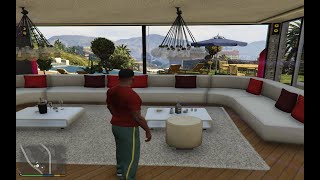
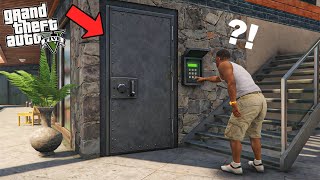
Franklin Next Door [Addon] Created by me.
Installation:
PLEASE READ IT CAREFULLY !
Download and install:
ScriptHook,
ScriptHook V.NET
OpenIV
MENYOO
And very important to download before install for props:
1 Panda Craft Mods (https://fr.gta5-mods.com/misc/dlc-panda-craft-add-on)
2 DNX Generic Add-On Props (https://fr.gta5-mods.com/misc/dnx-generic-add-on-props-add-on-props-for-your-custom-maps)
3 Map Builder 1.0 (https://fr.gta5-mods.com/tools/map-builder) for some grounds.
4 Increased Props [Add-on] 0.6 (https://fr.gta5-mods.com/tools/increased-props-add-on)
HOW TO INSTAL:
ADDON [Ymap] for Franklin Next Door
Installation for instal (OPEN IV needed for this)
1] Copy and paste the dlc folder "franklin next door"
To: mods>update>x64>dlcpacks
2] Add "dlcpacks:/franklin next door/" in dlclist.xml using OpenIV
To: mods >update.rpf >common >data>dlclist
3]Menyoo Peds
Copy: franklin next ped.xml
of my archive to GTAV menyooStuff Spooner.
Now launch in GTA5,
Press F8 to open Menyoo, select "ObjectSpooner", "SavedFiles",
And load in game: franklin next ped.xml
You spawn infront the entrance.
Good Game :-)
Tải lên lần đầu: 07 Tháng mười hai, 2025
Cập nhật lần cuối: 07 Tháng mười hai, 2025
Last Downloaded: 2 hours ago
3 Bình luận
More mods by zamalone:
Franklin Next Door [Addon] Created by me.
Installation:
PLEASE READ IT CAREFULLY !
Download and install:
ScriptHook,
ScriptHook V.NET
OpenIV
MENYOO
And very important to download before install for props:
1 Panda Craft Mods (https://fr.gta5-mods.com/misc/dlc-panda-craft-add-on)
2 DNX Generic Add-On Props (https://fr.gta5-mods.com/misc/dnx-generic-add-on-props-add-on-props-for-your-custom-maps)
3 Map Builder 1.0 (https://fr.gta5-mods.com/tools/map-builder) for some grounds.
4 Increased Props [Add-on] 0.6 (https://fr.gta5-mods.com/tools/increased-props-add-on)
HOW TO INSTAL:
ADDON [Ymap] for Franklin Next Door
Installation for instal (OPEN IV needed for this)
1] Copy and paste the dlc folder "franklin next door"
To: mods>update>x64>dlcpacks
2] Add "dlcpacks:/franklin next door/" in dlclist.xml using OpenIV
To: mods >update.rpf >common >data>dlclist
3]Menyoo Peds
Copy: franklin next ped.xml
of my archive to GTAV menyooStuff Spooner.
Now launch in GTA5,
Press F8 to open Menyoo, select "ObjectSpooner", "SavedFiles",
And load in game: franklin next ped.xml
You spawn infront the entrance.
Good Game :-)
Tải lên lần đầu: 07 Tháng mười hai, 2025
Cập nhật lần cuối: 07 Tháng mười hai, 2025
Last Downloaded: 2 hours ago
 5mods on Discord

This file has been approved automatically. If you think this file should not be here for any reason please report it.
What does this do?
Hi, I'm using GTA 5 v1.0.3788 and when I install the add-on, the windows at Franklin's place are always black and I can't access the inside, although I can see the doors. Do you have a solution?