1803's Car HUD + Fuel System 1.3


1,527
13
1,527
13
This is release V1.2 of my Car HUD. This is a scripthookdotnet script. Files go into the GTAV\Scripts folder.
How to install:
1. Make sure to have ScripthookVdotnetV3, the link below allows you to run both V2 and V3: https://www.gta5-mods.com/tools/scripthookv-net
2. Place all files except txt files in the GTAV\Scripts folder.
Showcase:
https://www.youtube.com/watch?v=3bs_zvPYR5w
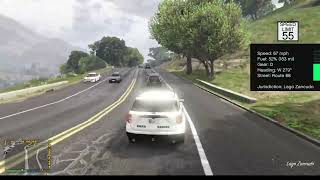
The Car HUD Shows: Speed, Gear, Direction, Road, Jurisdiction, and Fuel Levels Fuel system can be turned on or off in JSON file. Other settings are configurable in the json file. There is also a separate json file to manage refueling stations. Settings like fuel range, screen placement, and MIles/Kilometers are in the CarHUDDisplay.json file.
Also included and can be turned on/off is a refueling system.
Fuel System settings are in the CarHUDDisplay.json
Locations for refueling has its own file: CarHUDDisplay.RefuelLocations
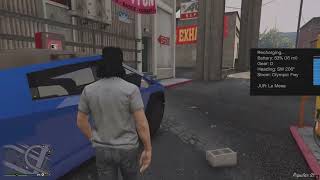
V1.3 Now includes EV Charging!
You can choose EV Charing locations in the json file.
Car will charge even when you leave the car and the HUD will stay up until it is done charging at 100%
V1.2
Moved everything a line up to fit more in the box,
Changed Jurisdiction to JUR:
Now also getting jurisdiction multiple ways, I have not seen any "unknown area" since this update
V1.1:
Jurisdiction was added
Fuel bar got some horizontal lines
首次上传时间: 2026年04月03日
最后更新时间: 2026年11月02日
最后下载: 2小时前
8个评论
More mods by 1803Creations:
This is release V1.2 of my Car HUD. This is a scripthookdotnet script. Files go into the GTAV\Scripts folder.
How to install:
1. Make sure to have ScripthookVdotnetV3, the link below allows you to run both V2 and V3: https://www.gta5-mods.com/tools/scripthookv-net
2. Place all files except txt files in the GTAV\Scripts folder.
Showcase:
https://www.youtube.com/watch?v=3bs_zvPYR5w
The Car HUD Shows: Speed, Gear, Direction, Road, Jurisdiction, and Fuel Levels Fuel system can be turned on or off in JSON file. Other settings are configurable in the json file. There is also a separate json file to manage refueling stations. Settings like fuel range, screen placement, and MIles/Kilometers are in the CarHUDDisplay.json file.
Also included and can be turned on/off is a refueling system.
Fuel System settings are in the CarHUDDisplay.json
Locations for refueling has its own file: CarHUDDisplay.RefuelLocations
V1.3 Now includes EV Charging!
You can choose EV Charing locations in the json file.
Car will charge even when you leave the car and the HUD will stay up until it is done charging at 100%
V1.2
Moved everything a line up to fit more in the box,
Changed Jurisdiction to JUR:
Now also getting jurisdiction multiple ways, I have not seen any "unknown area" since this update
V1.1:
Jurisdiction was added
Fuel bar got some horizontal lines
首次上传时间: 2026年04月03日
最后更新时间: 2026年11月02日
最后下载: 2小时前
 5mods on Discord

This file has been approved automatically. If you think this file should not be here for any reason please report it.
can you change the mph to kmh with ini ?
@VelyXCore Yes, you can change to KM but the config file is "CarHUDDisplay.json" not an .ini file
@GTAPatrol2026 I would recommend detecting the user's in-game preference using SHOULD_USE_METRIC_MEASUREMENTS instead.
@alloc8or Okay, ill look into it for the next version, thanks.
do all files go into scripts folder
@mikeysartori Yes, files go into the scripts folder. Sorry for the late reply, I didnt get a notification for your comment
@GTAPatrol2026 no worries happy memorial day sir!!!!!!