Addon Car Spawner Plus V2.2


28
0
28
0
Addon Car Spawner Plus
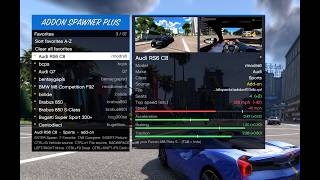
A brand-new add-on car spawner packed with all the features you always wished for, but nobody asked!! lol
(Check the screenshots for a better look at the menu in action.)
========================================
INSTALLATION
1. Make sure you have ScriptHookV installed.
2. Drop the "addon spawner" folder and "AddonCarSpawnerPlus.asi" straight into your main GTA V root folder (where GTAV.exe is located).
========================================
FEATURES
[ Finding Vehicles ]
- Easy Browsing: Browse all vehicles A-Z, by class, or by manufacturer.
- Live Search: Results update with every letter you type. Press Down to scroll through matches without losing your search text, and Up to keep typing.
- Spawn by Model Name: Type any model name to spawn it. Unknown or custom names are automatically saved for next time.
[ Favorites & Quick-Spawn ]
- Favorites List: Star your favorite rides and organize or reorder them however you want.
- Recent Vehicles: Quickly view and re-spawn cars from your recent history.
- Instant Hotkeys: Spawn your top 9 favorites anytime with Ctrl Numpad 1-9, or re-spawn your last car with Ctrl Numpad 0, no need to open the menu.
[ Vehicle Info & Comparison ]
- Full Vehicle Details: See the name, model code, make, class, source (Base Game or Add-on), and the exact dlc.rpf file it comes from.
- Stats & Top Speed: View seat count, top speed, and stat bars for speed, acceleration, braking, and traction.
- Live Comparison: Compare any car in the menu against the one you're currently driving (green = better, red = worse).
[ Preview Pictures & Screenshots ]
- Multiple Views: Press Insert to switch between exterior previews, interior dashboard views, or both side by side.
- Quick Screenshots: Take photos of your current car anytime with F9 (exterior) or Shift F9 (dashboard).
- Menu Capture & Auto-Photos: Snap pictures straight from the menu (Ctrl F9 for exterior, Ctrl Shift F9 for dashboard, or Alt F9 for both). Cars without a preview image will get one automatically the first time you spawn them.
[ Game vs. Add-on Sorting ]
- Mark Single Vehicles: Press G to mark the highlighted car as Base Game or Add-on.
- Mark Entire Packs: Press H to mark all vehicles from that same dlc.rpf file at once.
[ Spawning & Options ]
- Spawn Modes: Spawn directly inside the driver's seat, replace your current car, or keep spawned vehicles persistent in the world.
- Auto-Upgrades & Toggles: Automatically apply performance or full upgrades, turn on invincibility and bulletproof tires, start the engine on spawn, set custom license plates, and delete your previous spawned car.
- Smooth Loading & Safe Spawns: Heavy add-on cars load with a progress bar (Esc cancels anytime), and extra-long vehicles spawn with extra space so you don't get stuck.
[ Settings ]
- Change Any Hotkey: Rebind every keybind live inside the menu, including Ctrl, Shift, and Alt combos (press Ctrl K to jump straight to keybinds).
- Menu Customization: Switch between km/h and mph, change menu colors, and adjust how many rows appear on screen.
========================================
CREDITS
Addon Car Spawner Plus - Created by ThunderSB
Built on & Special Thanks:
- Alexander Blade - ScriptHookV (required to run .asi mods)
- ikt (ikt32) - Original Addon Spawner 1.4.4 (settings and picture folders are 100 percent compatible, so you can upgrade without moving a thing!) (Note: If anyone else contributed to the original, let me know so I can credit them properly!)
- DurtyFree / gta-v-data-dumps - Official vehicle list used to separate Base Game cars from Add-ons
- alloc8or - GTA V native database
- Zig Toolchain - Used to compile the .asi file
A brand-new add-on car spawner packed with all the features you always wished for, but nobody asked!! lol
(Check the screenshots for a better look at the menu in action.)
========================================
INSTALLATION
1. Make sure you have ScriptHookV installed.
2. Drop the "addon spawner" folder and "AddonCarSpawnerPlus.asi" straight into your main GTA V root folder (where GTAV.exe is located).
========================================
FEATURES
[ Finding Vehicles ]
- Easy Browsing: Browse all vehicles A-Z, by class, or by manufacturer.
- Live Search: Results update with every letter you type. Press Down to scroll through matches without losing your search text, and Up to keep typing.
- Spawn by Model Name: Type any model name to spawn it. Unknown or custom names are automatically saved for next time.
[ Favorites & Quick-Spawn ]
- Favorites List: Star your favorite rides and organize or reorder them however you want.
- Recent Vehicles: Quickly view and re-spawn cars from your recent history.
- Instant Hotkeys: Spawn your top 9 favorites anytime with Ctrl Numpad 1-9, or re-spawn your last car with Ctrl Numpad 0, no need to open the menu.
[ Vehicle Info & Comparison ]
- Full Vehicle Details: See the name, model code, make, class, source (Base Game or Add-on), and the exact dlc.rpf file it comes from.
- Stats & Top Speed: View seat count, top speed, and stat bars for speed, acceleration, braking, and traction.
- Live Comparison: Compare any car in the menu against the one you're currently driving (green = better, red = worse).
[ Preview Pictures & Screenshots ]
- Multiple Views: Press Insert to switch between exterior previews, interior dashboard views, or both side by side.
- Quick Screenshots: Take photos of your current car anytime with F9 (exterior) or Shift F9 (dashboard).
- Menu Capture & Auto-Photos: Snap pictures straight from the menu (Ctrl F9 for exterior, Ctrl Shift F9 for dashboard, or Alt F9 for both). Cars without a preview image will get one automatically the first time you spawn them.
[ Game vs. Add-on Sorting ]
- Mark Single Vehicles: Press G to mark the highlighted car as Base Game or Add-on.
- Mark Entire Packs: Press H to mark all vehicles from that same dlc.rpf file at once.
[ Spawning & Options ]
- Spawn Modes: Spawn directly inside the driver's seat, replace your current car, or keep spawned vehicles persistent in the world.
- Auto-Upgrades & Toggles: Automatically apply performance or full upgrades, turn on invincibility and bulletproof tires, start the engine on spawn, set custom license plates, and delete your previous spawned car.
- Smooth Loading & Safe Spawns: Heavy add-on cars load with a progress bar (Esc cancels anytime), and extra-long vehicles spawn with extra space so you don't get stuck.
[ Settings ]
- Change Any Hotkey: Rebind every keybind live inside the menu, including Ctrl, Shift, and Alt combos (press Ctrl K to jump straight to keybinds).
- Menu Customization: Switch between km/h and mph, change menu colors, and adjust how many rows appear on screen.
========================================
CREDITS
Addon Car Spawner Plus - Created by ThunderSB
Built on & Special Thanks:
- Alexander Blade - ScriptHookV (required to run .asi mods)
- ikt (ikt32) - Original Addon Spawner 1.4.4 (settings and picture folders are 100 percent compatible, so you can upgrade without moving a thing!) (Note: If anyone else contributed to the original, let me know so I can credit them properly!)
- DurtyFree / gta-v-data-dumps - Official vehicle list used to separate Base Game cars from Add-ons
- alloc8or - GTA V native database
- Zig Toolchain - Used to compile the .asi file
Carregat per primera vegada: fa 1 dia
Actualització més recent: fa 24 minuts
Últim descarregat: Fa 1 minut
5 Comentaris
Addon Car Spawner Plus
A brand-new add-on car spawner packed with all the features you always wished for, but nobody asked!! lol
(Check the screenshots for a better look at the menu in action.)
========================================
INSTALLATION
1. Make sure you have ScriptHookV installed.
2. Drop the "addon spawner" folder and "AddonCarSpawnerPlus.asi" straight into your main GTA V root folder (where GTAV.exe is located).
========================================
FEATURES
[ Finding Vehicles ]
- Easy Browsing: Browse all vehicles A-Z, by class, or by manufacturer.
- Live Search: Results update with every letter you type. Press Down to scroll through matches without losing your search text, and Up to keep typing.
- Spawn by Model Name: Type any model name to spawn it. Unknown or custom names are automatically saved for next time.
[ Favorites & Quick-Spawn ]
- Favorites List: Star your favorite rides and organize or reorder them however you want.
- Recent Vehicles: Quickly view and re-spawn cars from your recent history.
- Instant Hotkeys: Spawn your top 9 favorites anytime with Ctrl Numpad 1-9, or re-spawn your last car with Ctrl Numpad 0, no need to open the menu.
[ Vehicle Info & Comparison ]
- Full Vehicle Details: See the name, model code, make, class, source (Base Game or Add-on), and the exact dlc.rpf file it comes from.
- Stats & Top Speed: View seat count, top speed, and stat bars for speed, acceleration, braking, and traction.
- Live Comparison: Compare any car in the menu against the one you're currently driving (green = better, red = worse).
[ Preview Pictures & Screenshots ]
- Multiple Views: Press Insert to switch between exterior previews, interior dashboard views, or both side by side.
- Quick Screenshots: Take photos of your current car anytime with F9 (exterior) or Shift F9 (dashboard).
- Menu Capture & Auto-Photos: Snap pictures straight from the menu (Ctrl F9 for exterior, Ctrl Shift F9 for dashboard, or Alt F9 for both). Cars without a preview image will get one automatically the first time you spawn them.
[ Game vs. Add-on Sorting ]
- Mark Single Vehicles: Press G to mark the highlighted car as Base Game or Add-on.
- Mark Entire Packs: Press H to mark all vehicles from that same dlc.rpf file at once.
[ Spawning & Options ]
- Spawn Modes: Spawn directly inside the driver's seat, replace your current car, or keep spawned vehicles persistent in the world.
- Auto-Upgrades & Toggles: Automatically apply performance or full upgrades, turn on invincibility and bulletproof tires, start the engine on spawn, set custom license plates, and delete your previous spawned car.
- Smooth Loading & Safe Spawns: Heavy add-on cars load with a progress bar (Esc cancels anytime), and extra-long vehicles spawn with extra space so you don't get stuck.
[ Settings ]
- Change Any Hotkey: Rebind every keybind live inside the menu, including Ctrl, Shift, and Alt combos (press Ctrl K to jump straight to keybinds).
- Menu Customization: Switch between km/h and mph, change menu colors, and adjust how many rows appear on screen.
========================================
CREDITS
Addon Car Spawner Plus - Created by ThunderSB
Built on & Special Thanks:
- Alexander Blade - ScriptHookV (required to run .asi mods)
- ikt (ikt32) - Original Addon Spawner 1.4.4 (settings and picture folders are 100 percent compatible, so you can upgrade without moving a thing!) (Note: If anyone else contributed to the original, let me know so I can credit them properly!)
- DurtyFree / gta-v-data-dumps - Official vehicle list used to separate Base Game cars from Add-ons
- alloc8or - GTA V native database
- Zig Toolchain - Used to compile the .asi file
A brand-new add-on car spawner packed with all the features you always wished for, but nobody asked!! lol
(Check the screenshots for a better look at the menu in action.)
========================================
INSTALLATION
1. Make sure you have ScriptHookV installed.
2. Drop the "addon spawner" folder and "AddonCarSpawnerPlus.asi" straight into your main GTA V root folder (where GTAV.exe is located).
========================================
FEATURES
[ Finding Vehicles ]
- Easy Browsing: Browse all vehicles A-Z, by class, or by manufacturer.
- Live Search: Results update with every letter you type. Press Down to scroll through matches without losing your search text, and Up to keep typing.
- Spawn by Model Name: Type any model name to spawn it. Unknown or custom names are automatically saved for next time.
[ Favorites & Quick-Spawn ]
- Favorites List: Star your favorite rides and organize or reorder them however you want.
- Recent Vehicles: Quickly view and re-spawn cars from your recent history.
- Instant Hotkeys: Spawn your top 9 favorites anytime with Ctrl Numpad 1-9, or re-spawn your last car with Ctrl Numpad 0, no need to open the menu.
[ Vehicle Info & Comparison ]
- Full Vehicle Details: See the name, model code, make, class, source (Base Game or Add-on), and the exact dlc.rpf file it comes from.
- Stats & Top Speed: View seat count, top speed, and stat bars for speed, acceleration, braking, and traction.
- Live Comparison: Compare any car in the menu against the one you're currently driving (green = better, red = worse).
[ Preview Pictures & Screenshots ]
- Multiple Views: Press Insert to switch between exterior previews, interior dashboard views, or both side by side.
- Quick Screenshots: Take photos of your current car anytime with F9 (exterior) or Shift F9 (dashboard).
- Menu Capture & Auto-Photos: Snap pictures straight from the menu (Ctrl F9 for exterior, Ctrl Shift F9 for dashboard, or Alt F9 for both). Cars without a preview image will get one automatically the first time you spawn them.
[ Game vs. Add-on Sorting ]
- Mark Single Vehicles: Press G to mark the highlighted car as Base Game or Add-on.
- Mark Entire Packs: Press H to mark all vehicles from that same dlc.rpf file at once.
[ Spawning & Options ]
- Spawn Modes: Spawn directly inside the driver's seat, replace your current car, or keep spawned vehicles persistent in the world.
- Auto-Upgrades & Toggles: Automatically apply performance or full upgrades, turn on invincibility and bulletproof tires, start the engine on spawn, set custom license plates, and delete your previous spawned car.
- Smooth Loading & Safe Spawns: Heavy add-on cars load with a progress bar (Esc cancels anytime), and extra-long vehicles spawn with extra space so you don't get stuck.
[ Settings ]
- Change Any Hotkey: Rebind every keybind live inside the menu, including Ctrl, Shift, and Alt combos (press Ctrl K to jump straight to keybinds).
- Menu Customization: Switch between km/h and mph, change menu colors, and adjust how many rows appear on screen.
========================================
CREDITS
Addon Car Spawner Plus - Created by ThunderSB
Built on & Special Thanks:
- Alexander Blade - ScriptHookV (required to run .asi mods)
- ikt (ikt32) - Original Addon Spawner 1.4.4 (settings and picture folders are 100 percent compatible, so you can upgrade without moving a thing!) (Note: If anyone else contributed to the original, let me know so I can credit them properly!)
- DurtyFree / gta-v-data-dumps - Official vehicle list used to separate Base Game cars from Add-ons
- alloc8or - GTA V native database
- Zig Toolchain - Used to compile the .asi file
Carregat per primera vegada: fa 1 dia
Actualització més recent: fa 24 minuts
Últim descarregat: Fa 1 minut
 5mods on Discord

Please update your description and upload according to the site rules and regulations: https://github.com/5mods/tutorials/blob/master/5Mods%20Upload%20Guidelines.md
@meimeiriver what else should i put? i have Already mentioned features, Credits, installation, in game screenshots
@meimeiriver i now did update my description, please check
@Thunder_SB Add a (mandatory) video, for one. And explain the 'add-on' part, as it looks to me this mod just collects ALL cars ingame.
@meimeiriver yup added video, renamed file to addon car spawner plus. because it is used for addon cars or game car or all cars if wished for.