Crazy NPC Riot 2.0





907
16
907
16
Crazy NPC Riot
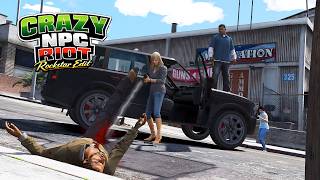
Crazy NPC Riot transforms GTA V pedestrians into a much more reactive and unpredictable crowd. A simple provocation can escalate into a realistic chain reaction where nearby NPCs decide whether to join the fight, defend themselves, or spread the conflict to others.
Version 1.0 - Features:
- NPCs react when attacked by the player.
- Dynamic NPC vs NPC combat.
- Natural domino effect that spreads fights through nearby crowds.
- Vehicle occupants react to snowball attacks by leaving their vehicle and engaging the player.
- Random weapon distribution during combat.
- Adjustable behavior through the included CrazyNPCRiot.ini configuration file.
- Optimized for stable gameplay and realistic crowd behavior.
Version 2.0 - What's New:
- Added a new dynamic weapon system for the riot.
- NPCs and police can now switch between Melee Mode and Firearms Mode in real time using a new toggle key.
- Press O to change the weapon mode.
- Melee Mode: all NPCs, including police, use only melee weapons.
- Firearms Mode: all NPCs, including police, use only firearms.
- Weapon switching works while the riot is active and affects both existing and newly involved NPCs.
- Improved weapon handling to prevent AI combat glitches during weapon changes.
- Police weapons are also replaced, allowing the entire city riot to follow the selected combat style.
- Added new INI configuration options for the weapon toggle key and starting weapon mode.
Requirements
- Script Hook V
- ScriptHookVDotNet (v2.11.6 or compatible)
- .NET Framework (required by ScriptHookVDotNet)
Installation
- Install ScriptHookV.
- Install ScriptHookVDotNet.
- Copy CrazyNPCRiot.cs and CrazyNPCRiot.ini into your scripts folder.
- Launch the game and press the L key to enable or disable the script.
Compatibility
This script has been tested on Grand Theft Auto V Build 3179.
Notes
A README file is included in the download package (v1.0) with instructions on how to customize the CrazyNPCRiot.ini configuration file.
Crazy NPC Riot transforms GTA V pedestrians into a much more reactive and unpredictable crowd. A simple provocation can escalate into a realistic chain reaction where nearby NPCs decide whether to join the fight, defend themselves, or spread the conflict to others.
Version 1.0 - Features:
- NPCs react when attacked by the player.
- Dynamic NPC vs NPC combat.
- Natural domino effect that spreads fights through nearby crowds.
- Vehicle occupants react to snowball attacks by leaving their vehicle and engaging the player.
- Random weapon distribution during combat.
- Adjustable behavior through the included CrazyNPCRiot.ini configuration file.
- Optimized for stable gameplay and realistic crowd behavior.
Version 2.0 - What's New:
- Added a new dynamic weapon system for the riot.
- NPCs and police can now switch between Melee Mode and Firearms Mode in real time using a new toggle key.
- Press O to change the weapon mode.
- Melee Mode: all NPCs, including police, use only melee weapons.
- Firearms Mode: all NPCs, including police, use only firearms.
- Weapon switching works while the riot is active and affects both existing and newly involved NPCs.
- Improved weapon handling to prevent AI combat glitches during weapon changes.
- Police weapons are also replaced, allowing the entire city riot to follow the selected combat style.
- Added new INI configuration options for the weapon toggle key and starting weapon mode.
Requirements
- Script Hook V
- ScriptHookVDotNet (v2.11.6 or compatible)
- .NET Framework (required by ScriptHookVDotNet)
Installation
- Install ScriptHookV.
- Install ScriptHookVDotNet.
- Copy CrazyNPCRiot.cs and CrazyNPCRiot.ini into your scripts folder.
- Launch the game and press the L key to enable or disable the script.
Compatibility
This script has been tested on Grand Theft Auto V Build 3179.
Notes
A README file is included in the download package (v1.0) with instructions on how to customize the CrazyNPCRiot.ini configuration file.
Carregat per primera vegada: 08 de Juliol de 2026
Actualització més recent: fa 8 dies
Últim descarregat: fa 42 minuts
32 Comentaris
More mods by FPVSKY:
Crazy NPC Riot
Crazy NPC Riot transforms GTA V pedestrians into a much more reactive and unpredictable crowd. A simple provocation can escalate into a realistic chain reaction where nearby NPCs decide whether to join the fight, defend themselves, or spread the conflict to others.
Version 1.0 - Features:
- NPCs react when attacked by the player.
- Dynamic NPC vs NPC combat.
- Natural domino effect that spreads fights through nearby crowds.
- Vehicle occupants react to snowball attacks by leaving their vehicle and engaging the player.
- Random weapon distribution during combat.
- Adjustable behavior through the included CrazyNPCRiot.ini configuration file.
- Optimized for stable gameplay and realistic crowd behavior.
Version 2.0 - What's New:
- Added a new dynamic weapon system for the riot.
- NPCs and police can now switch between Melee Mode and Firearms Mode in real time using a new toggle key.
- Press O to change the weapon mode.
- Melee Mode: all NPCs, including police, use only melee weapons.
- Firearms Mode: all NPCs, including police, use only firearms.
- Weapon switching works while the riot is active and affects both existing and newly involved NPCs.
- Improved weapon handling to prevent AI combat glitches during weapon changes.
- Police weapons are also replaced, allowing the entire city riot to follow the selected combat style.
- Added new INI configuration options for the weapon toggle key and starting weapon mode.
Requirements
- Script Hook V
- ScriptHookVDotNet (v2.11.6 or compatible)
- .NET Framework (required by ScriptHookVDotNet)
Installation
- Install ScriptHookV.
- Install ScriptHookVDotNet.
- Copy CrazyNPCRiot.cs and CrazyNPCRiot.ini into your scripts folder.
- Launch the game and press the L key to enable or disable the script.
Compatibility
This script has been tested on Grand Theft Auto V Build 3179.
Notes
A README file is included in the download package (v1.0) with instructions on how to customize the CrazyNPCRiot.ini configuration file.
Crazy NPC Riot transforms GTA V pedestrians into a much more reactive and unpredictable crowd. A simple provocation can escalate into a realistic chain reaction where nearby NPCs decide whether to join the fight, defend themselves, or spread the conflict to others.
Version 1.0 - Features:
- NPCs react when attacked by the player.
- Dynamic NPC vs NPC combat.
- Natural domino effect that spreads fights through nearby crowds.
- Vehicle occupants react to snowball attacks by leaving their vehicle and engaging the player.
- Random weapon distribution during combat.
- Adjustable behavior through the included CrazyNPCRiot.ini configuration file.
- Optimized for stable gameplay and realistic crowd behavior.
Version 2.0 - What's New:
- Added a new dynamic weapon system for the riot.
- NPCs and police can now switch between Melee Mode and Firearms Mode in real time using a new toggle key.
- Press O to change the weapon mode.
- Melee Mode: all NPCs, including police, use only melee weapons.
- Firearms Mode: all NPCs, including police, use only firearms.
- Weapon switching works while the riot is active and affects both existing and newly involved NPCs.
- Improved weapon handling to prevent AI combat glitches during weapon changes.
- Police weapons are also replaced, allowing the entire city riot to follow the selected combat style.
- Added new INI configuration options for the weapon toggle key and starting weapon mode.
Requirements
- Script Hook V
- ScriptHookVDotNet (v2.11.6 or compatible)
- .NET Framework (required by ScriptHookVDotNet)
Installation
- Install ScriptHookV.
- Install ScriptHookVDotNet.
- Copy CrazyNPCRiot.cs and CrazyNPCRiot.ini into your scripts folder.
- Launch the game and press the L key to enable or disable the script.
Compatibility
This script has been tested on Grand Theft Auto V Build 3179.
Notes
A README file is included in the download package (v1.0) with instructions on how to customize the CrazyNPCRiot.ini configuration file.
Carregat per primera vegada: 08 de Juliol de 2026
Actualització més recent: fa 8 dies
Últim descarregat: fa 42 minuts
 5mods on Discord

is it for enhanced version?
theres no ini file
can you make the npc only attack player, i want to feel like john wick
@thanhthanhhoa how did you get it to work when i press l it just crashes my game
@7777N Glad you like it and thanks
@SGYT Nope. Only for Legacy
@gooeswa3y Imposible. I just download the file and I have the .ini file..
@gooeswa3y If you read full description, you may encounter the error that you have. Posible error (crash) is the ScriptHookVDotNet. You need v2.11.6 or compatible. The mod it's designe to work only with this version.
@thanhthanhhoa The npc or npcs attack(s) the player..Don't really understand what you meen?!?! There are separate mods to feel like John Wick. Just search GTA 5 John Wick.. :)
Please update this mod. I respect your hardwork... Here are some suggestions... NPC are waiting too long after throwing snowball.. They should not attack player noc vs npc... Please refer this video... https://youtube.com/shorts/J0K9oteICLo
Please update i want mod like in the video.. Hope update comes...
https://youtube.com/shorts/J0K9oteICLo
I want mod like to be in the yt video.. please once watch open the link... Please author...make for me... It is most demanding...just need small changes... Hope update comes...❤️
https://youtube.com/shorts/J0K9oteICLo">https://youtube.com/shorts/J0K9oteICLo">https://youtube.com/shorts/J0K9oteICLo">https://youtube.com/shorts/J0K9oteICLo">https://youtube.com/shorts/J0K9oteICLo">https://youtube.com/shorts/J0K9oteICLo
https://youtube.com/shorts/J0K9oteICLo
https://youtube.com/shorts/J0K9oteICLo
https://youtube.com/shorts/J0K9oteICLo
https://youtube.com/shorts/J0K9oteICLo
https://youtube.com/shorts/J0K9oteICLo
Please make same copy like this....
@FPVSKY i mean all of the npcs only attack player, not attack each other, my bad english
@waheed100 Ok, I'll do my best. I'll try to make an update. Seen those videos you send me.
@thanhthanhhoa Ohh, okay. I'll try to make an update soon.
Can anybody share a tutorial like how to install this one I am getting some error
Error screenshot: https://kommodo.ai/i/1qi1ZYiwauNbXy8ebqRW
@FPVSKY
Can you share a tutorial like how to install this one please, I am getting some error
Error screenshot: https://kommodo.ai/i/1qi1ZYiwauNbXy8ebqRW
@bsukh69 it's not compatible with enhanced version.. Only Legacy
@FPVSKY Hey bro thanks for reverting, Yeah I anyhow got to know about this already and installed the legacy version and setup the mod on that too,
The issue I am facing now is that the mod is working but with so many bug like whenever I start the mod by pressing L and fight with NPC they didnt react and then when I switch the mod off again they start fighting but all the NPC fights and like so many bugs are there like I cant mention here so how to fix those all?
@waheed100 Hey brother do you get something like the video you shared, i also wanna create something like that but not able to find the right thing?