Fold Hands 1.1


719
17
719
17
Hands Fold Toggle
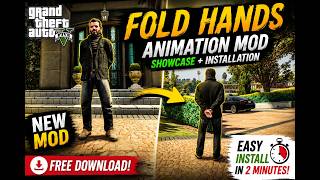
Hands Fold Toggle is a lightweight ScriptHookVDotNet mod that lets your character instantly switch between a natural hands-behind-back idle animation and normal gameplay with a single key press.
Features:
One-key animation toggle
Customizable hotkey and animation via FoldHands.ini
Lightweight and performance-friendly
Works in GTA V Story Mode
Compatible with Michael, Franklin, and Trevor
Requirements:
ScriptHookV
ScriptHookVDotNet
Installation:
1. Copy FoldHands.dll and FoldHands.ini to your GTA V scripts folder.
2. Launch GTA V.
3. Press the configured hotkey to toggle the animation.
Default Hotkey:
F5
What's New:
Improved animation quality
Smoother animation playback
Minor improvements and optimizations
Hands Fold Toggle is a lightweight ScriptHookVDotNet mod that lets your character instantly switch between a natural hands-behind-back idle animation and normal gameplay with a single key press.
Features:
One-key animation toggle
Customizable hotkey and animation via FoldHands.ini
Lightweight and performance-friendly
Works in GTA V Story Mode
Compatible with Michael, Franklin, and Trevor
Requirements:
ScriptHookV
ScriptHookVDotNet
Installation:
1. Copy FoldHands.dll and FoldHands.ini to your GTA V scripts folder.
2. Launch GTA V.
3. Press the configured hotkey to toggle the animation.
Default Hotkey:
F5
What's New:
Improved animation quality
Smoother animation playback
Minor improvements and optimizations
Carregat per primera vegada: 18 de Juliol de 2026
Actualització més recent: 25 de Juliol de 2026
Últim descarregat: Fa 2 hores
6 Comentaris
Hands Fold Toggle
Hands Fold Toggle is a lightweight ScriptHookVDotNet mod that lets your character instantly switch between a natural hands-behind-back idle animation and normal gameplay with a single key press.
Features:
One-key animation toggle
Customizable hotkey and animation via FoldHands.ini
Lightweight and performance-friendly
Works in GTA V Story Mode
Compatible with Michael, Franklin, and Trevor
Requirements:
ScriptHookV
ScriptHookVDotNet
Installation:
1. Copy FoldHands.dll and FoldHands.ini to your GTA V scripts folder.
2. Launch GTA V.
3. Press the configured hotkey to toggle the animation.
Default Hotkey:
F5
What's New:
Improved animation quality
Smoother animation playback
Minor improvements and optimizations
Hands Fold Toggle is a lightweight ScriptHookVDotNet mod that lets your character instantly switch between a natural hands-behind-back idle animation and normal gameplay with a single key press.
Features:
One-key animation toggle
Customizable hotkey and animation via FoldHands.ini
Lightweight and performance-friendly
Works in GTA V Story Mode
Compatible with Michael, Franklin, and Trevor
Requirements:
ScriptHookV
ScriptHookVDotNet
Installation:
1. Copy FoldHands.dll and FoldHands.ini to your GTA V scripts folder.
2. Launch GTA V.
3. Press the configured hotkey to toggle the animation.
Default Hotkey:
F5
What's New:
Improved animation quality
Smoother animation playback
Minor improvements and optimizations
Carregat per primera vegada: 18 de Juliol de 2026
Actualització més recent: 25 de Juliol de 2026
Últim descarregat: Fa 2 hores
 5mods on Discord

Great Mod!
there is nothing we can do... -Napoleon
Simple but really cool
@tryspartanhack1337 THANKS 😁
Really am loving these script-based animation mods of yours!!! ❤️ Keep up the great work bro! 🔥🐺🔥
@WolfFire23309 Thanks Can you Support my yt channel To motivate me for more mod