RDIAdvancedFishing v1.0.2 (Major Update/Bug Fixes)




365
9
365
9
Turn GTA V into a full fishing experience with RDI Advanced Fishing. Catch fish anywhere near valid water, purchase bait and fishing gear, manage your cooler, upgrade equipment, maintain damaged gear, buy boats, enter tournaments, use banking and loans, sell catches, and build your angler career.
RDI Advanced Fishing Changelog v1.0.2
This update expands RDI Advanced Fishing with a much larger fishing experience, improved UI, new equipment systems, better vehicle storage, more locations, controller support, and additional customization.
What We Added
Multiple RDI Bait & Tackle locations
Multiple Fish Market locations
Multiple Gear Repair locations
Fishing licenses and Game Warden patrols
Rod, reel, line, hook and bait setup system
Consumable fishing hooks
Fishing gear durability and repairs
Fishing Journal and personal records
Rig Loadouts
Daily Fish Market Orders
Fish quality and legal fishing regulations
Protected and illegal fish system
Random fishing finds
NPC buyer for recovered fishing items
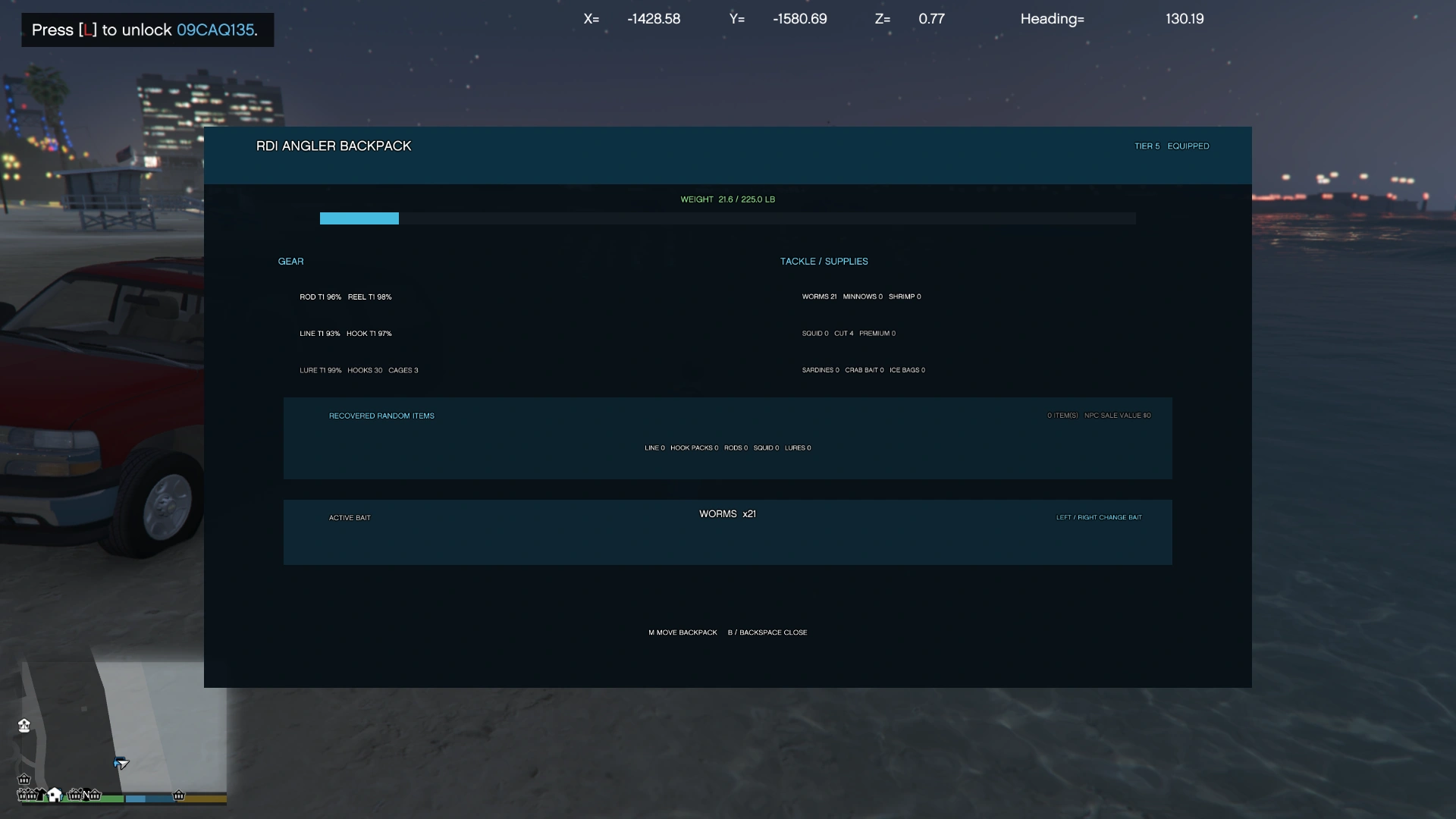
Physical RDI Angler Backpack
Backpack weight and upgrade system
Backpack vehicle trunk storage
In game Backpack Position Editor
Separate saved backpack positions for Michael, Franklin, Trevor, MP Male, MP Female and custom player models
Multiple portable coolers
Fish and ice cooler storage
Full cooler vehicle trunk storage
Vehicle storage capacity based on vehicle class
Crab Cage purchasing, placement, baiting, collecting and repairs
Crab selling and crab bait crafting
Custom Craft Bench system
Boat purchasing and upgrades
Sonar and fishing boat features
Improved F6 tablet with Inventory, Stats and Settings
Recovery Tools for stuck fishing states, props and menus
Controller support
Expanded Config.ini with configurable keys, prices, capacities, locations, system toggles, timing and gameplay values
HowToPlay.txt with full fishing instructions
CHANGELOG.txt with update information
Silent requirement scanner that checks both the GTA V game directory and scripts folder
Requirements.log for troubleshooting detected ScriptHookV, ScriptHookVDotNet3 and LemonUI files
Loose bait storage was removed from vehicle trunks. Vehicle trunks now focus on full coolers and the complete RDI Angler Backpack.
How To Install
Install ScriptHookV, ScriptHookVDotNet3 and LemonUI.SHVDN3.
Place the RDIAdvancedFishing folder inside:
[UserDrive]:\Steam\steamapps\common\Grand Theft Auto V\scripts
Your GTA V directory should be:
[UserDrive]:\Steam\steamapps\common\Grand Theft Auto V
Start GTA V and RDI Advanced Fishing will automatically scan the game directory and scripts folder for the required files.
Read HowToPlay.txt for controls and full gameplay instructions.
RDI Advanced Fishing Changelog v1.0.2
This update expands RDI Advanced Fishing with a much larger fishing experience, improved UI, new equipment systems, better vehicle storage, more locations, controller support, and additional customization.
What We Added
Multiple RDI Bait & Tackle locations
Multiple Fish Market locations
Multiple Gear Repair locations
Fishing licenses and Game Warden patrols
Rod, reel, line, hook and bait setup system
Consumable fishing hooks
Fishing gear durability and repairs
Fishing Journal and personal records
Rig Loadouts
Daily Fish Market Orders
Fish quality and legal fishing regulations
Protected and illegal fish system
Random fishing finds
NPC buyer for recovered fishing items
Physical RDI Angler Backpack
Backpack weight and upgrade system
Backpack vehicle trunk storage
In game Backpack Position Editor
Separate saved backpack positions for Michael, Franklin, Trevor, MP Male, MP Female and custom player models
Multiple portable coolers
Fish and ice cooler storage
Full cooler vehicle trunk storage
Vehicle storage capacity based on vehicle class
Crab Cage purchasing, placement, baiting, collecting and repairs
Crab selling and crab bait crafting
Custom Craft Bench system
Boat purchasing and upgrades
Sonar and fishing boat features
Improved F6 tablet with Inventory, Stats and Settings
Recovery Tools for stuck fishing states, props and menus
Controller support
Expanded Config.ini with configurable keys, prices, capacities, locations, system toggles, timing and gameplay values
HowToPlay.txt with full fishing instructions
CHANGELOG.txt with update information
Silent requirement scanner that checks both the GTA V game directory and scripts folder
Requirements.log for troubleshooting detected ScriptHookV, ScriptHookVDotNet3 and LemonUI files
Loose bait storage was removed from vehicle trunks. Vehicle trunks now focus on full coolers and the complete RDI Angler Backpack.
How To Install
Install ScriptHookV, ScriptHookVDotNet3 and LemonUI.SHVDN3.
Place the RDIAdvancedFishing folder inside:
[UserDrive]:\Steam\steamapps\common\Grand Theft Auto V\scripts
Your GTA V directory should be:
[UserDrive]:\Steam\steamapps\common\Grand Theft Auto V
Start GTA V and RDI Advanced Fishing will automatically scan the game directory and scripts folder for the required files.
Read HowToPlay.txt for controls and full gameplay instructions.
Poprvé nahráno: 14. Září 2026
Poslední aktulizace: 19 hours ago
Last Downloaded: před 22 minutami
21 Komentářů
Turn GTA V into a full fishing experience with RDI Advanced Fishing. Catch fish anywhere near valid water, purchase bait and fishing gear, manage your cooler, upgrade equipment, maintain damaged gear, buy boats, enter tournaments, use banking and loans, sell catches, and build your angler career.
RDI Advanced Fishing Changelog v1.0.2
This update expands RDI Advanced Fishing with a much larger fishing experience, improved UI, new equipment systems, better vehicle storage, more locations, controller support, and additional customization.
What We Added
Multiple RDI Bait & Tackle locations
Multiple Fish Market locations
Multiple Gear Repair locations
Fishing licenses and Game Warden patrols
Rod, reel, line, hook and bait setup system
Consumable fishing hooks
Fishing gear durability and repairs
Fishing Journal and personal records
Rig Loadouts
Daily Fish Market Orders
Fish quality and legal fishing regulations
Protected and illegal fish system
Random fishing finds
NPC buyer for recovered fishing items
Physical RDI Angler Backpack
Backpack weight and upgrade system
Backpack vehicle trunk storage
In game Backpack Position Editor
Separate saved backpack positions for Michael, Franklin, Trevor, MP Male, MP Female and custom player models
Multiple portable coolers
Fish and ice cooler storage
Full cooler vehicle trunk storage
Vehicle storage capacity based on vehicle class
Crab Cage purchasing, placement, baiting, collecting and repairs
Crab selling and crab bait crafting
Custom Craft Bench system
Boat purchasing and upgrades
Sonar and fishing boat features
Improved F6 tablet with Inventory, Stats and Settings
Recovery Tools for stuck fishing states, props and menus
Controller support
Expanded Config.ini with configurable keys, prices, capacities, locations, system toggles, timing and gameplay values
HowToPlay.txt with full fishing instructions
CHANGELOG.txt with update information
Silent requirement scanner that checks both the GTA V game directory and scripts folder
Requirements.log for troubleshooting detected ScriptHookV, ScriptHookVDotNet3 and LemonUI files
Loose bait storage was removed from vehicle trunks. Vehicle trunks now focus on full coolers and the complete RDI Angler Backpack.
How To Install
Install ScriptHookV, ScriptHookVDotNet3 and LemonUI.SHVDN3.
Place the RDIAdvancedFishing folder inside:
[UserDrive]:\Steam\steamapps\common\Grand Theft Auto V\scripts
Your GTA V directory should be:
[UserDrive]:\Steam\steamapps\common\Grand Theft Auto V
Start GTA V and RDI Advanced Fishing will automatically scan the game directory and scripts folder for the required files.
Read HowToPlay.txt for controls and full gameplay instructions.
RDI Advanced Fishing Changelog v1.0.2
This update expands RDI Advanced Fishing with a much larger fishing experience, improved UI, new equipment systems, better vehicle storage, more locations, controller support, and additional customization.
What We Added
Multiple RDI Bait & Tackle locations
Multiple Fish Market locations
Multiple Gear Repair locations
Fishing licenses and Game Warden patrols
Rod, reel, line, hook and bait setup system
Consumable fishing hooks
Fishing gear durability and repairs
Fishing Journal and personal records
Rig Loadouts
Daily Fish Market Orders
Fish quality and legal fishing regulations
Protected and illegal fish system
Random fishing finds
NPC buyer for recovered fishing items
Physical RDI Angler Backpack
Backpack weight and upgrade system
Backpack vehicle trunk storage
In game Backpack Position Editor
Separate saved backpack positions for Michael, Franklin, Trevor, MP Male, MP Female and custom player models
Multiple portable coolers
Fish and ice cooler storage
Full cooler vehicle trunk storage
Vehicle storage capacity based on vehicle class
Crab Cage purchasing, placement, baiting, collecting and repairs
Crab selling and crab bait crafting
Custom Craft Bench system
Boat purchasing and upgrades
Sonar and fishing boat features
Improved F6 tablet with Inventory, Stats and Settings
Recovery Tools for stuck fishing states, props and menus
Controller support
Expanded Config.ini with configurable keys, prices, capacities, locations, system toggles, timing and gameplay values
HowToPlay.txt with full fishing instructions
CHANGELOG.txt with update information
Silent requirement scanner that checks both the GTA V game directory and scripts folder
Requirements.log for troubleshooting detected ScriptHookV, ScriptHookVDotNet3 and LemonUI files
Loose bait storage was removed from vehicle trunks. Vehicle trunks now focus on full coolers and the complete RDI Angler Backpack.
How To Install
Install ScriptHookV, ScriptHookVDotNet3 and LemonUI.SHVDN3.
Place the RDIAdvancedFishing folder inside:
[UserDrive]:\Steam\steamapps\common\Grand Theft Auto V\scripts
Your GTA V directory should be:
[UserDrive]:\Steam\steamapps\common\Grand Theft Auto V
Start GTA V and RDI Advanced Fishing will automatically scan the game directory and scripts folder for the required files.
Read HowToPlay.txt for controls and full gameplay instructions.
Poprvé nahráno: 14. Září 2026
Poslední aktulizace: 19 hours ago
Last Downloaded: před 22 minutami
 5mods on Discord

@gamerboymuhammadpro thank you! Many updates coming 🤙🏾
this mod looks awesome and i really wanna ddd it to my modlist but i cant seem to get it to work. i had all the requierments andim getting no blips on my map. i even updated all my requierments and still nothing. really wanna give this mod a try any advice or help please?
@Tskywkr What Version you’re using & what ScripthookV Version you have? Also make sure you have my mod & LemonUI.SHVDN3 In your Scripts Folder.
im having the same issue as Tskywkr im using scripthookv v v3889.0/1158.13
@slip619, Ill do a quick Patch. Should be release in couple of hours.
great thk you cant wait this has a good chance of being my fav mod i appreciate it
thks again
@slip619 Sorry for long Update, Found few more bugs. I should be done soon.
awesome do your thing no rush from me im sure its not the easiest thing to do sometimes i wouldnt even know where to begin and i appreciate your time knowledge and generosity thks again when i get a chance ill make my way over to your patreon page
i would like to chat at ya for a mod that i would be super glad to have thats in my opinion super epic and would even be down to fund it how do i go about chatting at ya for that
@slip619 Thanks! and You can join my discord to chat with me in there for feature Mods.
it seems to be taking a long time for it to be approved is that normal
@slip619 I’m not sure. Waiting for staff to approve the updated version.
@RDIMods Add changelog in the description
@Biggdogg Oh ok ill edit it real quick
@RDIMods np
support controller ?
@ib_123 Ill add that in the next Update.
@RDIMods ok, thanks
Here is a link if you want to check the vid out https://youtu.be/6rAzXyzHsCg?is=UkkF2t1aJGJE2F5j
@Los01gaming Thanks for video, ahha. I left a comment. I will update soon lol.