RealWebV 0.0.3



303
13
303
13
DESCRIPTION
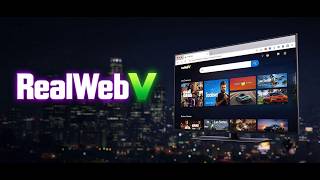
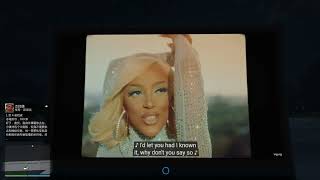
RealWebV turns any configured TV model in GTA V into a real web browser. Powered by WebView2, it renders a fully interactive browser on the TV screen, with a customizable homepage, a browser toolbar, a local media library and simulated 3D spatial audio as you walk around the screen.
FEATURES
- Real web browsing on in-game TV rendertargets (WebView2)
- Customizable homepage: shortcut tiles, themes, logo and background
- Browser toolbar: back, forward, reload, home, address bar
- Local media library: play videos, audio and images from a local folder
- Simulated 3D spatial audio: distance falloff, occlusion, directional cone, indoor and rain masking
- Configurable hotkeys via RealWebV/keys.ini
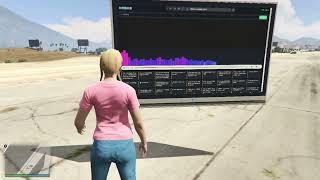
- On-screen debug panel (F7): distance, pan, cone, occlusion, indoor, rain
REQUIREMENTS
- Grand Theft Auto V (Single Player only, not for GTA Online)
- ScriptHookV
- ScriptHookVDotNet
- Microsoft Edge WebView2 Runtime (bundled with recent Windows 10/11)
INSTALLATION
1. Install ScriptHookV and ScriptHookVDotNet. Make sure a scripts folder exists in your GTA V directory.
2. Extract this archive into your GTA V root folder (merge the scripts, BrowserLib and RealWebV folders).
3. Launch the game (Story Mode) and walk near any TV. The standard flat-screen TV model is configured by default.
4. Press F10 to toggle the interactive browser interface.
HOTKEYS
- F10: Toggle control mode (interactive browser / passive)
- F5: Reload page
- Alt and Left / Alt and Right: Go back / forward
- F7: Toggle 3D audio debug panel
Hotkeys can be changed in RealWebV/keys.ini.
NOTES
- Requires WebView2 Runtime (install from Microsoft if missing).
- Put your media files into RealWebV/media, then click the Local Media shortcut on the homepage.
- ffmpeg.exe is included for mp4 faststart repack (GPL, source: [ffmpeg.org](https://ffmpeg.org)).
- Single Player only. Not for GTA Online. Use at your own risk.
CREDITS
- Special thanks to the MediaPlayerV author, the original inspiration for this project.
- EyefindPlus: homepage / gallery UI concept
- WreckDTV: TV Rendertarget concept
- StoryNui: backend architecture inspiration
- Alexander Blade: ScriptHookV
- ScriptHookVDotNet Team
- Microsoft: WebView2 Runtime
- ffmpeg project (GPL): [https://ffmpeg.org](https://ffmpeg.org)
RealWebV turns any configured TV model in GTA V into a real web browser. Powered by WebView2, it renders a fully interactive browser on the TV screen, with a customizable homepage, a browser toolbar, a local media library and simulated 3D spatial audio as you walk around the screen.
FEATURES
- Real web browsing on in-game TV rendertargets (WebView2)
- Customizable homepage: shortcut tiles, themes, logo and background
- Browser toolbar: back, forward, reload, home, address bar
- Local media library: play videos, audio and images from a local folder
- Simulated 3D spatial audio: distance falloff, occlusion, directional cone, indoor and rain masking
- Configurable hotkeys via RealWebV/keys.ini
- On-screen debug panel (F7): distance, pan, cone, occlusion, indoor, rain
REQUIREMENTS
- Grand Theft Auto V (Single Player only, not for GTA Online)
- ScriptHookV
- ScriptHookVDotNet
- Microsoft Edge WebView2 Runtime (bundled with recent Windows 10/11)
INSTALLATION
1. Install ScriptHookV and ScriptHookVDotNet. Make sure a scripts folder exists in your GTA V directory.
2. Extract this archive into your GTA V root folder (merge the scripts, BrowserLib and RealWebV folders).
3. Launch the game (Story Mode) and walk near any TV. The standard flat-screen TV model is configured by default.
4. Press F10 to toggle the interactive browser interface.
HOTKEYS
- F10: Toggle control mode (interactive browser / passive)
- F5: Reload page
- Alt and Left / Alt and Right: Go back / forward
- F7: Toggle 3D audio debug panel
Hotkeys can be changed in RealWebV/keys.ini.
NOTES
- Requires WebView2 Runtime (install from Microsoft if missing).
- Put your media files into RealWebV/media, then click the Local Media shortcut on the homepage.
- ffmpeg.exe is included for mp4 faststart repack (GPL, source: [ffmpeg.org](https://ffmpeg.org)).
- Single Player only. Not for GTA Online. Use at your own risk.
CREDITS
- Special thanks to the MediaPlayerV author, the original inspiration for this project.
- EyefindPlus: homepage / gallery UI concept
- WreckDTV: TV Rendertarget concept
- StoryNui: backend architecture inspiration
- Alexander Blade: ScriptHookV
- ScriptHookVDotNet Team
- Microsoft: WebView2 Runtime
- ffmpeg project (GPL): [https://ffmpeg.org](https://ffmpeg.org)
Poprvé nahráno: před 4 dny
Poslední aktulizace: před 3 dny
Last Downloaded: před 24 minutami
14 Komentářů
DESCRIPTION
RealWebV turns any configured TV model in GTA V into a real web browser. Powered by WebView2, it renders a fully interactive browser on the TV screen, with a customizable homepage, a browser toolbar, a local media library and simulated 3D spatial audio as you walk around the screen.
FEATURES
- Real web browsing on in-game TV rendertargets (WebView2)
- Customizable homepage: shortcut tiles, themes, logo and background
- Browser toolbar: back, forward, reload, home, address bar
- Local media library: play videos, audio and images from a local folder
- Simulated 3D spatial audio: distance falloff, occlusion, directional cone, indoor and rain masking
- Configurable hotkeys via RealWebV/keys.ini
- On-screen debug panel (F7): distance, pan, cone, occlusion, indoor, rain
REQUIREMENTS
- Grand Theft Auto V (Single Player only, not for GTA Online)
- ScriptHookV
- ScriptHookVDotNet
- Microsoft Edge WebView2 Runtime (bundled with recent Windows 10/11)
INSTALLATION
1. Install ScriptHookV and ScriptHookVDotNet. Make sure a scripts folder exists in your GTA V directory.
2. Extract this archive into your GTA V root folder (merge the scripts, BrowserLib and RealWebV folders).
3. Launch the game (Story Mode) and walk near any TV. The standard flat-screen TV model is configured by default.
4. Press F10 to toggle the interactive browser interface.
HOTKEYS
- F10: Toggle control mode (interactive browser / passive)
- F5: Reload page
- Alt and Left / Alt and Right: Go back / forward
- F7: Toggle 3D audio debug panel
Hotkeys can be changed in RealWebV/keys.ini.
NOTES
- Requires WebView2 Runtime (install from Microsoft if missing).
- Put your media files into RealWebV/media, then click the Local Media shortcut on the homepage.
- ffmpeg.exe is included for mp4 faststart repack (GPL, source: [ffmpeg.org](https://ffmpeg.org)).
- Single Player only. Not for GTA Online. Use at your own risk.
CREDITS
- Special thanks to the MediaPlayerV author, the original inspiration for this project.
- EyefindPlus: homepage / gallery UI concept
- WreckDTV: TV Rendertarget concept
- StoryNui: backend architecture inspiration
- Alexander Blade: ScriptHookV
- ScriptHookVDotNet Team
- Microsoft: WebView2 Runtime
- ffmpeg project (GPL): [https://ffmpeg.org](https://ffmpeg.org)
RealWebV turns any configured TV model in GTA V into a real web browser. Powered by WebView2, it renders a fully interactive browser on the TV screen, with a customizable homepage, a browser toolbar, a local media library and simulated 3D spatial audio as you walk around the screen.
FEATURES
- Real web browsing on in-game TV rendertargets (WebView2)
- Customizable homepage: shortcut tiles, themes, logo and background
- Browser toolbar: back, forward, reload, home, address bar
- Local media library: play videos, audio and images from a local folder
- Simulated 3D spatial audio: distance falloff, occlusion, directional cone, indoor and rain masking
- Configurable hotkeys via RealWebV/keys.ini
- On-screen debug panel (F7): distance, pan, cone, occlusion, indoor, rain
REQUIREMENTS
- Grand Theft Auto V (Single Player only, not for GTA Online)
- ScriptHookV
- ScriptHookVDotNet
- Microsoft Edge WebView2 Runtime (bundled with recent Windows 10/11)
INSTALLATION
1. Install ScriptHookV and ScriptHookVDotNet. Make sure a scripts folder exists in your GTA V directory.
2. Extract this archive into your GTA V root folder (merge the scripts, BrowserLib and RealWebV folders).
3. Launch the game (Story Mode) and walk near any TV. The standard flat-screen TV model is configured by default.
4. Press F10 to toggle the interactive browser interface.
HOTKEYS
- F10: Toggle control mode (interactive browser / passive)
- F5: Reload page
- Alt and Left / Alt and Right: Go back / forward
- F7: Toggle 3D audio debug panel
Hotkeys can be changed in RealWebV/keys.ini.
NOTES
- Requires WebView2 Runtime (install from Microsoft if missing).
- Put your media files into RealWebV/media, then click the Local Media shortcut on the homepage.
- ffmpeg.exe is included for mp4 faststart repack (GPL, source: [ffmpeg.org](https://ffmpeg.org)).
- Single Player only. Not for GTA Online. Use at your own risk.
CREDITS
- Special thanks to the MediaPlayerV author, the original inspiration for this project.
- EyefindPlus: homepage / gallery UI concept
- WreckDTV: TV Rendertarget concept
- StoryNui: backend architecture inspiration
- Alexander Blade: ScriptHookV
- ScriptHookVDotNet Team
- Microsoft: WebView2 Runtime
- ffmpeg project (GPL): [https://ffmpeg.org](https://ffmpeg.org)
Poprvé nahráno: před 4 dny
Poslední aktulizace: před 3 dny
Last Downloaded: před 24 minutami
 5mods on Discord

Installation:
1. Place BrowserLib and RealWebV inside your GTA V root folder.
2. Copy the contents from the included scripts folder into your game scripts folder or overwrite, You’re all set!
Feel free to post here if you run into any bugs.
@DanJaLey Sorry man aber deine mod hat Caos bei mir angerichtet und meinen Louncher zum absturz gebracht das war nicht in ordnung !! Ich sag nur eins UNBRAUCHBAR !!!!!!
@Moonraker Tut mir leid für das Problem! Könntest du deine Spielversion und Fehlermeldung teilen? Dann kann ich es prüfen.
@DanJaLey Cool mod! But I feel sorry for you since your comments are filled with hatred regarding the use of AI instead of focusing on the mod itself T_T
Also, do you think you can apply the same feature but for car infotainment systems? That would be a really cool mod ^_^
I believe you will understand what I am talking about. Thank you!
@
DanJaLey Nein die Mod hat mir genug Ärger gemacht sie wurde wieder gelöscht Viel Erfolg weiterhin .
5 stars for the concept alone
Cool mod looked up Grand Theft Auto VI😁
@Moonraker Tut mir leid, dass die Mod Probleme macht. Wenn du die Log-Datei teilst, sehe ich genau, woran es liegt. Danke!
@Norm68 This will be a fantastic window spanning two generations. Hope you enjoy it!
@DanJaLey New versions csn't also be 0.0.2
@meimeiriver Ok,Just a small mistake,I forgot the name. Think you!
v0.0.3 Update:
• New in‑game menu for TV spawning, position adjustment, cinematic view and UI settings
• Bottom‑right scaleform instructional key hints
• All main hot‑keys rebindable in keys.ini
• Fixed leftover instructional hints UI bug
@DanJaLey Does this work with TV add-ons?