RPFeatures 1.0


![Looter Shooter V [BETA]](https://img.gta5-mods.com/q75-w500-h333-cfill/images/looter-shooter-v-beta/c82b23-3240220_193.jpg "Looter Shooter V [BETA]")


289
10
289
10
RPFeatures - Roleplay Animation & Style Menu
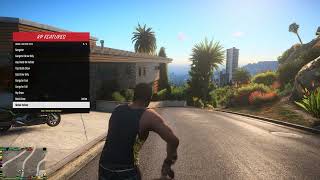
RPFeatures is a lightweight roleplay menu. It lets you customize how your character walks, aims, draws and holsters weapons, which facial expression they wear and which accessories they have on. Everything is set up in game from a clean menu (default key: G), and all your choices are saved to an .ini file so they load automatically every time you play.
Features
Aim Styles:
-Animation-based aiming, similar to the popular FiveM aim menus: Gangster (4 variations), Hillbilly, Generic, Female, Police Arrest, and two-handed versions for rifles and SMGs.
-The game's own weapon aim sets are also available (Gangster, Hillbilly, Michael, Franklin, Trevor, Female, Fat and more).
-One-handed styles keep the free hand away from the weapon, so there is no arm glitching.
-Aim animations turn off automatically in first person, in cover, in vehicles and while reloading.
Aim Movement:
-Changes how your legs move while strafing with a raised weapon (Cop, Gang, Roadcrew, Stealth, Crouched, Injured and more).
Draw / Holster Styles:
-Custom animations for drawing and holstering: Gangster, Gangster Fast, Cop Hand On Holster, Cop Quick Draw, Hip Draw, Back Draw and more.
-These only play when you actually draw or holster a weapon on foot. They never play when you get in or out of a vehicle, ragdoll, swim or fall.
A preview plays instantly when you pick a style.
Animation Tuning:
-Adjust the speed of the draw and holster animations.
-Skip the slow start and cut off the idle tail, so you are never stuck in an animation while someone is shooting at you.
-The draw animation is cancelled the moment you aim or fire.
An optional instant aim blend right after drawing lets you react faster.
Walk Styles:
-Over 45 walk styles for male and female characters: Gangster, Business, Tough Guy, Posh, Drunk, Injured, Sassy, Heels and many more.
A separate armed walk style is used while you hold a weapon.
Facial Expressions:
-Normal, Happy, Angry, Aiming, Injured, Stressed, Smug, Sulking, Drunk, Eyes Closed, Shocked and more.
Accessories:
-Take off or put on your hat, glasses, earwear, watch, bracelet, mask and neck chain.
Browse through every variation available for your character.
Presets:
-Apply a complete look in one click: Gangster, Aggressive, Hillbilly, Military, Realistic, Police or Vanilla.
-Create your own presets in the .ini file or inside game at trainer.
Weapon Filter:
-Choose which weapon groups use your custom animations: pistols, SMGs, rifles, machine guns, shotguns, snipers, heavy, stun gun, melee and thrown.
Set a single weapon to "always on" or "always off" straight from the menu.
Per-Weapon Styles:
-Give each weapon its own aim style and draw/holster style. For example, a gangster aim for your pistol and a cop quick draw for your combat pistol.
Quality of Life:
-Keep weapon after vehicle: your character takes out the weapon they were holding before getting into the vehicle.
-Auto save: every change in the menu is saved automatically.
Customizable menu: set the position, width, colors, title and sounds
-Asset check: at startup the mod checks which animations exist in your game version and hides the ones that don't.
Customization (.ini)
-Keys: every key is configurable (open menu, navigation, select, back, state dump).
-Custom entries: add your own walk styles, aim styles, aim movements, draw/holster animations and facial expressions using game animation names.
-Draw/holster timing: custom draw/holster entries support their own timing, their own weapon type and animations from different dictionaries.
Logging
A detailed log file (RPFeatures.log) records applied styles, missing animations, invalid keys, weapon changes and errors. This makes it easy to see why something doesn't work.
Five detail levels: Error, Warning, Info, Debug and Trace.
Automatic file rotation and optional periodic state snapshots.
Can be turned off completely with Enabled=0 in the [Logging] section.
Controls (default)
-Open / close menu G
-Navigate Arrow Up / Down
-Change value Arrow Left / Right
-Select / apply Enter
-Back Backspace
Requirements
-Script Hook V
-ASI Loader/ OpenIV.asi (with OpenIV)
Installation:
Install Script Hook V, and ASI Loader/OpenIV.ASI if you don't have them already.
Place RPFeatures.asi and RPFeatures.ini in your main GTA V directory (the folder that contains GTA5.exe).
Start the game and press G to open the menu. (key can be changed on ini)
Notes:
-Some aim styles only change the pose of one-handed weapons such as pistols. This is a limitation of the game's animations.
-The .ini file must be in the same folder as the .asi. If it's missing, the mod runs with default settings and writes a warning to the log.
-If something doesn't work as expected, check RPFeatures.log or use "Write Diagnostics" in the menu and include the log when you report the problem.
Changelog:
2.0:
-Fixed rolling animation when different aim style
-Fixed not changing weapons aim styles
-Added aim styles like: one hand, sideways
RPFeatures is a lightweight roleplay menu. It lets you customize how your character walks, aims, draws and holsters weapons, which facial expression they wear and which accessories they have on. Everything is set up in game from a clean menu (default key: G), and all your choices are saved to an .ini file so they load automatically every time you play.
Features
Aim Styles:
-Animation-based aiming, similar to the popular FiveM aim menus: Gangster (4 variations), Hillbilly, Generic, Female, Police Arrest, and two-handed versions for rifles and SMGs.
-The game's own weapon aim sets are also available (Gangster, Hillbilly, Michael, Franklin, Trevor, Female, Fat and more).
-One-handed styles keep the free hand away from the weapon, so there is no arm glitching.
-Aim animations turn off automatically in first person, in cover, in vehicles and while reloading.
Aim Movement:
-Changes how your legs move while strafing with a raised weapon (Cop, Gang, Roadcrew, Stealth, Crouched, Injured and more).
Draw / Holster Styles:
-Custom animations for drawing and holstering: Gangster, Gangster Fast, Cop Hand On Holster, Cop Quick Draw, Hip Draw, Back Draw and more.
-These only play when you actually draw or holster a weapon on foot. They never play when you get in or out of a vehicle, ragdoll, swim or fall.
A preview plays instantly when you pick a style.
Animation Tuning:
-Adjust the speed of the draw and holster animations.
-Skip the slow start and cut off the idle tail, so you are never stuck in an animation while someone is shooting at you.
-The draw animation is cancelled the moment you aim or fire.
An optional instant aim blend right after drawing lets you react faster.
Walk Styles:
-Over 45 walk styles for male and female characters: Gangster, Business, Tough Guy, Posh, Drunk, Injured, Sassy, Heels and many more.
A separate armed walk style is used while you hold a weapon.
Facial Expressions:
-Normal, Happy, Angry, Aiming, Injured, Stressed, Smug, Sulking, Drunk, Eyes Closed, Shocked and more.
Accessories:
-Take off or put on your hat, glasses, earwear, watch, bracelet, mask and neck chain.
Browse through every variation available for your character.
Presets:
-Apply a complete look in one click: Gangster, Aggressive, Hillbilly, Military, Realistic, Police or Vanilla.
-Create your own presets in the .ini file or inside game at trainer.
Weapon Filter:
-Choose which weapon groups use your custom animations: pistols, SMGs, rifles, machine guns, shotguns, snipers, heavy, stun gun, melee and thrown.
Set a single weapon to "always on" or "always off" straight from the menu.
Per-Weapon Styles:
-Give each weapon its own aim style and draw/holster style. For example, a gangster aim for your pistol and a cop quick draw for your combat pistol.
Quality of Life:
-Keep weapon after vehicle: your character takes out the weapon they were holding before getting into the vehicle.
-Auto save: every change in the menu is saved automatically.
Customizable menu: set the position, width, colors, title and sounds
-Asset check: at startup the mod checks which animations exist in your game version and hides the ones that don't.
Customization (.ini)
-Keys: every key is configurable (open menu, navigation, select, back, state dump).
-Custom entries: add your own walk styles, aim styles, aim movements, draw/holster animations and facial expressions using game animation names.
-Draw/holster timing: custom draw/holster entries support their own timing, their own weapon type and animations from different dictionaries.
Logging
A detailed log file (RPFeatures.log) records applied styles, missing animations, invalid keys, weapon changes and errors. This makes it easy to see why something doesn't work.
Five detail levels: Error, Warning, Info, Debug and Trace.
Automatic file rotation and optional periodic state snapshots.
Can be turned off completely with Enabled=0 in the [Logging] section.
Controls (default)
-Open / close menu G
-Navigate Arrow Up / Down
-Change value Arrow Left / Right
-Select / apply Enter
-Back Backspace
Requirements
-Script Hook V
-ASI Loader/ OpenIV.asi (with OpenIV)
Installation:
Install Script Hook V, and ASI Loader/OpenIV.ASI if you don't have them already.
Place RPFeatures.asi and RPFeatures.ini in your main GTA V directory (the folder that contains GTA5.exe).
Start the game and press G to open the menu. (key can be changed on ini)
Notes:
-Some aim styles only change the pose of one-handed weapons such as pistols. This is a limitation of the game's animations.
-The .ini file must be in the same folder as the .asi. If it's missing, the mod runs with default settings and writes a warning to the log.
-If something doesn't work as expected, check RPFeatures.log or use "Write Diagnostics" in the menu and include the log when you report the problem.
Changelog:
2.0:
-Fixed rolling animation when different aim style
-Fixed not changing weapons aim styles
-Added aim styles like: one hand, sideways
Poprvé nahráno: 30. Září 2026
Poslední aktulizace: před 5 dny
Last Downloaded: 1 hour ago
2 Komentáře
RPFeatures - Roleplay Animation & Style Menu
RPFeatures is a lightweight roleplay menu. It lets you customize how your character walks, aims, draws and holsters weapons, which facial expression they wear and which accessories they have on. Everything is set up in game from a clean menu (default key: G), and all your choices are saved to an .ini file so they load automatically every time you play.
Features
Aim Styles:
-Animation-based aiming, similar to the popular FiveM aim menus: Gangster (4 variations), Hillbilly, Generic, Female, Police Arrest, and two-handed versions for rifles and SMGs.
-The game's own weapon aim sets are also available (Gangster, Hillbilly, Michael, Franklin, Trevor, Female, Fat and more).
-One-handed styles keep the free hand away from the weapon, so there is no arm glitching.
-Aim animations turn off automatically in first person, in cover, in vehicles and while reloading.
Aim Movement:
-Changes how your legs move while strafing with a raised weapon (Cop, Gang, Roadcrew, Stealth, Crouched, Injured and more).
Draw / Holster Styles:
-Custom animations for drawing and holstering: Gangster, Gangster Fast, Cop Hand On Holster, Cop Quick Draw, Hip Draw, Back Draw and more.
-These only play when you actually draw or holster a weapon on foot. They never play when you get in or out of a vehicle, ragdoll, swim or fall.
A preview plays instantly when you pick a style.
Animation Tuning:
-Adjust the speed of the draw and holster animations.
-Skip the slow start and cut off the idle tail, so you are never stuck in an animation while someone is shooting at you.
-The draw animation is cancelled the moment you aim or fire.
An optional instant aim blend right after drawing lets you react faster.
Walk Styles:
-Over 45 walk styles for male and female characters: Gangster, Business, Tough Guy, Posh, Drunk, Injured, Sassy, Heels and many more.
A separate armed walk style is used while you hold a weapon.
Facial Expressions:
-Normal, Happy, Angry, Aiming, Injured, Stressed, Smug, Sulking, Drunk, Eyes Closed, Shocked and more.
Accessories:
-Take off or put on your hat, glasses, earwear, watch, bracelet, mask and neck chain.
Browse through every variation available for your character.
Presets:
-Apply a complete look in one click: Gangster, Aggressive, Hillbilly, Military, Realistic, Police or Vanilla.
-Create your own presets in the .ini file or inside game at trainer.
Weapon Filter:
-Choose which weapon groups use your custom animations: pistols, SMGs, rifles, machine guns, shotguns, snipers, heavy, stun gun, melee and thrown.
Set a single weapon to "always on" or "always off" straight from the menu.
Per-Weapon Styles:
-Give each weapon its own aim style and draw/holster style. For example, a gangster aim for your pistol and a cop quick draw for your combat pistol.
Quality of Life:
-Keep weapon after vehicle: your character takes out the weapon they were holding before getting into the vehicle.
-Auto save: every change in the menu is saved automatically.
Customizable menu: set the position, width, colors, title and sounds
-Asset check: at startup the mod checks which animations exist in your game version and hides the ones that don't.
Customization (.ini)
-Keys: every key is configurable (open menu, navigation, select, back, state dump).
-Custom entries: add your own walk styles, aim styles, aim movements, draw/holster animations and facial expressions using game animation names.
-Draw/holster timing: custom draw/holster entries support their own timing, their own weapon type and animations from different dictionaries.
Logging
A detailed log file (RPFeatures.log) records applied styles, missing animations, invalid keys, weapon changes and errors. This makes it easy to see why something doesn't work.
Five detail levels: Error, Warning, Info, Debug and Trace.
Automatic file rotation and optional periodic state snapshots.
Can be turned off completely with Enabled=0 in the [Logging] section.
Controls (default)
-Open / close menu G
-Navigate Arrow Up / Down
-Change value Arrow Left / Right
-Select / apply Enter
-Back Backspace
Requirements
-Script Hook V
-ASI Loader/ OpenIV.asi (with OpenIV)
Installation:
Install Script Hook V, and ASI Loader/OpenIV.ASI if you don't have them already.
Place RPFeatures.asi and RPFeatures.ini in your main GTA V directory (the folder that contains GTA5.exe).
Start the game and press G to open the menu. (key can be changed on ini)
Notes:
-Some aim styles only change the pose of one-handed weapons such as pistols. This is a limitation of the game's animations.
-The .ini file must be in the same folder as the .asi. If it's missing, the mod runs with default settings and writes a warning to the log.
-If something doesn't work as expected, check RPFeatures.log or use "Write Diagnostics" in the menu and include the log when you report the problem.
Changelog:
2.0:
-Fixed rolling animation when different aim style
-Fixed not changing weapons aim styles
-Added aim styles like: one hand, sideways
RPFeatures is a lightweight roleplay menu. It lets you customize how your character walks, aims, draws and holsters weapons, which facial expression they wear and which accessories they have on. Everything is set up in game from a clean menu (default key: G), and all your choices are saved to an .ini file so they load automatically every time you play.
Features
Aim Styles:
-Animation-based aiming, similar to the popular FiveM aim menus: Gangster (4 variations), Hillbilly, Generic, Female, Police Arrest, and two-handed versions for rifles and SMGs.
-The game's own weapon aim sets are also available (Gangster, Hillbilly, Michael, Franklin, Trevor, Female, Fat and more).
-One-handed styles keep the free hand away from the weapon, so there is no arm glitching.
-Aim animations turn off automatically in first person, in cover, in vehicles and while reloading.
Aim Movement:
-Changes how your legs move while strafing with a raised weapon (Cop, Gang, Roadcrew, Stealth, Crouched, Injured and more).
Draw / Holster Styles:
-Custom animations for drawing and holstering: Gangster, Gangster Fast, Cop Hand On Holster, Cop Quick Draw, Hip Draw, Back Draw and more.
-These only play when you actually draw or holster a weapon on foot. They never play when you get in or out of a vehicle, ragdoll, swim or fall.
A preview plays instantly when you pick a style.
Animation Tuning:
-Adjust the speed of the draw and holster animations.
-Skip the slow start and cut off the idle tail, so you are never stuck in an animation while someone is shooting at you.
-The draw animation is cancelled the moment you aim or fire.
An optional instant aim blend right after drawing lets you react faster.
Walk Styles:
-Over 45 walk styles for male and female characters: Gangster, Business, Tough Guy, Posh, Drunk, Injured, Sassy, Heels and many more.
A separate armed walk style is used while you hold a weapon.
Facial Expressions:
-Normal, Happy, Angry, Aiming, Injured, Stressed, Smug, Sulking, Drunk, Eyes Closed, Shocked and more.
Accessories:
-Take off or put on your hat, glasses, earwear, watch, bracelet, mask and neck chain.
Browse through every variation available for your character.
Presets:
-Apply a complete look in one click: Gangster, Aggressive, Hillbilly, Military, Realistic, Police or Vanilla.
-Create your own presets in the .ini file or inside game at trainer.
Weapon Filter:
-Choose which weapon groups use your custom animations: pistols, SMGs, rifles, machine guns, shotguns, snipers, heavy, stun gun, melee and thrown.
Set a single weapon to "always on" or "always off" straight from the menu.
Per-Weapon Styles:
-Give each weapon its own aim style and draw/holster style. For example, a gangster aim for your pistol and a cop quick draw for your combat pistol.
Quality of Life:
-Keep weapon after vehicle: your character takes out the weapon they were holding before getting into the vehicle.
-Auto save: every change in the menu is saved automatically.
Customizable menu: set the position, width, colors, title and sounds
-Asset check: at startup the mod checks which animations exist in your game version and hides the ones that don't.
Customization (.ini)
-Keys: every key is configurable (open menu, navigation, select, back, state dump).
-Custom entries: add your own walk styles, aim styles, aim movements, draw/holster animations and facial expressions using game animation names.
-Draw/holster timing: custom draw/holster entries support their own timing, their own weapon type and animations from different dictionaries.
Logging
A detailed log file (RPFeatures.log) records applied styles, missing animations, invalid keys, weapon changes and errors. This makes it easy to see why something doesn't work.
Five detail levels: Error, Warning, Info, Debug and Trace.
Automatic file rotation and optional periodic state snapshots.
Can be turned off completely with Enabled=0 in the [Logging] section.
Controls (default)
-Open / close menu G
-Navigate Arrow Up / Down
-Change value Arrow Left / Right
-Select / apply Enter
-Back Backspace
Requirements
-Script Hook V
-ASI Loader/ OpenIV.asi (with OpenIV)
Installation:
Install Script Hook V, and ASI Loader/OpenIV.ASI if you don't have them already.
Place RPFeatures.asi and RPFeatures.ini in your main GTA V directory (the folder that contains GTA5.exe).
Start the game and press G to open the menu. (key can be changed on ini)
Notes:
-Some aim styles only change the pose of one-handed weapons such as pistols. This is a limitation of the game's animations.
-The .ini file must be in the same folder as the .asi. If it's missing, the mod runs with default settings and writes a warning to the log.
-If something doesn't work as expected, check RPFeatures.log or use "Write Diagnostics" in the menu and include the log when you report the problem.
Changelog:
2.0:
-Fixed rolling animation when different aim style
-Fixed not changing weapons aim styles
-Added aim styles like: one hand, sideways
Poprvé nahráno: 30. Září 2026
Poslední aktulizace: před 5 dny
Last Downloaded: 1 hour ago
 5mods on Discord

is there a way to set a permanent voice to an MP freemode character?
@ComeFlyWithMe i could try to, anyway i dont think so