Realistic Beam System 1.0


832
26
832
26
Discord Server: https://discord.gg/3tVa3m9WPv (new link)
Realistic Beam System
About:
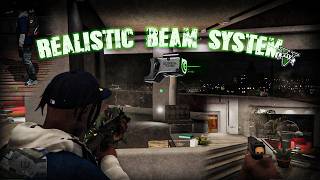
A customizable weapon laser/beam system that adds a more realistic visible laser to supported weapons.
The beam originates from the weapon's actual muzzle, follows your weapon/aim direction, reacts to surfaces, and creates a visible laser dot with optional glow and lighting effects.
Features:
- Laser beam starts from the weapon's actual muzzle position
- Accurate surface collision and laser impact detection
- Visible laser dot on walls, vehicles, NPCs, and other surfaces
- Optional impact glow and dynamic light effect
- Hybrid aiming system for natural behavior while aiming and at low-ready
- Stabilized weapon direction to prevent the beam pointing sideways or behind the player
- Beam automatically hides while reloading
- Optional Only While Aiming mode
- Toggle the laser ON/OFF with a configurable key
- Optional toggle sound
- Adjustable laser RGB color
- Adjustable beam length, width, opacity, and brightness
- Adjustable dot size, opacity, distance scaling, and visibility
- Adjustable impact glow and light settings
- Supports pistols, SMGs, assault rifles, MGs, shotguns, sniper rifles, stun guns, and heavy weapons
- Fully customizable via Settings.ini
Default Key:
- L - Toggle Realistic Beam System ON/OFF
Requirements:
- GTAV Legacy
- Script Hook V
- Script Hook V .NET (🔸Nightly Build🔸)
Using outdated versions of SHVDN may cause crashes. Use latest versions!
Installation:
Make sure to delete older versions before installing.
Drop the files from the "files folder" into your scripts folder.
The mod files should be located inside: scripts\RealisticBeamSystem
If you don’t have a scripts folder, just create one in the root GTA V directory.
To uninstall, remove the Realistic Beam System files from the scripts folder.
To disable temporarily, move the mod files out of the folder.
Configuration:
Edit RealisticBeamSystem\Settings.ini:
[General]
- ToggleKey – Key used to enable/disable the laser
- StartEnabled – Automatically enable the system when the script starts
- PlaySound – Enable/disable the toggle sound
- ShowStatusText – Show ON/OFF status text when toggling
- HideWhileReloading – Hide the laser while reloading
- OnlyWhileAiming – Only display the laser while aiming
- AimMode – Controls how the laser determines its aiming direction
[Aim Modes]:
- Hybrid – Recommended. Uses the camera/crosshair while aiming and the physical weapon direction while not aiming
- Barrel – Uses the physical weapon direction at all times
- Crosshair – Always points toward the gameplay camera/crosshair target
[Laser]
- Red / Green / Blue – Laser color
- BeamLength – Maximum laser distance
- BeamWidth – Thickness of the visible beam
- BeamAlpha – Beam opacity
- BeamBrightness – Beam brightness multiplier
- DrawBeam – Enable/disable the visible beam
- DrawDot – Enable/disable the impact dot
- DotSize – Base laser dot size
- DotAlpha – Dot opacity
- DotDistanceScale – Controls how the dot scales with distance
- DotMaxSize – Maximum dot size
- DotVisibilityAssist – Improves dot visibility on certain surfaces
- DrawImpactGlow – Enable/disable the glow around the laser dot
- ImpactGlowSize – Size of the impact glow
- ImpactGlowAlpha – Impact glow opacity
- DrawImpactLight – Enable/disable dynamic lighting at the hit point
- ImpactLightRange – Range of the impact light
- ImpactLightIntensity – Strength of the impact light
- CollisionRadius – Small collision fallback radius for thin or awkward surfaces
[Muzzle]
Contains advanced settings for weapon muzzle positioning and beam direction.
The default StabilizedPose mode is recommended for normal gameplay.
Other direction modes are mainly useful for tweaking/debugging different weapon models.
Known Bugs:
Due to differences between GTA V weapon models, some custom/add-on weapons may have slightly different muzzle alignment.
If you find any other bugs, report them in the comments.
If something breaks, reload scripts or restart the game.
Changelog:
- v1.0 - Initial release
DO NOT RE-UPLOAD without permission!
If you like this mod let me know in the comments :)
@ww_aleeex // @aleksforreal // 7aleksforreal
Discord Server: https://discord.gg/3tVa3m9WPv (new link)
Realistic Beam System
About:
A customizable weapon laser/beam system that adds a more realistic visible laser to supported weapons.
The beam originates from the weapon's actual muzzle, follows your weapon/aim direction, reacts to surfaces, and creates a visible laser dot with optional glow and lighting effects.
Features:
- Laser beam starts from the weapon's actual muzzle position
- Accurate surface collision and laser impact detection
- Visible laser dot on walls, vehicles, NPCs, and other surfaces
- Optional impact glow and dynamic light effect
- Hybrid aiming system for natural behavior while aiming and at low-ready
- Stabilized weapon direction to prevent the beam pointing sideways or behind the player
- Beam automatically hides while reloading
- Optional Only While Aiming mode
- Toggle the laser ON/OFF with a configurable key
- Optional toggle sound
- Adjustable laser RGB color
- Adjustable beam length, width, opacity, and brightness
- Adjustable dot size, opacity, distance scaling, and visibility
- Adjustable impact glow and light settings
- Supports pistols, SMGs, assault rifles, MGs, shotguns, sniper rifles, stun guns, and heavy weapons
- Fully customizable via Settings.ini
Default Key:
- L - Toggle Realistic Beam System ON/OFF
Requirements:
- GTAV Legacy
- Script Hook V
- Script Hook V .NET (🔸Nightly Build🔸)
Using outdated versions of SHVDN may cause crashes. Use latest versions!
Installation:
Make sure to delete older versions before installing.
Drop the files from the "files folder" into your scripts folder.
The mod files should be located inside: scripts\RealisticBeamSystem
If you don’t have a scripts folder, just create one in the root GTA V directory.
To uninstall, remove the Realistic Beam System files from the scripts folder.
To disable temporarily, move the mod files out of the folder.
Configuration:
Edit RealisticBeamSystem\Settings.ini:
[General]
- ToggleKey – Key used to enable/disable the laser
- StartEnabled – Automatically enable the system when the script starts
- PlaySound – Enable/disable the toggle sound
- ShowStatusText – Show ON/OFF status text when toggling
- HideWhileReloading – Hide the laser while reloading
- OnlyWhileAiming – Only display the laser while aiming
- AimMode – Controls how the laser determines its aiming direction
[Aim Modes]:
- Hybrid – Recommended. Uses the camera/crosshair while aiming and the physical weapon direction while not aiming
- Barrel – Uses the physical weapon direction at all times
- Crosshair – Always points toward the gameplay camera/crosshair target
[Laser]
- Red / Green / Blue – Laser color
- BeamLength – Maximum laser distance
- BeamWidth – Thickness of the visible beam
- BeamAlpha – Beam opacity
- BeamBrightness – Beam brightness multiplier
- DrawBeam – Enable/disable the visible beam
- DrawDot – Enable/disable the impact dot
- DotSize – Base laser dot size
- DotAlpha – Dot opacity
- DotDistanceScale – Controls how the dot scales with distance
- DotMaxSize – Maximum dot size
- DotVisibilityAssist – Improves dot visibility on certain surfaces
- DrawImpactGlow – Enable/disable the glow around the laser dot
- ImpactGlowSize – Size of the impact glow
- ImpactGlowAlpha – Impact glow opacity
- DrawImpactLight – Enable/disable dynamic lighting at the hit point
- ImpactLightRange – Range of the impact light
- ImpactLightIntensity – Strength of the impact light
- CollisionRadius – Small collision fallback radius for thin or awkward surfaces
[Muzzle]
Contains advanced settings for weapon muzzle positioning and beam direction.
The default StabilizedPose mode is recommended for normal gameplay.
Other direction modes are mainly useful for tweaking/debugging different weapon models.
Known Bugs:
Due to differences between GTA V weapon models, some custom/add-on weapons may have slightly different muzzle alignment.
If you find any other bugs, report them in the comments.
If something breaks, reload scripts or restart the game.
Changelog:
- v1.0 - Initial release
DO NOT RE-UPLOAD without permission!
If you like this mod let me know in the comments :)
@ww_aleeex // @aleksforreal // 7aleksforreal
Discord Server: https://discord.gg/3tVa3m9WPv (new link)
Zuerst hochgeladen: 4. September 2026
Letztes Update: 4. September 2026
Last Downloaded: 3 hours ago
18 Kommentare
More mods by aleksforreal:
Discord Server: https://discord.gg/3tVa3m9WPv (new link)
Realistic Beam System
About:
A customizable weapon laser/beam system that adds a more realistic visible laser to supported weapons.
The beam originates from the weapon's actual muzzle, follows your weapon/aim direction, reacts to surfaces, and creates a visible laser dot with optional glow and lighting effects.
Features:
- Laser beam starts from the weapon's actual muzzle position
- Accurate surface collision and laser impact detection
- Visible laser dot on walls, vehicles, NPCs, and other surfaces
- Optional impact glow and dynamic light effect
- Hybrid aiming system for natural behavior while aiming and at low-ready
- Stabilized weapon direction to prevent the beam pointing sideways or behind the player
- Beam automatically hides while reloading
- Optional Only While Aiming mode
- Toggle the laser ON/OFF with a configurable key
- Optional toggle sound
- Adjustable laser RGB color
- Adjustable beam length, width, opacity, and brightness
- Adjustable dot size, opacity, distance scaling, and visibility
- Adjustable impact glow and light settings
- Supports pistols, SMGs, assault rifles, MGs, shotguns, sniper rifles, stun guns, and heavy weapons
- Fully customizable via Settings.ini
Default Key:
- L - Toggle Realistic Beam System ON/OFF
Requirements:
- GTAV Legacy
- Script Hook V
- Script Hook V .NET (🔸Nightly Build🔸)
Using outdated versions of SHVDN may cause crashes. Use latest versions!
Installation:
Make sure to delete older versions before installing.
Drop the files from the "files folder" into your scripts folder.
The mod files should be located inside: scripts\RealisticBeamSystem
If you don’t have a scripts folder, just create one in the root GTA V directory.
To uninstall, remove the Realistic Beam System files from the scripts folder.
To disable temporarily, move the mod files out of the folder.
Configuration:
Edit RealisticBeamSystem\Settings.ini:
[General]
- ToggleKey – Key used to enable/disable the laser
- StartEnabled – Automatically enable the system when the script starts
- PlaySound – Enable/disable the toggle sound
- ShowStatusText – Show ON/OFF status text when toggling
- HideWhileReloading – Hide the laser while reloading
- OnlyWhileAiming – Only display the laser while aiming
- AimMode – Controls how the laser determines its aiming direction
[Aim Modes]:
- Hybrid – Recommended. Uses the camera/crosshair while aiming and the physical weapon direction while not aiming
- Barrel – Uses the physical weapon direction at all times
- Crosshair – Always points toward the gameplay camera/crosshair target
[Laser]
- Red / Green / Blue – Laser color
- BeamLength – Maximum laser distance
- BeamWidth – Thickness of the visible beam
- BeamAlpha – Beam opacity
- BeamBrightness – Beam brightness multiplier
- DrawBeam – Enable/disable the visible beam
- DrawDot – Enable/disable the impact dot
- DotSize – Base laser dot size
- DotAlpha – Dot opacity
- DotDistanceScale – Controls how the dot scales with distance
- DotMaxSize – Maximum dot size
- DotVisibilityAssist – Improves dot visibility on certain surfaces
- DrawImpactGlow – Enable/disable the glow around the laser dot
- ImpactGlowSize – Size of the impact glow
- ImpactGlowAlpha – Impact glow opacity
- DrawImpactLight – Enable/disable dynamic lighting at the hit point
- ImpactLightRange – Range of the impact light
- ImpactLightIntensity – Strength of the impact light
- CollisionRadius – Small collision fallback radius for thin or awkward surfaces
[Muzzle]
Contains advanced settings for weapon muzzle positioning and beam direction.
The default StabilizedPose mode is recommended for normal gameplay.
Other direction modes are mainly useful for tweaking/debugging different weapon models.
Known Bugs:
Due to differences between GTA V weapon models, some custom/add-on weapons may have slightly different muzzle alignment.
If you find any other bugs, report them in the comments.
If something breaks, reload scripts or restart the game.
Changelog:
- v1.0 - Initial release
DO NOT RE-UPLOAD without permission!
If you like this mod let me know in the comments :)
@ww_aleeex // @aleksforreal // 7aleksforreal
Discord Server: https://discord.gg/3tVa3m9WPv (new link)
Realistic Beam System
About:
A customizable weapon laser/beam system that adds a more realistic visible laser to supported weapons.
The beam originates from the weapon's actual muzzle, follows your weapon/aim direction, reacts to surfaces, and creates a visible laser dot with optional glow and lighting effects.
Features:
- Laser beam starts from the weapon's actual muzzle position
- Accurate surface collision and laser impact detection
- Visible laser dot on walls, vehicles, NPCs, and other surfaces
- Optional impact glow and dynamic light effect
- Hybrid aiming system for natural behavior while aiming and at low-ready
- Stabilized weapon direction to prevent the beam pointing sideways or behind the player
- Beam automatically hides while reloading
- Optional Only While Aiming mode
- Toggle the laser ON/OFF with a configurable key
- Optional toggle sound
- Adjustable laser RGB color
- Adjustable beam length, width, opacity, and brightness
- Adjustable dot size, opacity, distance scaling, and visibility
- Adjustable impact glow and light settings
- Supports pistols, SMGs, assault rifles, MGs, shotguns, sniper rifles, stun guns, and heavy weapons
- Fully customizable via Settings.ini
Default Key:
- L - Toggle Realistic Beam System ON/OFF
Requirements:
- GTAV Legacy
- Script Hook V
- Script Hook V .NET (🔸Nightly Build🔸)
Using outdated versions of SHVDN may cause crashes. Use latest versions!
Installation:
Make sure to delete older versions before installing.
Drop the files from the "files folder" into your scripts folder.
The mod files should be located inside: scripts\RealisticBeamSystem
If you don’t have a scripts folder, just create one in the root GTA V directory.
To uninstall, remove the Realistic Beam System files from the scripts folder.
To disable temporarily, move the mod files out of the folder.
Configuration:
Edit RealisticBeamSystem\Settings.ini:
[General]
- ToggleKey – Key used to enable/disable the laser
- StartEnabled – Automatically enable the system when the script starts
- PlaySound – Enable/disable the toggle sound
- ShowStatusText – Show ON/OFF status text when toggling
- HideWhileReloading – Hide the laser while reloading
- OnlyWhileAiming – Only display the laser while aiming
- AimMode – Controls how the laser determines its aiming direction
[Aim Modes]:
- Hybrid – Recommended. Uses the camera/crosshair while aiming and the physical weapon direction while not aiming
- Barrel – Uses the physical weapon direction at all times
- Crosshair – Always points toward the gameplay camera/crosshair target
[Laser]
- Red / Green / Blue – Laser color
- BeamLength – Maximum laser distance
- BeamWidth – Thickness of the visible beam
- BeamAlpha – Beam opacity
- BeamBrightness – Beam brightness multiplier
- DrawBeam – Enable/disable the visible beam
- DrawDot – Enable/disable the impact dot
- DotSize – Base laser dot size
- DotAlpha – Dot opacity
- DotDistanceScale – Controls how the dot scales with distance
- DotMaxSize – Maximum dot size
- DotVisibilityAssist – Improves dot visibility on certain surfaces
- DrawImpactGlow – Enable/disable the glow around the laser dot
- ImpactGlowSize – Size of the impact glow
- ImpactGlowAlpha – Impact glow opacity
- DrawImpactLight – Enable/disable dynamic lighting at the hit point
- ImpactLightRange – Range of the impact light
- ImpactLightIntensity – Strength of the impact light
- CollisionRadius – Small collision fallback radius for thin or awkward surfaces
[Muzzle]
Contains advanced settings for weapon muzzle positioning and beam direction.
The default StabilizedPose mode is recommended for normal gameplay.
Other direction modes are mainly useful for tweaking/debugging different weapon models.
Known Bugs:
Due to differences between GTA V weapon models, some custom/add-on weapons may have slightly different muzzle alignment.
If you find any other bugs, report them in the comments.
If something breaks, reload scripts or restart the game.
Changelog:
- v1.0 - Initial release
DO NOT RE-UPLOAD without permission!
If you like this mod let me know in the comments :)
@ww_aleeex // @aleksforreal // 7aleksforreal
Discord Server: https://discord.gg/3tVa3m9WPv (new link)
Zuerst hochgeladen: 4. September 2026
Letztes Update: 4. September 2026
Last Downloaded: 3 hours ago
 5mods on Discord

This file has been approved automatically. If you think this file should not be here for any reason please report it.
super cool
tuff
@NullVoid thankss man 🙏
Nah mud you you tweaking 🔥🔥 wtf flooding shii
@bizmeta1 hell yeaa bro thx for review man 🐐🔥
tough as hell
@plasmaboi appreciate it 🤙
It would be cool to have the option that only certain weapons have the beam, for example - taser.
is this only work in enhanced? i cant activate it
@unitedOrange66 bet bro next update imma add like an option to disable the beam for certain weapons individually
@fruitspring i dont make mods for enhanced they might work or might not. so if u use legacy what u need is latest script hook v, latest script hook v dot net Nightly Build (idk if it works with that enhanced script hook by Chiheb-Bacha i dont use that cuz some scripts i use from other modders dont work with that so i stick to the default SHVDN) and then make a scripts folder, drop the dll and the folder with the config file and sound in the scripts folder and then in game u gotta press L (can be changed in ini) to toggle the beam
and ofc a legitimate copy of GTA 5. idk if scripts work well on cr4ck3d gta5
@ww_aleeex thx, ill try new
tuff
@glassp0wder thankss bro 🙏🤞
Dope Script G🔥🔥👌
Every pole got a beam, we playin' laser tag - this is dope bro thanks for this!
Is it controller-friendly? Would be pretty nice to have an D-Pad Right ON/OFF toggle