Cinematic V Camera PRO 2.0


![LSLife Crash Fix [Legacy]](https://img.gta5-mods.com/q75-w500-h333-cfill/images/ls-life-crashing-fix-for-legacy/1897e1-9f890c94-d157-4a7e-b515-38e52e9721a2.jpg "LSLife Crash Fix [Legacy]")


1.403
23
1.403
23
## Cinematic V Camera PRO
by MaxPicco
If you like my work and want to support the maintenance and future updates, you can do so through the donation PATREON button on my GTA5-Mods profile.
Los Santos deserves better than a camera that just sits behind the car.
I got tired of driving in GTA V and feeling nothing. You hammer the throttle and the view stays glued in place. You brake hard and nothing moves. You hit a dirt road at 120 and the picture is as calm as a parked car. Every other driving game figured this out years ago: Forza Horizon, Assetto Corsa, The Crew Motorfest. The camera is not a tripod. It is a passenger. It has weight, it lags, it settles, it flinches on the bumps and it leans when you throw the car into a corner.
That is what this is. Not a wider FOV, not a repositioned chase cam. A camera system rebuilt from the ground up so that driving in this game finally feels like driving.
Every value you see below is exposed in an in game menu and can be tuned live, while you drive, without touching a text file. And every camera has three of your own preset slots, so you can go as far off the rails as you want and always come back.
---
Requirements
* Script Hook V
* ScriptHookVDotNet nightly 3.70
---
Installation
1. Drop CinematicVcameraPRO.asi and CinematicVcameraPRO.ini into your GTA V root folder, next to GTA5.exe.
2. (OPTIONAL BUT RECOMMENDED) IN OPENIV GO TO NEXT FOLDER: GTAV/mods/update/update.rpf/common/data/effects/peds
Then paste in peds folder the next file: first_person_alternates.meta
3. Launch the game. You will see a notification confirming the mod is running.
4. Press F11 in game to open the menu.
That is it. No dependencies to configure, no load order to worry about, nothing to install into your mods folder.
PRO edition ships as CinematicVcameraPRO.asi and CinematicVcameraPRO.ini, plus an optional first_person_alternates.meta.
---
Controls
* V - Cycle cameras: near - medium - far - first person - back to near
* F11 - Open the settings menu or type the cheat cpc
* C - Look behind
* B / N - Look left / right
* 1 - Enable or disable the mod
* F10 - Reload the ini without leaving the game
Inside the menu: arrows move and change values, hold left or right to run through a range, Enter opens a submenu or confirms, Backspace goes back or closes.
---
Features
A camera with mass
The single biggest change. The view no longer matches your mouse one to one. It chases it, with a damped response that takes a moment to pick up speed and keeps drifting for a beat after you stop. It is subtle by design, but it is the difference between looking around a scene and turning your head inside a car. Anyone who has driven a sim, or ridden through Red Dead plains, knows the feeling instantly.
Fully adjustable, from feather light to a weight that fights back.
Three real third person cameras
GTA ships two chase cameras that sit almost on top of each other. This gives you three genuinely distinct distances, cycled with V exactly like the stock game, and every one of them is a separate camera with its own everything:
* Its own field of view
* Its own distance behind the car
* Its own height
* Its own downward angle
* Its own fine trim on distance and height
* Its own three personal preset slots
* Its own reset to factory
Want a tight, aggressive near view at 70 FOV and a wide cinematic far view at 85 sitting high above the roof? That is two sliders and it is done.
Physics driven inertia
The camera responds to what the car is actually doing. Accelerate and it settles back into the seat. Brake and it eases forward. Corner and it leans against the load. This is all derived from real vehicle telemetry, not canned animation, so it scales naturally with how hard you are pushing and with what you are driving.
Strength is adjustable, all the way to zero if you want a rigid mount.
Terrain shake
Roads have texture again. Potholes, kerbs, rumble strips, gravel, open field: the camera reacts to every one of them, and it reacts proportionally, because the intensity comes from the real vertical acceleration of the car rather than a lookup table of surfaces. A gentle seam in the tarmac is a gentle nudge. Dropping off a kerb at speed is not.
It shakes both position and rotation, because a head that only slides looks lifeless and a head that pitches slightly over a bump looks alive. Both amounts are separately adjustable, and there is a hard ceiling so it can never turn into noise.
Speed sensitive field of view
The view opens up as you gain speed and closes as you slow down, on a curve that gives you most of the effect early and then tapers, so the sensation of speed builds where you feel it instead of running away on the highway. This is the oldest trick in racing games and it still works.
Horizon lock
Your neck compensates for your body. Roll the car through a banked corner and your eyes stay closer to level than your shoulders do. The camera does the same, partially, by a configurable amount, because full lock feels robotic and none at all makes ramps nauseating.
Smooth, eased recentering
Stop looking around and the view drifts back to its resting point on a proper easing curve. It leaves decisively, coasts, and settles. No snap, no linear pull, no rubber band. Duration and the shape of the landing are both yours to set.
It respects how GTA works
* The V key follows the stock cycle, so muscle memory transfers straight over.
* Your view is inherited both ways. Walk to your car in first person and you get in in first person. Step out of the far chase camera and you keep walking in that same view. It never switches behind your back.
* Enter and exit animations are vanilla and untouched. The mod steps aside while you climb in and hands everything back the moment you press the exit key.
* Cars and bikes only. Planes, helicopters, boats, trains and bicycles keep the stock camera, because a chase camera tuned for a road car has no business on a helicopter.
* Sideways look is limited to the cabin, so the view can never spin around onto your own character face.
Special ability, handled properly
Franklin ability slows the world down, and every camera mod I have seen falls apart there: the view lags, drifts behind the car, and takes forever to recover. This one measures its smoothing in real time rather than game time, so during slow motion the camera keeps up perfectly while your inertia, your shake and your framing all stay exactly as configured. Nothing gets disabled, nothing gets reset, nothing changes on screen except the world going quiet around you.
Wall aware
Back the camera into a wall or a tight garage and it slides in smoothly and eases back out when the space opens up, instead of clipping through geometry or snapping.
A real in game menu
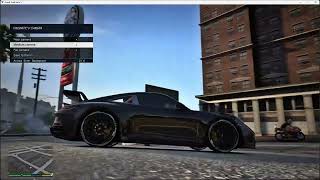
Not a debug overlay. A proper nested menu with a title bar, highlighted selection, live values, a help line under every single option explaining what it does, and confirmation toasts.
CINEMATIC V CAMERA
-- First person settings
-- Presets - three tuned setups plus three slots of your own
-- FOV, height, forward, side, pitch, yaw, roll
-- Head tracking, inertia limit, eye plane guard
-- Speed zoom, look weight, recenter time and easing
-- Reset to defaults
-- Third person cameras
-- Near camera - full settings, three slots, reset
-- Medium camera - full settings, three slots, reset
-- Far camera - full settings, three slots, reset
-- Feel and tracking - inertia, terrain, shake, weight, recentering
-- Save everything to the ini
Holding a direction runs through values and accelerates the longer you hold it, so crossing a wide range takes a second instead of two hundred taps. Every value moves in fine increments, down to two millimetres on positions and a tenth of a degree on angles.
While the menu is open the game own inputs are blocked, so navigating never opens your phone or the weapon wheel.
Your presets, saved properly
Three tuned presets to start from, and three personal slots in every single camera, first person included. Save the setup you like, keep experimenting, load it back when you go too far. Everything is written to the ini with your comments preserved, so it survives restarts and you can share a config file with a friend by sending them one file.
Every camera also keeps a reset to factory of its own, so wrecking the far camera never costs you the near one.
---
PRO edition
The standard edition rebuilds the three third person cameras and leaves first person to the game, or to Dynamic Vehicle First Person View if you have it.
PRO adds a complete first person camera of its own, built on the same system:
* Hands on the wheel, arms, body, the full driving pose
* Mounted to the driver head, with adjustable tracking rate, so it moves with him instead of floating
* Position control on all three axes, plus pitch, yaw and roll aim offsets, so you can compose the framing without moving the camera
* Its own inertia, terrain shake, engine vibration and horizon lock
* A safety guard that keeps the view in front of the eyes no matter what the animations do
* The vehicle heavy braking animation suppressed while you are inside the view, so the driver does not lurch into your face when you stand on the brakes
* Three tuned presets and three personal slots
---
Credits
ikt, author of Manual Transmission and Dynamic Vehicle First Person View, for generously sharing his solution to the first person ped problem. His FLAG NO HEAVY BRAKE ANIMATION technique and the pattern scan behind it are used in the PRO edition with his permission and are credited in the source. He did not have to help a stranger building something adjacent to his own work, and he did anyway. That is the modding scene at its best.
Everything else is my own work.
---
Notes
* The mod writes only to its own ini. It does not modify game files.
* Settings changed in the menu are live immediately. Use Save everything to the ini to keep them.
* If something ever looks wrong, every camera has a reset, and deleting the ini restores the shipped defaults.
by MaxPicco
If you like my work and want to support the maintenance and future updates, you can do so through the donation PATREON button on my GTA5-Mods profile.
Los Santos deserves better than a camera that just sits behind the car.
I got tired of driving in GTA V and feeling nothing. You hammer the throttle and the view stays glued in place. You brake hard and nothing moves. You hit a dirt road at 120 and the picture is as calm as a parked car. Every other driving game figured this out years ago: Forza Horizon, Assetto Corsa, The Crew Motorfest. The camera is not a tripod. It is a passenger. It has weight, it lags, it settles, it flinches on the bumps and it leans when you throw the car into a corner.
That is what this is. Not a wider FOV, not a repositioned chase cam. A camera system rebuilt from the ground up so that driving in this game finally feels like driving.
Every value you see below is exposed in an in game menu and can be tuned live, while you drive, without touching a text file. And every camera has three of your own preset slots, so you can go as far off the rails as you want and always come back.
---
Requirements
* Script Hook V
* ScriptHookVDotNet nightly 3.70
---
Installation
1. Drop CinematicVcameraPRO.asi and CinematicVcameraPRO.ini into your GTA V root folder, next to GTA5.exe.
2. (OPTIONAL BUT RECOMMENDED) IN OPENIV GO TO NEXT FOLDER: GTAV/mods/update/update.rpf/common/data/effects/peds
Then paste in peds folder the next file: first_person_alternates.meta
3. Launch the game. You will see a notification confirming the mod is running.
4. Press F11 in game to open the menu.
That is it. No dependencies to configure, no load order to worry about, nothing to install into your mods folder.
PRO edition ships as CinematicVcameraPRO.asi and CinematicVcameraPRO.ini, plus an optional first_person_alternates.meta.
---
Controls
* V - Cycle cameras: near - medium - far - first person - back to near
* F11 - Open the settings menu or type the cheat cpc
* C - Look behind
* B / N - Look left / right
* 1 - Enable or disable the mod
* F10 - Reload the ini without leaving the game
Inside the menu: arrows move and change values, hold left or right to run through a range, Enter opens a submenu or confirms, Backspace goes back or closes.
---
Features
A camera with mass
The single biggest change. The view no longer matches your mouse one to one. It chases it, with a damped response that takes a moment to pick up speed and keeps drifting for a beat after you stop. It is subtle by design, but it is the difference between looking around a scene and turning your head inside a car. Anyone who has driven a sim, or ridden through Red Dead plains, knows the feeling instantly.
Fully adjustable, from feather light to a weight that fights back.
Three real third person cameras
GTA ships two chase cameras that sit almost on top of each other. This gives you three genuinely distinct distances, cycled with V exactly like the stock game, and every one of them is a separate camera with its own everything:
* Its own field of view
* Its own distance behind the car
* Its own height
* Its own downward angle
* Its own fine trim on distance and height
* Its own three personal preset slots
* Its own reset to factory
Want a tight, aggressive near view at 70 FOV and a wide cinematic far view at 85 sitting high above the roof? That is two sliders and it is done.
Physics driven inertia
The camera responds to what the car is actually doing. Accelerate and it settles back into the seat. Brake and it eases forward. Corner and it leans against the load. This is all derived from real vehicle telemetry, not canned animation, so it scales naturally with how hard you are pushing and with what you are driving.
Strength is adjustable, all the way to zero if you want a rigid mount.
Terrain shake
Roads have texture again. Potholes, kerbs, rumble strips, gravel, open field: the camera reacts to every one of them, and it reacts proportionally, because the intensity comes from the real vertical acceleration of the car rather than a lookup table of surfaces. A gentle seam in the tarmac is a gentle nudge. Dropping off a kerb at speed is not.
It shakes both position and rotation, because a head that only slides looks lifeless and a head that pitches slightly over a bump looks alive. Both amounts are separately adjustable, and there is a hard ceiling so it can never turn into noise.
Speed sensitive field of view
The view opens up as you gain speed and closes as you slow down, on a curve that gives you most of the effect early and then tapers, so the sensation of speed builds where you feel it instead of running away on the highway. This is the oldest trick in racing games and it still works.
Horizon lock
Your neck compensates for your body. Roll the car through a banked corner and your eyes stay closer to level than your shoulders do. The camera does the same, partially, by a configurable amount, because full lock feels robotic and none at all makes ramps nauseating.
Smooth, eased recentering
Stop looking around and the view drifts back to its resting point on a proper easing curve. It leaves decisively, coasts, and settles. No snap, no linear pull, no rubber band. Duration and the shape of the landing are both yours to set.
It respects how GTA works
* The V key follows the stock cycle, so muscle memory transfers straight over.
* Your view is inherited both ways. Walk to your car in first person and you get in in first person. Step out of the far chase camera and you keep walking in that same view. It never switches behind your back.
* Enter and exit animations are vanilla and untouched. The mod steps aside while you climb in and hands everything back the moment you press the exit key.
* Cars and bikes only. Planes, helicopters, boats, trains and bicycles keep the stock camera, because a chase camera tuned for a road car has no business on a helicopter.
* Sideways look is limited to the cabin, so the view can never spin around onto your own character face.
Special ability, handled properly
Franklin ability slows the world down, and every camera mod I have seen falls apart there: the view lags, drifts behind the car, and takes forever to recover. This one measures its smoothing in real time rather than game time, so during slow motion the camera keeps up perfectly while your inertia, your shake and your framing all stay exactly as configured. Nothing gets disabled, nothing gets reset, nothing changes on screen except the world going quiet around you.
Wall aware
Back the camera into a wall or a tight garage and it slides in smoothly and eases back out when the space opens up, instead of clipping through geometry or snapping.
A real in game menu
Not a debug overlay. A proper nested menu with a title bar, highlighted selection, live values, a help line under every single option explaining what it does, and confirmation toasts.
CINEMATIC V CAMERA
-- First person settings
-- Presets - three tuned setups plus three slots of your own
-- FOV, height, forward, side, pitch, yaw, roll
-- Head tracking, inertia limit, eye plane guard
-- Speed zoom, look weight, recenter time and easing
-- Reset to defaults
-- Third person cameras
-- Near camera - full settings, three slots, reset
-- Medium camera - full settings, three slots, reset
-- Far camera - full settings, three slots, reset
-- Feel and tracking - inertia, terrain, shake, weight, recentering
-- Save everything to the ini
Holding a direction runs through values and accelerates the longer you hold it, so crossing a wide range takes a second instead of two hundred taps. Every value moves in fine increments, down to two millimetres on positions and a tenth of a degree on angles.
While the menu is open the game own inputs are blocked, so navigating never opens your phone or the weapon wheel.
Your presets, saved properly
Three tuned presets to start from, and three personal slots in every single camera, first person included. Save the setup you like, keep experimenting, load it back when you go too far. Everything is written to the ini with your comments preserved, so it survives restarts and you can share a config file with a friend by sending them one file.
Every camera also keeps a reset to factory of its own, so wrecking the far camera never costs you the near one.
---
PRO edition
The standard edition rebuilds the three third person cameras and leaves first person to the game, or to Dynamic Vehicle First Person View if you have it.
PRO adds a complete first person camera of its own, built on the same system:
* Hands on the wheel, arms, body, the full driving pose
* Mounted to the driver head, with adjustable tracking rate, so it moves with him instead of floating
* Position control on all three axes, plus pitch, yaw and roll aim offsets, so you can compose the framing without moving the camera
* Its own inertia, terrain shake, engine vibration and horizon lock
* A safety guard that keeps the view in front of the eyes no matter what the animations do
* The vehicle heavy braking animation suppressed while you are inside the view, so the driver does not lurch into your face when you stand on the brakes
* Three tuned presets and three personal slots
---
Credits
ikt, author of Manual Transmission and Dynamic Vehicle First Person View, for generously sharing his solution to the first person ped problem. His FLAG NO HEAVY BRAKE ANIMATION technique and the pattern scan behind it are used in the PRO edition with his permission and are credited in the source. He did not have to help a stranger building something adjacent to his own work, and he did anyway. That is the modding scene at its best.
Everything else is my own work.
---
Notes
* The mod writes only to its own ini. It does not modify game files.
* Settings changed in the menu are live immediately. Use Save everything to the ini to keep them.
* If something ever looks wrong, every camera has a reset, and deleting the ini restores the shipped defaults.
Subido por primera vez: 23 de julio de 2026
Última actualización: 15 de agosto de 2026
Descarga más reciente: hace 2 horas
25 Comentarios
## Cinematic V Camera PRO
by MaxPicco
If you like my work and want to support the maintenance and future updates, you can do so through the donation PATREON button on my GTA5-Mods profile.
Los Santos deserves better than a camera that just sits behind the car.
I got tired of driving in GTA V and feeling nothing. You hammer the throttle and the view stays glued in place. You brake hard and nothing moves. You hit a dirt road at 120 and the picture is as calm as a parked car. Every other driving game figured this out years ago: Forza Horizon, Assetto Corsa, The Crew Motorfest. The camera is not a tripod. It is a passenger. It has weight, it lags, it settles, it flinches on the bumps and it leans when you throw the car into a corner.
That is what this is. Not a wider FOV, not a repositioned chase cam. A camera system rebuilt from the ground up so that driving in this game finally feels like driving.
Every value you see below is exposed in an in game menu and can be tuned live, while you drive, without touching a text file. And every camera has three of your own preset slots, so you can go as far off the rails as you want and always come back.
---
Requirements
* Script Hook V
* ScriptHookVDotNet nightly 3.70
---
Installation
1. Drop CinematicVcameraPRO.asi and CinematicVcameraPRO.ini into your GTA V root folder, next to GTA5.exe.
2. (OPTIONAL BUT RECOMMENDED) IN OPENIV GO TO NEXT FOLDER: GTAV/mods/update/update.rpf/common/data/effects/peds
Then paste in peds folder the next file: first_person_alternates.meta
3. Launch the game. You will see a notification confirming the mod is running.
4. Press F11 in game to open the menu.
That is it. No dependencies to configure, no load order to worry about, nothing to install into your mods folder.
PRO edition ships as CinematicVcameraPRO.asi and CinematicVcameraPRO.ini, plus an optional first_person_alternates.meta.
---
Controls
* V - Cycle cameras: near - medium - far - first person - back to near
* F11 - Open the settings menu or type the cheat cpc
* C - Look behind
* B / N - Look left / right
* 1 - Enable or disable the mod
* F10 - Reload the ini without leaving the game
Inside the menu: arrows move and change values, hold left or right to run through a range, Enter opens a submenu or confirms, Backspace goes back or closes.
---
Features
A camera with mass
The single biggest change. The view no longer matches your mouse one to one. It chases it, with a damped response that takes a moment to pick up speed and keeps drifting for a beat after you stop. It is subtle by design, but it is the difference between looking around a scene and turning your head inside a car. Anyone who has driven a sim, or ridden through Red Dead plains, knows the feeling instantly.
Fully adjustable, from feather light to a weight that fights back.
Three real third person cameras
GTA ships two chase cameras that sit almost on top of each other. This gives you three genuinely distinct distances, cycled with V exactly like the stock game, and every one of them is a separate camera with its own everything:
* Its own field of view
* Its own distance behind the car
* Its own height
* Its own downward angle
* Its own fine trim on distance and height
* Its own three personal preset slots
* Its own reset to factory
Want a tight, aggressive near view at 70 FOV and a wide cinematic far view at 85 sitting high above the roof? That is two sliders and it is done.
Physics driven inertia
The camera responds to what the car is actually doing. Accelerate and it settles back into the seat. Brake and it eases forward. Corner and it leans against the load. This is all derived from real vehicle telemetry, not canned animation, so it scales naturally with how hard you are pushing and with what you are driving.
Strength is adjustable, all the way to zero if you want a rigid mount.
Terrain shake
Roads have texture again. Potholes, kerbs, rumble strips, gravel, open field: the camera reacts to every one of them, and it reacts proportionally, because the intensity comes from the real vertical acceleration of the car rather than a lookup table of surfaces. A gentle seam in the tarmac is a gentle nudge. Dropping off a kerb at speed is not.
It shakes both position and rotation, because a head that only slides looks lifeless and a head that pitches slightly over a bump looks alive. Both amounts are separately adjustable, and there is a hard ceiling so it can never turn into noise.
Speed sensitive field of view
The view opens up as you gain speed and closes as you slow down, on a curve that gives you most of the effect early and then tapers, so the sensation of speed builds where you feel it instead of running away on the highway. This is the oldest trick in racing games and it still works.
Horizon lock
Your neck compensates for your body. Roll the car through a banked corner and your eyes stay closer to level than your shoulders do. The camera does the same, partially, by a configurable amount, because full lock feels robotic and none at all makes ramps nauseating.
Smooth, eased recentering
Stop looking around and the view drifts back to its resting point on a proper easing curve. It leaves decisively, coasts, and settles. No snap, no linear pull, no rubber band. Duration and the shape of the landing are both yours to set.
It respects how GTA works
* The V key follows the stock cycle, so muscle memory transfers straight over.
* Your view is inherited both ways. Walk to your car in first person and you get in in first person. Step out of the far chase camera and you keep walking in that same view. It never switches behind your back.
* Enter and exit animations are vanilla and untouched. The mod steps aside while you climb in and hands everything back the moment you press the exit key.
* Cars and bikes only. Planes, helicopters, boats, trains and bicycles keep the stock camera, because a chase camera tuned for a road car has no business on a helicopter.
* Sideways look is limited to the cabin, so the view can never spin around onto your own character face.
Special ability, handled properly
Franklin ability slows the world down, and every camera mod I have seen falls apart there: the view lags, drifts behind the car, and takes forever to recover. This one measures its smoothing in real time rather than game time, so during slow motion the camera keeps up perfectly while your inertia, your shake and your framing all stay exactly as configured. Nothing gets disabled, nothing gets reset, nothing changes on screen except the world going quiet around you.
Wall aware
Back the camera into a wall or a tight garage and it slides in smoothly and eases back out when the space opens up, instead of clipping through geometry or snapping.
A real in game menu
Not a debug overlay. A proper nested menu with a title bar, highlighted selection, live values, a help line under every single option explaining what it does, and confirmation toasts.
CINEMATIC V CAMERA
-- First person settings
-- Presets - three tuned setups plus three slots of your own
-- FOV, height, forward, side, pitch, yaw, roll
-- Head tracking, inertia limit, eye plane guard
-- Speed zoom, look weight, recenter time and easing
-- Reset to defaults
-- Third person cameras
-- Near camera - full settings, three slots, reset
-- Medium camera - full settings, three slots, reset
-- Far camera - full settings, three slots, reset
-- Feel and tracking - inertia, terrain, shake, weight, recentering
-- Save everything to the ini
Holding a direction runs through values and accelerates the longer you hold it, so crossing a wide range takes a second instead of two hundred taps. Every value moves in fine increments, down to two millimetres on positions and a tenth of a degree on angles.
While the menu is open the game own inputs are blocked, so navigating never opens your phone or the weapon wheel.
Your presets, saved properly
Three tuned presets to start from, and three personal slots in every single camera, first person included. Save the setup you like, keep experimenting, load it back when you go too far. Everything is written to the ini with your comments preserved, so it survives restarts and you can share a config file with a friend by sending them one file.
Every camera also keeps a reset to factory of its own, so wrecking the far camera never costs you the near one.
---
PRO edition
The standard edition rebuilds the three third person cameras and leaves first person to the game, or to Dynamic Vehicle First Person View if you have it.
PRO adds a complete first person camera of its own, built on the same system:
* Hands on the wheel, arms, body, the full driving pose
* Mounted to the driver head, with adjustable tracking rate, so it moves with him instead of floating
* Position control on all three axes, plus pitch, yaw and roll aim offsets, so you can compose the framing without moving the camera
* Its own inertia, terrain shake, engine vibration and horizon lock
* A safety guard that keeps the view in front of the eyes no matter what the animations do
* The vehicle heavy braking animation suppressed while you are inside the view, so the driver does not lurch into your face when you stand on the brakes
* Three tuned presets and three personal slots
---
Credits
ikt, author of Manual Transmission and Dynamic Vehicle First Person View, for generously sharing his solution to the first person ped problem. His FLAG NO HEAVY BRAKE ANIMATION technique and the pattern scan behind it are used in the PRO edition with his permission and are credited in the source. He did not have to help a stranger building something adjacent to his own work, and he did anyway. That is the modding scene at its best.
Everything else is my own work.
---
Notes
* The mod writes only to its own ini. It does not modify game files.
* Settings changed in the menu are live immediately. Use Save everything to the ini to keep them.
* If something ever looks wrong, every camera has a reset, and deleting the ini restores the shipped defaults.
by MaxPicco
If you like my work and want to support the maintenance and future updates, you can do so through the donation PATREON button on my GTA5-Mods profile.
Los Santos deserves better than a camera that just sits behind the car.
I got tired of driving in GTA V and feeling nothing. You hammer the throttle and the view stays glued in place. You brake hard and nothing moves. You hit a dirt road at 120 and the picture is as calm as a parked car. Every other driving game figured this out years ago: Forza Horizon, Assetto Corsa, The Crew Motorfest. The camera is not a tripod. It is a passenger. It has weight, it lags, it settles, it flinches on the bumps and it leans when you throw the car into a corner.
That is what this is. Not a wider FOV, not a repositioned chase cam. A camera system rebuilt from the ground up so that driving in this game finally feels like driving.
Every value you see below is exposed in an in game menu and can be tuned live, while you drive, without touching a text file. And every camera has three of your own preset slots, so you can go as far off the rails as you want and always come back.
---
Requirements
* Script Hook V
* ScriptHookVDotNet nightly 3.70
---
Installation
1. Drop CinematicVcameraPRO.asi and CinematicVcameraPRO.ini into your GTA V root folder, next to GTA5.exe.
2. (OPTIONAL BUT RECOMMENDED) IN OPENIV GO TO NEXT FOLDER: GTAV/mods/update/update.rpf/common/data/effects/peds
Then paste in peds folder the next file: first_person_alternates.meta
3. Launch the game. You will see a notification confirming the mod is running.
4. Press F11 in game to open the menu.
That is it. No dependencies to configure, no load order to worry about, nothing to install into your mods folder.
PRO edition ships as CinematicVcameraPRO.asi and CinematicVcameraPRO.ini, plus an optional first_person_alternates.meta.
---
Controls
* V - Cycle cameras: near - medium - far - first person - back to near
* F11 - Open the settings menu or type the cheat cpc
* C - Look behind
* B / N - Look left / right
* 1 - Enable or disable the mod
* F10 - Reload the ini without leaving the game
Inside the menu: arrows move and change values, hold left or right to run through a range, Enter opens a submenu or confirms, Backspace goes back or closes.
---
Features
A camera with mass
The single biggest change. The view no longer matches your mouse one to one. It chases it, with a damped response that takes a moment to pick up speed and keeps drifting for a beat after you stop. It is subtle by design, but it is the difference between looking around a scene and turning your head inside a car. Anyone who has driven a sim, or ridden through Red Dead plains, knows the feeling instantly.
Fully adjustable, from feather light to a weight that fights back.
Three real third person cameras
GTA ships two chase cameras that sit almost on top of each other. This gives you three genuinely distinct distances, cycled with V exactly like the stock game, and every one of them is a separate camera with its own everything:
* Its own field of view
* Its own distance behind the car
* Its own height
* Its own downward angle
* Its own fine trim on distance and height
* Its own three personal preset slots
* Its own reset to factory
Want a tight, aggressive near view at 70 FOV and a wide cinematic far view at 85 sitting high above the roof? That is two sliders and it is done.
Physics driven inertia
The camera responds to what the car is actually doing. Accelerate and it settles back into the seat. Brake and it eases forward. Corner and it leans against the load. This is all derived from real vehicle telemetry, not canned animation, so it scales naturally with how hard you are pushing and with what you are driving.
Strength is adjustable, all the way to zero if you want a rigid mount.
Terrain shake
Roads have texture again. Potholes, kerbs, rumble strips, gravel, open field: the camera reacts to every one of them, and it reacts proportionally, because the intensity comes from the real vertical acceleration of the car rather than a lookup table of surfaces. A gentle seam in the tarmac is a gentle nudge. Dropping off a kerb at speed is not.
It shakes both position and rotation, because a head that only slides looks lifeless and a head that pitches slightly over a bump looks alive. Both amounts are separately adjustable, and there is a hard ceiling so it can never turn into noise.
Speed sensitive field of view
The view opens up as you gain speed and closes as you slow down, on a curve that gives you most of the effect early and then tapers, so the sensation of speed builds where you feel it instead of running away on the highway. This is the oldest trick in racing games and it still works.
Horizon lock
Your neck compensates for your body. Roll the car through a banked corner and your eyes stay closer to level than your shoulders do. The camera does the same, partially, by a configurable amount, because full lock feels robotic and none at all makes ramps nauseating.
Smooth, eased recentering
Stop looking around and the view drifts back to its resting point on a proper easing curve. It leaves decisively, coasts, and settles. No snap, no linear pull, no rubber band. Duration and the shape of the landing are both yours to set.
It respects how GTA works
* The V key follows the stock cycle, so muscle memory transfers straight over.
* Your view is inherited both ways. Walk to your car in first person and you get in in first person. Step out of the far chase camera and you keep walking in that same view. It never switches behind your back.
* Enter and exit animations are vanilla and untouched. The mod steps aside while you climb in and hands everything back the moment you press the exit key.
* Cars and bikes only. Planes, helicopters, boats, trains and bicycles keep the stock camera, because a chase camera tuned for a road car has no business on a helicopter.
* Sideways look is limited to the cabin, so the view can never spin around onto your own character face.
Special ability, handled properly
Franklin ability slows the world down, and every camera mod I have seen falls apart there: the view lags, drifts behind the car, and takes forever to recover. This one measures its smoothing in real time rather than game time, so during slow motion the camera keeps up perfectly while your inertia, your shake and your framing all stay exactly as configured. Nothing gets disabled, nothing gets reset, nothing changes on screen except the world going quiet around you.
Wall aware
Back the camera into a wall or a tight garage and it slides in smoothly and eases back out when the space opens up, instead of clipping through geometry or snapping.
A real in game menu
Not a debug overlay. A proper nested menu with a title bar, highlighted selection, live values, a help line under every single option explaining what it does, and confirmation toasts.
CINEMATIC V CAMERA
-- First person settings
-- Presets - three tuned setups plus three slots of your own
-- FOV, height, forward, side, pitch, yaw, roll
-- Head tracking, inertia limit, eye plane guard
-- Speed zoom, look weight, recenter time and easing
-- Reset to defaults
-- Third person cameras
-- Near camera - full settings, three slots, reset
-- Medium camera - full settings, three slots, reset
-- Far camera - full settings, three slots, reset
-- Feel and tracking - inertia, terrain, shake, weight, recentering
-- Save everything to the ini
Holding a direction runs through values and accelerates the longer you hold it, so crossing a wide range takes a second instead of two hundred taps. Every value moves in fine increments, down to two millimetres on positions and a tenth of a degree on angles.
While the menu is open the game own inputs are blocked, so navigating never opens your phone or the weapon wheel.
Your presets, saved properly
Three tuned presets to start from, and three personal slots in every single camera, first person included. Save the setup you like, keep experimenting, load it back when you go too far. Everything is written to the ini with your comments preserved, so it survives restarts and you can share a config file with a friend by sending them one file.
Every camera also keeps a reset to factory of its own, so wrecking the far camera never costs you the near one.
---
PRO edition
The standard edition rebuilds the three third person cameras and leaves first person to the game, or to Dynamic Vehicle First Person View if you have it.
PRO adds a complete first person camera of its own, built on the same system:
* Hands on the wheel, arms, body, the full driving pose
* Mounted to the driver head, with adjustable tracking rate, so it moves with him instead of floating
* Position control on all three axes, plus pitch, yaw and roll aim offsets, so you can compose the framing without moving the camera
* Its own inertia, terrain shake, engine vibration and horizon lock
* A safety guard that keeps the view in front of the eyes no matter what the animations do
* The vehicle heavy braking animation suppressed while you are inside the view, so the driver does not lurch into your face when you stand on the brakes
* Three tuned presets and three personal slots
---
Credits
ikt, author of Manual Transmission and Dynamic Vehicle First Person View, for generously sharing his solution to the first person ped problem. His FLAG NO HEAVY BRAKE ANIMATION technique and the pattern scan behind it are used in the PRO edition with his permission and are credited in the source. He did not have to help a stranger building something adjacent to his own work, and he did anyway. That is the modding scene at its best.
Everything else is my own work.
---
Notes
* The mod writes only to its own ini. It does not modify game files.
* Settings changed in the menu are live immediately. Use Save everything to the ini to keep them.
* If something ever looks wrong, every camera has a reset, and deleting the ini restores the shipped defaults.
Subido por primera vez: 23 de julio de 2026
Última actualización: 15 de agosto de 2026
Descarga más reciente: hace 2 horas
 5mods on Discord

@Senf-Man @MarcusStone @RetroGlad4053 @Feels @srb Hey fellas, i appreacite all your comments. I'm working on a pro free version of this mod for all of you. Pro version but free haha. Solving so much problems, i also use QuantV btw with corefx and reshade, but i dont have the blur problem. I will check it out! Im checking all the errors that u seend to me.
@eddiesanti0903 It happens haha. I'm working on that problem, thx you for letting me know. Im working on a Remastered Version!
@maxpicco1 heck yeah man ill follow for updates. cant wait
Enhanced ...PLS
@maxpicco1 does it or will it in the future include that extremly missed feature of being able to turn off 3rd person auto center in vehicles, like this unfortunately discontinued mod used to do? https://www.gta5-mods.com/scripts/extended-camera-settings
@maxpicco1 To add to what @Senf-Man said, Also an option to disable Speed Zoom in 3rd person. I see it's a option for 1st person but not 3rd. and something that removes vehicle Jitters at high speed. Thanks for your consideration.
Edit-Correction. Speed Zoom disabled actually works for both 1st and 3rd. Sorry about that.
you said this mod is compatible with dynamic first person camera, does that mean i dont have to change first person settings on this mod and keep the same ones i have with dynamic first person camera?
I like the mod, but QuantV's motion blur stops working. Is there a solution? Do you plan to release a future update?
most of the time when i crash or trying to change the camera , then the camera suddenly goes far way like out of the map and also my windows says this asi file is a virus trojan deleting automaticaly. plz fix this issue . this mod is a 10/10 mod that i was searching for decade
@Tanthai1969 Working on that my fella!
@maxpicco1 Important information: I'm using the June 2025 version of Quantv, so I believe this issue is occurring because it's an older version
@Feels Maybe it is, but chill. the new version is pending upload and have SO many bug fixes. Is a PRO version for free. And who wants to support is welcome!
@maxpicco1 beautiful work
hey thnx for the pro version as u promised but im encountering the same camera far away problem.if i crash or if i just watch my car around standing beside light pole or something the camera goes so far away
there's an issue where the camera is like 60 feet above when the view is obstructed but overall smooth mod
@seb007 working ot that, is already fixed in the new version. Wasnt aprovved yet
@maxpicco1 w Christian Bale pfp, ill take ur word for it
brooo how yalll quant v raindrops be working mine dont do shi
@seb007 @srb Has been busy days. But im working on my free time on the bugs for improve this!!