Dismemberment Revanced v1.0



18
0
18
0
--- This script is written by hand and AI is only ( less than 5 prercent ) used in Some places like in Texture glitchs, in Description and in bug fixing ---
--- Dismemberment Revanced ---
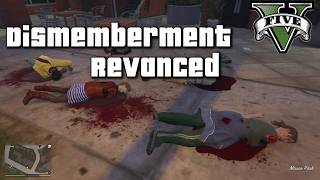
A single-player dismemberment mod for GTA V Legacy. NPCs can lose limbs or be cut at the torso, depending on the weapon and the part hit. Fast vehicle impacts can also dismember NPCs. Very fast frontal crashes can cause a torso cut.
---Features---
- NPCs have a chance to survive losing one arm or leg: 50 percent for regular peds and 80 percent for cops.
- Survivors ragdoll for about ten seconds. NPCs missing a leg stay down, and NPCs missing an arm drop their weapon.
- Losing another distinct limb, the head, or the torso is fatal.
- Configured guns and melee weapons such as knives and bottles can cause dismemberment. Bare-hand attacks do not.
- Explosions can sever limbs. Tough enemy models resist dismemberment while above 25 percent health.
- Shotgun hits cause moderate knockback.
- High-speed vehicle crashes use the struck body part when available. Very fast frontal impacts can cause a torso cut.
- Dark-red blood splashes and ground stains appear on hits. Moving bodies can continue bleeding for up to ten seconds. Hard impacts can leave blood marks on nearby surfaces and vehicles.
- A startup notification appears when the mod loads.
--- Requirements ---
GTA V Legacy in single-player mode
ScriptHookV
ScriptHookVDotNet 3
OpenIV or another way to use the mods folder
--- Installation ---
1. Install ScriptHookV and ScriptHookVDotNet 3.
2. Copy these files from the archive into your GTA V scripts folder:
DismembermentRevanced.dll
DismembermentRevanced.ini
DismembermentRevancedWeapons.cfg
DismembermentRevancedBlood.3.cs
3. Copy DismembermentRevancedASI.asi into the GTA V root folder beside GTA5.exe.
4. Copy the dismemberment folder into:
mods\update\x64\dlcpacks\
5. Open mods\update\update.rpf\common\data\dlclist.xml. Add this required entry inside the Paths section if it is not already there:
dlcpacks:/dismemberment/
6. Save the file and start GTA V Story Mode.
Primo Caricamento: 23 hours ago
Ultimo Aggiornamento: 32 minuti fa
Last Downloaded: 20 secondi fa
0 Commenti
More mods by Sujal7x:

- Gameplay
- Player
- .Net
5.0
1.624
17
V2.1 (Newest) (Fixed glitches)
By Sujal7x
--- This script is written by hand and AI is only ( less than 5 prercent ) used in Some places like in Texture glitchs, in Description and in bug fixing ---
--- Dismemberment Revanced ---
A single-player dismemberment mod for GTA V Legacy. NPCs can lose limbs or be cut at the torso, depending on the weapon and the part hit. Fast vehicle impacts can also dismember NPCs. Very fast frontal crashes can cause a torso cut.
---Features---
- NPCs have a chance to survive losing one arm or leg: 50 percent for regular peds and 80 percent for cops.
- Survivors ragdoll for about ten seconds. NPCs missing a leg stay down, and NPCs missing an arm drop their weapon.
- Losing another distinct limb, the head, or the torso is fatal.
- Configured guns and melee weapons such as knives and bottles can cause dismemberment. Bare-hand attacks do not.
- Explosions can sever limbs. Tough enemy models resist dismemberment while above 25 percent health.
- Shotgun hits cause moderate knockback.
- High-speed vehicle crashes use the struck body part when available. Very fast frontal impacts can cause a torso cut.
- Dark-red blood splashes and ground stains appear on hits. Moving bodies can continue bleeding for up to ten seconds. Hard impacts can leave blood marks on nearby surfaces and vehicles.
- A startup notification appears when the mod loads.
--- Requirements ---
GTA V Legacy in single-player mode
ScriptHookV
ScriptHookVDotNet 3
OpenIV or another way to use the mods folder
--- Installation ---
1. Install ScriptHookV and ScriptHookVDotNet 3.
2. Copy these files from the archive into your GTA V scripts folder:
DismembermentRevanced.dll
DismembermentRevanced.ini
DismembermentRevancedWeapons.cfg
DismembermentRevancedBlood.3.cs
3. Copy DismembermentRevancedASI.asi into the GTA V root folder beside GTA5.exe.
4. Copy the dismemberment folder into:
mods\update\x64\dlcpacks\
5. Open mods\update\update.rpf\common\data\dlclist.xml. Add this required entry inside the Paths section if it is not already there:
dlcpacks:/dismemberment/
6. Save the file and start GTA V Story Mode.
Primo Caricamento: 23 hours ago
Ultimo Aggiornamento: 32 minuti fa
Last Downloaded: 20 secondi fa
Partecipa alla conversazione! Accedi o registrati per poter commentare.
 5mods on Discord
