Motion Sickness Helper for flying plane 1.0.3889.0



![Advanced Custom Blips [.NET]](https://img.gta5-mods.com/q75-w500-h333-cfill/images/advanced-custom-blips-fe7d9d03-1fc1-4088-9fae-005dc2b1a270/7debc5-acb_thumbnail_optimized_2000_16x9_optimized_2000.png "Advanced Custom Blips [.NET]")

28
7
28
7
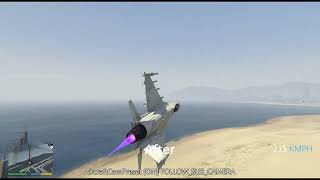
In GTA V the third-person chase camera of planes and helicopters rolls together with the airframe: the horizon in your view keeps tilting. For anyone prone to 3D motion sickness, that roll is the main trigger. This mod gives aircraft a chase camera that ignores roll, so the horizon stays level, while normal heading tracking and a moderate amount of pitch are preserved.
What it actually changes
GTA V picks which third-person camera a vehicle uses from the field in vehicles.meta, and caches that camera's joaat hash inside the vehicle's CVehicleModelInfo structure. Roll following is a property of which preset is selected, not of any field inside the preset which is exactly why tweaking individual camera parameters never removed it. AircraftCamPreset swaps that cached camera-preset hash for the duration of your flight and puts the original value back afterwards. No game file is edited and OpenIV is not needed, so the mod is fully reversible and safe to try.
Features
Works with any aircraft you fly, including stock, DLC and add-on models, because it keys off the game's own vehicle classification (IsPlane / IsHelicopter / autogyro / blimp) rather than a hardcoded model list.
Camera preset and chase distance are configurable in a plain text ini file.
Press F8 in game to toggle the mod on and off, so you can compare it against vanilla within seconds.
The original camera setting is restored automatically when you exit the aircraft, disable the mod, or unload the script.
A small log is written next to the script, so any problem can be diagnosed instead of guessed at.
Measured results (500+ real in-flight samples; "camera roll share" 0 = horizon never rolls, 1 = fully follows the airframe)
Installation
Install ScriptHookV first: copy ScriptHookV.dll and dinput8.dll into your GTA V root folder (the folder that contains GTA5.exe).
Install ScriptHookVDotNet 3.x into the same folder: ScriptHookVDotNet.asi plus ScriptHookVDotNet3.dll.
Extract this archive. You will find a scripts folder containing AircraftCamPreset.dll and AircraftCamPreset.ini, plus the source and readme files.
Copy the scripts folder into your GTA V root folder, so that you end up with:
...\Grand Theft Auto V\scripts\AircraftCamPreset.dll
...\Grand Theft Auto V\scripts\AircraftCamPreset.ini
If a scripts folder already exists there, just drop both files into it. Do not put them into a mods folder — script files are loaded from the game root.
Start the game in Story Mode. The mod loads by itself; no key needs to be pressed to enable it.
Optional: edit scripts\AircraftCamPreset.ini to change the camera preset or the chase distance, then restart the game.
To confirm it is running, get into any plane or helicopter and press F7 to show the status line, then F8 to toggle the effect on and off.
Configuration (scripts\AircraftCamPreset.ini, restart the game after editing)
CameraName= the camera preset. Only these five names actually exist in the game: FOLLOW_SUB_CAMERA (default, recommended), FOLLOW_MINISUB_CAMERA, FOLLOW_BIKE_CAMERA, FOLLOW_BOAT_CAMERA, FOLLOW_HELI_CAMERA. Any other name makes the game fall back to a camera that cuts between angles like the cinematic camera.
FollowDistance= chase distance. 1.0 is the game's original distance (about 15 m measured); larger is further back, maximum 4.0.
ZoomLevel= leave at -1 (do not touch the zoom level).
ShowHud= show or hide the status line.
Hotkeys
F7 — show / hide the status line.
F8 — toggle the mod on / off.
Uninstall
Delete scripts\AircraftCamPreset.dll and scripts\AircraftCamPreset.ini. Nothing else was changed.
Troubleshooting
Nothing happens: check that ScriptHookVDotNet 3.x is actually loading (its own log should appear), and that you are in Story Mode.
The camera behaves like the cinematic camera: CameraName= is misspelled. Use one of the five names listed above.
Read scripts\AircraftCamPreset.log for the resolved camera hash, the applied distance and any error message.
Known limitation
Pitch still follows the aircraft. None of the five camera presets that actually exist can turn it off; the only camera that drops both roll and pitch is the fallback used when a camera name does not resolve, and that one auto-cuts between angles, which feels worse. This mod therefore deliberately chooses "roll gone, moderate pitch and yaw kept".
What it actually changes
GTA V picks which third-person camera a vehicle uses from the field in vehicles.meta, and caches that camera's joaat hash inside the vehicle's CVehicleModelInfo structure. Roll following is a property of which preset is selected, not of any field inside the preset which is exactly why tweaking individual camera parameters never removed it. AircraftCamPreset swaps that cached camera-preset hash for the duration of your flight and puts the original value back afterwards. No game file is edited and OpenIV is not needed, so the mod is fully reversible and safe to try.
Features
Works with any aircraft you fly, including stock, DLC and add-on models, because it keys off the game's own vehicle classification (IsPlane / IsHelicopter / autogyro / blimp) rather than a hardcoded model list.
Camera preset and chase distance are configurable in a plain text ini file.
Press F8 in game to toggle the mod on and off, so you can compare it against vanilla within seconds.
The original camera setting is restored automatically when you exit the aircraft, disable the mod, or unload the script.
A small log is written next to the script, so any problem can be diagnosed instead of guessed at.
Measured results (500+ real in-flight samples; "camera roll share" 0 = horizon never rolls, 1 = fully follows the airframe)
Installation
Install ScriptHookV first: copy ScriptHookV.dll and dinput8.dll into your GTA V root folder (the folder that contains GTA5.exe).
Install ScriptHookVDotNet 3.x into the same folder: ScriptHookVDotNet.asi plus ScriptHookVDotNet3.dll.
Extract this archive. You will find a scripts folder containing AircraftCamPreset.dll and AircraftCamPreset.ini, plus the source and readme files.
Copy the scripts folder into your GTA V root folder, so that you end up with:
...\Grand Theft Auto V\scripts\AircraftCamPreset.dll
...\Grand Theft Auto V\scripts\AircraftCamPreset.ini
If a scripts folder already exists there, just drop both files into it. Do not put them into a mods folder — script files are loaded from the game root.
Start the game in Story Mode. The mod loads by itself; no key needs to be pressed to enable it.
Optional: edit scripts\AircraftCamPreset.ini to change the camera preset or the chase distance, then restart the game.
To confirm it is running, get into any plane or helicopter and press F7 to show the status line, then F8 to toggle the effect on and off.
Configuration (scripts\AircraftCamPreset.ini, restart the game after editing)
CameraName= the camera preset. Only these five names actually exist in the game: FOLLOW_SUB_CAMERA (default, recommended), FOLLOW_MINISUB_CAMERA, FOLLOW_BIKE_CAMERA, FOLLOW_BOAT_CAMERA, FOLLOW_HELI_CAMERA. Any other name makes the game fall back to a camera that cuts between angles like the cinematic camera.
FollowDistance= chase distance. 1.0 is the game's original distance (about 15 m measured); larger is further back, maximum 4.0.
ZoomLevel= leave at -1 (do not touch the zoom level).
ShowHud= show or hide the status line.
Hotkeys
F7 — show / hide the status line.
F8 — toggle the mod on / off.
Uninstall
Delete scripts\AircraftCamPreset.dll and scripts\AircraftCamPreset.ini. Nothing else was changed.
Troubleshooting
Nothing happens: check that ScriptHookVDotNet 3.x is actually loading (its own log should appear), and that you are in Story Mode.
The camera behaves like the cinematic camera: CameraName= is misspelled. Use one of the five names listed above.
Read scripts\AircraftCamPreset.log for the resolved camera hash, the applied distance and any error message.
Known limitation
Pitch still follows the aircraft. None of the five camera presets that actually exist can turn it off; the only camera that drops both roll and pitch is the fallback used when a camera name does not resolve, and that one auto-cuts between angles, which feels worse. This mod therefore deliberately chooses "roll gone, moderate pitch and yaw kept".
Primo Caricamento: 16 settembre 2026
Ultimo Aggiornamento: 6 giorni fa
Last Downloaded: 15 hours ago
3 Commenti
In GTA V the third-person chase camera of planes and helicopters rolls together with the airframe: the horizon in your view keeps tilting. For anyone prone to 3D motion sickness, that roll is the main trigger. This mod gives aircraft a chase camera that ignores roll, so the horizon stays level, while normal heading tracking and a moderate amount of pitch are preserved.
What it actually changes
GTA V picks which third-person camera a vehicle uses from the field in vehicles.meta, and caches that camera's joaat hash inside the vehicle's CVehicleModelInfo structure. Roll following is a property of which preset is selected, not of any field inside the preset which is exactly why tweaking individual camera parameters never removed it. AircraftCamPreset swaps that cached camera-preset hash for the duration of your flight and puts the original value back afterwards. No game file is edited and OpenIV is not needed, so the mod is fully reversible and safe to try.
Features
Works with any aircraft you fly, including stock, DLC and add-on models, because it keys off the game's own vehicle classification (IsPlane / IsHelicopter / autogyro / blimp) rather than a hardcoded model list.
Camera preset and chase distance are configurable in a plain text ini file.
Press F8 in game to toggle the mod on and off, so you can compare it against vanilla within seconds.
The original camera setting is restored automatically when you exit the aircraft, disable the mod, or unload the script.
A small log is written next to the script, so any problem can be diagnosed instead of guessed at.
Measured results (500+ real in-flight samples; "camera roll share" 0 = horizon never rolls, 1 = fully follows the airframe)
Installation
Install ScriptHookV first: copy ScriptHookV.dll and dinput8.dll into your GTA V root folder (the folder that contains GTA5.exe).
Install ScriptHookVDotNet 3.x into the same folder: ScriptHookVDotNet.asi plus ScriptHookVDotNet3.dll.
Extract this archive. You will find a scripts folder containing AircraftCamPreset.dll and AircraftCamPreset.ini, plus the source and readme files.
Copy the scripts folder into your GTA V root folder, so that you end up with:
...\Grand Theft Auto V\scripts\AircraftCamPreset.dll
...\Grand Theft Auto V\scripts\AircraftCamPreset.ini
If a scripts folder already exists there, just drop both files into it. Do not put them into a mods folder — script files are loaded from the game root.
Start the game in Story Mode. The mod loads by itself; no key needs to be pressed to enable it.
Optional: edit scripts\AircraftCamPreset.ini to change the camera preset or the chase distance, then restart the game.
To confirm it is running, get into any plane or helicopter and press F7 to show the status line, then F8 to toggle the effect on and off.
Configuration (scripts\AircraftCamPreset.ini, restart the game after editing)
CameraName= the camera preset. Only these five names actually exist in the game: FOLLOW_SUB_CAMERA (default, recommended), FOLLOW_MINISUB_CAMERA, FOLLOW_BIKE_CAMERA, FOLLOW_BOAT_CAMERA, FOLLOW_HELI_CAMERA. Any other name makes the game fall back to a camera that cuts between angles like the cinematic camera.
FollowDistance= chase distance. 1.0 is the game's original distance (about 15 m measured); larger is further back, maximum 4.0.
ZoomLevel= leave at -1 (do not touch the zoom level).
ShowHud= show or hide the status line.
Hotkeys
F7 — show / hide the status line.
F8 — toggle the mod on / off.
Uninstall
Delete scripts\AircraftCamPreset.dll and scripts\AircraftCamPreset.ini. Nothing else was changed.
Troubleshooting
Nothing happens: check that ScriptHookVDotNet 3.x is actually loading (its own log should appear), and that you are in Story Mode.
The camera behaves like the cinematic camera: CameraName= is misspelled. Use one of the five names listed above.
Read scripts\AircraftCamPreset.log for the resolved camera hash, the applied distance and any error message.
Known limitation
Pitch still follows the aircraft. None of the five camera presets that actually exist can turn it off; the only camera that drops both roll and pitch is the fallback used when a camera name does not resolve, and that one auto-cuts between angles, which feels worse. This mod therefore deliberately chooses "roll gone, moderate pitch and yaw kept".
What it actually changes
GTA V picks which third-person camera a vehicle uses from the field in vehicles.meta, and caches that camera's joaat hash inside the vehicle's CVehicleModelInfo structure. Roll following is a property of which preset is selected, not of any field inside the preset which is exactly why tweaking individual camera parameters never removed it. AircraftCamPreset swaps that cached camera-preset hash for the duration of your flight and puts the original value back afterwards. No game file is edited and OpenIV is not needed, so the mod is fully reversible and safe to try.
Features
Works with any aircraft you fly, including stock, DLC and add-on models, because it keys off the game's own vehicle classification (IsPlane / IsHelicopter / autogyro / blimp) rather than a hardcoded model list.
Camera preset and chase distance are configurable in a plain text ini file.
Press F8 in game to toggle the mod on and off, so you can compare it against vanilla within seconds.
The original camera setting is restored automatically when you exit the aircraft, disable the mod, or unload the script.
A small log is written next to the script, so any problem can be diagnosed instead of guessed at.
Measured results (500+ real in-flight samples; "camera roll share" 0 = horizon never rolls, 1 = fully follows the airframe)
Installation
Install ScriptHookV first: copy ScriptHookV.dll and dinput8.dll into your GTA V root folder (the folder that contains GTA5.exe).
Install ScriptHookVDotNet 3.x into the same folder: ScriptHookVDotNet.asi plus ScriptHookVDotNet3.dll.
Extract this archive. You will find a scripts folder containing AircraftCamPreset.dll and AircraftCamPreset.ini, plus the source and readme files.
Copy the scripts folder into your GTA V root folder, so that you end up with:
...\Grand Theft Auto V\scripts\AircraftCamPreset.dll
...\Grand Theft Auto V\scripts\AircraftCamPreset.ini
If a scripts folder already exists there, just drop both files into it. Do not put them into a mods folder — script files are loaded from the game root.
Start the game in Story Mode. The mod loads by itself; no key needs to be pressed to enable it.
Optional: edit scripts\AircraftCamPreset.ini to change the camera preset or the chase distance, then restart the game.
To confirm it is running, get into any plane or helicopter and press F7 to show the status line, then F8 to toggle the effect on and off.
Configuration (scripts\AircraftCamPreset.ini, restart the game after editing)
CameraName= the camera preset. Only these five names actually exist in the game: FOLLOW_SUB_CAMERA (default, recommended), FOLLOW_MINISUB_CAMERA, FOLLOW_BIKE_CAMERA, FOLLOW_BOAT_CAMERA, FOLLOW_HELI_CAMERA. Any other name makes the game fall back to a camera that cuts between angles like the cinematic camera.
FollowDistance= chase distance. 1.0 is the game's original distance (about 15 m measured); larger is further back, maximum 4.0.
ZoomLevel= leave at -1 (do not touch the zoom level).
ShowHud= show or hide the status line.
Hotkeys
F7 — show / hide the status line.
F8 — toggle the mod on / off.
Uninstall
Delete scripts\AircraftCamPreset.dll and scripts\AircraftCamPreset.ini. Nothing else was changed.
Troubleshooting
Nothing happens: check that ScriptHookVDotNet 3.x is actually loading (its own log should appear), and that you are in Story Mode.
The camera behaves like the cinematic camera: CameraName= is misspelled. Use one of the five names listed above.
Read scripts\AircraftCamPreset.log for the resolved camera hash, the applied distance and any error message.
Known limitation
Pitch still follows the aircraft. None of the five camera presets that actually exist can turn it off; the only camera that drops both roll and pitch is the fallback used when a camera name does not resolve, and that one auto-cuts between angles, which feels worse. This mod therefore deliberately chooses "roll gone, moderate pitch and yaw kept".
Primo Caricamento: 16 settembre 2026
Ultimo Aggiornamento: 6 giorni fa
Last Downloaded: 15 hours ago
 5mods on Discord

I think I might need this. I don't fly aircraft often but in the times that I've had I sometimes get disoriented because of the camera and crash into the ground. Motion sickness from camera movement doesn't affect me but at least there's an alternative use. 👍
Great mod, i dont need it, but it was needed. Awesome work.
great mod