Delete That Entity - RPH Plugin 0.1.4


1,073
13
1,073
13
(Legacy: ✅ | Enhanced: ✅)
🇺🇸 English
This RAGEPluginHook plugin can be used to delete almost all in-game entities :
- Vehicles (except trains/trams)
- Peds
- Some objects...
Deletion is only temporary (e.g. to quickly remove a vehicle that is blocking the way); if you move too far away, reload the game, or edit a sequence in the Rockstar Editor, the changes will not be saved.
📂 Installation:
Prerequisite :
- RAGE Plugin Hook
Open the downloaded .zip archive, then drag and drop the contents of the Grand Theft Auto V folder into your game folder.
🔧 Configuration
You can adjust some values in the .ini file :
📖 Usage
📝 Changelog
0.1.4 (Current) :
- Added a config file:
- You can change keybinds/controller buttons.
The default key to deselect is now Backspace.
- You can adjust the entity selection behavior when using a controller.
- You can disable the deletion confirmation.
- Update Checker : You can disable the update checks in the "/plugins/SSStuart_UpdateChecker.ini" file (you need to load the plugin at least once to initialize the file)
0.1.3 :
- Added controller support (A to select and delete, B to cancel).
- Added English/French translations.
0.1.2 :
- Code refactoring.
- Added an Update Check system for future versions.
0.1.1 : Initial release
🇫🇷 Francais
Ce plugin RAGEPluginHook permet de supprimer presque toutes les entitées en jeu :
- Véhicules (sauf les trains/trams)
- Personnes
- Certains objets...
La suppression n'est que temporaire (par exemple pour enlever rapidement un véhicule qui gêne); si vous vous éloignez trop, que vous rechargez le jeu, ou que vous éditez une séquence dans l'Éditeur Rockstar, les modifications ne seront pas sauvegardés !
📂 Installation :
Prérequis :
- RAGE Plugin Hook
Ouvrez l'archive .zip téléchargée, puis glissez-déposez le contenu du dossier Grand Theft Auto V dans votre dossier de jeu.
🔧 Configuration
Vous pouvez ajuster certaines valeurs dans le fichier .ini :
📖 Utilisation
Source code
github.com/SSStuart/DeleteThatEntity_RPHPlugin
🇺🇸 English
This RAGEPluginHook plugin can be used to delete almost all in-game entities :
- Vehicles (except trains/trams)
- Peds
- Some objects...
Deletion is only temporary (e.g. to quickly remove a vehicle that is blocking the way); if you move too far away, reload the game, or edit a sequence in the Rockstar Editor, the changes will not be saved.
📂 Installation:
Prerequisite :
- RAGE Plugin Hook
Open the downloaded .zip archive, then drag and drop the contents of the Grand Theft Auto V folder into your game folder.
🔧 Configuration
You can adjust some values in the .ini file :
- The key bindings and controller buttons
- Disable the deletion confirmation
- Adjust the entity selection behaviour when aiming with a controller
📖 Usage
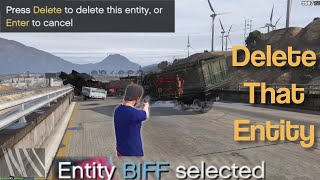
- Aim a weapon at an entity, then press Delete (⌨)/ A (🎮).
- The selected entity should become partially transparent.
- Then press Delete (⌨)/ A (🎮) a second time to confirm deletion, or press Backspace (⌨)/ B (🎮) to cancel.
📝 Changelog
0.1.4 (Current) :
- Added a config file:
- You can change keybinds/controller buttons.
The default key to deselect is now Backspace.
- You can adjust the entity selection behavior when using a controller.
- You can disable the deletion confirmation.
- Update Checker : You can disable the update checks in the "/plugins/SSStuart_UpdateChecker.ini" file (you need to load the plugin at least once to initialize the file)
0.1.3 :
- Added controller support (A to select and delete, B to cancel).
- Added English/French translations.
0.1.2 :
- Code refactoring.
- Added an Update Check system for future versions.
0.1.1 : Initial release
🇫🇷 Francais
Ce plugin RAGEPluginHook permet de supprimer presque toutes les entitées en jeu :
- Véhicules (sauf les trains/trams)
- Personnes
- Certains objets...
La suppression n'est que temporaire (par exemple pour enlever rapidement un véhicule qui gêne); si vous vous éloignez trop, que vous rechargez le jeu, ou que vous éditez une séquence dans l'Éditeur Rockstar, les modifications ne seront pas sauvegardés !
📂 Installation :
Prérequis :
- RAGE Plugin Hook
Ouvrez l'archive .zip téléchargée, puis glissez-déposez le contenu du dossier Grand Theft Auto V dans votre dossier de jeu.
🔧 Configuration
Vous pouvez ajuster certaines valeurs dans le fichier .ini :
- Ajuster les touches et boutons
- Désactiver la confirmation de suppression
- Ajuster le comportement de sélection des entités lors de la visée avec une manette
📖 Utilisation
- Visez une entité avec une arme, puis appuyez sur Suppr (⌨)/ A (🎮).
- L'entité sélectionnée devrait devenir semi transparente.
- Appuyez ensuite une seconde fois sur Suppr (⌨)/ A (🎮) pour confirmer la suppression, ou appuyez sur Retour arrière (⌨)/ B (🎮) pour annuler.
Source code
github.com/SSStuart/DeleteThatEntity_RPHPlugin
최초 업로드: 2023년 12월 10일
마지막 업로드: 2026년 07월 22일
마지막 다운로드: 6시간 전
댓글 14
More mods by SSStuart:
- 환경 설정
5.0
980
9
2.0
By SSStuart
(Legacy: ✅ | Enhanced: ✅)
🇺🇸 English
This RAGEPluginHook plugin can be used to delete almost all in-game entities :
- Vehicles (except trains/trams)
- Peds
- Some objects...
Deletion is only temporary (e.g. to quickly remove a vehicle that is blocking the way); if you move too far away, reload the game, or edit a sequence in the Rockstar Editor, the changes will not be saved.
📂 Installation:
Prerequisite :
- RAGE Plugin Hook
Open the downloaded .zip archive, then drag and drop the contents of the Grand Theft Auto V folder into your game folder.
🔧 Configuration
You can adjust some values in the .ini file :
📖 Usage
📝 Changelog
0.1.4 (Current) :
- Added a config file:
- You can change keybinds/controller buttons.
The default key to deselect is now Backspace.
- You can adjust the entity selection behavior when using a controller.
- You can disable the deletion confirmation.
- Update Checker : You can disable the update checks in the "/plugins/SSStuart_UpdateChecker.ini" file (you need to load the plugin at least once to initialize the file)
0.1.3 :
- Added controller support (A to select and delete, B to cancel).
- Added English/French translations.
0.1.2 :
- Code refactoring.
- Added an Update Check system for future versions.
0.1.1 : Initial release
🇫🇷 Francais
Ce plugin RAGEPluginHook permet de supprimer presque toutes les entitées en jeu :
- Véhicules (sauf les trains/trams)
- Personnes
- Certains objets...
La suppression n'est que temporaire (par exemple pour enlever rapidement un véhicule qui gêne); si vous vous éloignez trop, que vous rechargez le jeu, ou que vous éditez une séquence dans l'Éditeur Rockstar, les modifications ne seront pas sauvegardés !
📂 Installation :
Prérequis :
- RAGE Plugin Hook
Ouvrez l'archive .zip téléchargée, puis glissez-déposez le contenu du dossier Grand Theft Auto V dans votre dossier de jeu.
🔧 Configuration
Vous pouvez ajuster certaines valeurs dans le fichier .ini :
📖 Utilisation
Source code
github.com/SSStuart/DeleteThatEntity_RPHPlugin
🇺🇸 English
This RAGEPluginHook plugin can be used to delete almost all in-game entities :
- Vehicles (except trains/trams)
- Peds
- Some objects...
Deletion is only temporary (e.g. to quickly remove a vehicle that is blocking the way); if you move too far away, reload the game, or edit a sequence in the Rockstar Editor, the changes will not be saved.
📂 Installation:
Prerequisite :
- RAGE Plugin Hook
Open the downloaded .zip archive, then drag and drop the contents of the Grand Theft Auto V folder into your game folder.
🔧 Configuration
You can adjust some values in the .ini file :
- The key bindings and controller buttons
- Disable the deletion confirmation
- Adjust the entity selection behaviour when aiming with a controller
📖 Usage
- Aim a weapon at an entity, then press Delete (⌨)/ A (🎮).
- The selected entity should become partially transparent.
- Then press Delete (⌨)/ A (🎮) a second time to confirm deletion, or press Backspace (⌨)/ B (🎮) to cancel.
📝 Changelog
0.1.4 (Current) :
- Added a config file:
- You can change keybinds/controller buttons.
The default key to deselect is now Backspace.
- You can adjust the entity selection behavior when using a controller.
- You can disable the deletion confirmation.
- Update Checker : You can disable the update checks in the "/plugins/SSStuart_UpdateChecker.ini" file (you need to load the plugin at least once to initialize the file)
0.1.3 :
- Added controller support (A to select and delete, B to cancel).
- Added English/French translations.
0.1.2 :
- Code refactoring.
- Added an Update Check system for future versions.
0.1.1 : Initial release
🇫🇷 Francais
Ce plugin RAGEPluginHook permet de supprimer presque toutes les entitées en jeu :
- Véhicules (sauf les trains/trams)
- Personnes
- Certains objets...
La suppression n'est que temporaire (par exemple pour enlever rapidement un véhicule qui gêne); si vous vous éloignez trop, que vous rechargez le jeu, ou que vous éditez une séquence dans l'Éditeur Rockstar, les modifications ne seront pas sauvegardés !
📂 Installation :
Prérequis :
- RAGE Plugin Hook
Ouvrez l'archive .zip téléchargée, puis glissez-déposez le contenu du dossier Grand Theft Auto V dans votre dossier de jeu.
🔧 Configuration
Vous pouvez ajuster certaines valeurs dans le fichier .ini :
- Ajuster les touches et boutons
- Désactiver la confirmation de suppression
- Ajuster le comportement de sélection des entités lors de la visée avec une manette
📖 Utilisation
- Visez une entité avec une arme, puis appuyez sur Suppr (⌨)/ A (🎮).
- L'entité sélectionnée devrait devenir semi transparente.
- Appuyez ensuite une seconde fois sur Suppr (⌨)/ A (🎮) pour confirmer la suppression, ou appuyez sur Retour arrière (⌨)/ B (🎮) pour annuler.
Source code
github.com/SSStuart/DeleteThatEntity_RPHPlugin
최초 업로드: 2023년 12월 10일
마지막 업로드: 2026년 07월 22일
마지막 다운로드: 6시간 전
 5mods on Discord

@SSStuart Clever thanks!! Can this be used to delete entities from custom ymaps too?
Do they stay deleted or reappear in the Rockstar Editor?
Hello can you make a mod where i can make my body except arms invisible?
@gtavjamal
Hello 👋, as long as the object added by the YMAP is considered by the game as an entity, it should work ( ❕ deletion won't be saved if you reload the game/go too far away though).
@House Rushton
Hello, I've updated the description for clarification:
"Deletion is only temporary (e.g. to quickly remove a vehicle that is blocking the way); if you move too far away, reload the game, or edit a sequence in the Rockstar Editor, the changes will not be saved. "
-> Deleted entities will still appear in the Editor.
Alright thanks for clarifying
@SSStuart Hey dude, thank you for a great mod!!! Got one question though. Since like already many years, almost right after the V-th game got released and people started releasing different mods, different aircraft carriers, there, almost immediately, popped up one interesting issue, that noone didn't come up with the solution till even now. The issue is ---> how will you keep all that aircraft intact, on the deck of the Aircraft Carrier, while you actually driving that Carrier?? Because, as soon as you start driving the Carrier, all the aircraft, standing on deck immediately starts jumping around, bouncing about and explodes or falls over the board into water. Believe it or not dude, but some years back, I used to be sitting at my gaming PC desk, sipping my coffee, and dreaming if somebody maybe could come up with maybe similar mod(just like yours), where you basically approach to the plane, standing on Aircraft Carrier deck, stick out the gun, target this gun on the jet, makes aka invisible shot ---> and the jet gets glued to the deck. This way you can firmly glue all the aircraft on the carrier, and after you're done,you then easily drive the Carrier, and never worried about any of the jets would start bouncing about or fall off the deck into water or explode, while you're still driving the Carrier. And lastly, when you finally finished to drive the Carrier, you then approach to any of the aircraft you wanna fly(still being glued, on the deck) and you pull out the gun and aka shoot on it(kind of unfreeze/unglue) again -----> and woooalliiaaa!!! ---> it becomes unfrozen(or unglued) and you can sit in it and fly away, while the rest of the aircraft on the Deck remains still glued. How about this idea? is there any chance you might be willing to try to think if can be done ? It would be simply dream come true, if you could.
@duration
Hi, that's an interesting idea, I'll see what I can do ;)
*(when RAGEPluginHook is updated again)*
@SSStuart thank you big bude for a reply!
Will look forward to it a lot <3
@SSStuart Is it possible to delete entire vanilla buildings with this mod please? For example I want to delete the entire Cluckin Bell factory.
@gtavjamal Hello,
no, it's not possible to do this with this mod, as buildings are not considered entities.
@SSStuart Please explain the specific location of the plugins/folder. Thank you
@a012345 Hello 👋,
You must place the .dll file in the "plugins" folder located in the game folder.
You should have something like this : Grand Theft Auto V/plugins/DeleteThatEntity.dll
@duration
Hey,
I've been trying to get the " attaching " system to work for a while (sorry for the lack of news 😅), I've got something that works for position, but there's a mathematical part I can't figure out for rotations.
I've temporarily added a menu that lets you adjust position and rotation manually after attaching the entities together. I don't plan to publish the plugin as is, but if you're interested in testing the current version, contact me on Discord : @ssstuart
Have a nice day!