TrunkStorageV 1.1


282
13
282
13
v1.1 Changelog:
Added a lockpicking minigame to pick locked vehicle trunks.
Added Photo Mode (Press U) to hide the menu for clean screenshots of your trunk and outfits.
Added settings to toggle on-screen interaction prompts and menu help text on or off.
Trunks on random NPC cars are now locked by default.
Breaking pins or failing can set off the car alarm and alert the police.
Small items (pistols, knives, flashlights) now spawn in the glovebox.
Heavy weapons and tools (shotguns, rifles, crowbars, bats) spawn in the trunk.
Personal vehicles will never spawn random loot.
Fixed game crashes and improved performance.
Controls:
Photo Mode: Press U while in menu to toggle UI visibility
Lockpick (PC): Mouse = Move Pin | A, D, or Space = Turn Lock | ESC = Exit
Lockpick (Gamepad): Left Stick = Move Pin | RT or A Button = Turn Lock | B = Exit
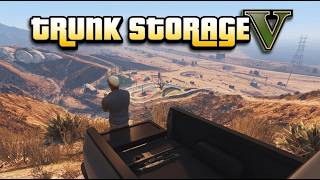
An immersive, lightweight, and realistic vehicle inventory system designed for GTA V Story Mode. Store weapons, ammo, custom components, and outfits in your vehicle trunk or glovebox, complete with 3D visible props resting directly on the carpet or truck bed.
==================================================
FEATURES
==================================================
- 3D Weapon Props: Stored firearms (rifles, shotguns, handguns) and tactical duffel bags physically render inside your trunk or truck bed with proper attachments and weapon tints!
- Full Controller & Keyboard Support: Seamlessly navigate, deposit, and withdraw using Xbox / PlayStation gamepads (D-Pad Right to interact, D-Pad Left + LT/L2 for glovebox) or Keyboard (E / J).
- Realistic Weight & Physics Sag: Storing heavy arsenals adds realistic vehicle mass, lowering suspension and realistically altering braking and handling.
- Glovebox Quick-Access: Access handguns, compact SMGs, and melee weapons right from inside the driver's seat.
- Mobile Wardrobe: Save and swap your favorite custom outfits directly from any vehicle trunk.
- Universal Vehicle Support: Fully compatible with Sedans, SUVs, Coupes, Muscle Cars, Pickup Trucks, Vans, and Motorcycles.
- Auto-Saving INI Storage: Persistent inventory saved per vehicle license plate.
==================================================
FIELD GUNSMITH WORKBENCH
==================================================
Turn any vehicle trunk into a mobile armorer's station:
- Interactive 3D Workbench: Inspect your weapon up close with a cinematic camera featuring 360-degree rotation and zoom controls.
- 6 Modular Tuning Slots:
* Optics: Red Dot sights, Holographic sights, Scopes & Thermal optics.
* Barrels & Muzzles: Suppressors, Muzzle Brakes, and Heavy Barrels.
* Underbarrel & Accessories: Tactical Flashlights, Lasers, and Foregrips.
* Magazines: Extended Clips, Drum Magazines, and Special Ammo types.
* Finishes & Camo: Custom weapon tints, Deluxe engravings, and liveries.
- Dynamic Weapon Stats: Real-time stat bars reflect attachment changes on Damage, Accuracy, Fire Rate, Recoil Control, and Mobility.
- Persistent Customization: All installed attachments and tints save automatically to your vehicle's inventory and reflect on physical 3D props inside your trunk!
==================================================
REQUIREMENTS
==================================================
- Grand Theft Auto V (Latest build recommended)
- Script Hook V (by Alexander Blade)
- ScriptHookVDotNet v3.6.0+
==================================================
INSTALLATION
==================================================
1. Ensure Script Hook V and ScriptHookVDotNet are installed in your GTA V root folder.
2. Drag and drop TrunkStorageScript.dll into your `Grand Theft Auto V\scripts\` folder.
3. Launch GTA V and walk up to the rear of any vehicle!
==================================================
CONTROLS
==================================================
KEYBOARD:
- Open Trunk: Press [E] near the trunk
- Open Glovebox: Press [J] while inside vehicle
- Navigate: Arrow Keys / Enter / Esc
CONTROLLER (Xbox / PlayStation):
- Open Trunk: Press [D-Pad Right] near trunk
- Open Glovebox: Hold [LT / L2] + Press [D-Pad Left] inside vehicle
- Navigate: D-Pad / [A / Cross] to Select / [B / Circle / R3] to Close
Added a lockpicking minigame to pick locked vehicle trunks.
Added Photo Mode (Press U) to hide the menu for clean screenshots of your trunk and outfits.
Added settings to toggle on-screen interaction prompts and menu help text on or off.
Trunks on random NPC cars are now locked by default.
Breaking pins or failing can set off the car alarm and alert the police.
Small items (pistols, knives, flashlights) now spawn in the glovebox.
Heavy weapons and tools (shotguns, rifles, crowbars, bats) spawn in the trunk.
Personal vehicles will never spawn random loot.
Fixed game crashes and improved performance.
Controls:
Photo Mode: Press U while in menu to toggle UI visibility
Lockpick (PC): Mouse = Move Pin | A, D, or Space = Turn Lock | ESC = Exit
Lockpick (Gamepad): Left Stick = Move Pin | RT or A Button = Turn Lock | B = Exit
An immersive, lightweight, and realistic vehicle inventory system designed for GTA V Story Mode. Store weapons, ammo, custom components, and outfits in your vehicle trunk or glovebox, complete with 3D visible props resting directly on the carpet or truck bed.
==================================================
FEATURES
==================================================
- 3D Weapon Props: Stored firearms (rifles, shotguns, handguns) and tactical duffel bags physically render inside your trunk or truck bed with proper attachments and weapon tints!
- Full Controller & Keyboard Support: Seamlessly navigate, deposit, and withdraw using Xbox / PlayStation gamepads (D-Pad Right to interact, D-Pad Left + LT/L2 for glovebox) or Keyboard (E / J).
- Realistic Weight & Physics Sag: Storing heavy arsenals adds realistic vehicle mass, lowering suspension and realistically altering braking and handling.
- Glovebox Quick-Access: Access handguns, compact SMGs, and melee weapons right from inside the driver's seat.
- Mobile Wardrobe: Save and swap your favorite custom outfits directly from any vehicle trunk.
- Universal Vehicle Support: Fully compatible with Sedans, SUVs, Coupes, Muscle Cars, Pickup Trucks, Vans, and Motorcycles.
- Auto-Saving INI Storage: Persistent inventory saved per vehicle license plate.
==================================================
FIELD GUNSMITH WORKBENCH
==================================================
Turn any vehicle trunk into a mobile armorer's station:
- Interactive 3D Workbench: Inspect your weapon up close with a cinematic camera featuring 360-degree rotation and zoom controls.
- 6 Modular Tuning Slots:
* Optics: Red Dot sights, Holographic sights, Scopes & Thermal optics.
* Barrels & Muzzles: Suppressors, Muzzle Brakes, and Heavy Barrels.
* Underbarrel & Accessories: Tactical Flashlights, Lasers, and Foregrips.
* Magazines: Extended Clips, Drum Magazines, and Special Ammo types.
* Finishes & Camo: Custom weapon tints, Deluxe engravings, and liveries.
- Dynamic Weapon Stats: Real-time stat bars reflect attachment changes on Damage, Accuracy, Fire Rate, Recoil Control, and Mobility.
- Persistent Customization: All installed attachments and tints save automatically to your vehicle's inventory and reflect on physical 3D props inside your trunk!
==================================================
REQUIREMENTS
==================================================
- Grand Theft Auto V (Latest build recommended)
- Script Hook V (by Alexander Blade)
- ScriptHookVDotNet v3.6.0+
==================================================
INSTALLATION
==================================================
1. Ensure Script Hook V and ScriptHookVDotNet are installed in your GTA V root folder.
2. Drag and drop TrunkStorageScript.dll into your `Grand Theft Auto V\scripts\` folder.
3. Launch GTA V and walk up to the rear of any vehicle!
==================================================
CONTROLS
==================================================
KEYBOARD:
- Open Trunk: Press [E] near the trunk
- Open Glovebox: Press [J] while inside vehicle
- Navigate: Arrow Keys / Enter / Esc
CONTROLLER (Xbox / PlayStation):
- Open Trunk: Press [D-Pad Right] near trunk
- Open Glovebox: Hold [LT / L2] + Press [D-Pad Left] inside vehicle
- Navigate: D-Pad / [A / Cross] to Select / [B / Circle / R3] to Close
최초 업로드: 3일 전
마지막 업로드: 1일 전
마지막 다운로드: 3분 전
댓글 6
v1.1 Changelog:
Added a lockpicking minigame to pick locked vehicle trunks.
Added Photo Mode (Press U) to hide the menu for clean screenshots of your trunk and outfits.
Added settings to toggle on-screen interaction prompts and menu help text on or off.
Trunks on random NPC cars are now locked by default.
Breaking pins or failing can set off the car alarm and alert the police.
Small items (pistols, knives, flashlights) now spawn in the glovebox.
Heavy weapons and tools (shotguns, rifles, crowbars, bats) spawn in the trunk.
Personal vehicles will never spawn random loot.
Fixed game crashes and improved performance.
Controls:
Photo Mode: Press U while in menu to toggle UI visibility
Lockpick (PC): Mouse = Move Pin | A, D, or Space = Turn Lock | ESC = Exit
Lockpick (Gamepad): Left Stick = Move Pin | RT or A Button = Turn Lock | B = Exit
An immersive, lightweight, and realistic vehicle inventory system designed for GTA V Story Mode. Store weapons, ammo, custom components, and outfits in your vehicle trunk or glovebox, complete with 3D visible props resting directly on the carpet or truck bed.
==================================================
FEATURES
==================================================
- 3D Weapon Props: Stored firearms (rifles, shotguns, handguns) and tactical duffel bags physically render inside your trunk or truck bed with proper attachments and weapon tints!
- Full Controller & Keyboard Support: Seamlessly navigate, deposit, and withdraw using Xbox / PlayStation gamepads (D-Pad Right to interact, D-Pad Left + LT/L2 for glovebox) or Keyboard (E / J).
- Realistic Weight & Physics Sag: Storing heavy arsenals adds realistic vehicle mass, lowering suspension and realistically altering braking and handling.
- Glovebox Quick-Access: Access handguns, compact SMGs, and melee weapons right from inside the driver's seat.
- Mobile Wardrobe: Save and swap your favorite custom outfits directly from any vehicle trunk.
- Universal Vehicle Support: Fully compatible with Sedans, SUVs, Coupes, Muscle Cars, Pickup Trucks, Vans, and Motorcycles.
- Auto-Saving INI Storage: Persistent inventory saved per vehicle license plate.
==================================================
FIELD GUNSMITH WORKBENCH
==================================================
Turn any vehicle trunk into a mobile armorer's station:
- Interactive 3D Workbench: Inspect your weapon up close with a cinematic camera featuring 360-degree rotation and zoom controls.
- 6 Modular Tuning Slots:
* Optics: Red Dot sights, Holographic sights, Scopes & Thermal optics.
* Barrels & Muzzles: Suppressors, Muzzle Brakes, and Heavy Barrels.
* Underbarrel & Accessories: Tactical Flashlights, Lasers, and Foregrips.
* Magazines: Extended Clips, Drum Magazines, and Special Ammo types.
* Finishes & Camo: Custom weapon tints, Deluxe engravings, and liveries.
- Dynamic Weapon Stats: Real-time stat bars reflect attachment changes on Damage, Accuracy, Fire Rate, Recoil Control, and Mobility.
- Persistent Customization: All installed attachments and tints save automatically to your vehicle's inventory and reflect on physical 3D props inside your trunk!
==================================================
REQUIREMENTS
==================================================
- Grand Theft Auto V (Latest build recommended)
- Script Hook V (by Alexander Blade)
- ScriptHookVDotNet v3.6.0+
==================================================
INSTALLATION
==================================================
1. Ensure Script Hook V and ScriptHookVDotNet are installed in your GTA V root folder.
2. Drag and drop TrunkStorageScript.dll into your `Grand Theft Auto V\scripts\` folder.
3. Launch GTA V and walk up to the rear of any vehicle!
==================================================
CONTROLS
==================================================
KEYBOARD:
- Open Trunk: Press [E] near the trunk
- Open Glovebox: Press [J] while inside vehicle
- Navigate: Arrow Keys / Enter / Esc
CONTROLLER (Xbox / PlayStation):
- Open Trunk: Press [D-Pad Right] near trunk
- Open Glovebox: Hold [LT / L2] + Press [D-Pad Left] inside vehicle
- Navigate: D-Pad / [A / Cross] to Select / [B / Circle / R3] to Close
Added a lockpicking minigame to pick locked vehicle trunks.
Added Photo Mode (Press U) to hide the menu for clean screenshots of your trunk and outfits.
Added settings to toggle on-screen interaction prompts and menu help text on or off.
Trunks on random NPC cars are now locked by default.
Breaking pins or failing can set off the car alarm and alert the police.
Small items (pistols, knives, flashlights) now spawn in the glovebox.
Heavy weapons and tools (shotguns, rifles, crowbars, bats) spawn in the trunk.
Personal vehicles will never spawn random loot.
Fixed game crashes and improved performance.
Controls:
Photo Mode: Press U while in menu to toggle UI visibility
Lockpick (PC): Mouse = Move Pin | A, D, or Space = Turn Lock | ESC = Exit
Lockpick (Gamepad): Left Stick = Move Pin | RT or A Button = Turn Lock | B = Exit
An immersive, lightweight, and realistic vehicle inventory system designed for GTA V Story Mode. Store weapons, ammo, custom components, and outfits in your vehicle trunk or glovebox, complete with 3D visible props resting directly on the carpet or truck bed.
==================================================
FEATURES
==================================================
- 3D Weapon Props: Stored firearms (rifles, shotguns, handguns) and tactical duffel bags physically render inside your trunk or truck bed with proper attachments and weapon tints!
- Full Controller & Keyboard Support: Seamlessly navigate, deposit, and withdraw using Xbox / PlayStation gamepads (D-Pad Right to interact, D-Pad Left + LT/L2 for glovebox) or Keyboard (E / J).
- Realistic Weight & Physics Sag: Storing heavy arsenals adds realistic vehicle mass, lowering suspension and realistically altering braking and handling.
- Glovebox Quick-Access: Access handguns, compact SMGs, and melee weapons right from inside the driver's seat.
- Mobile Wardrobe: Save and swap your favorite custom outfits directly from any vehicle trunk.
- Universal Vehicle Support: Fully compatible with Sedans, SUVs, Coupes, Muscle Cars, Pickup Trucks, Vans, and Motorcycles.
- Auto-Saving INI Storage: Persistent inventory saved per vehicle license plate.
==================================================
FIELD GUNSMITH WORKBENCH
==================================================
Turn any vehicle trunk into a mobile armorer's station:
- Interactive 3D Workbench: Inspect your weapon up close with a cinematic camera featuring 360-degree rotation and zoom controls.
- 6 Modular Tuning Slots:
* Optics: Red Dot sights, Holographic sights, Scopes & Thermal optics.
* Barrels & Muzzles: Suppressors, Muzzle Brakes, and Heavy Barrels.
* Underbarrel & Accessories: Tactical Flashlights, Lasers, and Foregrips.
* Magazines: Extended Clips, Drum Magazines, and Special Ammo types.
* Finishes & Camo: Custom weapon tints, Deluxe engravings, and liveries.
- Dynamic Weapon Stats: Real-time stat bars reflect attachment changes on Damage, Accuracy, Fire Rate, Recoil Control, and Mobility.
- Persistent Customization: All installed attachments and tints save automatically to your vehicle's inventory and reflect on physical 3D props inside your trunk!
==================================================
REQUIREMENTS
==================================================
- Grand Theft Auto V (Latest build recommended)
- Script Hook V (by Alexander Blade)
- ScriptHookVDotNet v3.6.0+
==================================================
INSTALLATION
==================================================
1. Ensure Script Hook V and ScriptHookVDotNet are installed in your GTA V root folder.
2. Drag and drop TrunkStorageScript.dll into your `Grand Theft Auto V\scripts\` folder.
3. Launch GTA V and walk up to the rear of any vehicle!
==================================================
CONTROLS
==================================================
KEYBOARD:
- Open Trunk: Press [E] near the trunk
- Open Glovebox: Press [J] while inside vehicle
- Navigate: Arrow Keys / Enter / Esc
CONTROLLER (Xbox / PlayStation):
- Open Trunk: Press [D-Pad Right] near trunk
- Open Glovebox: Hold [LT / L2] + Press [D-Pad Left] inside vehicle
- Navigate: D-Pad / [A / Cross] to Select / [B / Circle / R3] to Close
최초 업로드: 3일 전
마지막 업로드: 1일 전
마지막 다운로드: 3분 전
 5mods on Discord

this is sick!
love it! Just think it’d be cool if you could only open the trunk of unlocked cars, and maybe add a way to toggle off the keybind overlay.
Everything else is perfect!
Man I love how this is implemented, I just wish you went about it a little more vanilla, using help messages and the game's UI, not really a fan of this claude style ui new mods are having they break the game aesthetics, nevertheless, gotta give you some props, the mod is very nice
@kikeraudaaaa I might look into this had the idea while making the mod but didn’t go through with it
@thalilmythos Glad you like it I personally like the UI think it feels “clean”
the lockpicking was great idea it works perfectly! but disable the on-screen interaction prompts and changing the keybinds doesnt work for me.