Sasuke Sharingan Fire Aim Mod v.1.1



![Honkai: Star Rail - Kafka [Add-On Ped]](https://img.gta5-mods.com/q75-w500-h333-cfill/images/honkai-star-rail-kafka-add-on-ped/c36d18-IMG_20260911_230309.jpg "Honkai: Star Rail - Kafka [Add-On Ped]")
![Lucy Heartfilia – Fairy Tail [Add-On Ped]](https://img.gta5-mods.com/q75-w500-h333-cfill/images/lucy-heartfilia-fairy-tail-add-on-ped-kong2545/effbb6-903126-gallery15.jpg "Lucy Heartfilia – Fairy Tail [Add-On Ped]")


35
0
35
0
FireAimMod
==========
Description
-----------
This mod is Sasuke Uchiha's Sharingan mod for Grand Theft Auto V.
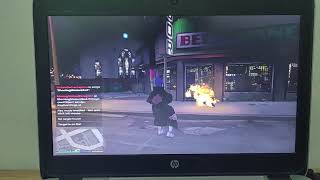
I created and wrote the scripts for this mod so that everyone can use it in their game. The current version allows the player to activate the ability, aim at an NPC, and set the target on fire.
I have also fixed the issue where pressing U, aiming at an NPC, and then pressing the left mouse button to activate the fire ability would conflict with the character's normal punching attack. Now, when Fire Mode is enabled, the left mouse button is used exclusively for the fire ability.
I hope that in future versions, I can improve Sasuke's Sharingan to make it look more realistic, detailed, and closer to the original Naruto style.
Thank you for downloading and using my mod!
Features
--------
- Press U to enable or disable Fire Mode.
- Plays a custom fire sound when Fire Mode is enabled.
- Displays a crosshair in the center of the screen.
- Aim at an NPC and press the left mouse button to set the target on fire.
- Uses a 75-meter aiming range.
- Only human NPCs (Peds) can be targeted.
- Vehicles and other objects cannot be targeted or set on fire.
- The left mouse button will not perform the normal punching attack while Fire Mode is enabled.
- The fire ability no longer conflicts with the character's normal punching attack.
- Custom fire sound is embedded directly inside the DLL.
- No separate sound file is required in the scripts folder.
Controls
--------
U
Enable / Disable Fire Mode
Left Mouse Button
Ignite the targeted NPC
Note:
While Fire Mode is enabled, the left mouse button is used exclusively
for the fire ability instead of the normal punching attack.
Installation
------------
1. Install ScriptHookV.
2. Install ScriptHookVDotNet.
3. Open your GTA V installation folder.
4. Open the "scripts" folder.
5. Copy "FireAimMod.dll" into the "scripts" folder.
The final path should look like:
GTA V\scripts\FireAimMod.dll
6. Launch GTA V.
How to Use
----------
1. Press U to enable Fire Mode.
2. The crosshair will appear in the center of the screen.
3. Aim at an NPC.
4. Press the left mouse button.
5. If the NPC is within the 75-meter range and detected correctly, the NPC will catch fire.
6. While Fire Mode is enabled, pressing the left mouse button will not make the player perform the normal punching attack.
7. If you aim at a vehicle or another object, the fire effect will not be activated.
Press U again to disable Fire Mode and restore the normal controls.
Target Restrictions
-------------------
- The ability can only target human NPCs (Peds).
- Vehicles cannot be targeted.
- Objects cannot be targeted.
- The player cannot target themselves.
- Dead NPCs cannot be targeted.
- The maximum aiming range is 75 meters.
Requirements
------------
- Grand Theft Auto V
- ScriptHookV
- ScriptHookVDotNet
Credits
-------
Created by Kong2545
Notes
-----
The fire sound is embedded inside FireAimMod.dll and does not need to be installed separately.
This mod was created for Grand Theft Auto V.
While Fire Mode is enabled, the normal left-mouse-button punching attack is disabled so that it does not interfere with the fire ability.
I hope you enjoy using the mod, and I plan to improve Sasuke's Sharingan and its effects in future versions.
Future versions may include more realistic and detailed Sharingan effects and additional abilities.
==========
Description
-----------
This mod is Sasuke Uchiha's Sharingan mod for Grand Theft Auto V.
I created and wrote the scripts for this mod so that everyone can use it in their game. The current version allows the player to activate the ability, aim at an NPC, and set the target on fire.
I have also fixed the issue where pressing U, aiming at an NPC, and then pressing the left mouse button to activate the fire ability would conflict with the character's normal punching attack. Now, when Fire Mode is enabled, the left mouse button is used exclusively for the fire ability.
I hope that in future versions, I can improve Sasuke's Sharingan to make it look more realistic, detailed, and closer to the original Naruto style.
Thank you for downloading and using my mod!
Features
--------
- Press U to enable or disable Fire Mode.
- Plays a custom fire sound when Fire Mode is enabled.
- Displays a crosshair in the center of the screen.
- Aim at an NPC and press the left mouse button to set the target on fire.
- Uses a 75-meter aiming range.
- Only human NPCs (Peds) can be targeted.
- Vehicles and other objects cannot be targeted or set on fire.
- The left mouse button will not perform the normal punching attack while Fire Mode is enabled.
- The fire ability no longer conflicts with the character's normal punching attack.
- Custom fire sound is embedded directly inside the DLL.
- No separate sound file is required in the scripts folder.
Controls
--------
U
Enable / Disable Fire Mode
Left Mouse Button
Ignite the targeted NPC
Note:
While Fire Mode is enabled, the left mouse button is used exclusively
for the fire ability instead of the normal punching attack.
Installation
------------
1. Install ScriptHookV.
2. Install ScriptHookVDotNet.
3. Open your GTA V installation folder.
4. Open the "scripts" folder.
5. Copy "FireAimMod.dll" into the "scripts" folder.
The final path should look like:
GTA V\scripts\FireAimMod.dll
6. Launch GTA V.
How to Use
----------
1. Press U to enable Fire Mode.
2. The crosshair will appear in the center of the screen.
3. Aim at an NPC.
4. Press the left mouse button.
5. If the NPC is within the 75-meter range and detected correctly, the NPC will catch fire.
6. While Fire Mode is enabled, pressing the left mouse button will not make the player perform the normal punching attack.
7. If you aim at a vehicle or another object, the fire effect will not be activated.
Press U again to disable Fire Mode and restore the normal controls.
Target Restrictions
-------------------
- The ability can only target human NPCs (Peds).
- Vehicles cannot be targeted.
- Objects cannot be targeted.
- The player cannot target themselves.
- Dead NPCs cannot be targeted.
- The maximum aiming range is 75 meters.
Requirements
------------
- Grand Theft Auto V
- ScriptHookV
- ScriptHookVDotNet
Credits
-------
Created by Kong2545
Notes
-----
The fire sound is embedded inside FireAimMod.dll and does not need to be installed separately.
This mod was created for Grand Theft Auto V.
While Fire Mode is enabled, the normal left-mouse-button punching attack is disabled so that it does not interfere with the fire ability.
I hope you enjoy using the mod, and I plan to improve Sasuke's Sharingan and its effects in future versions.
Future versions may include more realistic and detailed Sharingan effects and additional abilities.
Pertama dimuat naik: 1 hari yang lalu
Tarikh Kemaskini: 9 hours ago
Last Downloaded: 18 minit yang lalu
1 Komen
More mods by Kong2545:
FireAimMod
==========
Description
-----------
This mod is Sasuke Uchiha's Sharingan mod for Grand Theft Auto V.
I created and wrote the scripts for this mod so that everyone can use it in their game. The current version allows the player to activate the ability, aim at an NPC, and set the target on fire.
I have also fixed the issue where pressing U, aiming at an NPC, and then pressing the left mouse button to activate the fire ability would conflict with the character's normal punching attack. Now, when Fire Mode is enabled, the left mouse button is used exclusively for the fire ability.
I hope that in future versions, I can improve Sasuke's Sharingan to make it look more realistic, detailed, and closer to the original Naruto style.
Thank you for downloading and using my mod!
Features
--------
- Press U to enable or disable Fire Mode.
- Plays a custom fire sound when Fire Mode is enabled.
- Displays a crosshair in the center of the screen.
- Aim at an NPC and press the left mouse button to set the target on fire.
- Uses a 75-meter aiming range.
- Only human NPCs (Peds) can be targeted.
- Vehicles and other objects cannot be targeted or set on fire.
- The left mouse button will not perform the normal punching attack while Fire Mode is enabled.
- The fire ability no longer conflicts with the character's normal punching attack.
- Custom fire sound is embedded directly inside the DLL.
- No separate sound file is required in the scripts folder.
Controls
--------
U
Enable / Disable Fire Mode
Left Mouse Button
Ignite the targeted NPC
Note:
While Fire Mode is enabled, the left mouse button is used exclusively
for the fire ability instead of the normal punching attack.
Installation
------------
1. Install ScriptHookV.
2. Install ScriptHookVDotNet.
3. Open your GTA V installation folder.
4. Open the "scripts" folder.
5. Copy "FireAimMod.dll" into the "scripts" folder.
The final path should look like:
GTA V\scripts\FireAimMod.dll
6. Launch GTA V.
How to Use
----------
1. Press U to enable Fire Mode.
2. The crosshair will appear in the center of the screen.
3. Aim at an NPC.
4. Press the left mouse button.
5. If the NPC is within the 75-meter range and detected correctly, the NPC will catch fire.
6. While Fire Mode is enabled, pressing the left mouse button will not make the player perform the normal punching attack.
7. If you aim at a vehicle or another object, the fire effect will not be activated.
Press U again to disable Fire Mode and restore the normal controls.
Target Restrictions
-------------------
- The ability can only target human NPCs (Peds).
- Vehicles cannot be targeted.
- Objects cannot be targeted.
- The player cannot target themselves.
- Dead NPCs cannot be targeted.
- The maximum aiming range is 75 meters.
Requirements
------------
- Grand Theft Auto V
- ScriptHookV
- ScriptHookVDotNet
Credits
-------
Created by Kong2545
Notes
-----
The fire sound is embedded inside FireAimMod.dll and does not need to be installed separately.
This mod was created for Grand Theft Auto V.
While Fire Mode is enabled, the normal left-mouse-button punching attack is disabled so that it does not interfere with the fire ability.
I hope you enjoy using the mod, and I plan to improve Sasuke's Sharingan and its effects in future versions.
Future versions may include more realistic and detailed Sharingan effects and additional abilities.
==========
Description
-----------
This mod is Sasuke Uchiha's Sharingan mod for Grand Theft Auto V.
I created and wrote the scripts for this mod so that everyone can use it in their game. The current version allows the player to activate the ability, aim at an NPC, and set the target on fire.
I have also fixed the issue where pressing U, aiming at an NPC, and then pressing the left mouse button to activate the fire ability would conflict with the character's normal punching attack. Now, when Fire Mode is enabled, the left mouse button is used exclusively for the fire ability.
I hope that in future versions, I can improve Sasuke's Sharingan to make it look more realistic, detailed, and closer to the original Naruto style.
Thank you for downloading and using my mod!
Features
--------
- Press U to enable or disable Fire Mode.
- Plays a custom fire sound when Fire Mode is enabled.
- Displays a crosshair in the center of the screen.
- Aim at an NPC and press the left mouse button to set the target on fire.
- Uses a 75-meter aiming range.
- Only human NPCs (Peds) can be targeted.
- Vehicles and other objects cannot be targeted or set on fire.
- The left mouse button will not perform the normal punching attack while Fire Mode is enabled.
- The fire ability no longer conflicts with the character's normal punching attack.
- Custom fire sound is embedded directly inside the DLL.
- No separate sound file is required in the scripts folder.
Controls
--------
U
Enable / Disable Fire Mode
Left Mouse Button
Ignite the targeted NPC
Note:
While Fire Mode is enabled, the left mouse button is used exclusively
for the fire ability instead of the normal punching attack.
Installation
------------
1. Install ScriptHookV.
2. Install ScriptHookVDotNet.
3. Open your GTA V installation folder.
4. Open the "scripts" folder.
5. Copy "FireAimMod.dll" into the "scripts" folder.
The final path should look like:
GTA V\scripts\FireAimMod.dll
6. Launch GTA V.
How to Use
----------
1. Press U to enable Fire Mode.
2. The crosshair will appear in the center of the screen.
3. Aim at an NPC.
4. Press the left mouse button.
5. If the NPC is within the 75-meter range and detected correctly, the NPC will catch fire.
6. While Fire Mode is enabled, pressing the left mouse button will not make the player perform the normal punching attack.
7. If you aim at a vehicle or another object, the fire effect will not be activated.
Press U again to disable Fire Mode and restore the normal controls.
Target Restrictions
-------------------
- The ability can only target human NPCs (Peds).
- Vehicles cannot be targeted.
- Objects cannot be targeted.
- The player cannot target themselves.
- Dead NPCs cannot be targeted.
- The maximum aiming range is 75 meters.
Requirements
------------
- Grand Theft Auto V
- ScriptHookV
- ScriptHookVDotNet
Credits
-------
Created by Kong2545
Notes
-----
The fire sound is embedded inside FireAimMod.dll and does not need to be installed separately.
This mod was created for Grand Theft Auto V.
While Fire Mode is enabled, the normal left-mouse-button punching attack is disabled so that it does not interfere with the fire ability.
I hope you enjoy using the mod, and I plan to improve Sasuke's Sharingan and its effects in future versions.
Future versions may include more realistic and detailed Sharingan effects and additional abilities.
Pertama dimuat naik: 1 hari yang lalu
Tarikh Kemaskini: 9 hours ago
Last Downloaded: 18 minit yang lalu
 5mods on Discord

I have also fixed the issue where pressing U, aiming at an NPC, and then pressing the left mouse button to activate the fire ability would conflict with the character's normal punching attack. Now, when Fire Mode is enabled, the left mouse button is used exclusively for the fire ability.