Driver's Eye 1.2 (No Watermark)


![Stunt Director 0.2.2 [Legacy & Enhanced]](https://img.gta5-mods.com/q75-w500-h333-cfill/images/stunt-director-beta-multi-actor-animation-sequence-studio-leagcy-enhanced/f447b0-stunt.jpg "Stunt Director 0.2.2 [Legacy & Enhanced]")


3 436
39
3 436
39
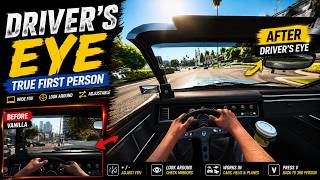
The stock first person camera in GTA V is way too tight, you're basically nose to the windshield and can't see half the dashboard. This widens it out so you can actually see the wheel and what's around you, works in cars, helis, and planes.
Free version, no watermark. There's a Premium version too with a few extra features, link's in the Discord below.
Everything runs off a menu now (F6) instead of the old +/- keys. FOV, camera height, auto-recenter (view drifts back to center if you stop looking around), all adjustable live and it remembers your settings.
Requirements: ScriptHookV, GTA V Legacy version.
Install: drop DriversEye.asi in your GTA V folder next to GTA5.exe, get in a car, hit V for first person.
Controls: F6 opens the menu, hold V to go back to third person.
Changelog
v1.2 - removed the on-screen watermark entirely.
v1.1 - new settings menu, added a master on/off toggle and auto-recenter, fixed numpad navigation, fixed a bug where exiting first person sometimes landed on the wrong third-person distance, fixed the driver's head clipping into view under hard braking. Premium side gets per-vehicle height memory, adjustable look sensitivity, dynamic FOV, corner lean, and passenger seat support now too.
v1.0 - first release, wide FOV for driving/flying with live adjustment and look-around.
Discord if you want the Premium version, have a bug to report, or just want to post a clip:
https://discord.gg/UfWGqrCVph
Free version, no watermark. There's a Premium version too with a few extra features, link's in the Discord below.
Everything runs off a menu now (F6) instead of the old +/- keys. FOV, camera height, auto-recenter (view drifts back to center if you stop looking around), all adjustable live and it remembers your settings.
Requirements: ScriptHookV, GTA V Legacy version.
Install: drop DriversEye.asi in your GTA V folder next to GTA5.exe, get in a car, hit V for first person.
Controls: F6 opens the menu, hold V to go back to third person.
Changelog
v1.2 - removed the on-screen watermark entirely.
v1.1 - new settings menu, added a master on/off toggle and auto-recenter, fixed numpad navigation, fixed a bug where exiting first person sometimes landed on the wrong third-person distance, fixed the driver's head clipping into view under hard braking. Premium side gets per-vehicle height memory, adjustable look sensitivity, dynamic FOV, corner lean, and passenger seat support now too.
v1.0 - first release, wide FOV for driving/flying with live adjustment and look-around.
Discord if you want the Premium version, have a bug to report, or just want to post a clip:
https://discord.gg/UfWGqrCVph
Først Lastet opp: 19. juli 2026
Sist Oppdatert: 31. juli 2026
Last Downloaded: 10 minutter siden
20 Kommentarer
More mods by AntonioMontanaGTA:
The stock first person camera in GTA V is way too tight, you're basically nose to the windshield and can't see half the dashboard. This widens it out so you can actually see the wheel and what's around you, works in cars, helis, and planes.
Free version, no watermark. There's a Premium version too with a few extra features, link's in the Discord below.
Everything runs off a menu now (F6) instead of the old +/- keys. FOV, camera height, auto-recenter (view drifts back to center if you stop looking around), all adjustable live and it remembers your settings.
Requirements: ScriptHookV, GTA V Legacy version.
Install: drop DriversEye.asi in your GTA V folder next to GTA5.exe, get in a car, hit V for first person.
Controls: F6 opens the menu, hold V to go back to third person.
Changelog
v1.2 - removed the on-screen watermark entirely.
v1.1 - new settings menu, added a master on/off toggle and auto-recenter, fixed numpad navigation, fixed a bug where exiting first person sometimes landed on the wrong third-person distance, fixed the driver's head clipping into view under hard braking. Premium side gets per-vehicle height memory, adjustable look sensitivity, dynamic FOV, corner lean, and passenger seat support now too.
v1.0 - first release, wide FOV for driving/flying with live adjustment and look-around.
Discord if you want the Premium version, have a bug to report, or just want to post a clip:
https://discord.gg/UfWGqrCVph
Free version, no watermark. There's a Premium version too with a few extra features, link's in the Discord below.
Everything runs off a menu now (F6) instead of the old +/- keys. FOV, camera height, auto-recenter (view drifts back to center if you stop looking around), all adjustable live and it remembers your settings.
Requirements: ScriptHookV, GTA V Legacy version.
Install: drop DriversEye.asi in your GTA V folder next to GTA5.exe, get in a car, hit V for first person.
Controls: F6 opens the menu, hold V to go back to third person.
Changelog
v1.2 - removed the on-screen watermark entirely.
v1.1 - new settings menu, added a master on/off toggle and auto-recenter, fixed numpad navigation, fixed a bug where exiting first person sometimes landed on the wrong third-person distance, fixed the driver's head clipping into view under hard braking. Premium side gets per-vehicle height memory, adjustable look sensitivity, dynamic FOV, corner lean, and passenger seat support now too.
v1.0 - first release, wide FOV for driving/flying with live adjustment and look-around.
Discord if you want the Premium version, have a bug to report, or just want to post a clip:
https://discord.gg/UfWGqrCVph
Først Lastet opp: 19. juli 2026
Sist Oppdatert: 31. juli 2026
Last Downloaded: 10 minutter siden
 5mods on Discord

Why is there even a water mark in general? im not paying 5$ bucks for ts
Wait is this alternate first person in drive mode? seems idenitcal...
WATER MARKED MOD? dude..
What's the difference between dynamic vehicle camera and this? Isn't dvc better than this?
The plot is interesting, but this mod is so raw. The execution is kinda 2/10.
i need this camera to snap back to the center
A minha nem funcionou ou não sei ativar
correction, i need a way for it to center the camera instantly
@eddiesanti0903 join discord
@AntonioMontanaGTA lead me to a Link n ill join
water marking mods... really?
@shifuguru it’s not like anyone will steal the mod bro just remove the water mark
watermark bro.why watermark for a mod?
watermark for a mod where you.. didnt bother to create a design and used ai
@oldmodel watermark is removed bro, and no part of this was made with ai
@Snacer it's removed
@qcvntrx very very long time to reply! Seems like people like you couldn’t 🥹✌️
@qcvntrx Hey all you're stuff from patreon got leaked right now on launcher leaks.
karma is a dish best served digitally
@ReNNie @El1 his patreon got deleted too. I was digging around in his files all of them are from sketchfab or other websites. His gore mod is also more gore but repackaged. Ren if u want to do something about you can whenever