Ghostline V [Legacy & Enhanced] 0.6


![Self Radio V [Legacy & Enhanced]](https://img.gta5-mods.com/q75-w500-h333-cfill/images/self-radio-v/9bccf6-5345ewf.jpeg "Self Radio V [Legacy & Enhanced]")


1.423
33
1.423
33
GHOSTLINE V turns your phone into a cyberpunk / Watch Dogs-style hacking device for GTA V Story Mode. Scan the world around you and take instant control of vehicles, police, civilians, traffic lights, ATMs, trains and the power grid. Lock a target and you're in.
Features
Menu Controls
All controls can be changed in GHOSTLINE V.ini under the [Controls] section.
Gamepad also works out of the box, configurable under the [GamepadControls] section:
It's purely additive – the keyboard keeps working exactly as configured regardless of these, and gamepad controls only activate once a controller was the last input device actually used.
Requirements
Legacy:
Enhanced:
Installation
Legacy:
Enhanced:
Notes
Known Issues
Credits
Permissions
Enjoy! If you find any bugs, please report them along with what you were doing and your GHOSTLINE V.ini settings.
Changelog
0.6
0.5
0.4
0.3
0.2
0.1 Initial Release
Features
- Instant hacking: no minigame – simply lock a target and connect immediately.
- Fully custom HUD: every panel, beam and menu is rendered using raw natives, with no LemonUI or NativeUI dependency.
- Live scan panel: displays the target's name, owner, network and security level in real time.
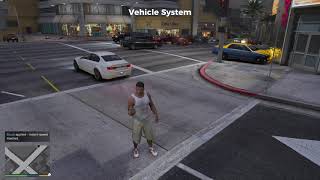
- Vehicle System: Remote Drive (control a vehicle while standing outside it), Engine On/Off, Full Throttle, Boost, Brake, Repair, Open/Close/Lock/Unlock Doors, Alarm Spam, Vehicle Tracker, Explode Engine and Vehicle Data.
- Tow Vehicle (BETA): dispatches a real tow truck that drives to the target, hooks it up and drives off with it. Only works on an empty vehicle – no driver, no passengers.
- False Flag: frame an NPC driver with a fake APB. A real rifle-armed 2-officer unit, then escalates to aggressive PIT and ramming tactics if the chase continues.
- Police System: Enable/Disable Sirens, Fake Dispatch (Robbery, Fight, Explosion or Gunfire), Police Tracker, Clear Wanted and False Wanted.
- Ped System: hack a civilian who's distracted on a phone or tablet – Steal Wallet, Remote Detonate (loots whatever's left in the wallet first), Track Ped and Panic.
- Traffic Light System: All Green, All Red, Blinking Yellow, Random Mode, Traffic Chaos, Green Wave, Red Wave and Restore Normal.
- ATM System: Cash Spill (real cash piles with NPCs scrambling to collect them), ATM Error and Fake Withdrawal.
- ATM Shutdown: dispatches a rifle-armed 2-officer unit that drives to the ATM, parks, walks to the exact machine and guards it.
- Train System: Stop, Turbo, Super Turbo (2x speed), Reverse, Track and Emergency Brake.
- Power Grid System: Blackout District, Restore Power, Alarm Network and Camera Network.
- Overload: blows up the electrical junction box with a real explosion and sparks, triggers a sustained alarm and sends nearby pedestrians and drivers fleeing in panic.
- Chaos Events (no target required): Vehicle Pileup, Massive Police Chase, Bank Panic, Train Disaster, City Blackout, EMP Blast, Riot Mode, Skyfall Plane and Random Event.
- Skyfall Plane: a wave of aircraft (mostly planes, the occasional helicopter) come crashing down out of the sky around you.
- Massive Police Chase: spawns a fleeing suspect, five pursuing police units (driver + gunner) and a police helicopter, all using full pursuit AI.
- Pursuit AI escalation: spawned police units from False Flag and Massive Police Chase become increasingly aggressive over time, eventually performing PIT and ramming maneuvers like vanilla GTA V police.
- Riot Mode: nearby civilians panic over a wide radius, vehicle alarms activate simultaneously and police respond to pursue a fleeing rioter.
- EMP Blast: permanently fries every nearby vehicle except your own – engine dead for good, with a light wisp of smoke off the hood. It won't come back on its own, and nothing (NPC or otherwise) can restart it.
- Custom alarm sounds: drop your own exported .wav files into GHOSTLINE V\Audio\. Overload, ATM Error, Bank Panic and Riot Mode will randomly use your custom clips instead of the built-in fallback. Alarm volume is controlled from the ini. Triggering the same alarm twice in quick succession no longer stacks or cuts the sound – the first one just keeps playing.
- Automatic cleanup: every unit spawned by Chaos Events, Fake Dispatch and False Flag despawns after roughly 3 minutes (1 minute for Skyfall Plane), but only once it is off-screen.
- Safe spawn system: validates spawn positions so vehicles and NPCs never appear directly on top of the player.
Menu Controls
- F5 – Open / Close GHOSTLINE V
- E – Connect to the locked target
- Enter – Confirm selection, or open Chaos Events when no target is locked
- W / S – Navigate the menu
- Backspace – Go back one level / Close the application
All controls can be changed in GHOSTLINE V.ini under the [Controls] section.
Gamepad also works out of the box, configurable under the [GamepadControls] section:
- ToggleControl = FrontendSelect
- BackControl = FrontendCancel
- NavigateUpControl = FrontendUp
- NavigateDownControl = FrontendDown
- SelectControl = FrontendAccept
It's purely additive – the keyboard keeps working exactly as configured regardless of these, and gamepad controls only activate once a controller was the last input device actually used.
Requirements
Legacy:
Enhanced:
Installation
Legacy:
- Install Script Hook V and ScriptHookVDotNet-nightly (x64).
- Copy GHOSTLINE V.dll and GHOSTLINE V.ini into GTA V\scripts.
- (Optional) Place your own exported alarm .wav files into GTA V\scripts\GHOSTLINE V\Audio\.
- Launch GTA V Story Mode. The script starts automatically—press F5 in-game to open it.
Enhanced:
- Install Script Hook V and Script Hook V .NET Enhanced (x64).
- Copy GHOSTLINE V.dll and GHOSTLINE V.ini into GTA V Enhanced\scripts.
- (Optional) Place your own exported alarm .wav files into GTA V Enhanced\scripts\GHOSTLINE V\Audio\.
- Launch GTA V Story Mode (Legacy or Enhanced). The script starts automatically—press F5 in-game to open it.
Notes
- Chaos Events, Fake Dispatch and False Flag spawn real peds and vehicles, so expect a brief performance drop in crowded areas while they are active.
- Per-traffic-light control is not available through GTA V natives. The Traffic Light System approximates the effect by combining junction-wide state changes with direct driver AI tasks.
- Remote Drive hides and freezes the player while forwarding controls into the selected vehicle, as Story Mode has no built-in RC vehicle functionality.
- ATM Shutdown uses a manually mapped database of exact ATM coordinates, ensuring officers walk to the real machine rather than an approximate scan position.
- Ped System's phone/tablet detection is based on an exact prop model match on what's attached to the civilian's hand, not on the animation they're playing – if it ever misses a variant, ShowDebugTargetInfo (see below) will surface the model hash so it can be added.
- Tow Vehicle (BETA) only runs one job at a time and refuses an occupied vehicle up front; if someone climbs in mid-approach, the job cancels instead of towing them off.
- If you encounter an unsupported traffic light or power grid prop, enable [Debug] ShowDebugTargetInfo=true in the ini. GHOSTLINE V will display the model hash so support can be added in a future update.
Known Issues
- Enable Sirens (after a manual Disable Sirens) doesn't reliably restore audio on every vehicle – the light comes back, but the sound sometimes doesn't. This looks like a native engine limitation rather than something purely script-side; still investigating.
- Newly spawned police vehicles can occasionally show a corrupted, oversized siren light glitch. This has been significantly reduced but not fully eliminated – if you see it, it should be rare and vehicle-specific.
Credits
- Script: DexterLooo
Permissions
- Please do not re-upload without permission.
- You may use this script in videos or livestreams. Credit is appreciated.
Enjoy! If you find any bugs, please report them along with what you were doing and your GHOSTLINE V.ini settings.
Changelog
0.6
- Added: Recruit Ped to the Ped System – permanently flips a civilian's loyalty instead of a temporary Puppet Control session. They're added to your own PedGroup, so the game's normal companion AI (follow, take cover, fight whatever you're fighting) kicks in for free, the same way a vanilla squadmate works in story missions. Gets armed with a pistol automatically if they weren't already carrying a weapon.
- Added: Settings Ped to the Ped System – only unlocks once a ped's been recruited. Invincible toggle (single item, flips ON/OFF in place) and a full Weapon menu covering every Rifle, SMG, and Shotgun in the game plus the RPG, so a recruited ally can actually be built into a real backup unit instead of whatever they happened to spawn with.
- Fixed: a dead ped could still be hit with False Flag or Wanted Stars, dispatching units to chase down a corpse that was never going anywhere. Both now check for that and refuse with a clear message instead.
- Fixed: Track Ped's blip had no lifetime of its own – once its ped died, the blip could keep sitting on the map wherever that happened until the game's own cleanup eventually got around to the body, littering the map in the meantime. It now disappears the instant the tracked ped dies.
- Fixed: compiler warnings from a string of Script Hook V .NET input/spawn APIs going obsolete in nightly builds past v3.7.0-nightly.175 (control reads, control-disable calls, and the World.CreateVehicle/CreatePed/CreateProp/CreateCamera family) – all migrated to their current replacements ahead of nightly.188.
- Added: full Script Hook V .NET Enhanced (SHVDNE) compatibility – a single build now runs on GTA V Enhanced exactly like Legacy, no separate branch needed. The static Prop/Ped/Vehicle.Create factories (not yet ported to SHVDNE) were swapped for the universal World.CreateProp/CreatePed/CreateVehicle, and the GTA.Input.Controls wrapper class – which doesn't exist on SHVDNE's older SHVDN base – was swapped for the classic Game.* control methods everywhere the mod reads or disables input.
- Added: full gamepad support for Hack Mode – opening/closing, Back, and menu navigation (Up/Down/Select) all read from a configurable [GamepadControls] block in the ini (defaults to the Frontend button group: Select/Cancel/Up/Down/Accept). Gated behind the game's last-used input method, so it only activates once a controller was actually used and never double-fires alongside keyboard input.
0.5
- Added: Wanted Stars to the Ped System – flag a civilian as 1, 2, or 3 stars. Response scales with the level: more units, tougher health/armor, and better weapons if they resist (MicroSMG → SMG → Rifle). 3 stars also brings in an FIB Granger with two agents riding the sides, matching the real vanilla 4-star response vehicle. Each target randomly resists (fights back) or complies (flees) instead of always doing the same thing, and a floating star marker follows them overhead so you can track who's wanted at a glance.
- Fixed: deleting a vehicle that still had peds seated in it left those peds standing right where the vehicle used to be instead of despawning with it. Fixed at the shared cleanup system level, so every pursuit-style feature benefits, not just the new one.
0.4
- Added: CCTV Hack to the Power Grid System – Camera Network now scans for real in-world security camera props, and if any are found, lets you spectate through them (pan/tilt with the mouse, cycle between multiple feeds) instead of just revealing nearby signatures.
- Added: NPC Profiler to the Ped System – scanning a civilian now shows a made-up age and occupation alongside their actual wallet balance (the same amount Steal Wallet would actually loot, not a random unrelated number).
- Added: GPS Hijack to the Vehicle System – redirect an occupied vehicle's own driver to your current map waypoint instead of taking the wheel yourself (Remote Drive) or towing it away empty (Tow Vehicle).
- Fixed: GPS Hijack drivers would quietly give up and revert to ambient AI partway to a long-distance waypoint, sit idle for ~30 seconds to a minute after actually arriving before resuming normal behavior, and could get recycled by the game's population system entirely if you disconnected from the hack menu mid-trip. The route is now kept alive with periodic re-tasking and stuck detection, the vehicle stays protected for the duration of the hijack, and arrival now hands the driver back to ambient AI immediately with an explicit task instead of leaving them stranded.
- Fixed: selecting any menu item while sitting in a vehicle would exit the vehicle as an unrelated side effect of the same keypress.
- Fixed: the phone's "checking phone" hold animation was being force-replayed every tick while seated in a vehicle (where it can't actually play), for no visible benefit.
- Fixed: gunners in False Flag/Massive Police Chase pursuit units could cause a noticeable stutter switching to their rifle mid-firefight - the weapon asset is now preloaded well before it's actually needed instead of streaming in synchronously at the worst possible moment.
0.3
- Added: False Flag to the Ped System – frame a civilian caught on their phone/tablet with a fake APB, same escalating pursuit as the Vehicle System version.
- Added: Puppet Control to the Ped System – take direct control of an NPC, Watch Dogs-style, while your own body is held safely out of harm's way until you let go.
- Fixed: False Flag and Massive Police Chase units weren't actually shooting. The gunner was tasked with on-foot combat AI while still seated in a moving car (which mostly just made them try to bail out instead of firing), and was carrying a rifle-class weapon that isn't valid for shooting out a car window in the first place. Units now do a proper drive-by with an appropriate weapon, and automatically fall back to a guaranteed on-foot firefight if the drive-by never lines up.
- Fixed: the driver in those same pursuit units was completely unarmed, so even the on-foot fallback had nothing to shoot with.
- Fixed: a vehicle marked persistent while being actively hacked was never released afterward – every vehicle you ever hacked in a session stayed in the world permanently instead of returning to the game's normal cleanup, an unbounded leak that could contribute to memory-related crashes over long sessions.
0.2
- Added: Ped System – hack civilians distracted on a phone or tablet (Steal Wallet, Remote Detonate, Track Ped, Panic).
- Added: Skyfall Plane to Chaos Events – rains aircraft down around the player.
- Added: Tow Vehicle (BETA) to the Vehicle System – only works on empty vehicles.
- Changed: EMP Blast now permanently disables affected vehicles (they can no longer be restarted) and produces a light smoke effect instead of nothing happening.
- Changed: Bank Panic and Riot Mode now affect a wider radius.
- Fixed: Rapidly re-triggering the same alarm no longer stacks overlapping sounds or cuts the first one off.
- Fixed: Skyfall Plane aircraft were despawning the instant they left view (even for a split second) instead of after a proper lifetime.
- Improved: Reworked how newly spawned police vehicles' sirens turn on, reducing (though not fully eliminating – see Known Issues) the oversized light glitch on spawn.
0.1 Initial Release
İlk Yüklenme Zamanı: 21 Temmuz 2026 Salı
Son Güncellenme Zamanı: 6 Ağustos 2026 Perşembe
Last Downloaded: 1 hour ago
All Versions
27 Yorum
More mods by DexterLooo:
GHOSTLINE V turns your phone into a cyberpunk / Watch Dogs-style hacking device for GTA V Story Mode. Scan the world around you and take instant control of vehicles, police, civilians, traffic lights, ATMs, trains and the power grid. Lock a target and you're in.
Features
Menu Controls
All controls can be changed in GHOSTLINE V.ini under the [Controls] section.
Gamepad also works out of the box, configurable under the [GamepadControls] section:
It's purely additive – the keyboard keeps working exactly as configured regardless of these, and gamepad controls only activate once a controller was the last input device actually used.
Requirements
Legacy:
Enhanced:
Installation
Legacy:
Enhanced:
Notes
Known Issues
Credits
Permissions
Enjoy! If you find any bugs, please report them along with what you were doing and your GHOSTLINE V.ini settings.
Changelog
0.6
0.5
0.4
0.3
0.2
0.1 Initial Release
Features
- Instant hacking: no minigame – simply lock a target and connect immediately.
- Fully custom HUD: every panel, beam and menu is rendered using raw natives, with no LemonUI or NativeUI dependency.
- Live scan panel: displays the target's name, owner, network and security level in real time.
- Vehicle System: Remote Drive (control a vehicle while standing outside it), Engine On/Off, Full Throttle, Boost, Brake, Repair, Open/Close/Lock/Unlock Doors, Alarm Spam, Vehicle Tracker, Explode Engine and Vehicle Data.
- Tow Vehicle (BETA): dispatches a real tow truck that drives to the target, hooks it up and drives off with it. Only works on an empty vehicle – no driver, no passengers.
- False Flag: frame an NPC driver with a fake APB. A real rifle-armed 2-officer unit, then escalates to aggressive PIT and ramming tactics if the chase continues.
- Police System: Enable/Disable Sirens, Fake Dispatch (Robbery, Fight, Explosion or Gunfire), Police Tracker, Clear Wanted and False Wanted.
- Ped System: hack a civilian who's distracted on a phone or tablet – Steal Wallet, Remote Detonate (loots whatever's left in the wallet first), Track Ped and Panic.
- Traffic Light System: All Green, All Red, Blinking Yellow, Random Mode, Traffic Chaos, Green Wave, Red Wave and Restore Normal.
- ATM System: Cash Spill (real cash piles with NPCs scrambling to collect them), ATM Error and Fake Withdrawal.
- ATM Shutdown: dispatches a rifle-armed 2-officer unit that drives to the ATM, parks, walks to the exact machine and guards it.
- Train System: Stop, Turbo, Super Turbo (2x speed), Reverse, Track and Emergency Brake.
- Power Grid System: Blackout District, Restore Power, Alarm Network and Camera Network.
- Overload: blows up the electrical junction box with a real explosion and sparks, triggers a sustained alarm and sends nearby pedestrians and drivers fleeing in panic.
- Chaos Events (no target required): Vehicle Pileup, Massive Police Chase, Bank Panic, Train Disaster, City Blackout, EMP Blast, Riot Mode, Skyfall Plane and Random Event.
- Skyfall Plane: a wave of aircraft (mostly planes, the occasional helicopter) come crashing down out of the sky around you.
- Massive Police Chase: spawns a fleeing suspect, five pursuing police units (driver + gunner) and a police helicopter, all using full pursuit AI.
- Pursuit AI escalation: spawned police units from False Flag and Massive Police Chase become increasingly aggressive over time, eventually performing PIT and ramming maneuvers like vanilla GTA V police.
- Riot Mode: nearby civilians panic over a wide radius, vehicle alarms activate simultaneously and police respond to pursue a fleeing rioter.
- EMP Blast: permanently fries every nearby vehicle except your own – engine dead for good, with a light wisp of smoke off the hood. It won't come back on its own, and nothing (NPC or otherwise) can restart it.
- Custom alarm sounds: drop your own exported .wav files into GHOSTLINE V\Audio\. Overload, ATM Error, Bank Panic and Riot Mode will randomly use your custom clips instead of the built-in fallback. Alarm volume is controlled from the ini. Triggering the same alarm twice in quick succession no longer stacks or cuts the sound – the first one just keeps playing.
- Automatic cleanup: every unit spawned by Chaos Events, Fake Dispatch and False Flag despawns after roughly 3 minutes (1 minute for Skyfall Plane), but only once it is off-screen.
- Safe spawn system: validates spawn positions so vehicles and NPCs never appear directly on top of the player.
Menu Controls
- F5 – Open / Close GHOSTLINE V
- E – Connect to the locked target
- Enter – Confirm selection, or open Chaos Events when no target is locked
- W / S – Navigate the menu
- Backspace – Go back one level / Close the application
All controls can be changed in GHOSTLINE V.ini under the [Controls] section.
Gamepad also works out of the box, configurable under the [GamepadControls] section:
- ToggleControl = FrontendSelect
- BackControl = FrontendCancel
- NavigateUpControl = FrontendUp
- NavigateDownControl = FrontendDown
- SelectControl = FrontendAccept
It's purely additive – the keyboard keeps working exactly as configured regardless of these, and gamepad controls only activate once a controller was the last input device actually used.
Requirements
Legacy:
Enhanced:
Installation
Legacy:
- Install Script Hook V and ScriptHookVDotNet-nightly (x64).
- Copy GHOSTLINE V.dll and GHOSTLINE V.ini into GTA V\scripts.
- (Optional) Place your own exported alarm .wav files into GTA V\scripts\GHOSTLINE V\Audio\.
- Launch GTA V Story Mode. The script starts automatically—press F5 in-game to open it.
Enhanced:
- Install Script Hook V and Script Hook V .NET Enhanced (x64).
- Copy GHOSTLINE V.dll and GHOSTLINE V.ini into GTA V Enhanced\scripts.
- (Optional) Place your own exported alarm .wav files into GTA V Enhanced\scripts\GHOSTLINE V\Audio\.
- Launch GTA V Story Mode (Legacy or Enhanced). The script starts automatically—press F5 in-game to open it.
Notes
- Chaos Events, Fake Dispatch and False Flag spawn real peds and vehicles, so expect a brief performance drop in crowded areas while they are active.
- Per-traffic-light control is not available through GTA V natives. The Traffic Light System approximates the effect by combining junction-wide state changes with direct driver AI tasks.
- Remote Drive hides and freezes the player while forwarding controls into the selected vehicle, as Story Mode has no built-in RC vehicle functionality.
- ATM Shutdown uses a manually mapped database of exact ATM coordinates, ensuring officers walk to the real machine rather than an approximate scan position.
- Ped System's phone/tablet detection is based on an exact prop model match on what's attached to the civilian's hand, not on the animation they're playing – if it ever misses a variant, ShowDebugTargetInfo (see below) will surface the model hash so it can be added.
- Tow Vehicle (BETA) only runs one job at a time and refuses an occupied vehicle up front; if someone climbs in mid-approach, the job cancels instead of towing them off.
- If you encounter an unsupported traffic light or power grid prop, enable [Debug] ShowDebugTargetInfo=true in the ini. GHOSTLINE V will display the model hash so support can be added in a future update.
Known Issues
- Enable Sirens (after a manual Disable Sirens) doesn't reliably restore audio on every vehicle – the light comes back, but the sound sometimes doesn't. This looks like a native engine limitation rather than something purely script-side; still investigating.
- Newly spawned police vehicles can occasionally show a corrupted, oversized siren light glitch. This has been significantly reduced but not fully eliminated – if you see it, it should be rare and vehicle-specific.
Credits
- Script: DexterLooo
Permissions
- Please do not re-upload without permission.
- You may use this script in videos or livestreams. Credit is appreciated.
Enjoy! If you find any bugs, please report them along with what you were doing and your GHOSTLINE V.ini settings.
Changelog
0.6
- Added: Recruit Ped to the Ped System – permanently flips a civilian's loyalty instead of a temporary Puppet Control session. They're added to your own PedGroup, so the game's normal companion AI (follow, take cover, fight whatever you're fighting) kicks in for free, the same way a vanilla squadmate works in story missions. Gets armed with a pistol automatically if they weren't already carrying a weapon.
- Added: Settings Ped to the Ped System – only unlocks once a ped's been recruited. Invincible toggle (single item, flips ON/OFF in place) and a full Weapon menu covering every Rifle, SMG, and Shotgun in the game plus the RPG, so a recruited ally can actually be built into a real backup unit instead of whatever they happened to spawn with.
- Fixed: a dead ped could still be hit with False Flag or Wanted Stars, dispatching units to chase down a corpse that was never going anywhere. Both now check for that and refuse with a clear message instead.
- Fixed: Track Ped's blip had no lifetime of its own – once its ped died, the blip could keep sitting on the map wherever that happened until the game's own cleanup eventually got around to the body, littering the map in the meantime. It now disappears the instant the tracked ped dies.
- Fixed: compiler warnings from a string of Script Hook V .NET input/spawn APIs going obsolete in nightly builds past v3.7.0-nightly.175 (control reads, control-disable calls, and the World.CreateVehicle/CreatePed/CreateProp/CreateCamera family) – all migrated to their current replacements ahead of nightly.188.
- Added: full Script Hook V .NET Enhanced (SHVDNE) compatibility – a single build now runs on GTA V Enhanced exactly like Legacy, no separate branch needed. The static Prop/Ped/Vehicle.Create factories (not yet ported to SHVDNE) were swapped for the universal World.CreateProp/CreatePed/CreateVehicle, and the GTA.Input.Controls wrapper class – which doesn't exist on SHVDNE's older SHVDN base – was swapped for the classic Game.* control methods everywhere the mod reads or disables input.
- Added: full gamepad support for Hack Mode – opening/closing, Back, and menu navigation (Up/Down/Select) all read from a configurable [GamepadControls] block in the ini (defaults to the Frontend button group: Select/Cancel/Up/Down/Accept). Gated behind the game's last-used input method, so it only activates once a controller was actually used and never double-fires alongside keyboard input.
0.5
- Added: Wanted Stars to the Ped System – flag a civilian as 1, 2, or 3 stars. Response scales with the level: more units, tougher health/armor, and better weapons if they resist (MicroSMG → SMG → Rifle). 3 stars also brings in an FIB Granger with two agents riding the sides, matching the real vanilla 4-star response vehicle. Each target randomly resists (fights back) or complies (flees) instead of always doing the same thing, and a floating star marker follows them overhead so you can track who's wanted at a glance.
- Fixed: deleting a vehicle that still had peds seated in it left those peds standing right where the vehicle used to be instead of despawning with it. Fixed at the shared cleanup system level, so every pursuit-style feature benefits, not just the new one.
0.4
- Added: CCTV Hack to the Power Grid System – Camera Network now scans for real in-world security camera props, and if any are found, lets you spectate through them (pan/tilt with the mouse, cycle between multiple feeds) instead of just revealing nearby signatures.
- Added: NPC Profiler to the Ped System – scanning a civilian now shows a made-up age and occupation alongside their actual wallet balance (the same amount Steal Wallet would actually loot, not a random unrelated number).
- Added: GPS Hijack to the Vehicle System – redirect an occupied vehicle's own driver to your current map waypoint instead of taking the wheel yourself (Remote Drive) or towing it away empty (Tow Vehicle).
- Fixed: GPS Hijack drivers would quietly give up and revert to ambient AI partway to a long-distance waypoint, sit idle for ~30 seconds to a minute after actually arriving before resuming normal behavior, and could get recycled by the game's population system entirely if you disconnected from the hack menu mid-trip. The route is now kept alive with periodic re-tasking and stuck detection, the vehicle stays protected for the duration of the hijack, and arrival now hands the driver back to ambient AI immediately with an explicit task instead of leaving them stranded.
- Fixed: selecting any menu item while sitting in a vehicle would exit the vehicle as an unrelated side effect of the same keypress.
- Fixed: the phone's "checking phone" hold animation was being force-replayed every tick while seated in a vehicle (where it can't actually play), for no visible benefit.
- Fixed: gunners in False Flag/Massive Police Chase pursuit units could cause a noticeable stutter switching to their rifle mid-firefight - the weapon asset is now preloaded well before it's actually needed instead of streaming in synchronously at the worst possible moment.
0.3
- Added: False Flag to the Ped System – frame a civilian caught on their phone/tablet with a fake APB, same escalating pursuit as the Vehicle System version.
- Added: Puppet Control to the Ped System – take direct control of an NPC, Watch Dogs-style, while your own body is held safely out of harm's way until you let go.
- Fixed: False Flag and Massive Police Chase units weren't actually shooting. The gunner was tasked with on-foot combat AI while still seated in a moving car (which mostly just made them try to bail out instead of firing), and was carrying a rifle-class weapon that isn't valid for shooting out a car window in the first place. Units now do a proper drive-by with an appropriate weapon, and automatically fall back to a guaranteed on-foot firefight if the drive-by never lines up.
- Fixed: the driver in those same pursuit units was completely unarmed, so even the on-foot fallback had nothing to shoot with.
- Fixed: a vehicle marked persistent while being actively hacked was never released afterward – every vehicle you ever hacked in a session stayed in the world permanently instead of returning to the game's normal cleanup, an unbounded leak that could contribute to memory-related crashes over long sessions.
0.2
- Added: Ped System – hack civilians distracted on a phone or tablet (Steal Wallet, Remote Detonate, Track Ped, Panic).
- Added: Skyfall Plane to Chaos Events – rains aircraft down around the player.
- Added: Tow Vehicle (BETA) to the Vehicle System – only works on empty vehicles.
- Changed: EMP Blast now permanently disables affected vehicles (they can no longer be restarted) and produces a light smoke effect instead of nothing happening.
- Changed: Bank Panic and Riot Mode now affect a wider radius.
- Fixed: Rapidly re-triggering the same alarm no longer stacks overlapping sounds or cuts the first one off.
- Fixed: Skyfall Plane aircraft were despawning the instant they left view (even for a split second) instead of after a proper lifetime.
- Improved: Reworked how newly spawned police vehicles' sirens turn on, reducing (though not fully eliminating – see Known Issues) the oversized light glitch on spawn.
0.1 Initial Release
İlk Yüklenme Zamanı: 21 Temmuz 2026 Salı
Son Güncellenme Zamanı: 6 Ağustos 2026 Perşembe
Last Downloaded: 1 hour ago
 5mods on Discord

Every time I press f5 the game just crashes I have all the latest version of everything
I would really like to see a function that allows you to give pads wanted stars like the one in Watch Dogs 2
If its possible maybe controller support when choosing the options in the menus
@Herobrine7707 Do you mean giving the selected ped a wanted level, with wanted stars displayed above them and the police actively pursuing them, similar to Watch Dogs 2? GHOSTLINE V already has the False Flag feature, which frames an NPC and dispatches police to chase them, but I’m curious if you mean a more visible wanted-star system.
@NinjaG786 coming soon
@DexterLooo Yes, that's what I mean by a function with which you can give pads wanted stars where there is also the chance that some will fight against the police and others won't
@Herobrine7707 That's a cool feature idea. I'll do my best to implement it.
one question is it for enhanced or legacy?
@DexterLooo Is controller support in yet, or nah?
@Herobrine7707 Yes, it supports both Legacy and Enhanced now.
@nj5050 Yes! Controller support is now available. You can also customize the controls in the [GamepadControls] section of GHOSTLINE V.ini. If you find any bugs or run into any errors, just leave a comment here with the error details, and I'll do my best to fix it.
Nice mod, I just tested it, but unfortunately aiming at the pads doesn't work that well. E.g. it often targets other things than pads, even when I'm close and looking at the pad. That doesn't work well
@DexterLooo Why does it give an error every time I enter the game? The game is a clean, mod-free version 1.73.3889. Can you provide the full script files including the necessary files?
Fun & Entertaining, being a full fledge hacker!
@Herobrine7707 Hey, thanks for trying it out! Regarding the targeting, that's actually a known behavior of the soft-lock system, the scanner checks everything that can be hacked (vehicles, ATMs, street lights, power boxes, NPCs using their phones, etc.) within a 20m radius in front of the camera, then picks the closest target, rather than the one that's most "centered" on screen. The camera angle only acts as a small tiebreaker when multiple targets are at roughly the same distance.
So if there's a car, NPC, or another object that's closer to you than the pad (even if you're already aiming the camera directly at the pad), the system can "steal" the lock and prioritize that object instead. This happens most often in crowded areas like parking lots or along the roadside.
Temporary fix: try moving your character/camera closer to the pad so it becomes the closest candidate. Alternatively, you can lower ScanRadius in GHOSTLINE V.ini (default is 20.0) so objects farther away won't be considered as candidates. You can also enable ShowDebugTargetInfo=true in the INI to see which objects are competing for the target when you're in that area.
For the next version, I'll consider increasing the weight of the camera angle so the target you're actually looking at gets prioritized more over distance alone. Thanks for the report!
@a012345 Hey, could you help me check two things so I can look into this properly?
1. Which SHVDN version are you using, Legacy Nightly or SHVDNE, and what’s the exact version number?
2. Please send me the full contents of `ScriptHookVDotNet.log` from your GTA V folder.
That error usually only shows up when the SHVDN version is incompatible or not up to date enough. The file itself is already complete out of the box, so it’s most likely not an issue with a missing file.
@nj5050 Thanks mate! Glad you enjoyed it!
@DexterLooo [14:58:15] [INFO] ScriptHookV .Net Enhanced 3.9.0.6 (1.1.0.6)
[14:58:15] [DEBUG] Loading API from .\ScriptHookVDotNet2.dll ...
[14:58:15] [DEBUG] Loading API from .\ScriptHookVDotNet3.dll ...
[14:58:15] [DEBUG] Initializing NativeMemory members...
[14:58:16] [INFO] CreateHook: SHVNDE created the hook GxtMinHooked, of type MinHook, at 0x7FF79DD773BC, with OriginalTarget at 0x7FF79CF20FC0.
[14:58:16] [INFO] CreateHook: SHVNDE created the hook UpdateSpecialFlightVehicleBonesCallHooked, of type CallHook, at 0x7FF79DF52BC6, with OriginalTarget at 0x7FF79DFBC45C, Stub at 0x7FF79CF10000.
[14:58:17] [DEBUG] NativeMemory took 2001 milliseconds
[14:58:17] [DEBUG] Loading scripts from D:\1111111111111111111111111111111111111.1.73.gta---8-13\GTA5-7.26-3889.--1.1.0.6传承版本---23.00\scripts ...
[14:58:18] [DEBUG] Loading assembly GHOSTLINE V.dll ...
[14:58:18] [INFO] Found 1 script(s) in GHOSTLINE V.dll resolved to API version 3.9.0 (target API version: 3.7.0).
[14:58:18] [DEBUG] Loading assembly iFruitAddon2.dll ...
[14:58:18] [INFO] Found 1 script(s) in iFruitAddon2.dll resolved to API version 3.9.0 (target API version: 3.6.0).
[14:58:18] [DEBUG] Loading assembly LemonUI.SHVDN2.dll ...
[14:58:18] [INFO] Found 0 script(s) in LemonUI.SHVDN2.dll (target API version: 2.10.12).
[14:58:18] [DEBUG] Loading assembly LemonUI.SHVDN3.dll ...
[14:58:18] [INFO] Found 0 script(s) in LemonUI.SHVDN3.dll (target API version: 3.6.0).
[14:58:18] [DEBUG] Loading assembly LemonUI.SHVDNC.dll ...
[14:58:18] [INFO] Found no compatible scripts in LemonUI.SHVDNC.dll but loaded for scripts.
[14:58:18] [DEBUG] Loading assembly NativeUI.dll ...
[14:58:18] [INFO] Found 1 script(s) in NativeUI.dll resolved to API version 2.11.6 (target API version: 2.10.9).
[14:58:18] [DEBUG] Loading assembly NAudio.dll ...
[14:58:18] [INFO] Found no compatible scripts in NAudio.dll but loaded for scripts.
[14:58:18] [INFO] Found 1 script(s) resolved to the deprecated API version 2.x (ScriptHookVDotNet2.dll), though the script(s) are currently running. Although the v2 API is still supported, it is deprecated and no longer actively maintained, so if you are a developer, please migrate to v3. The list of script names:
[14:58:18] [WARNING] NativeUI.dll
[14:58:18] [DEBUG] Instantiating script LSNetwork.LSNetworkMain ...
[14:58:18] [INFO] Started script LSNetwork.LSNetworkMain.
[14:58:18] [DEBUG] Instantiating script iFruitAddon2.iFruitAddon2 ...
[14:58:19] [INFO] Started script iFruitAddon2.iFruitAddon2.
[14:58:19] [DEBUG] Instantiating script NativeUI.BigMessageThread ...
[14:58:19] [INFO] Started script NativeUI.BigMessageThread.
[14:58:19] [ERROR] Caught unhandled exception:
System.TypeLoadException: 未能从程序集“ScriptHookVDotNet3, Version=3.9.0.0, Culture=neutral, PublicKeyToken=null”中加载类型“GTA.Input.Controls”。
在 LSNetwork.Core.HackSession.PollGamepad()
在 LSNetwork.Core.HackSession.Tick()
在 LSNetwork.LSNetworkMain.OnTick(Object sender, EventArgs e)
在 SHVDN.Script.DoTick()
[14:58:19] [ERROR] The exception was thrown while executing the script LSNetwork.LSNetworkMain from "D:\1111111111111111111111111111111111111.1.73.gta---8-13\GTA5-7.26-3889.--1.1.0.6传承版本---23.00\scripts\GHOSTLINE V.dll".
[14:58:19] [WARNING] Aborted script LSNetwork.LSNetworkMain.
在 System.Threading.Thread.AbortInternal()
在 System.Threading.Thread.Abort()
在 SHVDN.Script.Abort()
在 SHVDN.Script.DoTick()
在 SHVDN.Script.MainLoop()
@a012345 BTW, I also noticed that your game folder is build 1.0.3889.0, that's the version number for GTA V Legacy, not Enhanced. SHVDNE itself is designed to work with both versions, so that's not the issue.
However, for our GTA V Legacy script support, we use the SHVDN nightly build rather than SHVDN Enhanced. That may be what's causing the error. Please correct me if I'm wrong.
You can download the SHVDN nightly build here: https://github.com/scripthookvdotnet/scripthookvdotnet-nightly/releases
can i change the hotkey to open in the ini file