Selective Fire 1.0





289
18
289
18
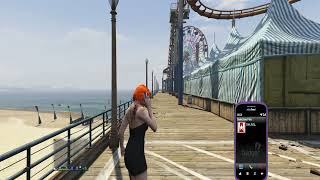
Take full control of your weapon handling with Selective Fire, a lightweight and highly configurable mod that adds realistic fire mode selection to Grand Theft Auto V.
Switch between Full Auto, Burst Fire, and Semi-Automatic firing modes on supported weapons, allowing you to tailor your shooting style to every situation. Selective Fire brings a host of customizability at its core. Including:
Customizable change fire key
Seperated customization for each weapon:
Option to disable the mod
Ability to disable Semi auto and Burst fire
Ability to change the delay between shooting burst fire bursts
Ability to change the delay between shooting semi auto shots
Ability to allow or disable player needing to release fire key before next burst
Set custom burst-fire shot counts
Fully configurable in-game settings throught phone contact and lemonUI menu
For Addon Weapons (as far as ive tested) no manual setup is required. The mod automatically detects addon weapons and allows them to be configured just like standard GTA V firearms, making it ideal for players using large weapon packs or custom weapon mods.
Install Instructions
1. download and Install scripthookv + Scripthookvdotnet (latest Scripthookvdotnet nightly if your on the latest game patch), make sure to set a reload key in scripthookvdontet.ini, preferably Insert
2. create a scripts folder (named scripts and not Scripts) if you havent got one already
3. install LemonUI(if you havnt already got it for SHVDN3) there is a download link in the text file of the zip, copy the url into a browser, then a zip will be downloaded, drag the CONTENTS of the SHVDN3 folder into scripts
4. drag SelectiveFire.dll, SelectiveFire folder, SelectiveFire.pdb into scripts folder
5. You should have contact in your ingame phone contacts called Selective Fire, you should also see three bullet icons next your minimap on weapon that support Selective Fire
Switch between Full Auto, Burst Fire, and Semi-Automatic firing modes on supported weapons, allowing you to tailor your shooting style to every situation. Selective Fire brings a host of customizability at its core. Including:
Customizable change fire key
Seperated customization for each weapon:
Option to disable the mod
Ability to disable Semi auto and Burst fire
Ability to change the delay between shooting burst fire bursts
Ability to change the delay between shooting semi auto shots
Ability to allow or disable player needing to release fire key before next burst
Set custom burst-fire shot counts
Fully configurable in-game settings throught phone contact and lemonUI menu
For Addon Weapons (as far as ive tested) no manual setup is required. The mod automatically detects addon weapons and allows them to be configured just like standard GTA V firearms, making it ideal for players using large weapon packs or custom weapon mods.
Install Instructions
1. download and Install scripthookv + Scripthookvdotnet (latest Scripthookvdotnet nightly if your on the latest game patch), make sure to set a reload key in scripthookvdontet.ini, preferably Insert
2. create a scripts folder (named scripts and not Scripts) if you havent got one already
3. install LemonUI(if you havnt already got it for SHVDN3) there is a download link in the text file of the zip, copy the url into a browser, then a zip will be downloaded, drag the CONTENTS of the SHVDN3 folder into scripts
4. drag SelectiveFire.dll, SelectiveFire folder, SelectiveFire.pdb into scripts folder
5. You should have contact in your ingame phone contacts called Selective Fire, you should also see three bullet icons next your minimap on weapon that support Selective Fire
Перше завантаження: 24 Червня 2026
Останнє оновлення 24 Червня 2026
Last Downloaded: кілька хвилин назад
5 коментаря
More mods by HKH191:

- Mission
- Gameplay
- .Net
4.76
7 315
96
1.1.1 (Fix Missing Update Modhelper)
By HKH191

- Mission
- Gameplay
- .Net
4.79
4 377
106
2.1 (GTAV Enhanced Support)
By HKH191
- Mission
- Gameplay
- .Net
- Lcpp
4.03
97 155
527
6.1 (Fix Gangs of LS Not running)
By HKH191
Take full control of your weapon handling with Selective Fire, a lightweight and highly configurable mod that adds realistic fire mode selection to Grand Theft Auto V.
Switch between Full Auto, Burst Fire, and Semi-Automatic firing modes on supported weapons, allowing you to tailor your shooting style to every situation. Selective Fire brings a host of customizability at its core. Including:
Customizable change fire key
Seperated customization for each weapon:
Option to disable the mod
Ability to disable Semi auto and Burst fire
Ability to change the delay between shooting burst fire bursts
Ability to change the delay between shooting semi auto shots
Ability to allow or disable player needing to release fire key before next burst
Set custom burst-fire shot counts
Fully configurable in-game settings throught phone contact and lemonUI menu
For Addon Weapons (as far as ive tested) no manual setup is required. The mod automatically detects addon weapons and allows them to be configured just like standard GTA V firearms, making it ideal for players using large weapon packs or custom weapon mods.
Install Instructions
1. download and Install scripthookv + Scripthookvdotnet (latest Scripthookvdotnet nightly if your on the latest game patch), make sure to set a reload key in scripthookvdontet.ini, preferably Insert
2. create a scripts folder (named scripts and not Scripts) if you havent got one already
3. install LemonUI(if you havnt already got it for SHVDN3) there is a download link in the text file of the zip, copy the url into a browser, then a zip will be downloaded, drag the CONTENTS of the SHVDN3 folder into scripts
4. drag SelectiveFire.dll, SelectiveFire folder, SelectiveFire.pdb into scripts folder
5. You should have contact in your ingame phone contacts called Selective Fire, you should also see three bullet icons next your minimap on weapon that support Selective Fire
Switch between Full Auto, Burst Fire, and Semi-Automatic firing modes on supported weapons, allowing you to tailor your shooting style to every situation. Selective Fire brings a host of customizability at its core. Including:
Customizable change fire key
Seperated customization for each weapon:
Option to disable the mod
Ability to disable Semi auto and Burst fire
Ability to change the delay between shooting burst fire bursts
Ability to change the delay between shooting semi auto shots
Ability to allow or disable player needing to release fire key before next burst
Set custom burst-fire shot counts
Fully configurable in-game settings throught phone contact and lemonUI menu
For Addon Weapons (as far as ive tested) no manual setup is required. The mod automatically detects addon weapons and allows them to be configured just like standard GTA V firearms, making it ideal for players using large weapon packs or custom weapon mods.
Install Instructions
1. download and Install scripthookv + Scripthookvdotnet (latest Scripthookvdotnet nightly if your on the latest game patch), make sure to set a reload key in scripthookvdontet.ini, preferably Insert
2. create a scripts folder (named scripts and not Scripts) if you havent got one already
3. install LemonUI(if you havnt already got it for SHVDN3) there is a download link in the text file of the zip, copy the url into a browser, then a zip will be downloaded, drag the CONTENTS of the SHVDN3 folder into scripts
4. drag SelectiveFire.dll, SelectiveFire folder, SelectiveFire.pdb into scripts folder
5. You should have contact in your ingame phone contacts called Selective Fire, you should also see three bullet icons next your minimap on weapon that support Selective Fire
Перше завантаження: 24 Червня 2026
Останнє оновлення 24 Червня 2026
Last Downloaded: кілька хвилин назад
 5mods on Discord

This file has been approved automatically. If you think this file should not be here for any reason please report it.
Anyway, I can change the fire indicator color or turn it off maybe, near the minimap?
@QQQQ28a yeah ill look into it
Unfortunately it doesn't work and keep on producing an errors associated with windows taking back ownership and unticking "read-only" does absolutely nothing
@Ford Mustang the mod does work, if you need further help you can contact me on discord for help