FOV Teleporter 1.1



244
3
244
3
AI Disclaimer: Free Claude was used for marker and large distance checks
Code written by Infinite Question
FOV Teleporter
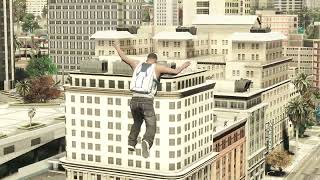
FOV Teleporter turns camera zoom into a questionable form of transportation.
Lock onto a spot, release the zoom, and let reality sort out the rest.
Hold the activation key to progressively narrow the camera's field of view.
Aim at a destination, then release the key to launch toward it.
The player moves toward the selected location while the field of view
smoothly returns to normal, creating a fast, cinematic teleport effect.
Updates:
⠀⠀⠀⠀➤ 1.1
⠀⠀⠀⠀⠀● Added a cursor to teleport destination for more accurate teleporting
⠀⠀⠀⠀⠀● Since collisions seem to have a max distance, if the cursor can't lock onto a collision then the player will teleport toward the center of the screen until a collision can be found
Features
- FOV based teleportation: The amount of zoom determines how far you travel.
- Smooth camera transitions: The field of view returns to normal as you approach your destination.
- Surface targeting: Raycasting helps select locations on roads, buildings, rooftops, and other geometry.
- Adaptive targeting: Additional ray searches help find surfaces when the initial aim misses.
- Obstacle avoidance: Attempts lateral movement when the player gets blocked.
- Configurable controls and settings: Customize the activation key, controller input, FOV limits, movement speed, and targeting behavior through the generated INI file.
The goal is to make movement feel like a cinematic camera zoom that pulls the player toward wherever they're aiming, rather than a conventional instant teleport.
How To Use
● Press G on keyboard or B button
● Keys can be changed in ini
Installation:
Place the FOV.asi in your GTA V directory
Launch the game, the configuration INI is generated automatically.
Poprvé nahráno: 10. Říjen 2026
Poslední aktulizace: před 3 dny
Last Downloaded: 10 hours ago
7 Komentářů
More mods by InfiniteQuestion:

- Map Model
5.0
6.231
43
Legacy 1.0
AI Disclaimer: Free Claude was used for marker and large distance checks
Code written by Infinite Question
FOV Teleporter
FOV Teleporter turns camera zoom into a questionable form of transportation.
Lock onto a spot, release the zoom, and let reality sort out the rest.
Hold the activation key to progressively narrow the camera's field of view.
Aim at a destination, then release the key to launch toward it.
The player moves toward the selected location while the field of view
smoothly returns to normal, creating a fast, cinematic teleport effect.
Updates:
⠀⠀⠀⠀➤ 1.1
⠀⠀⠀⠀⠀● Added a cursor to teleport destination for more accurate teleporting
⠀⠀⠀⠀⠀● Since collisions seem to have a max distance, if the cursor can't lock onto a collision then the player will teleport toward the center of the screen until a collision can be found
Features
- FOV based teleportation: The amount of zoom determines how far you travel.
- Smooth camera transitions: The field of view returns to normal as you approach your destination.
- Surface targeting: Raycasting helps select locations on roads, buildings, rooftops, and other geometry.
- Adaptive targeting: Additional ray searches help find surfaces when the initial aim misses.
- Obstacle avoidance: Attempts lateral movement when the player gets blocked.
- Configurable controls and settings: Customize the activation key, controller input, FOV limits, movement speed, and targeting behavior through the generated INI file.
The goal is to make movement feel like a cinematic camera zoom that pulls the player toward wherever they're aiming, rather than a conventional instant teleport.
How To Use
● Press G on keyboard or B button
● Keys can be changed in ini
Installation:
Place the FOV.asi in your GTA V directory
Launch the game, the configuration INI is generated automatically.
Poprvé nahráno: 10. Říjen 2026
Poslední aktulizace: před 3 dny
Last Downloaded: 10 hours ago
 5mods on Discord

This file has been approved automatically. If you think this file should not be here for any reason please report it.
@ InfiniteQuestion It's a great mod; I wonder if we can increase the distance or teleportation limit?
@gtav-fan there should be a setting in the ini. I'll test out more long distance teleports
@gtav-fan A new feature has been added for more accurate and further teleporting
@InfiniteQuestion thanks for the update...
I have encountered a bug imn this mod, not only the G key teleports, but also theq key which is to take cover.
@DirtSpray That isnt a bug, thats how the mod works. If you want to change the key to whatever you want, you can edit the ini. It will take any keyboard button or controller such as LB, LT, RB, RT, A, X, Y, B. Use any button you want
[Controls]
ActivationKey=G
ControllerButton=LB