FOV Teleporter 1.0



67
1
67
1
FOV Teleporter
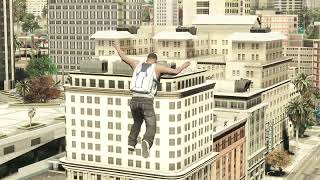
FOV Teleporter turns camera zoom into a questionable form of transportation.
Lock onto a spot, release the zoom, and let reality sort out the rest.
Hold the activation key to progressively narrow the camera's field of view.
Aim at a destination, then release the key to launch toward it.
The player moves toward the selected location while the field of view
smoothly returns to normal, creating a fast, cinematic teleport effect.
Features
- FOV based teleportation: The amount of zoom determines how far you travel.
- Smooth camera transitions: The field of view returns to normal as you approach your destination.
- Surface targeting: Raycasting helps select locations on roads, buildings, rooftops, and other geometry.
- Adaptive targeting: Additional ray searches help find surfaces when the initial aim misses.
- Obstacle avoidance: Attempts lateral movement when the player gets blocked.
- Configurable controls and settings: Customize the activation key, controller input, FOV limits, movement speed, and targeting behavior through the generated INI file.
The goal is to make movement feel like a cinematic camera zoom that pulls the player toward wherever they're aiming, rather than a conventional instant teleport.
How To Use
● Press G on keyboard or B button
● Keys can be changed in ini
Installation:
Place the FOV.asi in your GTA V directory
Launch the game, the configuration INI is generated automatically.
FOV Teleporter turns camera zoom into a questionable form of transportation.
Lock onto a spot, release the zoom, and let reality sort out the rest.
Hold the activation key to progressively narrow the camera's field of view.
Aim at a destination, then release the key to launch toward it.
The player moves toward the selected location while the field of view
smoothly returns to normal, creating a fast, cinematic teleport effect.
Features
- FOV based teleportation: The amount of zoom determines how far you travel.
- Smooth camera transitions: The field of view returns to normal as you approach your destination.
- Surface targeting: Raycasting helps select locations on roads, buildings, rooftops, and other geometry.
- Adaptive targeting: Additional ray searches help find surfaces when the initial aim misses.
- Obstacle avoidance: Attempts lateral movement when the player gets blocked.
- Configurable controls and settings: Customize the activation key, controller input, FOV limits, movement speed, and targeting behavior through the generated INI file.
The goal is to make movement feel like a cinematic camera zoom that pulls the player toward wherever they're aiming, rather than a conventional instant teleport.
How To Use
● Press G on keyboard or B button
● Keys can be changed in ini
Installation:
Place the FOV.asi in your GTA V directory
Launch the game, the configuration INI is generated automatically.
Først uploadet: 3 dage siden
Sidst opdateret: 3 dage siden
Last Downloaded: 1 hour ago
3 Kommentarer
More mods by InfiniteQuestion:
FOV Teleporter
FOV Teleporter turns camera zoom into a questionable form of transportation.
Lock onto a spot, release the zoom, and let reality sort out the rest.
Hold the activation key to progressively narrow the camera's field of view.
Aim at a destination, then release the key to launch toward it.
The player moves toward the selected location while the field of view
smoothly returns to normal, creating a fast, cinematic teleport effect.
Features
- FOV based teleportation: The amount of zoom determines how far you travel.
- Smooth camera transitions: The field of view returns to normal as you approach your destination.
- Surface targeting: Raycasting helps select locations on roads, buildings, rooftops, and other geometry.
- Adaptive targeting: Additional ray searches help find surfaces when the initial aim misses.
- Obstacle avoidance: Attempts lateral movement when the player gets blocked.
- Configurable controls and settings: Customize the activation key, controller input, FOV limits, movement speed, and targeting behavior through the generated INI file.
The goal is to make movement feel like a cinematic camera zoom that pulls the player toward wherever they're aiming, rather than a conventional instant teleport.
How To Use
● Press G on keyboard or B button
● Keys can be changed in ini
Installation:
Place the FOV.asi in your GTA V directory
Launch the game, the configuration INI is generated automatically.
FOV Teleporter turns camera zoom into a questionable form of transportation.
Lock onto a spot, release the zoom, and let reality sort out the rest.
Hold the activation key to progressively narrow the camera's field of view.
Aim at a destination, then release the key to launch toward it.
The player moves toward the selected location while the field of view
smoothly returns to normal, creating a fast, cinematic teleport effect.
Features
- FOV based teleportation: The amount of zoom determines how far you travel.
- Smooth camera transitions: The field of view returns to normal as you approach your destination.
- Surface targeting: Raycasting helps select locations on roads, buildings, rooftops, and other geometry.
- Adaptive targeting: Additional ray searches help find surfaces when the initial aim misses.
- Obstacle avoidance: Attempts lateral movement when the player gets blocked.
- Configurable controls and settings: Customize the activation key, controller input, FOV limits, movement speed, and targeting behavior through the generated INI file.
The goal is to make movement feel like a cinematic camera zoom that pulls the player toward wherever they're aiming, rather than a conventional instant teleport.
How To Use
● Press G on keyboard or B button
● Keys can be changed in ini
Installation:
Place the FOV.asi in your GTA V directory
Launch the game, the configuration INI is generated automatically.
Først uploadet: 3 dage siden
Sidst opdateret: 3 dage siden
Last Downloaded: 1 hour ago
 5mods on Discord

This file has been approved automatically. If you think this file should not be here for any reason please report it.
@ InfiniteQuestion It's a great mod; I wonder if we can increase the distance or teleportation limit?
@gtav-fan there should be a setting in the ini. I'll test out more long distance teleports