ParkSnap [Enhanced] 2.3.1


17
1
17
1
Per 5MODS Rules: This script was 90 percent written by a human and 10 percent assisted by AI.
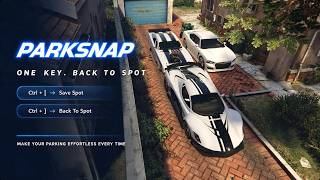
ParkSnap lets you save a parking spot for each of your vehicles and snap a vehicle back to that exact spot with a single key press - same position, same angle, every time. Spots are saved to disk, so they are still there after you restart the game, and each story-mode character keeps their own list. To keep your vehicles themselves saved between game sessions, ParkSnap works great with Persistence (Save Vehicles) [Enhanced].
Single player only. Do not use it online.
ParkSnap does not save or spawn vehicles. It only moves the vehicle you are driving back to a spot you recorded earlier.
REQUIREMENTS
Made for GTA V Enhanced. It should also work on GTA V Legacy, as long as your Script Hook V .NET Enhanced version supports your game build.
INSTALLATION
CONTROLS (default)
All keys can be changed in ParkSnap.ini.
HOW TO USE
FEATURES
TIPS AND TRICKS
Same car, different parking spots. Because ParkSnap differentiates vehicles by model and license plate, the same car can have as many parking spots as you have license plates. Assign a different license plate to each parking spot you want:
Each plate shows up as its own entry in the menu, for example "Adder [ABC 123]" and "Adder [XYZ 789]". To snap the car to one of them later, make sure it currently has the plate that belongs to that spot.
CHANGELOG
2.3.1
2.2.1
ParkSnap lets you save a parking spot for each of your vehicles and snap a vehicle back to that exact spot with a single key press - same position, same angle, every time. Spots are saved to disk, so they are still there after you restart the game, and each story-mode character keeps their own list. To keep your vehicles themselves saved between game sessions, ParkSnap works great with Persistence (Save Vehicles) [Enhanced].
Single player only. Do not use it online.
ParkSnap does not save or spawn vehicles. It only moves the vehicle you are driving back to a spot you recorded earlier.
REQUIREMENTS
- Script Hook V (follow the installation instructions they have provided)
- Script Hook V .NET Enhanced (follow the installation instructions they have provided)
- LemonUI (use SHVDN3 version, this is the framework used for the menu)
Made for GTA V Enhanced. It should also work on GTA V Legacy, as long as your Script Hook V .NET Enhanced version supports your game build.
INSTALLATION
- Install Script Hook V and Script Hook V .NET Enhanced.
- Copy LemonUI.SHVDN3.dll and LemonUI.SHVDN3.pdb into the "scripts" folder inside your GTA V folder.
- Copy ParkSnap.dll into the same "scripts" folder.
- Start the game. ParkSnap.ini is created automatically the first time you play.
CONTROLS (default)
- Ctrl-[ : Save the parking spot of the vehicle you are in (any seat works)
- Ctrl-] : Snap the vehicle you are driving back to its saved spot
- F6 : Open / Close the ParkSnap menu.
All keys can be changed in ParkSnap.ini.
HOW TO USE
- Park your vehicle exactly where you want it, then press Ctrl-[ to save the spot.
- When you come back, drive within 50 meters of the spot (the default) and press Ctrl-]. The vehicle is placed back on the exact spot.
- To move a spot, park the vehicle somewhere else and press Ctrl-[ again. This will replace the old parking spot. Parking spots are assigned based on your vehicle model and license plate number.
FEATURES
- ONE SPOT PER MODEL AND LICENSE PLATE
A vehicle is identified by its model and license plate. Two cars of the same model each need their own license plate to park in different spots (see tips below). - EACH CHARACTER HAS THEIR OWN LIST
Michael, Franklin, and Trevor each have their own place in separate files. - MENU FOR MANAGING SPOTS
Press F6 to open the menu. It shows the characters that have saved spots.
TIPS AND TRICKS
Same car, different parking spots. Because ParkSnap differentiates vehicles by model and license plate, the same car can have as many parking spots as you have license plates. Assign a different license plate to each parking spot you want:
- Change the license plate of your car. Menyoo is recommended for this.
- Park the car where you want it and press Ctrl-[ to save the spot for that plate.
- Repeat with another plate for another spot.
Each plate shows up as its own entry in the menu, for example "Adder [ABC 123]" and "Adder [XYZ 789]". To snap the car to one of them later, make sure it currently has the plate that belongs to that spot.
CHANGELOG
2.3.1
- The menu no longer uses the mouse at all - no cursor is shown. Navigate with the keyboard or gamepad.
- The menu now stays open after "Snap to Spot", after deleting a spot, and after saving a spot with the key bind - the list refreshes automatically.
- Spots are now sorted newest first in the menu.
- Data files saved by older versions are upgraded automatically on first load.
2.2.1
- Initial release.
Poprvé nahráno: před 2 dny
Poslední aktulizace: 2 hours ago
Last Downloaded: před 15 minutami
0 Komentářů
Per 5MODS Rules: This script was 90 percent written by a human and 10 percent assisted by AI.
ParkSnap lets you save a parking spot for each of your vehicles and snap a vehicle back to that exact spot with a single key press - same position, same angle, every time. Spots are saved to disk, so they are still there after you restart the game, and each story-mode character keeps their own list. To keep your vehicles themselves saved between game sessions, ParkSnap works great with Persistence (Save Vehicles) [Enhanced].
Single player only. Do not use it online.
ParkSnap does not save or spawn vehicles. It only moves the vehicle you are driving back to a spot you recorded earlier.
REQUIREMENTS
Made for GTA V Enhanced. It should also work on GTA V Legacy, as long as your Script Hook V .NET Enhanced version supports your game build.
INSTALLATION
CONTROLS (default)
All keys can be changed in ParkSnap.ini.
HOW TO USE
FEATURES
TIPS AND TRICKS
Same car, different parking spots. Because ParkSnap differentiates vehicles by model and license plate, the same car can have as many parking spots as you have license plates. Assign a different license plate to each parking spot you want:
Each plate shows up as its own entry in the menu, for example "Adder [ABC 123]" and "Adder [XYZ 789]". To snap the car to one of them later, make sure it currently has the plate that belongs to that spot.
CHANGELOG
2.3.1
2.2.1
ParkSnap lets you save a parking spot for each of your vehicles and snap a vehicle back to that exact spot with a single key press - same position, same angle, every time. Spots are saved to disk, so they are still there after you restart the game, and each story-mode character keeps their own list. To keep your vehicles themselves saved between game sessions, ParkSnap works great with Persistence (Save Vehicles) [Enhanced].
Single player only. Do not use it online.
ParkSnap does not save or spawn vehicles. It only moves the vehicle you are driving back to a spot you recorded earlier.
REQUIREMENTS
- Script Hook V (follow the installation instructions they have provided)
- Script Hook V .NET Enhanced (follow the installation instructions they have provided)
- LemonUI (use SHVDN3 version, this is the framework used for the menu)
Made for GTA V Enhanced. It should also work on GTA V Legacy, as long as your Script Hook V .NET Enhanced version supports your game build.
INSTALLATION
- Install Script Hook V and Script Hook V .NET Enhanced.
- Copy LemonUI.SHVDN3.dll and LemonUI.SHVDN3.pdb into the "scripts" folder inside your GTA V folder.
- Copy ParkSnap.dll into the same "scripts" folder.
- Start the game. ParkSnap.ini is created automatically the first time you play.
CONTROLS (default)
- Ctrl-[ : Save the parking spot of the vehicle you are in (any seat works)
- Ctrl-] : Snap the vehicle you are driving back to its saved spot
- F6 : Open / Close the ParkSnap menu.
All keys can be changed in ParkSnap.ini.
HOW TO USE
- Park your vehicle exactly where you want it, then press Ctrl-[ to save the spot.
- When you come back, drive within 50 meters of the spot (the default) and press Ctrl-]. The vehicle is placed back on the exact spot.
- To move a spot, park the vehicle somewhere else and press Ctrl-[ again. This will replace the old parking spot. Parking spots are assigned based on your vehicle model and license plate number.
FEATURES
- ONE SPOT PER MODEL AND LICENSE PLATE
A vehicle is identified by its model and license plate. Two cars of the same model each need their own license plate to park in different spots (see tips below). - EACH CHARACTER HAS THEIR OWN LIST
Michael, Franklin, and Trevor each have their own place in separate files. - MENU FOR MANAGING SPOTS
Press F6 to open the menu. It shows the characters that have saved spots.
TIPS AND TRICKS
Same car, different parking spots. Because ParkSnap differentiates vehicles by model and license plate, the same car can have as many parking spots as you have license plates. Assign a different license plate to each parking spot you want:
- Change the license plate of your car. Menyoo is recommended for this.
- Park the car where you want it and press Ctrl-[ to save the spot for that plate.
- Repeat with another plate for another spot.
Each plate shows up as its own entry in the menu, for example "Adder [ABC 123]" and "Adder [XYZ 789]". To snap the car to one of them later, make sure it currently has the plate that belongs to that spot.
CHANGELOG
2.3.1
- The menu no longer uses the mouse at all - no cursor is shown. Navigate with the keyboard or gamepad.
- The menu now stays open after "Snap to Spot", after deleting a spot, and after saving a spot with the key bind - the list refreshes automatically.
- Spots are now sorted newest first in the menu.
- Data files saved by older versions are upgraded automatically on first load.
2.2.1
- Initial release.
Poprvé nahráno: před 2 dny
Poslední aktulizace: 2 hours ago
Last Downloaded: před 15 minutami
Přidejte se do konverzace! Přihlaste se nebo zaregistruje pro možnost přidávání komentářů.
 5mods on Discord
