Persistence (Save Vehicles) [Enhanced] 1.8.0


![LSLife Crash Fix [Legacy]](https://img.gta5-mods.com/q75-w500-h333-cfill/images/ls-life-crashing-fix-for-legacy/1897e1-9f890c94-d157-4a7e-b515-38e52e9721a2.jpg "LSLife Crash Fix [Legacy]")


5,389
26
5,389
26
PERSISTENCE PRO
Save any vehicle anywhere on the map and walk back to it later, even after restarting the game.
Park it, press [E], and it will be waiting exactly where you left it. You don't need to unlock it or go through any extra menus. If you need it somewhere else, a mechanic will drive it to you.
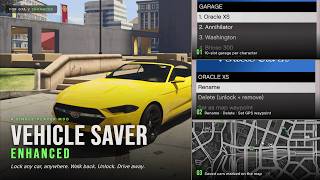
Also included: a garage for each character, colour-coded map blips, car photos, and a full in-game menu on [F7].
---------------------------------------------
INSTALLATION
1. Install ScriptHookV (the Enhanced-compatible build) and ScriptHookVDotNet (the Enhanced nightly).
2. Open your GTA V Enhanced install folder (the one with GTA5 Enhanced.exe in it). Open the "scripts" folder inside it, or create one if it isn't there.
3. Copy these files from the ZIP into \scripts\
PersistencePro.dll (required)
PersistencePro.ini (config file if it's missing, it is created the first time you launch the game)
4. OPTIONAL: install iFruit Jailbreak 6.0 or newer to get the phone features (a Mechanic contact and a Vehicles app). If the installer asks about iFruitAddon2.dll, choose Replace. Without it, everything else works the same.
5. Launch the game. Within a few seconds a message will confirm:
"PersistencePro loaded. [E] save, [F7] menu."
---------------------------------------------
CONFIGURATION
Open PersistencePro.ini in any text editor. It's in "scripts", or in AppData\GTA V\PersistencePro\ if the scripts folder isn't writable.
Every setting has a comment explaining it.
After editing, press [Insert] in-game to reload the file, or restart the game.
Most settings can also be changed in-game under F7 > Settings.
---------------------------------------------
FEATURES
ONE-KEY SAVE
Press [E] to save your vehicle. A horn beep and a headlight flash confirm the save. You can change the key in F7 > Settings > Controls.
MECHANIC DELIVERY
Pick any saved car and choose "Deliver to me". A mechanic drives it over from just out of sight, flashes his lights as he pulls up, parks beside you and walks off. If you'd rather have it instantly, set Delivery mode to Spawn and the car simply appears next to you.
PHONE SUPPORT (optional, needs iFruit Jailbreak)
Call the Mechanic contact to open your garage, or use the Vehicles app on the phone's home screen. You can browse and search your character's cars, then have one delivered or set a waypoint to it, with a photo of the car as confirmation.
CAR PHOTOS
The garage menu shows a photo of the highlighted car, using the pictures from the game's own car websites.
ALWAYS DRIVABLE
Saved vehicles never ask you to unlock them. Pedestrians ignore them while they're parked, so they won't get carjacked while you're away.
POSITION TRACKING
If you move a saved car, its saved spot updates automatically. Saves survive crashes and restarts.
LIGHT ON PERFORMANCE
Saved cars only exist in the world when you're near them. A car you leave far behind is stored exactly as it was and comes back when you return, so even a full garage won't fill the map with cars.
60-slot shared garage by default, or 10 slots per character. Switchable from the in-game Settings menu.
Map blips. Live blips with per-character colours (Michael blue, Franklin green, Trevor orange) and class-specific icons for cars, bikes, helicopters, boats, and planes. Configurable size, with automatic minimap declutter at distance.
Full customisation saved. Paint, custom RGB colours, liveries, all 50 mod slots, wheel type, tyre variation, extras, window tint, interior and dashboard colour, neon lights, tyre-smoke colour, xenon headlight colour, licence plate, vehicle health, and towed trailers.
Trainer and LS Customs compatible. Any modifications applied to a saved vehicle are re-captured automatically when you step out.
In-game garage menu [F7]. Per-character lists, favorites and search. For each car: Deliver to me, Teleport to me, set a GPS waypoint, respawn a repaired copy, unstuck it from water or geometry, rename, favorite, or delete it from tracking without removing it from the world.
In-game Settings. Shared or per-character garages, map blip options, horn beep and headlight flash, delivery mode, and the menu and save keys.
Safe by default. Automatically disabled in GTA Online and during scripted cutscenes.
Changelog
v1.8.0 New: Mechanic delivery
New Deliver to me option for every saved car (F7 - pick a car - Deliver to me). A mechanic drives your car over from just out of sight, already facing you, flashes his headlights twice as he pulls up, parks beside you, gets out and walks away. The car is left unlocked with the engine running.
If you get in before he's parked, he hops out and leaves. If you move while he's on his way, he follows you. If he gets stuck or can't reach you, your car is placed beside you instead.
Helicopters, planes and boats are always placed beside you.
If you prefer no mechanic, F7 - Settings - Delivery mode - Spawn makes the car simply appear beside you.
New: Phone support (optional)
With iFruit Jailbreak installed, a Mechanic contact appears in your phone. Calling him opens the garage menu.
A Vehicles app also appears on your phone's home screen. It lists your current character's cars (favorites first) right on the phone, with a Search option and wrap-around scrolling (arrows or mouse wheel). Pick a car, then Deliver to me or Set waypoint, and the phone confirms with a photo of your car, its name and plate.
Both are optional. Without iFruit Jailbreak the mod works exactly as before.
New: Car photos
The garage menu now shows a photo of the highlighted car next to the menu, using the game's own car website pictures. Cars with no in-game photo (police, some service and add-on vehicles) simply show none.
New: Garage menu redesign
A cleaner look: solid banner, solid highlight, arrows on rows that open another screen, a position counter (e.g. 3 / 10), and a footer showing how full your garage is.
Car list rows now read Name [PLATE], with the plate faded so names stand out.
Each car's options are grouped: Get it (Deliver to me, Teleport to me, Set as map waypoint), Fix it (Respawn, Unstuck), Manage (Rename, Favorite, Delete).
Settings are split into sections: Garage, Map blips, Sounds & lights, Delivery, Controls.
The menu now closes after Deliver to me, Teleport to me or Set as map waypoint.
New: Change the save key
The save key no longer has to be E. Change it in F7 - Settings - Controls - Save car key, or with SaveVehicle in the INI. E still works on a controller (D-pad right). any other key is keyboard only.
New Headlight flash on save switch in F7 - Settings - Sounds & lights (it was INI-only before).
Performance
Saved cars you leave far behind (more than 350 m) are now saved exactly as they are and removed from the world, then come back when you return. Big garages no longer fill the map with cars over a long session. Cars someone is sitting in, the car you're driving, a car being delivered, and towed or trailer-attached cars are never removed. Adjust with DespawnRangeM in the INI.
Fixes
Fixed: the save prompt never appeared for long vehicles like the Akula helicopter. The save range is now measured from the vehicle's body, not its centre.
Fixed: loading a game save could leave a duplicate of the car you were driving. The mod now recognises the game's own copy (same model and plate) and adopts it instead of spawning another.
Just install the new version - your saves and settings carry over. For the phone features, install iFruit Jailbreak. v1.6.6
Fixed: map blips were huge and the Blip Size setting did nothing on some PCs. If your Windows region uses a comma as the decimal separator (common in Europe), the mod read its number settings wrong - so blips came out about 10x too big and covered the map, and every "Blip Size" option looked like it did nothing. All settings are now read correctly no matter your region, and blip size is capped so it can never cover the map again.
Changing Blip Size now applies instantly - no more reloading the game to see the new size.
Smaller default blip size for a cleaner map out of the box. Adjust any time in F7 - Settings - Blip Size (Small / Medium / Large).
Fixed: "Teleport to me" now faces the car toward you. A teleported car could spawn pointing the wrong way: it now lines up with you, and that facing is saved so it stays correct after a respawn or reload.
Fixed: save-file version tag is now written correctly, preventing problems with future updates. Your existing saves are unaffected.
Under the hood: reduced log spam from map blips and removed some dead code. No change to how the mod plays.
If you were affected, just install the new version - you don't need to edit anything. To make blips even smaller, set F7 - Settings - Blip Size - Small.
v1.6.6
If you were affected, just install the new version - you don't need to edit anything. To make blips even smaller, set F7 - Settings - Blip Size - Small.
v1.6.4
v1.5.4
v1.5.3
v1.5.2
v1.5.1
Save any vehicle anywhere on the map and walk back to it later, even after restarting the game.
Park it, press [E], and it will be waiting exactly where you left it. You don't need to unlock it or go through any extra menus. If you need it somewhere else, a mechanic will drive it to you.
Also included: a garage for each character, colour-coded map blips, car photos, and a full in-game menu on [F7].
---------------------------------------------
INSTALLATION
1. Install ScriptHookV (the Enhanced-compatible build) and ScriptHookVDotNet (the Enhanced nightly).
2. Open your GTA V Enhanced install folder (the one with GTA5 Enhanced.exe in it). Open the "scripts" folder inside it, or create one if it isn't there.
3. Copy these files from the ZIP into \scripts\
PersistencePro.dll (required)
PersistencePro.ini (config file if it's missing, it is created the first time you launch the game)
4. OPTIONAL: install iFruit Jailbreak 6.0 or newer to get the phone features (a Mechanic contact and a Vehicles app). If the installer asks about iFruitAddon2.dll, choose Replace. Without it, everything else works the same.
5. Launch the game. Within a few seconds a message will confirm:
"PersistencePro loaded. [E] save, [F7] menu."
---------------------------------------------
CONFIGURATION
Open PersistencePro.ini in any text editor. It's in "scripts", or in AppData\GTA V\PersistencePro\ if the scripts folder isn't writable.
Every setting has a comment explaining it.
After editing, press [Insert] in-game to reload the file, or restart the game.
Most settings can also be changed in-game under F7 > Settings.
---------------------------------------------
FEATURES
ONE-KEY SAVE
Press [E] to save your vehicle. A horn beep and a headlight flash confirm the save. You can change the key in F7 > Settings > Controls.
MECHANIC DELIVERY
Pick any saved car and choose "Deliver to me". A mechanic drives it over from just out of sight, flashes his lights as he pulls up, parks beside you and walks off. If you'd rather have it instantly, set Delivery mode to Spawn and the car simply appears next to you.
PHONE SUPPORT (optional, needs iFruit Jailbreak)
Call the Mechanic contact to open your garage, or use the Vehicles app on the phone's home screen. You can browse and search your character's cars, then have one delivered or set a waypoint to it, with a photo of the car as confirmation.
CAR PHOTOS
The garage menu shows a photo of the highlighted car, using the pictures from the game's own car websites.
ALWAYS DRIVABLE
Saved vehicles never ask you to unlock them. Pedestrians ignore them while they're parked, so they won't get carjacked while you're away.
POSITION TRACKING
If you move a saved car, its saved spot updates automatically. Saves survive crashes and restarts.
LIGHT ON PERFORMANCE
Saved cars only exist in the world when you're near them. A car you leave far behind is stored exactly as it was and comes back when you return, so even a full garage won't fill the map with cars.
60-slot shared garage by default, or 10 slots per character. Switchable from the in-game Settings menu.
Map blips. Live blips with per-character colours (Michael blue, Franklin green, Trevor orange) and class-specific icons for cars, bikes, helicopters, boats, and planes. Configurable size, with automatic minimap declutter at distance.
Full customisation saved. Paint, custom RGB colours, liveries, all 50 mod slots, wheel type, tyre variation, extras, window tint, interior and dashboard colour, neon lights, tyre-smoke colour, xenon headlight colour, licence plate, vehicle health, and towed trailers.
Trainer and LS Customs compatible. Any modifications applied to a saved vehicle are re-captured automatically when you step out.
In-game garage menu [F7]. Per-character lists, favorites and search. For each car: Deliver to me, Teleport to me, set a GPS waypoint, respawn a repaired copy, unstuck it from water or geometry, rename, favorite, or delete it from tracking without removing it from the world.
In-game Settings. Shared or per-character garages, map blip options, horn beep and headlight flash, delivery mode, and the menu and save keys.
Safe by default. Automatically disabled in GTA Online and during scripted cutscenes.
Changelog
v1.8.0 New: Mechanic delivery
New Deliver to me option for every saved car (F7 - pick a car - Deliver to me). A mechanic drives your car over from just out of sight, already facing you, flashes his headlights twice as he pulls up, parks beside you, gets out and walks away. The car is left unlocked with the engine running.
If you get in before he's parked, he hops out and leaves. If you move while he's on his way, he follows you. If he gets stuck or can't reach you, your car is placed beside you instead.
Helicopters, planes and boats are always placed beside you.
If you prefer no mechanic, F7 - Settings - Delivery mode - Spawn makes the car simply appear beside you.
New: Phone support (optional)
With iFruit Jailbreak installed, a Mechanic contact appears in your phone. Calling him opens the garage menu.
A Vehicles app also appears on your phone's home screen. It lists your current character's cars (favorites first) right on the phone, with a Search option and wrap-around scrolling (arrows or mouse wheel). Pick a car, then Deliver to me or Set waypoint, and the phone confirms with a photo of your car, its name and plate.
Both are optional. Without iFruit Jailbreak the mod works exactly as before.
New: Car photos
The garage menu now shows a photo of the highlighted car next to the menu, using the game's own car website pictures. Cars with no in-game photo (police, some service and add-on vehicles) simply show none.
New: Garage menu redesign
A cleaner look: solid banner, solid highlight, arrows on rows that open another screen, a position counter (e.g. 3 / 10), and a footer showing how full your garage is.
Car list rows now read Name [PLATE], with the plate faded so names stand out.
Each car's options are grouped: Get it (Deliver to me, Teleport to me, Set as map waypoint), Fix it (Respawn, Unstuck), Manage (Rename, Favorite, Delete).
Settings are split into sections: Garage, Map blips, Sounds & lights, Delivery, Controls.
The menu now closes after Deliver to me, Teleport to me or Set as map waypoint.
New: Change the save key
The save key no longer has to be E. Change it in F7 - Settings - Controls - Save car key, or with SaveVehicle in the INI. E still works on a controller (D-pad right). any other key is keyboard only.
New Headlight flash on save switch in F7 - Settings - Sounds & lights (it was INI-only before).
Performance
Saved cars you leave far behind (more than 350 m) are now saved exactly as they are and removed from the world, then come back when you return. Big garages no longer fill the map with cars over a long session. Cars someone is sitting in, the car you're driving, a car being delivered, and towed or trailer-attached cars are never removed. Adjust with DespawnRangeM in the INI.
Fixes
Fixed: the save prompt never appeared for long vehicles like the Akula helicopter. The save range is now measured from the vehicle's body, not its centre.
Fixed: loading a game save could leave a duplicate of the car you were driving. The mod now recognises the game's own copy (same model and plate) and adopts it instead of spawning another.
Just install the new version - your saves and settings carry over. For the phone features, install iFruit Jailbreak. v1.6.6
Fixed: map blips were huge and the Blip Size setting did nothing on some PCs. If your Windows region uses a comma as the decimal separator (common in Europe), the mod read its number settings wrong - so blips came out about 10x too big and covered the map, and every "Blip Size" option looked like it did nothing. All settings are now read correctly no matter your region, and blip size is capped so it can never cover the map again.
Changing Blip Size now applies instantly - no more reloading the game to see the new size.
Smaller default blip size for a cleaner map out of the box. Adjust any time in F7 - Settings - Blip Size (Small / Medium / Large).
Fixed: "Teleport to me" now faces the car toward you. A teleported car could spawn pointing the wrong way: it now lines up with you, and that facing is saved so it stays correct after a respawn or reload.
Fixed: save-file version tag is now written correctly, preventing problems with future updates. Your existing saves are unaffected.
Under the hood: reduced log spam from map blips and removed some dead code. No change to how the mod plays.
If you were affected, just install the new version - you don't need to edit anything. To make blips even smaller, set F7 - Settings - Blip Size - Small.
v1.6.6
- Fixed: map blips were huge and the Blip Size setting did nothing on some PCs. If your Windows region uses a comma as the decimal separator (common in Europe), the mod read its number settings wrong - so blips came out about 10x too big and covered the map, and every "Blip Size" option looked like it did nothing. All settings are now read correctly no matter your region, and blip size is capped so it can never cover the map again.
- Changing Blip Size now applies instantly - no more reloading the game to see the new size.
- Smaller default blip size for a cleaner map out of the box. Adjust any time in F7 - Settings - Blip Size (Small / Medium / Large).
- Fixed: "Teleport to me" now faces the car toward you. A teleported car could spawn pointing the wrong way: it now lines up with you, and that facing is saved so it stays correct after a respawn or reload.
- Fixed: save-file version tag is now written correctly, preventing problems with future updates. Your existing saves are unaffected.
- Under the hood: reduced log spam from map blips and removed some dead code. No change to how the mod plays.
If you were affected, just install the new version - you don't need to edit anything. To make blips even smaller, set F7 - Settings - Blip Size - Small.
v1.6.4
- Saves now capture every customization - added licence plate style/colour (Blue-on-White, Yellow-on-Black, Yankton, etc.) and bulletproof tyres, on top of the paint, custom RGB, wheels/tyres, drift upgrade, HSW and all other Los Santos Customs mods, neon, xenon, interior/dashboard colours, window tint, livery, turbo and plate text that already saved.
- Damage and dirt are no longer kept - a saved car now always comes back clean and fully repaired.
- The pause-menu big map now shows ALL your saved cars, while the minimap still only shows nearby ones - so the map stays uncluttered during play but you can always find any car.
- The F7 menu stays open after an action. Teleport / Respawn / Unstuck / Set waypoint keep you on the same car so you can chain actions: Rename shows the new name: Delete drops you back to the list.
- New "Teleport to me" per-car option - brings the car to a clear spot right next to you, and it won't clip into traffic or your other cars (teleport several and they line up around you).
- Favorites - star a car to pin it to the top of the menu, give it its own Favorites list, and keep its map blip always visible.
- Search - find a saved car by name or licence plate.
- Smarter map blips - only nearby cars clutter the minimap, which keeps you under the game's blip limit so mission blips don't disappear.
- Map blips now show the licence plate next to the name instead of a live distance readout.
- The mod keeps working during cutscenes - it only pauses for actual loading screens (and stays off in GTA Online).
v1.5.4
- Smooth blip tracking (on by default) - the map blip now glides along with your car instead of stepping a few times a second.
- Fixed: blips froze during mission cutscenes - they now keep tracking through cutscenes while vehicle spawning stays safely paused.
- The car you're currently driving no longer shows its own map blip.
v1.5.3
- Off-road bikes and quads now drive correctly when saved. Vehicles such as the Nagasaki Blazer were respawning with the engine off, making the throttle unresponsive. They now mount and ride normally. The fix auto-recovers any affected vehicle already saved under an earlier version.
- Garage capacity raised to 60 vehicles in shared mode (previously 30).
- Any saved vehicle you enter is now guaranteed to be unfrozen and ready to drive.
v1.5.2
- Map blip tracking corrected. Fixed a bug where the vehicle icon could glitch and stop following its live position.
- Blip flicker after Respawn, Unstuck, and Rename operations resolved.
- Blips now refresh more smoothly while driving.
v1.5.1
- Stability and save-reliability improvements. An interrupted save can no longer leave a stray temporary file, and a valid save can no longer be silently skipped.
- Auto-save-on-exit hardened against errors triggered while exiting a vehicle.
- Per-frame workload reduced for better performance.
- Removed leftover wording from the old lock/unlock system in the menu.
First Uploaded: May 13, 2026
Last Updated: 9 hours ago
Last Downloaded: 17 minutes ago
28 Comments
PERSISTENCE PRO
Save any vehicle anywhere on the map and walk back to it later, even after restarting the game.
Park it, press [E], and it will be waiting exactly where you left it. You don't need to unlock it or go through any extra menus. If you need it somewhere else, a mechanic will drive it to you.
Also included: a garage for each character, colour-coded map blips, car photos, and a full in-game menu on [F7].
---------------------------------------------
INSTALLATION
1. Install ScriptHookV (the Enhanced-compatible build) and ScriptHookVDotNet (the Enhanced nightly).
2. Open your GTA V Enhanced install folder (the one with GTA5 Enhanced.exe in it). Open the "scripts" folder inside it, or create one if it isn't there.
3. Copy these files from the ZIP into \scripts\
PersistencePro.dll (required)
PersistencePro.ini (config file if it's missing, it is created the first time you launch the game)
4. OPTIONAL: install iFruit Jailbreak 6.0 or newer to get the phone features (a Mechanic contact and a Vehicles app). If the installer asks about iFruitAddon2.dll, choose Replace. Without it, everything else works the same.
5. Launch the game. Within a few seconds a message will confirm:
"PersistencePro loaded. [E] save, [F7] menu."
---------------------------------------------
CONFIGURATION
Open PersistencePro.ini in any text editor. It's in "scripts", or in AppData\GTA V\PersistencePro\ if the scripts folder isn't writable.
Every setting has a comment explaining it.
After editing, press [Insert] in-game to reload the file, or restart the game.
Most settings can also be changed in-game under F7 > Settings.
---------------------------------------------
FEATURES
ONE-KEY SAVE
Press [E] to save your vehicle. A horn beep and a headlight flash confirm the save. You can change the key in F7 > Settings > Controls.
MECHANIC DELIVERY
Pick any saved car and choose "Deliver to me". A mechanic drives it over from just out of sight, flashes his lights as he pulls up, parks beside you and walks off. If you'd rather have it instantly, set Delivery mode to Spawn and the car simply appears next to you.
PHONE SUPPORT (optional, needs iFruit Jailbreak)
Call the Mechanic contact to open your garage, or use the Vehicles app on the phone's home screen. You can browse and search your character's cars, then have one delivered or set a waypoint to it, with a photo of the car as confirmation.
CAR PHOTOS
The garage menu shows a photo of the highlighted car, using the pictures from the game's own car websites.
ALWAYS DRIVABLE
Saved vehicles never ask you to unlock them. Pedestrians ignore them while they're parked, so they won't get carjacked while you're away.
POSITION TRACKING
If you move a saved car, its saved spot updates automatically. Saves survive crashes and restarts.
LIGHT ON PERFORMANCE
Saved cars only exist in the world when you're near them. A car you leave far behind is stored exactly as it was and comes back when you return, so even a full garage won't fill the map with cars.
60-slot shared garage by default, or 10 slots per character. Switchable from the in-game Settings menu.
Map blips. Live blips with per-character colours (Michael blue, Franklin green, Trevor orange) and class-specific icons for cars, bikes, helicopters, boats, and planes. Configurable size, with automatic minimap declutter at distance.
Full customisation saved. Paint, custom RGB colours, liveries, all 50 mod slots, wheel type, tyre variation, extras, window tint, interior and dashboard colour, neon lights, tyre-smoke colour, xenon headlight colour, licence plate, vehicle health, and towed trailers.
Trainer and LS Customs compatible. Any modifications applied to a saved vehicle are re-captured automatically when you step out.
In-game garage menu [F7]. Per-character lists, favorites and search. For each car: Deliver to me, Teleport to me, set a GPS waypoint, respawn a repaired copy, unstuck it from water or geometry, rename, favorite, or delete it from tracking without removing it from the world.
In-game Settings. Shared or per-character garages, map blip options, horn beep and headlight flash, delivery mode, and the menu and save keys.
Safe by default. Automatically disabled in GTA Online and during scripted cutscenes.
Changelog
v1.8.0 New: Mechanic delivery
New Deliver to me option for every saved car (F7 - pick a car - Deliver to me). A mechanic drives your car over from just out of sight, already facing you, flashes his headlights twice as he pulls up, parks beside you, gets out and walks away. The car is left unlocked with the engine running.
If you get in before he's parked, he hops out and leaves. If you move while he's on his way, he follows you. If he gets stuck or can't reach you, your car is placed beside you instead.
Helicopters, planes and boats are always placed beside you.
If you prefer no mechanic, F7 - Settings - Delivery mode - Spawn makes the car simply appear beside you.
New: Phone support (optional)
With iFruit Jailbreak installed, a Mechanic contact appears in your phone. Calling him opens the garage menu.
A Vehicles app also appears on your phone's home screen. It lists your current character's cars (favorites first) right on the phone, with a Search option and wrap-around scrolling (arrows or mouse wheel). Pick a car, then Deliver to me or Set waypoint, and the phone confirms with a photo of your car, its name and plate.
Both are optional. Without iFruit Jailbreak the mod works exactly as before.
New: Car photos
The garage menu now shows a photo of the highlighted car next to the menu, using the game's own car website pictures. Cars with no in-game photo (police, some service and add-on vehicles) simply show none.
New: Garage menu redesign
A cleaner look: solid banner, solid highlight, arrows on rows that open another screen, a position counter (e.g. 3 / 10), and a footer showing how full your garage is.
Car list rows now read Name [PLATE], with the plate faded so names stand out.
Each car's options are grouped: Get it (Deliver to me, Teleport to me, Set as map waypoint), Fix it (Respawn, Unstuck), Manage (Rename, Favorite, Delete).
Settings are split into sections: Garage, Map blips, Sounds & lights, Delivery, Controls.
The menu now closes after Deliver to me, Teleport to me or Set as map waypoint.
New: Change the save key
The save key no longer has to be E. Change it in F7 - Settings - Controls - Save car key, or with SaveVehicle in the INI. E still works on a controller (D-pad right). any other key is keyboard only.
New Headlight flash on save switch in F7 - Settings - Sounds & lights (it was INI-only before).
Performance
Saved cars you leave far behind (more than 350 m) are now saved exactly as they are and removed from the world, then come back when you return. Big garages no longer fill the map with cars over a long session. Cars someone is sitting in, the car you're driving, a car being delivered, and towed or trailer-attached cars are never removed. Adjust with DespawnRangeM in the INI.
Fixes
Fixed: the save prompt never appeared for long vehicles like the Akula helicopter. The save range is now measured from the vehicle's body, not its centre.
Fixed: loading a game save could leave a duplicate of the car you were driving. The mod now recognises the game's own copy (same model and plate) and adopts it instead of spawning another.
Just install the new version - your saves and settings carry over. For the phone features, install iFruit Jailbreak. v1.6.6
Fixed: map blips were huge and the Blip Size setting did nothing on some PCs. If your Windows region uses a comma as the decimal separator (common in Europe), the mod read its number settings wrong - so blips came out about 10x too big and covered the map, and every "Blip Size" option looked like it did nothing. All settings are now read correctly no matter your region, and blip size is capped so it can never cover the map again.
Changing Blip Size now applies instantly - no more reloading the game to see the new size.
Smaller default blip size for a cleaner map out of the box. Adjust any time in F7 - Settings - Blip Size (Small / Medium / Large).
Fixed: "Teleport to me" now faces the car toward you. A teleported car could spawn pointing the wrong way: it now lines up with you, and that facing is saved so it stays correct after a respawn or reload.
Fixed: save-file version tag is now written correctly, preventing problems with future updates. Your existing saves are unaffected.
Under the hood: reduced log spam from map blips and removed some dead code. No change to how the mod plays.
If you were affected, just install the new version - you don't need to edit anything. To make blips even smaller, set F7 - Settings - Blip Size - Small.
v1.6.6
If you were affected, just install the new version - you don't need to edit anything. To make blips even smaller, set F7 - Settings - Blip Size - Small.
v1.6.4
v1.5.4
v1.5.3
v1.5.2
v1.5.1
Save any vehicle anywhere on the map and walk back to it later, even after restarting the game.
Park it, press [E], and it will be waiting exactly where you left it. You don't need to unlock it or go through any extra menus. If you need it somewhere else, a mechanic will drive it to you.
Also included: a garage for each character, colour-coded map blips, car photos, and a full in-game menu on [F7].
---------------------------------------------
INSTALLATION
1. Install ScriptHookV (the Enhanced-compatible build) and ScriptHookVDotNet (the Enhanced nightly).
2. Open your GTA V Enhanced install folder (the one with GTA5 Enhanced.exe in it). Open the "scripts" folder inside it, or create one if it isn't there.
3. Copy these files from the ZIP into \scripts\
PersistencePro.dll (required)
PersistencePro.ini (config file if it's missing, it is created the first time you launch the game)
4. OPTIONAL: install iFruit Jailbreak 6.0 or newer to get the phone features (a Mechanic contact and a Vehicles app). If the installer asks about iFruitAddon2.dll, choose Replace. Without it, everything else works the same.
5. Launch the game. Within a few seconds a message will confirm:
"PersistencePro loaded. [E] save, [F7] menu."
---------------------------------------------
CONFIGURATION
Open PersistencePro.ini in any text editor. It's in "scripts", or in AppData\GTA V\PersistencePro\ if the scripts folder isn't writable.
Every setting has a comment explaining it.
After editing, press [Insert] in-game to reload the file, or restart the game.
Most settings can also be changed in-game under F7 > Settings.
---------------------------------------------
FEATURES
ONE-KEY SAVE
Press [E] to save your vehicle. A horn beep and a headlight flash confirm the save. You can change the key in F7 > Settings > Controls.
MECHANIC DELIVERY
Pick any saved car and choose "Deliver to me". A mechanic drives it over from just out of sight, flashes his lights as he pulls up, parks beside you and walks off. If you'd rather have it instantly, set Delivery mode to Spawn and the car simply appears next to you.
PHONE SUPPORT (optional, needs iFruit Jailbreak)
Call the Mechanic contact to open your garage, or use the Vehicles app on the phone's home screen. You can browse and search your character's cars, then have one delivered or set a waypoint to it, with a photo of the car as confirmation.
CAR PHOTOS
The garage menu shows a photo of the highlighted car, using the pictures from the game's own car websites.
ALWAYS DRIVABLE
Saved vehicles never ask you to unlock them. Pedestrians ignore them while they're parked, so they won't get carjacked while you're away.
POSITION TRACKING
If you move a saved car, its saved spot updates automatically. Saves survive crashes and restarts.
LIGHT ON PERFORMANCE
Saved cars only exist in the world when you're near them. A car you leave far behind is stored exactly as it was and comes back when you return, so even a full garage won't fill the map with cars.
60-slot shared garage by default, or 10 slots per character. Switchable from the in-game Settings menu.
Map blips. Live blips with per-character colours (Michael blue, Franklin green, Trevor orange) and class-specific icons for cars, bikes, helicopters, boats, and planes. Configurable size, with automatic minimap declutter at distance.
Full customisation saved. Paint, custom RGB colours, liveries, all 50 mod slots, wheel type, tyre variation, extras, window tint, interior and dashboard colour, neon lights, tyre-smoke colour, xenon headlight colour, licence plate, vehicle health, and towed trailers.
Trainer and LS Customs compatible. Any modifications applied to a saved vehicle are re-captured automatically when you step out.
In-game garage menu [F7]. Per-character lists, favorites and search. For each car: Deliver to me, Teleport to me, set a GPS waypoint, respawn a repaired copy, unstuck it from water or geometry, rename, favorite, or delete it from tracking without removing it from the world.
In-game Settings. Shared or per-character garages, map blip options, horn beep and headlight flash, delivery mode, and the menu and save keys.
Safe by default. Automatically disabled in GTA Online and during scripted cutscenes.
Changelog
v1.8.0 New: Mechanic delivery
New Deliver to me option for every saved car (F7 - pick a car - Deliver to me). A mechanic drives your car over from just out of sight, already facing you, flashes his headlights twice as he pulls up, parks beside you, gets out and walks away. The car is left unlocked with the engine running.
If you get in before he's parked, he hops out and leaves. If you move while he's on his way, he follows you. If he gets stuck or can't reach you, your car is placed beside you instead.
Helicopters, planes and boats are always placed beside you.
If you prefer no mechanic, F7 - Settings - Delivery mode - Spawn makes the car simply appear beside you.
New: Phone support (optional)
With iFruit Jailbreak installed, a Mechanic contact appears in your phone. Calling him opens the garage menu.
A Vehicles app also appears on your phone's home screen. It lists your current character's cars (favorites first) right on the phone, with a Search option and wrap-around scrolling (arrows or mouse wheel). Pick a car, then Deliver to me or Set waypoint, and the phone confirms with a photo of your car, its name and plate.
Both are optional. Without iFruit Jailbreak the mod works exactly as before.
New: Car photos
The garage menu now shows a photo of the highlighted car next to the menu, using the game's own car website pictures. Cars with no in-game photo (police, some service and add-on vehicles) simply show none.
New: Garage menu redesign
A cleaner look: solid banner, solid highlight, arrows on rows that open another screen, a position counter (e.g. 3 / 10), and a footer showing how full your garage is.
Car list rows now read Name [PLATE], with the plate faded so names stand out.
Each car's options are grouped: Get it (Deliver to me, Teleport to me, Set as map waypoint), Fix it (Respawn, Unstuck), Manage (Rename, Favorite, Delete).
Settings are split into sections: Garage, Map blips, Sounds & lights, Delivery, Controls.
The menu now closes after Deliver to me, Teleport to me or Set as map waypoint.
New: Change the save key
The save key no longer has to be E. Change it in F7 - Settings - Controls - Save car key, or with SaveVehicle in the INI. E still works on a controller (D-pad right). any other key is keyboard only.
New Headlight flash on save switch in F7 - Settings - Sounds & lights (it was INI-only before).
Performance
Saved cars you leave far behind (more than 350 m) are now saved exactly as they are and removed from the world, then come back when you return. Big garages no longer fill the map with cars over a long session. Cars someone is sitting in, the car you're driving, a car being delivered, and towed or trailer-attached cars are never removed. Adjust with DespawnRangeM in the INI.
Fixes
Fixed: the save prompt never appeared for long vehicles like the Akula helicopter. The save range is now measured from the vehicle's body, not its centre.
Fixed: loading a game save could leave a duplicate of the car you were driving. The mod now recognises the game's own copy (same model and plate) and adopts it instead of spawning another.
Just install the new version - your saves and settings carry over. For the phone features, install iFruit Jailbreak. v1.6.6
Fixed: map blips were huge and the Blip Size setting did nothing on some PCs. If your Windows region uses a comma as the decimal separator (common in Europe), the mod read its number settings wrong - so blips came out about 10x too big and covered the map, and every "Blip Size" option looked like it did nothing. All settings are now read correctly no matter your region, and blip size is capped so it can never cover the map again.
Changing Blip Size now applies instantly - no more reloading the game to see the new size.
Smaller default blip size for a cleaner map out of the box. Adjust any time in F7 - Settings - Blip Size (Small / Medium / Large).
Fixed: "Teleport to me" now faces the car toward you. A teleported car could spawn pointing the wrong way: it now lines up with you, and that facing is saved so it stays correct after a respawn or reload.
Fixed: save-file version tag is now written correctly, preventing problems with future updates. Your existing saves are unaffected.
Under the hood: reduced log spam from map blips and removed some dead code. No change to how the mod plays.
If you were affected, just install the new version - you don't need to edit anything. To make blips even smaller, set F7 - Settings - Blip Size - Small.
v1.6.6
- Fixed: map blips were huge and the Blip Size setting did nothing on some PCs. If your Windows region uses a comma as the decimal separator (common in Europe), the mod read its number settings wrong - so blips came out about 10x too big and covered the map, and every "Blip Size" option looked like it did nothing. All settings are now read correctly no matter your region, and blip size is capped so it can never cover the map again.
- Changing Blip Size now applies instantly - no more reloading the game to see the new size.
- Smaller default blip size for a cleaner map out of the box. Adjust any time in F7 - Settings - Blip Size (Small / Medium / Large).
- Fixed: "Teleport to me" now faces the car toward you. A teleported car could spawn pointing the wrong way: it now lines up with you, and that facing is saved so it stays correct after a respawn or reload.
- Fixed: save-file version tag is now written correctly, preventing problems with future updates. Your existing saves are unaffected.
- Under the hood: reduced log spam from map blips and removed some dead code. No change to how the mod plays.
If you were affected, just install the new version - you don't need to edit anything. To make blips even smaller, set F7 - Settings - Blip Size - Small.
v1.6.4
- Saves now capture every customization - added licence plate style/colour (Blue-on-White, Yellow-on-Black, Yankton, etc.) and bulletproof tyres, on top of the paint, custom RGB, wheels/tyres, drift upgrade, HSW and all other Los Santos Customs mods, neon, xenon, interior/dashboard colours, window tint, livery, turbo and plate text that already saved.
- Damage and dirt are no longer kept - a saved car now always comes back clean and fully repaired.
- The pause-menu big map now shows ALL your saved cars, while the minimap still only shows nearby ones - so the map stays uncluttered during play but you can always find any car.
- The F7 menu stays open after an action. Teleport / Respawn / Unstuck / Set waypoint keep you on the same car so you can chain actions: Rename shows the new name: Delete drops you back to the list.
- New "Teleport to me" per-car option - brings the car to a clear spot right next to you, and it won't clip into traffic or your other cars (teleport several and they line up around you).
- Favorites - star a car to pin it to the top of the menu, give it its own Favorites list, and keep its map blip always visible.
- Search - find a saved car by name or licence plate.
- Smarter map blips - only nearby cars clutter the minimap, which keeps you under the game's blip limit so mission blips don't disappear.
- Map blips now show the licence plate next to the name instead of a live distance readout.
- The mod keeps working during cutscenes - it only pauses for actual loading screens (and stays off in GTA Online).
v1.5.4
- Smooth blip tracking (on by default) - the map blip now glides along with your car instead of stepping a few times a second.
- Fixed: blips froze during mission cutscenes - they now keep tracking through cutscenes while vehicle spawning stays safely paused.
- The car you're currently driving no longer shows its own map blip.
v1.5.3
- Off-road bikes and quads now drive correctly when saved. Vehicles such as the Nagasaki Blazer were respawning with the engine off, making the throttle unresponsive. They now mount and ride normally. The fix auto-recovers any affected vehicle already saved under an earlier version.
- Garage capacity raised to 60 vehicles in shared mode (previously 30).
- Any saved vehicle you enter is now guaranteed to be unfrozen and ready to drive.
v1.5.2
- Map blip tracking corrected. Fixed a bug where the vehicle icon could glitch and stop following its live position.
- Blip flicker after Respawn, Unstuck, and Rename operations resolved.
- Blips now refresh more smoothly while driving.
v1.5.1
- Stability and save-reliability improvements. An interrupted save can no longer leave a stray temporary file, and a valid save can no longer be silently skipped.
- Auto-save-on-exit hardened against errors triggered while exiting a vehicle.
- Per-frame workload reduced for better performance.
- Removed leftover wording from the old lock/unlock system in the menu.
First Uploaded: May 13, 2026
Last Updated: 9 hours ago
Last Downloaded: 17 minutes ago
 5mods on Discord

I think I did everything correctly, but for some reason it doesn't work, and a notification appears on the right : INFO: 1 scripts are running but are using the v2 API (ScriptHookVDotNet2.dll), which is deprecated and actively supported. It may stop being supported in the future, disabling the ability to run the scripts. You could contact the author(s) or find alternatives to avoid the issue. See the console outputs or the log file for more details.
@Hotary hi bro, make sure you have installed Script Hook V .Net Enhanced and ScriptHookV by Alexander
@Thirsty_edits Are you using the latest version?
@kimdusics It has been removed because I've implemented a different saving mechanism.
@Suxhe i think so, if ur implying the lights turn off with the latest version ill reinstall it and try it out
so unlocking/locking doesnt work? can you fix so that bikes engine will switch off? this mod somehow makes bikes engine running even after using gameplayfixes and manual engine off mod
does this also work for legacy?
Great mod and thankfully it works with the enhanced version. But I have an important question. Where are all saved cars files stored? If I need to reinstall the game, I hope there is a way to not lose all the saves! Please reply!
@Nedim95
\AppData\Roaming\GTA V\PersistencePro
hey. why does it when i click F7, the mod flickers on and off? And when i click F7 again it disappears. and F7 to bring menu again it flickers
Excellent mod !
Well done.
Not too complex, not bloated trying to do too much.
As such you nailed it.
Do not ever try to make it too clever.
Simple is good.
5*
After installing this mod, I can’t watch TV.
@Suxhe can you make an option to change the ''E'' save button?
Great mod!!!!
Good that it works for legacy i was looking for something like this because the only good vechicle saving mod was from ls life for fuck sakes, finally something good
its not up to date with latest nightly SHVDN for legacy.
this just doesnt work it says it has files that are not supposed to be there
@Suxhe Changelog for 1.8.0 is missing. Also, don't upload AI-generated/edited images.
For some reason, the mod isn’t working, the issue is SHVDN3?
Great mod; could you make this for the Legacy version?