VicePoint | Tactical HUD & Gameplay Overhaul 0.2.0


![Reshade Preset For NVE + Quantv [ColourFul]](https://img.gta5-mods.com/q75-w500-h333-cfill/images/reshade-preset-for-nve-quantv-colourful/5c161b-Comp-min.png "Reshade Preset For NVE + Quantv [ColourFul]")


2 067
36
2 067
36
VicePoint GTA V Tactical HUD & Gameplay Overhaul
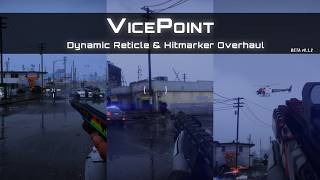
A next generation combat HUD overhaul for GTA V inspired by the dynamic crosshairs and hit feedback shown in the GTA VI extended preview.
The goal of VicePoint is to bring that same responsive combat feel into GTA V while keeping everything clean and natural within the game.
Features
The Underworld & Crime System
Tactical HUD & Combat
Important Notice: VicePoint v0.2.0 is a massive work-in-progress expansion. Bugs, occasional crashes and features not working as intended are to be expected during this phase. If you experience instability and prefer only hitmarkers and crosshairs, it's recommend reverting to the lightweight version, v0.1.2.
Required Dependencies
Please read the included Readme carefully before installing.
GTA V Legacy
GTA V Enhanced
Future Roadmap
VicePoint is planned to become more than just a reticle and hitmarker mod. The long-term goal is to bring as much of the GTA VI style combat feedback and Wanted System to GTA V as possible.
There is no guarantee that all of these features will be possible. GTA V has its own engine and technical limitations so some GTA VI systems may not be possible to recreate exactly. How far the Wanted System and other planned features can go will depend on what I am able to achieve and how much time I have to work on the mod. The goal is simply to take VicePoint as far toward the GTA VI experience as GTA V allows.
Special thanks to
Changelog
v0.2.0 - The Underworld Expansion
v0.1.2
v0.1.1 Hotfix
v0.1 Initial Release
A next generation combat HUD overhaul for GTA V inspired by the dynamic crosshairs and hit feedback shown in the GTA VI extended preview.
The goal of VicePoint is to bring that same responsive combat feel into GTA V while keeping everything clean and natural within the game.
Features
The Underworld & Crime System
- Evidence-Based Wanted System: A complete overhaul of police AI. Cops now rely on physical descriptions, vehicle plates, and weapon identification. Swap clothes at your vehicle's trunk to drop your description, or use stolen cars to mask your identity.
- Tactical Escalations & Responses: Face progressive, intelligent police responses ranging from local LSPD patrols to multi-agency military blockades and FIB interceptors at 6 Stars.
- Surveillance Network: Watch your step around 24/7 stores and major intersections. CCTV cameras and Traffic Scanners will flag your vehicle and alert dispatch if you have an active warrant.
- Dynamic Robberies: Hold up convenience stores for Dirty Loot. Clerks may comply or fight back. Lingering too long will trip silent alarms.
- Gangs, Fences & Chop Shops: The criminal economy is separate from your GTA bank account. Chop stolen cars or launder Dirty Loot through gang Fences. Earn "Respect" by interacting with gang members on their turf to lower their laundering fees.
- Burner Phones & Bribes: Purchase Encrypted Burner Phones and Carjacking Bypass Kits from Fences. Use the phone during pursuits to bribe corrupt dispatchers, deploy decoy APBs, or scrub your wanted description.
Tactical HUD & Combat
- Player Vitals HUD: Sleek, circular, and animated UI rings for Health, Kevlar Armor, Oxygen, and a Bullet-Time Ability meter. Features an active bleeding system that requires bandages or tourniquets for critical wounds.
- Dynamic Weapon & Ammo UI: Clean, minimalist weapon icons and ammo counters that dynamically reposition themselves based on your active wanted level.
- Weapon-Class Base Reticles: Unique crosshairs for Pistols, Shotguns, and Rifles/SMGs with dynamic blooming and aspect-ratio correction for all monitor sizes.
- Decoupled Recoil Feedback: Every shot triggers an instant recoil kick on the reticle, which smoothly returns to center using quadratic ease-back logic.
- Adaptive Hit & Kill Feedback: Distinct hitmarkers for non-lethal body hits (White), lethal body kills (Yellow), and critical headshots (Red) alongside a custom red-screen kill flash.
- Master Calibration Menu: A massive, built-in LemonUI control panel to reposition every HUD element, adjust crosshair scales, and toggle individual features live in-game.
Important Notice: VicePoint v0.2.0 is a massive work-in-progress expansion. Bugs, occasional crashes and features not working as intended are to be expected during this phase. If you experience instability and prefer only hitmarkers and crosshairs, it's recommend reverting to the lightweight version, v0.1.2.
Required Dependencies
Please read the included Readme carefully before installing.
GTA V Legacy
- Script Hook V
- Script Hook V .NET Enhanced
- LemonUI
- OpenIV for importing VicePoint.ytd
GTA V Enhanced
Future Roadmap
VicePoint is planned to become more than just a reticle and hitmarker mod. The long-term goal is to bring as much of the GTA VI style combat feedback and Wanted System to GTA V as possible.
- More Combat Feedback I plan to add more GTA VI style combat feedback including new hit indicators new animations and other small details that can make combat feel more responsive.
- More Weapon Reticles If Rockstar shows new weapons reticles or aiming behavior in future GTA VI footage I will look into adding them to VicePoint where possible.
- Research I will continue looking through new trailers and gameplay footage to see what other GTA VI features could potentially be recreated in GTA V.
There is no guarantee that all of these features will be possible. GTA V has its own engine and technical limitations so some GTA VI systems may not be possible to recreate exactly. How far the Wanted System and other planned features can go will depend on what I am able to achieve and how much time I have to work on the mod. The goal is simply to take VicePoint as far toward the GTA VI experience as GTA V allows.
Special thanks to
- Alexander Blade
- Chiheb Bacha
- Alloc8or
- justalemon
Changelog
v0.2.0 - The Underworld Expansion
- Major Feature: Added an advanced, evidence-based 6-Star Wanted System with CCTV persistence, traffic camera networks and custom pursuit AI.
- Major Feature: Implemented a new Economy (Bank, Clean Cash, Dirty Loot and Vice Points).
- Major Feature: Added Gang Fences, Chop Shops and Convenience Store Robberies with dynamic silent alarms.
- Major Feature: Added a complete Player Vitals HUD (Health, Armor, Oxygen, Bullet Time) with active bleeding/first-aid mechanics.
- Major Feature: Added dynamic Weapon & Ammo HUDs that seamlessly integrate with the new Wanted UI.
- New Items: Added Encrypted Burner Phones, Carjacking Bypass kits and Dispatcher Bribes/Decoys.
- Interaction System: Greet gang members and pet guard dogs to earn Respect, which lowers fencing fees.
- Menu: Added a massive in-game configuration menu to manually adjust X/Y coordinates and scales of all UI elements.
v0.1.2
- Improved Texture Quality All reticle and hitmarker textures have been updated for sharper and cleaner visuals.
- Always Show Aim Dot Added AlwaysShowAimDot = True/False to VicePoint.ini. When enabled a persistent center aim dot remains visible at all times. This uses a dedicated aim dot texture that is more distinct from the standard vanilla version.
v0.1.1 Hotfix
- Fixes & Improvements
- Removed External Dependencies Removed the LemonUI requirement completely. The script is now standalone and no longer depends on LemonUI. This also fixes silent script loading failures that could occur on GTA V Legacy.
- Smart Vehicle Aiming & INI Toggle Crosshairs are now hidden while driving or while idle inside vehicles when unarmed. The custom crosshair activates when actively aiming during a Drive By with Pistols or SMGs. Added EnableVehicleCross = True/False to VicePoint.ini to switch between the custom vehicle reticle and the vanilla vehicle reticle.
v0.1 Initial Release
- Added custom dynamic reticles for Pistols Shotguns Assault Rifles SMGs and MGs.
- Added aspect ratio invariant rendering with smooth quadratic recoil ease back.
- Added separate White Yellow and Red hit confirmation layers.
- Added camera mode and FOV based first person scope detection.
- Added full VicePoint.ini configuration support.
Première mise en ligne : 29 août 2026
Dernière mise à jour : 29 septembre 2026
Téléchargé pour la dernière fois : il y a 9 minutes
111 commentaires
More mods by REX MODS:

- Véhicules
- .Net
- HUD
- Speedometer
4.97
6 800
57
1.3 [Legacy + Enhanced]
By REX MODS
VicePoint GTA V Tactical HUD & Gameplay Overhaul
A next generation combat HUD overhaul for GTA V inspired by the dynamic crosshairs and hit feedback shown in the GTA VI extended preview.
The goal of VicePoint is to bring that same responsive combat feel into GTA V while keeping everything clean and natural within the game.
Features
The Underworld & Crime System
Tactical HUD & Combat
Important Notice: VicePoint v0.2.0 is a massive work-in-progress expansion. Bugs, occasional crashes and features not working as intended are to be expected during this phase. If you experience instability and prefer only hitmarkers and crosshairs, it's recommend reverting to the lightweight version, v0.1.2.
Required Dependencies
Please read the included Readme carefully before installing.
GTA V Legacy
GTA V Enhanced
Future Roadmap
VicePoint is planned to become more than just a reticle and hitmarker mod. The long-term goal is to bring as much of the GTA VI style combat feedback and Wanted System to GTA V as possible.
There is no guarantee that all of these features will be possible. GTA V has its own engine and technical limitations so some GTA VI systems may not be possible to recreate exactly. How far the Wanted System and other planned features can go will depend on what I am able to achieve and how much time I have to work on the mod. The goal is simply to take VicePoint as far toward the GTA VI experience as GTA V allows.
Special thanks to
Changelog
v0.2.0 - The Underworld Expansion
v0.1.2
v0.1.1 Hotfix
v0.1 Initial Release
A next generation combat HUD overhaul for GTA V inspired by the dynamic crosshairs and hit feedback shown in the GTA VI extended preview.
The goal of VicePoint is to bring that same responsive combat feel into GTA V while keeping everything clean and natural within the game.
Features
The Underworld & Crime System
- Evidence-Based Wanted System: A complete overhaul of police AI. Cops now rely on physical descriptions, vehicle plates, and weapon identification. Swap clothes at your vehicle's trunk to drop your description, or use stolen cars to mask your identity.
- Tactical Escalations & Responses: Face progressive, intelligent police responses ranging from local LSPD patrols to multi-agency military blockades and FIB interceptors at 6 Stars.
- Surveillance Network: Watch your step around 24/7 stores and major intersections. CCTV cameras and Traffic Scanners will flag your vehicle and alert dispatch if you have an active warrant.
- Dynamic Robberies: Hold up convenience stores for Dirty Loot. Clerks may comply or fight back. Lingering too long will trip silent alarms.
- Gangs, Fences & Chop Shops: The criminal economy is separate from your GTA bank account. Chop stolen cars or launder Dirty Loot through gang Fences. Earn "Respect" by interacting with gang members on their turf to lower their laundering fees.
- Burner Phones & Bribes: Purchase Encrypted Burner Phones and Carjacking Bypass Kits from Fences. Use the phone during pursuits to bribe corrupt dispatchers, deploy decoy APBs, or scrub your wanted description.
Tactical HUD & Combat
- Player Vitals HUD: Sleek, circular, and animated UI rings for Health, Kevlar Armor, Oxygen, and a Bullet-Time Ability meter. Features an active bleeding system that requires bandages or tourniquets for critical wounds.
- Dynamic Weapon & Ammo UI: Clean, minimalist weapon icons and ammo counters that dynamically reposition themselves based on your active wanted level.
- Weapon-Class Base Reticles: Unique crosshairs for Pistols, Shotguns, and Rifles/SMGs with dynamic blooming and aspect-ratio correction for all monitor sizes.
- Decoupled Recoil Feedback: Every shot triggers an instant recoil kick on the reticle, which smoothly returns to center using quadratic ease-back logic.
- Adaptive Hit & Kill Feedback: Distinct hitmarkers for non-lethal body hits (White), lethal body kills (Yellow), and critical headshots (Red) alongside a custom red-screen kill flash.
- Master Calibration Menu: A massive, built-in LemonUI control panel to reposition every HUD element, adjust crosshair scales, and toggle individual features live in-game.
Important Notice: VicePoint v0.2.0 is a massive work-in-progress expansion. Bugs, occasional crashes and features not working as intended are to be expected during this phase. If you experience instability and prefer only hitmarkers and crosshairs, it's recommend reverting to the lightweight version, v0.1.2.
Required Dependencies
Please read the included Readme carefully before installing.
GTA V Legacy
- Script Hook V
- Script Hook V .NET Enhanced
- LemonUI
- OpenIV for importing VicePoint.ytd
GTA V Enhanced
Future Roadmap
VicePoint is planned to become more than just a reticle and hitmarker mod. The long-term goal is to bring as much of the GTA VI style combat feedback and Wanted System to GTA V as possible.
- More Combat Feedback I plan to add more GTA VI style combat feedback including new hit indicators new animations and other small details that can make combat feel more responsive.
- More Weapon Reticles If Rockstar shows new weapons reticles or aiming behavior in future GTA VI footage I will look into adding them to VicePoint where possible.
- Research I will continue looking through new trailers and gameplay footage to see what other GTA VI features could potentially be recreated in GTA V.
There is no guarantee that all of these features will be possible. GTA V has its own engine and technical limitations so some GTA VI systems may not be possible to recreate exactly. How far the Wanted System and other planned features can go will depend on what I am able to achieve and how much time I have to work on the mod. The goal is simply to take VicePoint as far toward the GTA VI experience as GTA V allows.
Special thanks to
- Alexander Blade
- Chiheb Bacha
- Alloc8or
- justalemon
Changelog
v0.2.0 - The Underworld Expansion
- Major Feature: Added an advanced, evidence-based 6-Star Wanted System with CCTV persistence, traffic camera networks and custom pursuit AI.
- Major Feature: Implemented a new Economy (Bank, Clean Cash, Dirty Loot and Vice Points).
- Major Feature: Added Gang Fences, Chop Shops and Convenience Store Robberies with dynamic silent alarms.
- Major Feature: Added a complete Player Vitals HUD (Health, Armor, Oxygen, Bullet Time) with active bleeding/first-aid mechanics.
- Major Feature: Added dynamic Weapon & Ammo HUDs that seamlessly integrate with the new Wanted UI.
- New Items: Added Encrypted Burner Phones, Carjacking Bypass kits and Dispatcher Bribes/Decoys.
- Interaction System: Greet gang members and pet guard dogs to earn Respect, which lowers fencing fees.
- Menu: Added a massive in-game configuration menu to manually adjust X/Y coordinates and scales of all UI elements.
v0.1.2
- Improved Texture Quality All reticle and hitmarker textures have been updated for sharper and cleaner visuals.
- Always Show Aim Dot Added AlwaysShowAimDot = True/False to VicePoint.ini. When enabled a persistent center aim dot remains visible at all times. This uses a dedicated aim dot texture that is more distinct from the standard vanilla version.
v0.1.1 Hotfix
- Fixes & Improvements
- Removed External Dependencies Removed the LemonUI requirement completely. The script is now standalone and no longer depends on LemonUI. This also fixes silent script loading failures that could occur on GTA V Legacy.
- Smart Vehicle Aiming & INI Toggle Crosshairs are now hidden while driving or while idle inside vehicles when unarmed. The custom crosshair activates when actively aiming during a Drive By with Pistols or SMGs. Added EnableVehicleCross = True/False to VicePoint.ini to switch between the custom vehicle reticle and the vanilla vehicle reticle.
v0.1 Initial Release
- Added custom dynamic reticles for Pistols Shotguns Assault Rifles SMGs and MGs.
- Added aspect ratio invariant rendering with smooth quadratic recoil ease back.
- Added separate White Yellow and Red hit confirmation layers.
- Added camera mode and FOV based first person scope detection.
- Added full VicePoint.ini configuration support.
Première mise en ligne : 29 août 2026
Dernière mise à jour : 29 septembre 2026
Téléchargé pour la dernière fois : il y a 9 minutes
 5mods on Discord

@REX MODS casual usage of phone
After I installed your mod, whenever I play as Michael, Trevor, or Franklin and press the Up key to open the character’s phone, the phone interface closes automatically. The issue I’m reporting is not about the burner phone, but about the protagonist’s regular phone and the phone used in the prologue mission to detonate the bomb.
Your mod is the best but how to disable mod wanted system? When i turn EnableWantedSystem to False in ViceWanted.ini it keep turn back on when i open gta v
@jiangxiangyu I looked through the code and couldn't find anything that would mess with the phone interface and i tested every character's phone with VicePoint installed and none of them closed. Even played the prologue with no issues. So i have no idea why it's happening on your end. Only thing i can suggest is changing the keycode as it could be another mod interfering with VicePoint or something, not sure.
@Colpaymento XD Thank you :) As for the wanted system, right now it's just a non active field. The reason i left the EnableWantedSystem option in the INI is that before release, i tested disabling the custom wanted system for users who might prefer the vanilla one or want it off during missions. However, because several other gameplay areas of vicepoint were linked to it, disabling it caused some issues that needed time to fix. So, im currently working on a fix and im separating those other gameplay areas from the mod when the option is disabled. There will be a patch update soon for that system, along with a reworked menu.
@REX MODS your mod might be conflicting with iFruitAddon2. That would explain why opening the protagonist’s regular phone, or the phone used at the beginning of the prologue to detonate the bomb, can cause the phone interface to close automatically after it opens. However, iFruitAddon2 is a prerequisite for many mods. I’m not only going to install your mod, but also other mods that depend on iFruitAddon2.
Because I installed iFruitAddon2.
I’ll check whether iFruitAddon2 has any logical conflicts with your MOD.
Personal phones and the prologue bomb phone close immediately after installing VicePoint; burner phones are not affected
I am using GTA V Legacy on Windows 10.
Installed prerequisites:
· LemonUI: Open Source UI Library
· ScriptHookV
· ScriptHookVDotNet-v3.7.0-nightly.191
· Rebalanced Dispatch Enhanced Lite
· Packfile Limit Adjuster Enhanced
· Static Bounds Limit Adjuster
· Gameconfig.xml
· Modkit Limit Adjuster
· Siren Setting Limit Adjuster
· fwBoxStreamer
· Ped Prop Limit Adjuster
· Resource Adjuster
· Vehicle ModKit Limit
· NativeUI
· Phone HUD Fix
Not installed: iFruitAddon2.
Affected phones:
· Franklin's, Michael's, and Trevor's personal phones.
· The phone used to detonate the bomb in the prologue.
Not affected:
· Burner / disposable / one-time phones.
Before installing VicePoint | Tactical HUD & Gameplay Overhaul:
· Pressing the Up Arrow key opens Franklin's, Michael's, and Trevor's personal phones, and the prologue bomb phone, normally.
· They stay open and do not close by themselves.
· Burner / disposable / one-time phones also work normally.
After installing VicePoint | Tactical HUD & Gameplay Overhaul:
· Pressing the Up Arrow key opens Franklin's, Michael's, or Trevor's personal phone, or the prologue bomb phone, but the UI closes automatically immediately, even if I do nothing.
· Burner / disposable / one-time phones still work normally and do not have this issue.
Troubleshooting already done:
· I removed iFruitAddon2 to test, but the issue still happens.
· Even with only the prerequisites and VicePoint installed, the issue still happens.
· This means the problem is not caused by iFruitAddon2. It appears to be caused by VicePoint itself, or by a conflict between VicePoint and one of the prerequisites.
@jiangxiangyu Thanks for the detailed test check. I don't have legacy installed right now, but i will install it soon and go through the mods you used one by one. I'll post a fix as soon as I can.
@REX MODS I also noticed a problem: in the Legacy version, pressing ↑ to use the phone while driving does not automatically turn it off; it only turns off automatically when using the phone while walking. This doesn’t refer to disposable phones, but the phones commonly used by the main characters.
Hi, I installed the mod because of the crosshair, but there is a problem; the crosshair was buggy; when installing the mod, a png appeared on my GTA V screen where it shows a huge white dot in the center and a green screen on the background. I saw that it was possible to disable this in the mod menu, but after I specifically got the rifles it appeared again and only disappears when aiming, and when I aim, it seems like the aim gets buggy; it gets a bit exaggerated. Do I have to put a specific co-figuration to solve this problem?
I’d like to report an issue: I also found a problem. To use the regular phone, you have to find the money-laundering fence, and you have to face him and press E to open the menu, then exit the menu. Once the regular phone is opened, it won’t close automatically.
@tasy11 Could you join the Discord and open a support ticket if possible?
In the meantime, here's how to fix your issues:
To disable the player stats HUD: Set EnableHUD = False in VicePlayerHUD.ini and reload the script or simply disable the HUD from the menu.
For the crosshair size: Open the menu -> Custom Reticles and Dot -> Adjust Rifle Dot and Center, then decrease the value. That should fix it.
The INI files included with the mod are already adjusted for this, but screen scaling ratios or something similar might be causing them to overshoot in size.
@jiangxiangyu Oh ok. By the way i tried all the mods you mentioned on Legacy and tested everything, even with iFruitAddon2, but i couldn't recreate the issue at all. The phones worked every time and didn't close once during the play test. I also tested with both SHVDN Nightly and SHVDNE.
Also, if you could please join the Discord and open a support ticket, then send me a screen recording of the issue. I know what you're referring to, but since i couldn't recreate it, it would be better if i could see it myself. Please include your ScriptHookVDotNet log file as well.
The video shows me controlling the main character; after pressing the ↑ button to open the phone, the phone UI automatically closes.
I wanted to use it to relive the story, but unfortunately, pressing the ↑ button to open the phone’s UI interface causes it to close automatically, which has affected my ability to experience the story.
Check the messages in Discord, specifically in the #lobby category. My ID is jiangxiangyu.
@REX MODS ok, i'll join discord
@REX MODS I managed to solve my problem