YVR Recorder 1.2



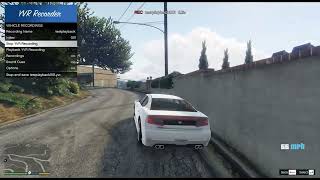
192
4
192
4
1.2 Changelog:
- Added Multi YVR Playback: play as many recordings together as you like to build a full chase with scripted traffic.
- Added Record Mode: record a new car alongside ghost playbacks of your other cars.
- Added .pack files: save a whole scene into one file you can load any time or share.
- Added Louder Cars: playback cars and sound cues are louder and carry further. Can be turned off in Options.
- Rubberband now uses the game's own mission chase logic and works across all cars in Multi YVR Playback.
- Fixed recording over an existing name playing the old take.
- Added Vanilla YVRS: a new tab with the game's own mission recordings and a search, so you can play any of them.
1.1 Changelog: Added Show Status. It turns off the time and speed display at the top of the screen so you can record clean video. You can toggle it in Options or set ShowStatus in YvrRecorder.ini
Record any vehicle to a .yvr and play it back with GTA V's own vehicle recording system, just like mission chases. New recordings play right away, no OpenIV or restart needed.
Features:
- Native playback with real engine sound, gears and camera
- Spawn the vehicle you recorded in, ride along, or use your own car
- Playback speed from -5x to 5x (including reverse)
- Rubberband chase mode and looping
- Sound cues like drifts and tire skids at any point in a recording
Requirements: Script Hook V, ScriptHookVDotNet 3.7, LemonUI
Installation: Drop the files from the scripts folder into your GTA V scripts folder and press F7 in game.
Note: Instant loading only works on game version 1.0.3889.0.
Credits: CodeWalker by dexyfex, LemonUI by justalemon, QuadrupleTurbo for the entire YVR playback
- Added Multi YVR Playback: play as many recordings together as you like to build a full chase with scripted traffic.
- Added Record Mode: record a new car alongside ghost playbacks of your other cars.
- Added .pack files: save a whole scene into one file you can load any time or share.
- Added Louder Cars: playback cars and sound cues are louder and carry further. Can be turned off in Options.
- Rubberband now uses the game's own mission chase logic and works across all cars in Multi YVR Playback.
- Fixed recording over an existing name playing the old take.
- Added Vanilla YVRS: a new tab with the game's own mission recordings and a search, so you can play any of them.
1.1 Changelog: Added Show Status. It turns off the time and speed display at the top of the screen so you can record clean video. You can toggle it in Options or set ShowStatus in YvrRecorder.ini
Record any vehicle to a .yvr and play it back with GTA V's own vehicle recording system, just like mission chases. New recordings play right away, no OpenIV or restart needed.
Features:
- Native playback with real engine sound, gears and camera
- Spawn the vehicle you recorded in, ride along, or use your own car
- Playback speed from -5x to 5x (including reverse)
- Rubberband chase mode and looping
- Sound cues like drifts and tire skids at any point in a recording
Requirements: Script Hook V, ScriptHookVDotNet 3.7, LemonUI
Installation: Drop the files from the scripts folder into your GTA V scripts folder and press F7 in game.
Note: Instant loading only works on game version 1.0.3889.0.
Credits: CodeWalker by dexyfex, LemonUI by justalemon, QuadrupleTurbo for the entire YVR playback
Először Feltöltve: 5 napja
Utoljára Feltöltve: 1 napja
Utoljára Letöltött: 34 perce
7 Hozzászólás
1.2 Changelog:
- Added Multi YVR Playback: play as many recordings together as you like to build a full chase with scripted traffic.
- Added Record Mode: record a new car alongside ghost playbacks of your other cars.
- Added .pack files: save a whole scene into one file you can load any time or share.
- Added Louder Cars: playback cars and sound cues are louder and carry further. Can be turned off in Options.
- Rubberband now uses the game's own mission chase logic and works across all cars in Multi YVR Playback.
- Fixed recording over an existing name playing the old take.
- Added Vanilla YVRS: a new tab with the game's own mission recordings and a search, so you can play any of them.
1.1 Changelog: Added Show Status. It turns off the time and speed display at the top of the screen so you can record clean video. You can toggle it in Options or set ShowStatus in YvrRecorder.ini
Record any vehicle to a .yvr and play it back with GTA V's own vehicle recording system, just like mission chases. New recordings play right away, no OpenIV or restart needed.
Features:
- Native playback with real engine sound, gears and camera
- Spawn the vehicle you recorded in, ride along, or use your own car
- Playback speed from -5x to 5x (including reverse)
- Rubberband chase mode and looping
- Sound cues like drifts and tire skids at any point in a recording
Requirements: Script Hook V, ScriptHookVDotNet 3.7, LemonUI
Installation: Drop the files from the scripts folder into your GTA V scripts folder and press F7 in game.
Note: Instant loading only works on game version 1.0.3889.0.
Credits: CodeWalker by dexyfex, LemonUI by justalemon, QuadrupleTurbo for the entire YVR playback
- Added Multi YVR Playback: play as many recordings together as you like to build a full chase with scripted traffic.
- Added Record Mode: record a new car alongside ghost playbacks of your other cars.
- Added .pack files: save a whole scene into one file you can load any time or share.
- Added Louder Cars: playback cars and sound cues are louder and carry further. Can be turned off in Options.
- Rubberband now uses the game's own mission chase logic and works across all cars in Multi YVR Playback.
- Fixed recording over an existing name playing the old take.
- Added Vanilla YVRS: a new tab with the game's own mission recordings and a search, so you can play any of them.
1.1 Changelog: Added Show Status. It turns off the time and speed display at the top of the screen so you can record clean video. You can toggle it in Options or set ShowStatus in YvrRecorder.ini
Record any vehicle to a .yvr and play it back with GTA V's own vehicle recording system, just like mission chases. New recordings play right away, no OpenIV or restart needed.
Features:
- Native playback with real engine sound, gears and camera
- Spawn the vehicle you recorded in, ride along, or use your own car
- Playback speed from -5x to 5x (including reverse)
- Rubberband chase mode and looping
- Sound cues like drifts and tire skids at any point in a recording
Requirements: Script Hook V, ScriptHookVDotNet 3.7, LemonUI
Installation: Drop the files from the scripts folder into your GTA V scripts folder and press F7 in game.
Note: Instant loading only works on game version 1.0.3889.0.
Credits: CodeWalker by dexyfex, LemonUI by justalemon, QuadrupleTurbo for the entire YVR playback
Először Feltöltve: 5 napja
Utoljára Feltöltve: 1 napja
Utoljára Letöltött: 34 perce
 5mods on Discord

Good work. Please add an option to hide the "REC" indicator and the numbers at the top—it would be great to be able to hide them while recording videos
Please add a Changelog
@meimeiriver done
@davidbaach Thanks! Added in 1.1: turn off "Show Status" in Options to hide it
@X9Kong9X Great, good job, thanks
Hi! Great mod. Quick question: If I use an "Add-on" car with a custom "Add-on" engine sound, will the playback retain that exact custom sound during normal gameplay and inside the Rockstar Editor? I want to make sure both cars in a chase keep their loud, custom sounds for editing. Thanks!
@kareem-grandman Thanks! Yes, your custom engine sound should stay in normal gameplay. Playback spawns your actual add-on car and the game plays whatever engine sound that car has, so the mod doesn't replace it. Record the chase in the add-on cars so it remembers them, then play both with Multi YVR Playback and Louder Cars on. I haven't tested it yet, so try a short clip there first to make sure the sound carries over