YVR Recorder 1.1



52
3
52
3
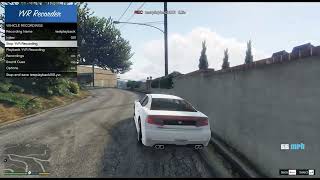
Changelog: Added Show Status. It turns off the time and speed display at the top of the screen so you can record clean video. You can toggle it in Options or set ShowStatus in YvrRecorder.ini
Record any vehicle to a .yvr and play it back with GTA V's own vehicle recording system, just like mission chases. New recordings play right away, no OpenIV or restart needed.
Features:
- Native playback with real engine sound, gears and camera
- Spawn the vehicle you recorded in, ride along, or use your own car
- Playback speed from -5x to 5x (including reverse)
- Rubberband chase mode and looping
- Sound cues like drifts and tire skids at any point in a recording
Requirements: Script Hook V, ScriptHookVDotNet 3.7, LemonUI
Installation: Drop the files from the scripts folder into your GTA V scripts folder and press F7 in game.
Note: Instant loading only works on game version 1.0.3889.0.
Credits: CodeWalker by dexyfex, LemonUI by justalemon
Record any vehicle to a .yvr and play it back with GTA V's own vehicle recording system, just like mission chases. New recordings play right away, no OpenIV or restart needed.
Features:
- Native playback with real engine sound, gears and camera
- Spawn the vehicle you recorded in, ride along, or use your own car
- Playback speed from -5x to 5x (including reverse)
- Rubberband chase mode and looping
- Sound cues like drifts and tire skids at any point in a recording
Requirements: Script Hook V, ScriptHookVDotNet 3.7, LemonUI
Installation: Drop the files from the scripts folder into your GTA V scripts folder and press F7 in game.
Note: Instant loading only works on game version 1.0.3889.0.
Credits: CodeWalker by dexyfex, LemonUI by justalemon
First Uploaded: 1 day ago
Last Updated: 4 hours ago
Last Downloaded: 15 minutes ago
3 Comments
Changelog: Added Show Status. It turns off the time and speed display at the top of the screen so you can record clean video. You can toggle it in Options or set ShowStatus in YvrRecorder.ini
Record any vehicle to a .yvr and play it back with GTA V's own vehicle recording system, just like mission chases. New recordings play right away, no OpenIV or restart needed.
Features:
- Native playback with real engine sound, gears and camera
- Spawn the vehicle you recorded in, ride along, or use your own car
- Playback speed from -5x to 5x (including reverse)
- Rubberband chase mode and looping
- Sound cues like drifts and tire skids at any point in a recording
Requirements: Script Hook V, ScriptHookVDotNet 3.7, LemonUI
Installation: Drop the files from the scripts folder into your GTA V scripts folder and press F7 in game.
Note: Instant loading only works on game version 1.0.3889.0.
Credits: CodeWalker by dexyfex, LemonUI by justalemon
Record any vehicle to a .yvr and play it back with GTA V's own vehicle recording system, just like mission chases. New recordings play right away, no OpenIV or restart needed.
Features:
- Native playback with real engine sound, gears and camera
- Spawn the vehicle you recorded in, ride along, or use your own car
- Playback speed from -5x to 5x (including reverse)
- Rubberband chase mode and looping
- Sound cues like drifts and tire skids at any point in a recording
Requirements: Script Hook V, ScriptHookVDotNet 3.7, LemonUI
Installation: Drop the files from the scripts folder into your GTA V scripts folder and press F7 in game.
Note: Instant loading only works on game version 1.0.3889.0.
Credits: CodeWalker by dexyfex, LemonUI by justalemon
First Uploaded: 1 day ago
Last Updated: 4 hours ago
Last Downloaded: 15 minutes ago
 5mods on Discord

Good work. Please add an option to hide the "REC" indicator and the numbers at the top—it would be great to be able to hide them while recording videos
Please add a Changelog
@meimeiriver done