Extended Visual Camera [Legacy & Enhanced] 1.1

![Los Santos "Vice Style" Radar Map [Legacy]](https://img.gta5-mods.com/q75-w500-h333-cfill/images/los-santos-vice-map-legacy/a3f9dd-cover.png "Los Santos \"Vice Style\" Radar Map [Legacy]")
![ActionMenu [Legacy Version]](https://img.gta5-mods.com/q75-w500-h333-cfill/images/actionmenu-legacy-version/e5bd80-cover.png "ActionMenu [Legacy Version]")
![DriveStyle [Legacy]](https://img.gta5-mods.com/q75-w500-h333-cfill/images/drivestyle-legacy-version/9e8060-cover.png "DriveStyle [Legacy]")
![BikeLifeMenu [Legacy Version]](https://img.gta5-mods.com/q75-w500-h333-cfill/images/bikelifemenu-legacy-version/4d1f58-cover.png "BikeLifeMenu [Legacy Version]")
![DanceStyle Menu [Legacy]](https://img.gta5-mods.com/q75-w500-h333-cfill/images/dancestyle-menu-1-0-legacy-version/641b9f-39826.png "DanceStyle Menu [Legacy]")


557
15
557
15
Extended Visual Camera
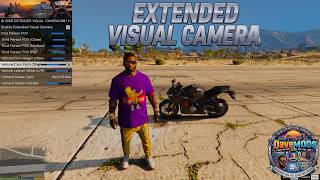
Extended Visual Camera is a camera control script for Grand Theft Auto V (compatible with both Legacy and Enhanced editions via Script Hook V .NET).
It allows complete customization of camera positioning, field of view (FOV), pitch, and lateral offsets without conflicts or camera bugs during gameplay.
Behind the Scenes & Fixes
During development, several technical issues were addressed to ensure stability:
Separated On-Foot & In-Vehicle Logic: Camera values no longer overlap or "bounce" when switching between on-foot and driving modes. Each vehicle class has its own independent saved settings.
Camera Shake Clean-Up: Fixed SHAKE_CAM conflicts and freezing by properly clearing previous camera shake effects before applying new ones.
Motorcycle & First-Person Handling: Expanded slider ranges for pitch/height and added lateral offset (left/right) to prevent character models or helmets from blocking the view.
Protected Config File: Clean custom file handling ensures settings and credits remain preserved inside the CameraSettings.ini file.
Key Features:
Vehicle Category Profiles: Set dedicated heights, pitches, lateral offsets, and FOVs for Supercars, Motorcycles, Off-Roaders, SUVs, and more.
Advanced FOV Management: Separate adjustments for first-person and third-person perspectives across distinct distances (Close, Medium, Far).
Cinematic Shake Effects: Choose from multiple vibration types (Road Vibration, Hand Shake, Vehicle Jolt, Drunk Motion) with adjustable intensity.
Water Lock Safety: Prevent accidental camera switching while swimming or in water.
Clean INI File: An organized configuration file automatically generated in your scripts folder.
Installation Guide
1. Prerequisites:
Script Hook V (by Alexander Blade)
Script Hook V .NET (v3 for Legacy, or equivalent SHVDNE for Enhanced)
LemonUI library placed in the main GTA V directory
2. Mod Installation:
-ENHANCED VERSION:
Copy ExtendedVisualCamera.dll into the scripts/ folder inside your main GTA V directory.
Launch the game. The configuration file CameraSettings.ini will automatically generate in your scripts folder.
-LEGACY VERSION:
For the Legacy version, OIV files are also available for automatic installation.
You have completed the installation, enjoy!
In-Game Controls
F11 Key: Opens / Closes the mod configuration menu.
V Key (while menu is open): Toggles native camera views to assist with testing.
=====================================================
Extended Visual Camera - Changelog
=====================================================
Version 1.0: Release Extended Visual Camera [Legacy & Enhanced]
- The first version of the mod has been officially released.
Version 1.1 Update Enhanced version:
- Fixed compatibility and texture loading issues related to the DLC pack.
- Optimized the mod to run as a standalone script: the DLC is no longer required.
- The menu and all camera features (FOV, offsets, shake) will continue to work perfectly without the DLC package.
(You can safely bypass or remove it while maintaining full functionality)
- The menu will still be generated, but unlike the Legacy version, it will display a simple, clean header banner due to LemonUI's limitations regarding external texture dictionaries in the Enhanced editions.
=====================================================
FEEDBACK & COMMUNITY
Give it a try and let me know what you think!
Your feedback is invaluable as we fine-tune future updates.
Thank you for your support!
https://www.patreon.com/DaveMods
https://www.youtube.com/@DaveMods76
https://discord.gg/qmtesc8MSV
MODS by DaveMods
Happy modding!
Notice / Copyright
All rights reserved. Unauthorized redistribution or reverse engineering without explicit prior permission is prohibited.
Extended Visual Camera is a camera control script for Grand Theft Auto V (compatible with both Legacy and Enhanced editions via Script Hook V .NET).
It allows complete customization of camera positioning, field of view (FOV), pitch, and lateral offsets without conflicts or camera bugs during gameplay.
Behind the Scenes & Fixes
During development, several technical issues were addressed to ensure stability:
Separated On-Foot & In-Vehicle Logic: Camera values no longer overlap or "bounce" when switching between on-foot and driving modes. Each vehicle class has its own independent saved settings.
Camera Shake Clean-Up: Fixed SHAKE_CAM conflicts and freezing by properly clearing previous camera shake effects before applying new ones.
Motorcycle & First-Person Handling: Expanded slider ranges for pitch/height and added lateral offset (left/right) to prevent character models or helmets from blocking the view.
Protected Config File: Clean custom file handling ensures settings and credits remain preserved inside the CameraSettings.ini file.
Key Features:
Vehicle Category Profiles: Set dedicated heights, pitches, lateral offsets, and FOVs for Supercars, Motorcycles, Off-Roaders, SUVs, and more.
Advanced FOV Management: Separate adjustments for first-person and third-person perspectives across distinct distances (Close, Medium, Far).
Cinematic Shake Effects: Choose from multiple vibration types (Road Vibration, Hand Shake, Vehicle Jolt, Drunk Motion) with adjustable intensity.
Water Lock Safety: Prevent accidental camera switching while swimming or in water.
Clean INI File: An organized configuration file automatically generated in your scripts folder.
Installation Guide
1. Prerequisites:
Script Hook V (by Alexander Blade)
Script Hook V .NET (v3 for Legacy, or equivalent SHVDNE for Enhanced)
LemonUI library placed in the main GTA V directory
2. Mod Installation:
-ENHANCED VERSION:
Copy ExtendedVisualCamera.dll into the scripts/ folder inside your main GTA V directory.
Launch the game. The configuration file CameraSettings.ini will automatically generate in your scripts folder.
-LEGACY VERSION:
For the Legacy version, OIV files are also available for automatic installation.
You have completed the installation, enjoy!
In-Game Controls
F11 Key: Opens / Closes the mod configuration menu.
V Key (while menu is open): Toggles native camera views to assist with testing.
=====================================================
Extended Visual Camera - Changelog
=====================================================
Version 1.0: Release Extended Visual Camera [Legacy & Enhanced]
- The first version of the mod has been officially released.
Version 1.1 Update Enhanced version:
- Fixed compatibility and texture loading issues related to the DLC pack.
- Optimized the mod to run as a standalone script: the DLC is no longer required.
- The menu and all camera features (FOV, offsets, shake) will continue to work perfectly without the DLC package.
(You can safely bypass or remove it while maintaining full functionality)
- The menu will still be generated, but unlike the Legacy version, it will display a simple, clean header banner due to LemonUI's limitations regarding external texture dictionaries in the Enhanced editions.
=====================================================
FEEDBACK & COMMUNITY
Give it a try and let me know what you think!
Your feedback is invaluable as we fine-tune future updates.
Thank you for your support!
https://www.patreon.com/DaveMods
https://www.youtube.com/@DaveMods76
https://discord.gg/qmtesc8MSV
MODS by DaveMods
Happy modding!
Notice / Copyright
All rights reserved. Unauthorized redistribution or reverse engineering without explicit prior permission is prohibited.
최초 업로드: 2026년 09월 17일
마지막 업로드: 2026년 09월 19일
마지막 다운로드: 34분 전
댓글 32
More mods by DaveModsGTA:
Extended Visual Camera
Extended Visual Camera is a camera control script for Grand Theft Auto V (compatible with both Legacy and Enhanced editions via Script Hook V .NET).
It allows complete customization of camera positioning, field of view (FOV), pitch, and lateral offsets without conflicts or camera bugs during gameplay.
Behind the Scenes & Fixes
During development, several technical issues were addressed to ensure stability:
Separated On-Foot & In-Vehicle Logic: Camera values no longer overlap or "bounce" when switching between on-foot and driving modes. Each vehicle class has its own independent saved settings.
Camera Shake Clean-Up: Fixed SHAKE_CAM conflicts and freezing by properly clearing previous camera shake effects before applying new ones.
Motorcycle & First-Person Handling: Expanded slider ranges for pitch/height and added lateral offset (left/right) to prevent character models or helmets from blocking the view.
Protected Config File: Clean custom file handling ensures settings and credits remain preserved inside the CameraSettings.ini file.
Key Features:
Vehicle Category Profiles: Set dedicated heights, pitches, lateral offsets, and FOVs for Supercars, Motorcycles, Off-Roaders, SUVs, and more.
Advanced FOV Management: Separate adjustments for first-person and third-person perspectives across distinct distances (Close, Medium, Far).
Cinematic Shake Effects: Choose from multiple vibration types (Road Vibration, Hand Shake, Vehicle Jolt, Drunk Motion) with adjustable intensity.
Water Lock Safety: Prevent accidental camera switching while swimming or in water.
Clean INI File: An organized configuration file automatically generated in your scripts folder.
Installation Guide
1. Prerequisites:
Script Hook V (by Alexander Blade)
Script Hook V .NET (v3 for Legacy, or equivalent SHVDNE for Enhanced)
LemonUI library placed in the main GTA V directory
2. Mod Installation:
-ENHANCED VERSION:
Copy ExtendedVisualCamera.dll into the scripts/ folder inside your main GTA V directory.
Launch the game. The configuration file CameraSettings.ini will automatically generate in your scripts folder.
-LEGACY VERSION:
For the Legacy version, OIV files are also available for automatic installation.
You have completed the installation, enjoy!
In-Game Controls
F11 Key: Opens / Closes the mod configuration menu.
V Key (while menu is open): Toggles native camera views to assist with testing.
=====================================================
Extended Visual Camera - Changelog
=====================================================
Version 1.0: Release Extended Visual Camera [Legacy & Enhanced]
- The first version of the mod has been officially released.
Version 1.1 Update Enhanced version:
- Fixed compatibility and texture loading issues related to the DLC pack.
- Optimized the mod to run as a standalone script: the DLC is no longer required.
- The menu and all camera features (FOV, offsets, shake) will continue to work perfectly without the DLC package.
(You can safely bypass or remove it while maintaining full functionality)
- The menu will still be generated, but unlike the Legacy version, it will display a simple, clean header banner due to LemonUI's limitations regarding external texture dictionaries in the Enhanced editions.
=====================================================
FEEDBACK & COMMUNITY
Give it a try and let me know what you think!
Your feedback is invaluable as we fine-tune future updates.
Thank you for your support!
https://www.patreon.com/DaveMods
https://www.youtube.com/@DaveMods76
https://discord.gg/qmtesc8MSV
MODS by DaveMods
Happy modding!
Notice / Copyright
All rights reserved. Unauthorized redistribution or reverse engineering without explicit prior permission is prohibited.
Extended Visual Camera is a camera control script for Grand Theft Auto V (compatible with both Legacy and Enhanced editions via Script Hook V .NET).
It allows complete customization of camera positioning, field of view (FOV), pitch, and lateral offsets without conflicts or camera bugs during gameplay.
Behind the Scenes & Fixes
During development, several technical issues were addressed to ensure stability:
Separated On-Foot & In-Vehicle Logic: Camera values no longer overlap or "bounce" when switching between on-foot and driving modes. Each vehicle class has its own independent saved settings.
Camera Shake Clean-Up: Fixed SHAKE_CAM conflicts and freezing by properly clearing previous camera shake effects before applying new ones.
Motorcycle & First-Person Handling: Expanded slider ranges for pitch/height and added lateral offset (left/right) to prevent character models or helmets from blocking the view.
Protected Config File: Clean custom file handling ensures settings and credits remain preserved inside the CameraSettings.ini file.
Key Features:
Vehicle Category Profiles: Set dedicated heights, pitches, lateral offsets, and FOVs for Supercars, Motorcycles, Off-Roaders, SUVs, and more.
Advanced FOV Management: Separate adjustments for first-person and third-person perspectives across distinct distances (Close, Medium, Far).
Cinematic Shake Effects: Choose from multiple vibration types (Road Vibration, Hand Shake, Vehicle Jolt, Drunk Motion) with adjustable intensity.
Water Lock Safety: Prevent accidental camera switching while swimming or in water.
Clean INI File: An organized configuration file automatically generated in your scripts folder.
Installation Guide
1. Prerequisites:
Script Hook V (by Alexander Blade)
Script Hook V .NET (v3 for Legacy, or equivalent SHVDNE for Enhanced)
LemonUI library placed in the main GTA V directory
2. Mod Installation:
-ENHANCED VERSION:
Copy ExtendedVisualCamera.dll into the scripts/ folder inside your main GTA V directory.
Launch the game. The configuration file CameraSettings.ini will automatically generate in your scripts folder.
-LEGACY VERSION:
For the Legacy version, OIV files are also available for automatic installation.
You have completed the installation, enjoy!
In-Game Controls
F11 Key: Opens / Closes the mod configuration menu.
V Key (while menu is open): Toggles native camera views to assist with testing.
=====================================================
Extended Visual Camera - Changelog
=====================================================
Version 1.0: Release Extended Visual Camera [Legacy & Enhanced]
- The first version of the mod has been officially released.
Version 1.1 Update Enhanced version:
- Fixed compatibility and texture loading issues related to the DLC pack.
- Optimized the mod to run as a standalone script: the DLC is no longer required.
- The menu and all camera features (FOV, offsets, shake) will continue to work perfectly without the DLC package.
(You can safely bypass or remove it while maintaining full functionality)
- The menu will still be generated, but unlike the Legacy version, it will display a simple, clean header banner due to LemonUI's limitations regarding external texture dictionaries in the Enhanced editions.
=====================================================
FEEDBACK & COMMUNITY
Give it a try and let me know what you think!
Your feedback is invaluable as we fine-tune future updates.
Thank you for your support!
https://www.patreon.com/DaveMods
https://www.youtube.com/@DaveMods76
https://discord.gg/qmtesc8MSV
MODS by DaveMods
Happy modding!
Notice / Copyright
All rights reserved. Unauthorized redistribution or reverse engineering without explicit prior permission is prohibited.
최초 업로드: 2026년 09월 17일
마지막 업로드: 2026년 09월 19일
마지막 다운로드: 34분 전
 5mods on Discord

Hi everyone!
Version 1.1 is now available, fixing the crash in the Enhanced version. However, nothing changes for the Legacy version.
@DaveModsGTA
Thanks for clarifying.
This is in no way a judgment thing - I know with these camera mods you have to recreate the camera system essentially and you have a lovely lemonUi looking menu to handle all those features (which is great). I fear for my own personal preference that a camera mod should also include the ability to disable the auto centering - again personal preference and I would love you forever if you brought a modern camera mod that addressed ALL of these aspects.
Adding a fine-grained smooth transition between camera value adjustments will yield better results.
Hey everyone, and thank you very much for your detailed feedback! I truly appreciate it as it helps me improve the mod. Here is a quick update addressing your points:
@zanny1000: Thanks for pointing out the first-person auto-sprint issue and the crash in the in-game menu. I am looking into what caused this behavior to get it fixed as soon as possible.
@MarcusStone: Thanks for testing on Legacy. I will definitely look into the vehicle shaking issue and the ScriptHookV reload conflict to release a proper fix.
@dimedius: Thanks for the kind words about the LemonUI menu! I will take note of your suggestion regarding the ability to disable camera auto-centering—it's a great idea to accommodate personal player preferences.
@JoyLucien: Thanks as well for the technical advice; adding fine-grained smooth transitions between camera value adjustments is an excellent suggestion that I will try to integrate in future updates.
I'll be working on an update to address these points. Stay tuned!
@DaveModsGTA Yo this is mod is the beez kneez bruh, insane! It has some bugs like rotating camera getting stuck and not working while driving and camera keep getting popped back and forth due to the mod being confused between on-foot and driving camera adjustments constantly. I hope you update and improve it way more in the next update and add seperate camera adjustments as well (on-foot 3rd person, on-foot 1st person, driving 3rd person, driving 1st person) all that jazz but all in all an excellent mod
@Ballsy thanks friend, I will definitely continue to perfect this mod as much as possible especially thanks to your feedback... I did a lot of testing in the game but I must not have noticed some things, you know I really spent an infinite amount of time creating it and ran into many problems but I will definitely try to improve it 🤝😉
@DaveModsGTA https://www.gta5-mods.com/scripts/cinematic-v-camera You can try out this mod. Its camera adjustment is really smooth without any jarring stutters. Switching camera views is also seamless, though it only has the vehicle camera view, and there are a few bugs with the vehicle camera.
@JoyLucien Thanks for the suggestion! However, that mod uses an .asi plugin architecture, whereas Extended Visual Camera is built as a C# .dll script via ScriptHookVDotNet. Because they run on completely different frameworks, they handle hooks, camera states, and customization options differently. That said, I'll definitely keep working hard to improve Extended Visual Camera and make it as smooth and polished as possible. Appreciate you sharing it though!
listen if you tweak with it for a little im sure its gonna be great has loads of potential and im sure its gonna have loads of downloads mods for FOVS just dont exist for the current version of the game neither legacy or enchanced hell even flawless widescreen needs a work around and still some times it dossent work so i tryly recomend you to keep tweaking my guy its gonna be great
@zanny1000 😉🤝😊👍
Thanks for Listening Buddy. Again everything else is perfect and I love how you added the option for the pool camera. Never been done before and it was great. Can't wait for the updates. Keep it up!
@MarcusStone thx so much 😊🤝
very cool, very needed, i just have this issue where the car sort of shakes around while driving, or the camera shakes or summing. goes away when disabling the mod, in the settings there is some sort of came shake but it doesn't fully turn off.
@drifter109 Yeah, I know about that issue; I'm working on fixing it along with a few other things that need sorting out. I actually tried to fix it during development and thought I had, but I'll have to take another look at it. Please bear with me—I'll get it sorted. I put an incredible amount of time into creating this mod, and I'm not stopping here!
@DaveModsGTA Bookmarked, will check again in some time. this is one of those essentials in my list.
@drifter109 👍👋
Despite a few issues, I think this mod deserves 5 stars for encouragement; I look forward to updates!!
@paperone Hi! Thank you so much for the 5 stars and your amazing support! Your words are a huge encouragement. I'm already working on fixing the reported issues and will release an update soon. See you soon!😉🤙
@DaveModsGTA
Hey mate thanks for this Mod!
Would it be possible for a Version of this that allows us to move the Aiming Camera Left or Right?
So we can have our Character in the Centre of the Screen when Aiming.
Thanks mate :)
@MattyReady thx buddy....oh yes, why not?.....i am working on new release 😊😊
You're a legend thanks mate :)
Sorry to request something else, But if we could also raise the camera when aiming?
that way if the aiming Camera is in the centre, the player Character isn't in the way.
Thanks again! :)