Pet Squad 1.0



12
0
12
0
Pet Squad GTA V Mod
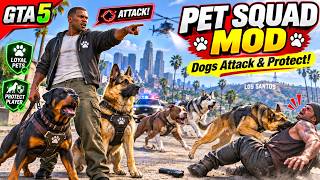
Bring your own powerful pet squad into the world of Grand Theft Auto V! Recruit animal companions, command them to attack enemies, and enjoy exciting adventures across Los Santos.
Requirements
Grand Theft Auto V (PC)
Script Hook V (Required)|
INSTALLATION
Choose ONE of the following methods.
METHOD 1: MANUAL INSTALLATION
1. Close GTA V and extract PetSquad
2. Open your GTA V game folder and locate the scripts folder. Create it if needed.
3. Copy scripts/PetSquad.dll from this ZIP into the game's scripts folder.
5. Start GTA V in single-player mode and press F11 to open Pet Squad.
METHOD 2: OPENIV PACKAGE INSTALLATION
1. Close GTA V and extract PetSquad
2. Open OpenIV's Package Installer and select the included PetSquad.oiv.
3. Install to the GAME FOLDER.
4. Start GTA V in single-player mode and press F11.
Controls
Press "f11" Open or close the Pet Squad menu.
Press "E" Command your pets to attack the targeted enemy.
Press "T" Call your pets back to your position.
Additional Controls Customize other features and controls through the mod's settings menu.
Important Notes
Make sure Script Hook V is properly installed before using the mod.
Check that your GTA V version is compatible with Script Hook V.
Download Pet Squad and take control of your very own animal team in GTA V!
Bring your own powerful pet squad into the world of Grand Theft Auto V! Recruit animal companions, command them to attack enemies, and enjoy exciting adventures across Los Santos.
Requirements
Grand Theft Auto V (PC)
Script Hook V (Required)|
INSTALLATION
Choose ONE of the following methods.
METHOD 1: MANUAL INSTALLATION
1. Close GTA V and extract PetSquad
2. Open your GTA V game folder and locate the scripts folder. Create it if needed.
3. Copy scripts/PetSquad.dll from this ZIP into the game's scripts folder.
5. Start GTA V in single-player mode and press F11 to open Pet Squad.
METHOD 2: OPENIV PACKAGE INSTALLATION
1. Close GTA V and extract PetSquad
2. Open OpenIV's Package Installer and select the included PetSquad.oiv.
3. Install to the GAME FOLDER.
4. Start GTA V in single-player mode and press F11.
Controls
Press "f11" Open or close the Pet Squad menu.
Press "E" Command your pets to attack the targeted enemy.
Press "T" Call your pets back to your position.
Additional Controls Customize other features and controls through the mod's settings menu.
Important Notes
Make sure Script Hook V is properly installed before using the mod.
Check that your GTA V version is compatible with Script Hook V.
Download Pet Squad and take control of your very own animal team in GTA V!
최초 업로드: 1일 전
마지막 업로드: 1시간 전
마지막 다운로드: 1분 전
댓글 0
Pet Squad GTA V Mod
Bring your own powerful pet squad into the world of Grand Theft Auto V! Recruit animal companions, command them to attack enemies, and enjoy exciting adventures across Los Santos.
Requirements
Grand Theft Auto V (PC)
Script Hook V (Required)|
INSTALLATION
Choose ONE of the following methods.
METHOD 1: MANUAL INSTALLATION
1. Close GTA V and extract PetSquad
2. Open your GTA V game folder and locate the scripts folder. Create it if needed.
3. Copy scripts/PetSquad.dll from this ZIP into the game's scripts folder.
5. Start GTA V in single-player mode and press F11 to open Pet Squad.
METHOD 2: OPENIV PACKAGE INSTALLATION
1. Close GTA V and extract PetSquad
2. Open OpenIV's Package Installer and select the included PetSquad.oiv.
3. Install to the GAME FOLDER.
4. Start GTA V in single-player mode and press F11.
Controls
Press "f11" Open or close the Pet Squad menu.
Press "E" Command your pets to attack the targeted enemy.
Press "T" Call your pets back to your position.
Additional Controls Customize other features and controls through the mod's settings menu.
Important Notes
Make sure Script Hook V is properly installed before using the mod.
Check that your GTA V version is compatible with Script Hook V.
Download Pet Squad and take control of your very own animal team in GTA V!
Bring your own powerful pet squad into the world of Grand Theft Auto V! Recruit animal companions, command them to attack enemies, and enjoy exciting adventures across Los Santos.
Requirements
Grand Theft Auto V (PC)
Script Hook V (Required)|
INSTALLATION
Choose ONE of the following methods.
METHOD 1: MANUAL INSTALLATION
1. Close GTA V and extract PetSquad
2. Open your GTA V game folder and locate the scripts folder. Create it if needed.
3. Copy scripts/PetSquad.dll from this ZIP into the game's scripts folder.
5. Start GTA V in single-player mode and press F11 to open Pet Squad.
METHOD 2: OPENIV PACKAGE INSTALLATION
1. Close GTA V and extract PetSquad
2. Open OpenIV's Package Installer and select the included PetSquad.oiv.
3. Install to the GAME FOLDER.
4. Start GTA V in single-player mode and press F11.
Controls
Press "f11" Open or close the Pet Squad menu.
Press "E" Command your pets to attack the targeted enemy.
Press "T" Call your pets back to your position.
Additional Controls Customize other features and controls through the mod's settings menu.
Important Notes
Make sure Script Hook V is properly installed before using the mod.
Check that your GTA V version is compatible with Script Hook V.
Download Pet Squad and take control of your very own animal team in GTA V!
최초 업로드: 1일 전
마지막 업로드: 1시간 전
마지막 다운로드: 1분 전
대화에 참여해보세요! 로그인 또는 가입 을 하면 댓글을 달 수 있습니다.
 5mods on Discord
