Cypress Flats Murder 1.0



233
2
233
2
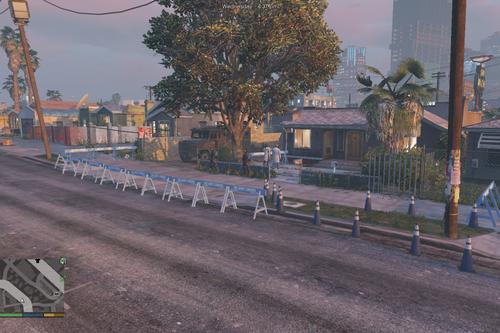
# Cypress Flats Murder Map + (Optional) Chucky Addon Ped
Welcome to Cypress Flats Murder, a custom atmospheric map mod set in the industrial alleyways of Cypress Flats. Perfect for horror roleplay, cinematic shots, and spooky gameplay!
---
## Requirements
Before installing, make sure you have the following installed:
1. ScriptHookV
2. ScriptHookVDotNet
3. Menyoo PC Trainer
4. OpenIV (required ONLY if installing the optional Chucky ped)
5. AddonPeds Script (required ONLY if installing the optional Chucky ped)
---
## Installation Guide
### Step 1: Map Installation (Menyoo XML)
1. Download and extract the zip archive.
2. Open your GTA V main directory.
3. Drag and drop the CypressFlatsMurder.xml file into:
Grand Theft Auto V / menyooStuff / Spooner
4. Launch GTA V, open Menyoo in-game by pressing F8.
5. Go to Object Spooner > Manage Saved Files > CypressFlatsMurder.xml > Load Placements.
---
## Optional: Installing the Chucky Addon Ped
Download the Chucky ped here: https://www.gta5-mods.com/player/chucky-add-on-ped
If you want Chucky to spawn at the crime scene, follow these steps:
1. Make sure AddonPeds is installed in your GTA V directory.
2. Open OpenIV, turn on Edit Mode, and navigate to:
mods / update / x64 / dlcpacks / addonpeds / dlc.rpf / peds.rpf
3. Drag and drop the Chucky ped files (chucky.ydd, chucky.yft, chucky.ymt, chucky.ytd) into peds.rpf.
4. Open AddonPeds Editor.exe (run as Administrator).
5. Click Peds > Add New Ped and enter:
- Ped Name: chucky
- Ped Type: Male
- Is Streamed: False
6. Click Add Ped, then click REBUILD in the top menu bar.
7. In-game, open the AddonPeds menu (or Menyoo Spooner) and spawn chucky at the location!
---
## Credits & Notes
- Created by: UnknownM0dd3r
- Please do not re-upload or re-distribute this map without permission.
- Leave a rating and drop your feedback in the comments section below!
Welcome to Cypress Flats Murder, a custom atmospheric map mod set in the industrial alleyways of Cypress Flats. Perfect for horror roleplay, cinematic shots, and spooky gameplay!
---
## Requirements
Before installing, make sure you have the following installed:
1. ScriptHookV
2. ScriptHookVDotNet
3. Menyoo PC Trainer
4. OpenIV (required ONLY if installing the optional Chucky ped)
5. AddonPeds Script (required ONLY if installing the optional Chucky ped)
---
## Installation Guide
### Step 1: Map Installation (Menyoo XML)
1. Download and extract the zip archive.
2. Open your GTA V main directory.
3. Drag and drop the CypressFlatsMurder.xml file into:
Grand Theft Auto V / menyooStuff / Spooner
4. Launch GTA V, open Menyoo in-game by pressing F8.
5. Go to Object Spooner > Manage Saved Files > CypressFlatsMurder.xml > Load Placements.
---
## Optional: Installing the Chucky Addon Ped
Download the Chucky ped here: https://www.gta5-mods.com/player/chucky-add-on-ped
If you want Chucky to spawn at the crime scene, follow these steps:
1. Make sure AddonPeds is installed in your GTA V directory.
2. Open OpenIV, turn on Edit Mode, and navigate to:
mods / update / x64 / dlcpacks / addonpeds / dlc.rpf / peds.rpf
3. Drag and drop the Chucky ped files (chucky.ydd, chucky.yft, chucky.ymt, chucky.ytd) into peds.rpf.
4. Open AddonPeds Editor.exe (run as Administrator).
5. Click Peds > Add New Ped and enter:
- Ped Name: chucky
- Ped Type: Male
- Is Streamed: False
6. Click Add Ped, then click REBUILD in the top menu bar.
7. In-game, open the AddonPeds menu (or Menyoo Spooner) and spawn chucky at the location!
---
## Credits & Notes
- Created by: UnknownM0dd3r
- Please do not re-upload or re-distribute this map without permission.
- Leave a rating and drop your feedback in the comments section below!
First Uploaded: August 02, 2026
Last Updated: August 04, 2026
Last Downloaded: 18 hours ago
0 Comments
More mods by UnknownM0dd3r:
# Cypress Flats Murder Map + (Optional) Chucky Addon Ped
Welcome to Cypress Flats Murder, a custom atmospheric map mod set in the industrial alleyways of Cypress Flats. Perfect for horror roleplay, cinematic shots, and spooky gameplay!
---
## Requirements
Before installing, make sure you have the following installed:
1. ScriptHookV
2. ScriptHookVDotNet
3. Menyoo PC Trainer
4. OpenIV (required ONLY if installing the optional Chucky ped)
5. AddonPeds Script (required ONLY if installing the optional Chucky ped)
---
## Installation Guide
### Step 1: Map Installation (Menyoo XML)
1. Download and extract the zip archive.
2. Open your GTA V main directory.
3. Drag and drop the CypressFlatsMurder.xml file into:
Grand Theft Auto V / menyooStuff / Spooner
4. Launch GTA V, open Menyoo in-game by pressing F8.
5. Go to Object Spooner > Manage Saved Files > CypressFlatsMurder.xml > Load Placements.
---
## Optional: Installing the Chucky Addon Ped
Download the Chucky ped here: https://www.gta5-mods.com/player/chucky-add-on-ped
If you want Chucky to spawn at the crime scene, follow these steps:
1. Make sure AddonPeds is installed in your GTA V directory.
2. Open OpenIV, turn on Edit Mode, and navigate to:
mods / update / x64 / dlcpacks / addonpeds / dlc.rpf / peds.rpf
3. Drag and drop the Chucky ped files (chucky.ydd, chucky.yft, chucky.ymt, chucky.ytd) into peds.rpf.
4. Open AddonPeds Editor.exe (run as Administrator).
5. Click Peds > Add New Ped and enter:
- Ped Name: chucky
- Ped Type: Male
- Is Streamed: False
6. Click Add Ped, then click REBUILD in the top menu bar.
7. In-game, open the AddonPeds menu (or Menyoo Spooner) and spawn chucky at the location!
---
## Credits & Notes
- Created by: UnknownM0dd3r
- Please do not re-upload or re-distribute this map without permission.
- Leave a rating and drop your feedback in the comments section below!
Welcome to Cypress Flats Murder, a custom atmospheric map mod set in the industrial alleyways of Cypress Flats. Perfect for horror roleplay, cinematic shots, and spooky gameplay!
---
## Requirements
Before installing, make sure you have the following installed:
1. ScriptHookV
2. ScriptHookVDotNet
3. Menyoo PC Trainer
4. OpenIV (required ONLY if installing the optional Chucky ped)
5. AddonPeds Script (required ONLY if installing the optional Chucky ped)
---
## Installation Guide
### Step 1: Map Installation (Menyoo XML)
1. Download and extract the zip archive.
2. Open your GTA V main directory.
3. Drag and drop the CypressFlatsMurder.xml file into:
Grand Theft Auto V / menyooStuff / Spooner
4. Launch GTA V, open Menyoo in-game by pressing F8.
5. Go to Object Spooner > Manage Saved Files > CypressFlatsMurder.xml > Load Placements.
---
## Optional: Installing the Chucky Addon Ped
Download the Chucky ped here: https://www.gta5-mods.com/player/chucky-add-on-ped
If you want Chucky to spawn at the crime scene, follow these steps:
1. Make sure AddonPeds is installed in your GTA V directory.
2. Open OpenIV, turn on Edit Mode, and navigate to:
mods / update / x64 / dlcpacks / addonpeds / dlc.rpf / peds.rpf
3. Drag and drop the Chucky ped files (chucky.ydd, chucky.yft, chucky.ymt, chucky.ytd) into peds.rpf.
4. Open AddonPeds Editor.exe (run as Administrator).
5. Click Peds > Add New Ped and enter:
- Ped Name: chucky
- Ped Type: Male
- Is Streamed: False
6. Click Add Ped, then click REBUILD in the top menu bar.
7. In-game, open the AddonPeds menu (or Menyoo Spooner) and spawn chucky at the location!
---
## Credits & Notes
- Created by: UnknownM0dd3r
- Please do not re-upload or re-distribute this map without permission.
- Leave a rating and drop your feedback in the comments section below!
First Uploaded: August 02, 2026
Last Updated: August 04, 2026
Last Downloaded: 18 hours ago
Join the conversation! Log In or register for an account to be able to comment.
 5mods on Discord
