Photorealistic (QuantV ReShade Preset) 1.5



![Real Time Strategy Peds Pain & Death Sounds [Replace]](https://img.gta5-mods.com/q75-w500-h333-cfill/images/real-time-strategy-peds-pain-death-sounds-replaced/b60615-copy.jpg "Real Time Strategy Peds Pain & Death Sounds [Replace]")


11,840
22
11,840
22
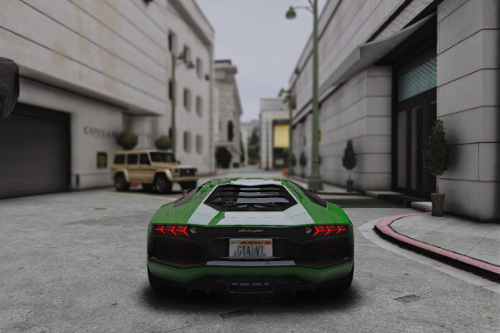
I customized some reshade effects to add a photorealistic effect to GTA 5 QuantV by adjusting colors , tonemapping , contrast , etc.
To get the same result as in the screen shots .
Use LA revo textures with maximum graphics settings with my reshade present .
If you want even better results use my premium reshade present for QuantV link is in the readme file ; )
v1.5 changelog :
Some tweak in global colors , ambient light . Now there are two presents ( with warm colors , with cold colors ) .
v1.4 changelog :
Improved sky colors , Dark road textures by QuantV , and some minor tweaks ; )
v1.3 changelog ;
Latest QuantV November 2025 added new AO technique so i customized & used it instead of XeGTAO . And Some tweaks to effects .
v1.2 changelog :
I recreated it completely . So this is a whole new version to get better results ; )
v1.1 changelog :
Some colors adjustment , added yellow tint .
Installation (text tutorial):
1. Download Reshade: https://reshade.me/
2. Run the installer, Direct it to where your GTA5.exe is located
3. Select all the optional effects
4. When it's done, it'll say that ReShade is installed and you can close it out
5. Drop the preset file to your game folder
6. In game, open ReShade menu (Home , End , Ins)
7. Select my preset from the list
8. Enjoy!
To get the same result as in the screen shots .
Use LA revo textures with maximum graphics settings with my reshade present .
If you want even better results use my premium reshade present for QuantV link is in the readme file ; )
v1.5 changelog :
Some tweak in global colors , ambient light . Now there are two presents ( with warm colors , with cold colors ) .
v1.4 changelog :
Improved sky colors , Dark road textures by QuantV , and some minor tweaks ; )
v1.3 changelog ;
Latest QuantV November 2025 added new AO technique so i customized & used it instead of XeGTAO . And Some tweaks to effects .
v1.2 changelog :
I recreated it completely . So this is a whole new version to get better results ; )
v1.1 changelog :
Some colors adjustment , added yellow tint .
Installation (text tutorial):
1. Download Reshade: https://reshade.me/
2. Run the installer, Direct it to where your GTA5.exe is located
3. Select all the optional effects
4. When it's done, it'll say that ReShade is installed and you can close it out
5. Drop the preset file to your game folder
6. In game, open ReShade menu (Home , End , Ins)
7. Select my preset from the list
8. Enjoy!
First Uploaded: May 26, 2025
Last Updated: April 28, 2026
Last Downloaded: 7 hours ago
6 Comments
More mods by GFM1237:
I customized some reshade effects to add a photorealistic effect to GTA 5 QuantV by adjusting colors , tonemapping , contrast , etc.
To get the same result as in the screen shots .
Use LA revo textures with maximum graphics settings with my reshade present .
If you want even better results use my premium reshade present for QuantV link is in the readme file ; )
v1.5 changelog :
Some tweak in global colors , ambient light . Now there are two presents ( with warm colors , with cold colors ) .
v1.4 changelog :
Improved sky colors , Dark road textures by QuantV , and some minor tweaks ; )
v1.3 changelog ;
Latest QuantV November 2025 added new AO technique so i customized & used it instead of XeGTAO . And Some tweaks to effects .
v1.2 changelog :
I recreated it completely . So this is a whole new version to get better results ; )
v1.1 changelog :
Some colors adjustment , added yellow tint .
Installation (text tutorial):
1. Download Reshade: https://reshade.me/
2. Run the installer, Direct it to where your GTA5.exe is located
3. Select all the optional effects
4. When it's done, it'll say that ReShade is installed and you can close it out
5. Drop the preset file to your game folder
6. In game, open ReShade menu (Home , End , Ins)
7. Select my preset from the list
8. Enjoy!
To get the same result as in the screen shots .
Use LA revo textures with maximum graphics settings with my reshade present .
If you want even better results use my premium reshade present for QuantV link is in the readme file ; )
v1.5 changelog :
Some tweak in global colors , ambient light . Now there are two presents ( with warm colors , with cold colors ) .
v1.4 changelog :
Improved sky colors , Dark road textures by QuantV , and some minor tweaks ; )
v1.3 changelog ;
Latest QuantV November 2025 added new AO technique so i customized & used it instead of XeGTAO . And Some tweaks to effects .
v1.2 changelog :
I recreated it completely . So this is a whole new version to get better results ; )
v1.1 changelog :
Some colors adjustment , added yellow tint .
Installation (text tutorial):
1. Download Reshade: https://reshade.me/
2. Run the installer, Direct it to where your GTA5.exe is located
3. Select all the optional effects
4. When it's done, it'll say that ReShade is installed and you can close it out
5. Drop the preset file to your game folder
6. In game, open ReShade menu (Home , End , Ins)
7. Select my preset from the list
8. Enjoy!
First Uploaded: May 26, 2025
Last Updated: April 28, 2026
Last Downloaded: 7 hours ago
 5mods on Discord

what version of reshade do i need? i got the latest 6.7.3 but reshade wont even work. pressing Home or wtv the button is normally, wont work and the bar on top of the screen wont show.
@PurpleGhoul I am using the latest version 6.7.3 . For me reshade menu opens with Home button by default . If you are using the latest QuantV( march 2026 and onward ) the reshade would not work . There is a problem with it I dont know why . But if you are not using the latest version of QuantV then try reinstalling reshade .
@GFM1237 oh shi. im new to gta 5 modding with graphics and i didnt know i need QuantV also. I thought the mod meant its like QuantV. Could that be the problem why Reshade didnt open?
@PurpleGhoul Welcome to GTA 5 modding ; ) . This is the reshade present for GTA 5 legacy with QuantV by Quant mods from patreon . Reshade in GTA 5 can work without QuantV mod . But without QuantV mod this reshade present would not work properly .
@GFM1237 oh well when ill buy QuantV ill make sure to use this
@PurpleGhoul ; )