Enhanced Underglow V [Legacy / Enhanced] 1.0 Legacy




166
16
166
16
Enhanced Underglow V - Version 1.0 (Legacy & Enhanced)
A complete overhaul of vehicle underglow for GTA V single player. Press F7 in any vehicle and pick from 29 animated effects. They use real dynamic lights that work on every car, bike and boat, even ones that can't fit neon at Los Santos Customs. Neon you've already bought at LSC is upgraded automatically, every door can project a real brand logo onto the ground, and a live 3D visualiser lets you see every light while you edit.
Why I made this
The stock underglow in GTA V has never changed: one colour, always on, only on cars Los Santos Customs lets you fit it to, and nothing you can do with it once it's installed. Every time I built a car I wanted the glow to actually do something, like pulse, chase around the car, react when I brake or indicate, or match the rest of my lighting.
So I built Enhanced Underglow V to make underglow a proper feature instead of an afterthought. It keeps everything you already have from LS Customs, then adds effects, real lighting, reactions and a menu that literally glows with your car.
Features include:
Requirements:
Installation:
Controls:
Toggle Underglow, Visualiser and Boost / Nitro keys are unbound by default. Set them in F7 > Settings or in EnhancedUnderglowV.ini.
Try these first:
Door Logos:
Compatibility & Notes:
Troubleshooting:
Changelog:
Enhanced Underglow V is free for personal use only. Do not redistribute, re-upload, modify and re-upload, decompile, or claim this mod as your own without permission. Brand logos are trademarks of their respective owners and are included only to identify vehicle makes. Not affiliated with Rockstar Games, Take-Two Interactive or any vehicle manufacturer.
Hex Modifications © 2026
A complete overhaul of vehicle underglow for GTA V single player. Press F7 in any vehicle and pick from 29 animated effects. They use real dynamic lights that work on every car, bike and boat, even ones that can't fit neon at Los Santos Customs. Neon you've already bought at LSC is upgraded automatically, every door can project a real brand logo onto the ground, and a live 3D visualiser lets you see every light while you edit.
Why I made this
The stock underglow in GTA V has never changed: one colour, always on, only on cars Los Santos Customs lets you fit it to, and nothing you can do with it once it's installed. Every time I built a car I wanted the glow to actually do something, like pulse, chase around the car, react when I brake or indicate, or match the rest of my lighting.
So I built Enhanced Underglow V to make underglow a proper feature instead of an afterthought. It keeps everything you already have from LS Customs, then adds effects, real lighting, reactions and a menu that literally glows with your car.
Features include:
- Works On Every Vehicle - real dynamic lights placed from each model's shape, so bikes, boats, quads and cars without neon support glow too. No LS Customs neon needed
- 29 Animated Effects - Static, Breathe, Strobe, Double Strobe, Heartbeat, Neon Flicker, Colour Fade, Tri-Colour Cycle, Rainbow Cycle, Rainbow Wave, Gradient, Chase, Comet, Scanner, Emergency, Dual Tone, Sparkle, Lightning, Fire, Ocean, Aurora, Ripple, Speedometer, RPM Reactive, Throttle Reactive, Steer Follow, Music Reactive, Status Bar and Drift
- LS Customs Neon, Enhanced - neon bought at LSC is upgraded automatically, using the colour and sides you picked there, with a brightness boost and reactive lighting. Your LSC neon is always restored exactly as it was
- Real Door Logos - 387 real brand logos pre-installed. Grotti shows Ferrari, Ubermacht shows BMW, Pegassi shows Lamborghini and more, and add-on cars with real brands match automatically. Open a door and the logo is projected onto the ground, sized for that car, like a real puddle lamp
- Your Own Logos - drop any PNG or JPG into the logos folder and project it as light. No .ytd needed
- Reacts To Your Driving - ignition sweep, brake, indicators and hazards, reverse, horn flash, police lights when wanted, boost / nitro flash, rain boost and damage flicker
- Music Sync - the glow pulses with the radio or anything else playing, with beat detection
- Ground Projection - halo ring, pulse rings, chevrons, turn arrows and a Tron-style grid on the road
- Headlights & Exhaust - xenon colours that match your glow, headlight strobe and beat flash, exhaust glow with RPM and backfire flames
- Extras - rim rings, wheel arch glow, puddle lights, interior light, light trail at speed, trailer underglow, per-side colours and convoy sync with nearby traffic
- 3D Visualiser - orbit camera, preset views, live markers on every light, light path, radius rings, a top-down schematic and force night. The menu stays open, so every change previews live
- Live Menu - pink by default, then the header mirrors your car's glow light by light. Keyboard and controller, with keys you can rebind in the menu
- Profiles & Presets - saved per car (model + plate) or per model, auto-save, 29 built-in presets, your own presets and share codes to swap setups with friends
- Traffic Neon - random NPC underglow, and NPC cars that spawn with neon use your LS Customs settings
- Lightweight - light and shape budgets, a draw distance and minimal native calls
Requirements:
- GTA V Legacy or GTA V Enhanced (story mode)
- Script Hook V
- Script Hook V .NET 3 (for GTA V Enhanced, use the latest nightly build with Enhanced support)
- Microsoft .NET Framework 4.8
Installation:
- Open your GTA V directory
- Open the "Game Files" folder in the download that matches your game (Legacy or Enhanced)
- Drag its "scripts" folder into your GTA V directory and merge it with the existing one
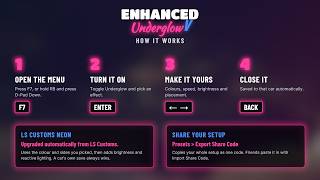
- Launch the game into story mode, get in a vehicle and press F7
Controls:
- F7 - Open the menu
- RB + D-Pad Down - Open the menu on a controller
- Up / Down - Navigate
- Left / Right - Change a value (hold to scroll quickly)
- Enter - Select, or open the HSV / RGB colour editor on a colour
- Backspace / Esc - Back / close
- Mouse / Right Stick - Orbit the car in the 3D visualiser
- Mouse Wheel / LT RT - Zoom in the 3D visualiser
Toggle Underglow, Visualiser and Boost / Nitro keys are unbound by default. Set them in F7 > Settings or in EnhancedUnderglowV.ini.
Try these first:
- F7 > Underglow > Effect: Rainbow Wave - a rainbow that travels around the car
- F7 > Presets > Northern Lights - drifting aurora in green, teal and purple
- F7 > Surprise Me - a random effect and matching colour set
- F7 > 3D Visualiser > Visualiser Camera - orbit the car and watch every light as you edit
- Open a door - the car's real brand logo appears on the ground
- F7 > Ground Projection > Ground Pattern: Halo Ring - a glowing ring on the road around the car
- F7 > Headlights & Exhaust > Backfire Flames - rev it and let off
Door Logos:
- Automatic - the default logo setting picks the real-world brand for the car's manufacturer. F7 > Ground Projection > Detected Brand shows what it matched
- Pick any logo - Search Logo lets you type a brand name, or choose from the Logo list
- Your own - copy a PNG, JPG, BMP or GIF into scripts\EnhancedUnderglowV\logos, then F7 > Ground Projection > Reload Logos. Transparent PNGs with bold shapes work best
- Style - Solid (a crisp projected image) or Light Dots (an LED matrix), with tint, size, flip and trigger options
- Door logos work even with the underglow switched off
Compatibility & Notes:
- The Legacy and Enhanced downloads use the same script. Pick the download that matches your game so the readme and requirements are right for you.
- Other neon or underglow mods may fight over the same neon tubes, so use one at a time.
- If F7 is used by another mod, change MenuKey in EnhancedUnderglowV.ini or rebind it in F7 > Settings.
- Ground patterns and logos are drawn as light, so they look best at dusk and at night.
- Need more FPS? Lower Global Light Budget or Ground Shape Budget in F7 > Settings.
- Saved cars and presets are in scripts\EnhancedUnderglowV\profiles.txt. Delete it, or use F7 > Settings > Reset EVERYTHING To Default, to start fresh.
- Story mode only. Not for GTA Online.
Troubleshooting:
- Nothing happens on F7: check that ScriptHookVDotNet.log in your game folder lists EnhancedUnderglowV.dll. If it doesn't, right-click the .dll > Properties > tick Unblock if shown, and check your antivirus hasn't quarantined it. After a game update, update Script Hook V and Script Hook V .NET.
- No glow on a bike or boat: make sure Light Engine > Custom Light Engine is on.
- A door logo is upside down or the wrong size: F7 > Ground Projection > Flip Logo, or turn off Auto Size and set Logo Size.
- No logo on a car: check Detected Brand. Some GTA brands have no real-world match, so pick one with Search Logo.
- Music sync shows "Gated": turn off Only When Radio Is On in F7 > Music & Sync.
- Log file: ScriptHookVDotNet.log in your game folder
Changelog:
- 1.0 - Initial release
Enhanced Underglow V is free for personal use only. Do not redistribute, re-upload, modify and re-upload, decompile, or claim this mod as your own without permission. Brand logos are trademarks of their respective owners and are included only to identify vehicle makes. Not affiliated with Rockstar Games, Take-Two Interactive or any vehicle manufacturer.
Hex Modifications © 2026
Pertama dimuat naik: 9 hari yang lalu
Tarikh Kemaskini: 3 hari yang lalu
Last Downloaded: 10 minit yang lalu
6 Komen
More mods by Hex Modifications:

- Gameplay
- Asi
4.94
1,148
54
1.0 ENHANCED
By Hex Spyderz
Enhanced Underglow V - Version 1.0 (Legacy & Enhanced)
A complete overhaul of vehicle underglow for GTA V single player. Press F7 in any vehicle and pick from 29 animated effects. They use real dynamic lights that work on every car, bike and boat, even ones that can't fit neon at Los Santos Customs. Neon you've already bought at LSC is upgraded automatically, every door can project a real brand logo onto the ground, and a live 3D visualiser lets you see every light while you edit.
Why I made this
The stock underglow in GTA V has never changed: one colour, always on, only on cars Los Santos Customs lets you fit it to, and nothing you can do with it once it's installed. Every time I built a car I wanted the glow to actually do something, like pulse, chase around the car, react when I brake or indicate, or match the rest of my lighting.
So I built Enhanced Underglow V to make underglow a proper feature instead of an afterthought. It keeps everything you already have from LS Customs, then adds effects, real lighting, reactions and a menu that literally glows with your car.
Features include:
Requirements:
Installation:
Controls:
Toggle Underglow, Visualiser and Boost / Nitro keys are unbound by default. Set them in F7 > Settings or in EnhancedUnderglowV.ini.
Try these first:
Door Logos:
Compatibility & Notes:
Troubleshooting:
Changelog:
Enhanced Underglow V is free for personal use only. Do not redistribute, re-upload, modify and re-upload, decompile, or claim this mod as your own without permission. Brand logos are trademarks of their respective owners and are included only to identify vehicle makes. Not affiliated with Rockstar Games, Take-Two Interactive or any vehicle manufacturer.
Hex Modifications © 2026
A complete overhaul of vehicle underglow for GTA V single player. Press F7 in any vehicle and pick from 29 animated effects. They use real dynamic lights that work on every car, bike and boat, even ones that can't fit neon at Los Santos Customs. Neon you've already bought at LSC is upgraded automatically, every door can project a real brand logo onto the ground, and a live 3D visualiser lets you see every light while you edit.
Why I made this
The stock underglow in GTA V has never changed: one colour, always on, only on cars Los Santos Customs lets you fit it to, and nothing you can do with it once it's installed. Every time I built a car I wanted the glow to actually do something, like pulse, chase around the car, react when I brake or indicate, or match the rest of my lighting.
So I built Enhanced Underglow V to make underglow a proper feature instead of an afterthought. It keeps everything you already have from LS Customs, then adds effects, real lighting, reactions and a menu that literally glows with your car.
Features include:
- Works On Every Vehicle - real dynamic lights placed from each model's shape, so bikes, boats, quads and cars without neon support glow too. No LS Customs neon needed
- 29 Animated Effects - Static, Breathe, Strobe, Double Strobe, Heartbeat, Neon Flicker, Colour Fade, Tri-Colour Cycle, Rainbow Cycle, Rainbow Wave, Gradient, Chase, Comet, Scanner, Emergency, Dual Tone, Sparkle, Lightning, Fire, Ocean, Aurora, Ripple, Speedometer, RPM Reactive, Throttle Reactive, Steer Follow, Music Reactive, Status Bar and Drift
- LS Customs Neon, Enhanced - neon bought at LSC is upgraded automatically, using the colour and sides you picked there, with a brightness boost and reactive lighting. Your LSC neon is always restored exactly as it was
- Real Door Logos - 387 real brand logos pre-installed. Grotti shows Ferrari, Ubermacht shows BMW, Pegassi shows Lamborghini and more, and add-on cars with real brands match automatically. Open a door and the logo is projected onto the ground, sized for that car, like a real puddle lamp
- Your Own Logos - drop any PNG or JPG into the logos folder and project it as light. No .ytd needed
- Reacts To Your Driving - ignition sweep, brake, indicators and hazards, reverse, horn flash, police lights when wanted, boost / nitro flash, rain boost and damage flicker
- Music Sync - the glow pulses with the radio or anything else playing, with beat detection
- Ground Projection - halo ring, pulse rings, chevrons, turn arrows and a Tron-style grid on the road
- Headlights & Exhaust - xenon colours that match your glow, headlight strobe and beat flash, exhaust glow with RPM and backfire flames
- Extras - rim rings, wheel arch glow, puddle lights, interior light, light trail at speed, trailer underglow, per-side colours and convoy sync with nearby traffic
- 3D Visualiser - orbit camera, preset views, live markers on every light, light path, radius rings, a top-down schematic and force night. The menu stays open, so every change previews live
- Live Menu - pink by default, then the header mirrors your car's glow light by light. Keyboard and controller, with keys you can rebind in the menu
- Profiles & Presets - saved per car (model + plate) or per model, auto-save, 29 built-in presets, your own presets and share codes to swap setups with friends
- Traffic Neon - random NPC underglow, and NPC cars that spawn with neon use your LS Customs settings
- Lightweight - light and shape budgets, a draw distance and minimal native calls
Requirements:
- GTA V Legacy or GTA V Enhanced (story mode)
- Script Hook V
- Script Hook V .NET 3 (for GTA V Enhanced, use the latest nightly build with Enhanced support)
- Microsoft .NET Framework 4.8
Installation:
- Open your GTA V directory
- Open the "Game Files" folder in the download that matches your game (Legacy or Enhanced)
- Drag its "scripts" folder into your GTA V directory and merge it with the existing one
- Launch the game into story mode, get in a vehicle and press F7
Controls:
- F7 - Open the menu
- RB + D-Pad Down - Open the menu on a controller
- Up / Down - Navigate
- Left / Right - Change a value (hold to scroll quickly)
- Enter - Select, or open the HSV / RGB colour editor on a colour
- Backspace / Esc - Back / close
- Mouse / Right Stick - Orbit the car in the 3D visualiser
- Mouse Wheel / LT RT - Zoom in the 3D visualiser
Toggle Underglow, Visualiser and Boost / Nitro keys are unbound by default. Set them in F7 > Settings or in EnhancedUnderglowV.ini.
Try these first:
- F7 > Underglow > Effect: Rainbow Wave - a rainbow that travels around the car
- F7 > Presets > Northern Lights - drifting aurora in green, teal and purple
- F7 > Surprise Me - a random effect and matching colour set
- F7 > 3D Visualiser > Visualiser Camera - orbit the car and watch every light as you edit
- Open a door - the car's real brand logo appears on the ground
- F7 > Ground Projection > Ground Pattern: Halo Ring - a glowing ring on the road around the car
- F7 > Headlights & Exhaust > Backfire Flames - rev it and let off
Door Logos:
- Automatic - the default logo setting picks the real-world brand for the car's manufacturer. F7 > Ground Projection > Detected Brand shows what it matched
- Pick any logo - Search Logo lets you type a brand name, or choose from the Logo list
- Your own - copy a PNG, JPG, BMP or GIF into scripts\EnhancedUnderglowV\logos, then F7 > Ground Projection > Reload Logos. Transparent PNGs with bold shapes work best
- Style - Solid (a crisp projected image) or Light Dots (an LED matrix), with tint, size, flip and trigger options
- Door logos work even with the underglow switched off
Compatibility & Notes:
- The Legacy and Enhanced downloads use the same script. Pick the download that matches your game so the readme and requirements are right for you.
- Other neon or underglow mods may fight over the same neon tubes, so use one at a time.
- If F7 is used by another mod, change MenuKey in EnhancedUnderglowV.ini or rebind it in F7 > Settings.
- Ground patterns and logos are drawn as light, so they look best at dusk and at night.
- Need more FPS? Lower Global Light Budget or Ground Shape Budget in F7 > Settings.
- Saved cars and presets are in scripts\EnhancedUnderglowV\profiles.txt. Delete it, or use F7 > Settings > Reset EVERYTHING To Default, to start fresh.
- Story mode only. Not for GTA Online.
Troubleshooting:
- Nothing happens on F7: check that ScriptHookVDotNet.log in your game folder lists EnhancedUnderglowV.dll. If it doesn't, right-click the .dll > Properties > tick Unblock if shown, and check your antivirus hasn't quarantined it. After a game update, update Script Hook V and Script Hook V .NET.
- No glow on a bike or boat: make sure Light Engine > Custom Light Engine is on.
- A door logo is upside down or the wrong size: F7 > Ground Projection > Flip Logo, or turn off Auto Size and set Logo Size.
- No logo on a car: check Detected Brand. Some GTA brands have no real-world match, so pick one with Search Logo.
- Music sync shows "Gated": turn off Only When Radio Is On in F7 > Music & Sync.
- Log file: ScriptHookVDotNet.log in your game folder
Changelog:
- 1.0 - Initial release
Enhanced Underglow V is free for personal use only. Do not redistribute, re-upload, modify and re-upload, decompile, or claim this mod as your own without permission. Brand logos are trademarks of their respective owners and are included only to identify vehicle makes. Not affiliated with Rockstar Games, Take-Two Interactive or any vehicle manufacturer.
Hex Modifications © 2026
Pertama dimuat naik: 9 hari yang lalu
Tarikh Kemaskini: 3 hari yang lalu
Last Downloaded: 10 minit yang lalu
 5mods on Discord

Perfect mod. It would be great if the bottom lights had the same effect as the game's native ones.
备选(更贴合模组玩家社区口语,适合YouTube/论坛留言)
Perfect mod! Wish the bottom lights matched the game's native lighting effect.
说明: native 在游戏模组圈子特指游戏原生自带的,比 own 更地道。
why does it crash stoy moe as soon as game loads dou need to take off normal neon mod first
wow nice mode
Could you also add a Chinese translation?
works great. i especially like the door logos but they seem very pixelated (also when using custom files) and it would be cool if there would be an option to make them active only during nighttime
You have no idea how long I been waiting on a improved underglow and rgb lights system for GTA 5! The only other mod that came close was Menyoo 2.0. This is so good!