VI Vision HUD 1.0


58
2
58
2
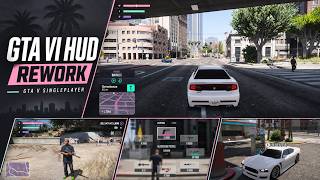
Fieldline HUD GTA VI Style Interface for GTA V Legacy
Fieldline gives GTA V single player a complete GTA VI inspired HUD
Everything is drawn crisp at every resolution and every aspect ratio and installs with one OIV file
The interface is available in English and German
What is new in version 0 7
Round minimap with a purple white colour filter that turns red when you have a wanted level
Vehicle card above the minimap with make and model and two circle gauges for engine and fuel
Navigation banner that slides in under the gauges and pushes them up and back down again
Health energy and armour bars with icons that only appear when you get hurt heal sprint or lose or gain armour
Whole HUD fades out when you open the pause menu and fades back in when you return
Weapon wheel with Weapons and Items tabs plus clothing parachute and vest with a whitish translucent look
Screen blur only while you hold Tab in the weapon wheel
Radio station bar with logos and a fade when you change station
Money and weapon blocks in the top right with the money change shown for a few seconds
Wanted stars with search phase and status icons
Enter vehicle prompt at the driver door with a button circle three dots and the vehicle name
Fuel system with fuel drain a jerry can blip on every gas station and a services prompt at the pump
Hold the key to refuel pay per litre or choose repair with a smooth switch animation
Own texture pack with pre filtered small icons so nothing looks pixelated
Optional relief map tiles made in Blender for OpenIV
Installer and uninstaller as OIV files
Features
Minimap frame notches and route colour in GTA VI magenta
Vehicle card with script font make watermark and low value pulse
Vitals with heart bolt and shield discs and a white divider on health
Weapon wheel with eight directions ammo bars and category icons
Items tab with clothing hat shoes and vest shop on Q
Radio hud with station key and logo
Fuel capacity 65 litres with repair and refuel prices
Money block with bank cash and card icons
Wanted hud with pulsing search stars
Settings in the ini file with single modules you can switch on or off
Works with every safe zone and UI scale
What you need
GTA V Legacy single player
Script Hook V
Script Hook V DotNet version 3
OpenIV for the OIV install
Installation
Close GTA V
Open Fieldline OIV in OpenIV and choose the mods folder as target
Install it once only because it adds one entry to the dlclist
Start GTA V in story mode and restart once after installing so the texture pack loads
To remove it install Fieldline Entfernen OIV
Without OpenIV copy the scripts folder content into the scripts folder of your GTA V folder
Keys
F enter vehicle
E refuel or confirm at the pump
Tab weapon wheel
Q hold in the wheel to pick with the mouse wheel and open the vest shop
Ctrl F8 HUD preview
Credits
Script Hook V by Alexander Blade
Script Hook V DotNet by its contributors
HUD design inspired by GTA VI
Fan made project not affiliated with Rockstar Games or Take Two Interactive
Single player only do not use in GTA Online
Первая загрузка: 26 минут назад
Последнее обновление: 22 минуты назад
Последнее скачивание: 10 секунд назад
4 комментария
Fieldline HUD GTA VI Style Interface for GTA V Legacy
Fieldline gives GTA V single player a complete GTA VI inspired HUD
Everything is drawn crisp at every resolution and every aspect ratio and installs with one OIV file
The interface is available in English and German
What is new in version 0 7
Round minimap with a purple white colour filter that turns red when you have a wanted level
Vehicle card above the minimap with make and model and two circle gauges for engine and fuel
Navigation banner that slides in under the gauges and pushes them up and back down again
Health energy and armour bars with icons that only appear when you get hurt heal sprint or lose or gain armour
Whole HUD fades out when you open the pause menu and fades back in when you return
Weapon wheel with Weapons and Items tabs plus clothing parachute and vest with a whitish translucent look
Screen blur only while you hold Tab in the weapon wheel
Radio station bar with logos and a fade when you change station
Money and weapon blocks in the top right with the money change shown for a few seconds
Wanted stars with search phase and status icons
Enter vehicle prompt at the driver door with a button circle three dots and the vehicle name
Fuel system with fuel drain a jerry can blip on every gas station and a services prompt at the pump
Hold the key to refuel pay per litre or choose repair with a smooth switch animation
Own texture pack with pre filtered small icons so nothing looks pixelated
Optional relief map tiles made in Blender for OpenIV
Installer and uninstaller as OIV files
Features
Minimap frame notches and route colour in GTA VI magenta
Vehicle card with script font make watermark and low value pulse
Vitals with heart bolt and shield discs and a white divider on health
Weapon wheel with eight directions ammo bars and category icons
Items tab with clothing hat shoes and vest shop on Q
Radio hud with station key and logo
Fuel capacity 65 litres with repair and refuel prices
Money block with bank cash and card icons
Wanted hud with pulsing search stars
Settings in the ini file with single modules you can switch on or off
Works with every safe zone and UI scale
What you need
GTA V Legacy single player
Script Hook V
Script Hook V DotNet version 3
OpenIV for the OIV install
Installation
Close GTA V
Open Fieldline OIV in OpenIV and choose the mods folder as target
Install it once only because it adds one entry to the dlclist
Start GTA V in story mode and restart once after installing so the texture pack loads
To remove it install Fieldline Entfernen OIV
Without OpenIV copy the scripts folder content into the scripts folder of your GTA V folder
Keys
F enter vehicle
E refuel or confirm at the pump
Tab weapon wheel
Q hold in the wheel to pick with the mouse wheel and open the vest shop
Ctrl F8 HUD preview
Credits
Script Hook V by Alexander Blade
Script Hook V DotNet by its contributors
HUD design inspired by GTA VI
Fan made project not affiliated with Rockstar Games or Take Two Interactive
Single player only do not use in GTA Online
Первая загрузка: 26 минут назад
Последнее обновление: 22 минуты назад
Последнее скачивание: 10 секунд назад
 5mods on Discord

Hey everyone! I'm sorry, I accidentally uploaded the German-only version instead of the correct one. I'll upload the complete and correct version right away. Thanks for your patience and understanding!
This file has been approved automatically. If you think this file should not be here for any reason please report it.