Media Player V 1.0 ENHANCED





173
27
173
27
Hex Media Player V brings real YouTube, SoundCloud and Spotify music and video into GTA V single player. Place physical speakers and TVs anywhere in the world, paste a link, and it plays with positional 3D audio and HD video on the screen. Includes four ready-made outdoor cinemas around the map.
IMPORTANT - CHOOSE THE RIGHT VERSION FOR YOUR GAME
Not sure which you have? GTA V Enhanced has a file called GTA5_Enhanced.exe in its game folder. If you don't have that file, you're on Legacy.
SHOWCASE 1: https://youtu.be/qxVjhz7HPoo
SHOWCASE 2: https://youtu.be/5q_mpgrrndc
Features
Content is streamed live while you play. Nothing is downloaded or saved to your PC. Spotify audio is DRM protected, so Spotify links play the same track from YouTube.
Requirements
Installation
Controls
Known issues and notes
VirusTotal scans
Credits
Full licences and source code links for FFmpeg and yt-dlp are in the Licenses folder of the download. Both licences allow redistribution. Not affiliated with Rockstar Games, YouTube, Google, Spotify or SoundCloud.
License
Free for personal use only. Do not redistribute, re-upload, modify and re-upload, or claim this mod as your own without permission.
Hex Modifications © 2026
IMPORTANT - CHOOSE THE RIGHT VERSION FOR YOUR GAME
- GTA V Enhanced - download the Enhanced version (MediaPlayerV.asi)
- GTA V Legacy - download the Legacy version (MediaPlayerV_Legacy.asi)
- Install only one. Never put both .asi files in the same game folder. If you tried the wrong one before, delete it first.
Not sure which you have? GTA V Enhanced has a file called GTA5_Enhanced.exe in its game folder. If you don't have that file, you're on Legacy.
SHOWCASE 1: https://youtu.be/qxVjhz7HPoo
SHOWCASE 2: https://youtu.be/5q_mpgrrndc
Features
- Spawnable speakers - boombox, ghetto blasters, hi-fi, radio, bookshelf, PA and club speakers
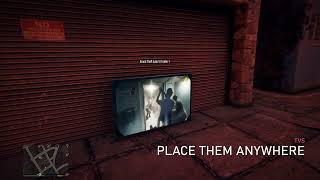
- Spawnable screens - flat TVs, old TV, CRT, office TV, huge display and cinema screen
- Free placement - carry, raise, rotate and drop any device, even onto walls
- YouTube, SoundCloud and Spotify - paste a link, or just type a song name to search
- Real 3D audio - sound comes from the device, fades with distance, pans as you turn, muffles behind walls and inside cars
- HD video on screens - real video drawn onto the TV, synced to the audio
- Screen light - screens cast light matching the video onto the area in front of them
- Mouse control box - play/pause, seek, skip, loop, queue, volume and range
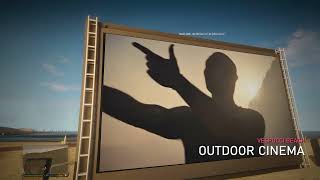
- 4 outdoor cinemas with map blips: Vespucci Beach, Chumash Sunset, Vinewood Bowl and the Starlight Drive-In, with big screens, speakers, seating, people, security, night lighting and snack stands
- Snack stands - buy hot dogs, burgers, popcorn and drinks and eat them in game
- Fully configurable keys, video quality, ranges and brightness in MediaPlayerV.ini
Content is streamed live while you play. Nothing is downloaded or saved to your PC. Spotify audio is DRM protected, so Spotify links play the same track from YouTube.
Requirements
- GTA V Enhanced or Legacy (story mode), with the matching version of this mod
- Script Hook V for your game version, with its ASI Loader (dinput8.dll)
- Windows 10 or 11 and an internet connection
Installation
- Open the "Game Files" folder in the download for your game version
- Enhanced: drag MediaPlayerV.asi and the MediaPlayerV folder into your GTA V Enhanced directory
- Legacy: drag MediaPlayerV_Legacy.asi and the MediaPlayerV folder into your GTA V (Legacy) directory
- Launch story mode and press F8
Controls
- F8 - Media Player menu (spawn devices, outdoor cinemas, settings)
- F6 - control box for the nearest speaker or screen
- Placing: Mouse Wheel distance, Up/Down height, Left/Right rotate, Enter place, G drop to ground, Backspace cancel
- E at a cinema snack stand - buy food and drinks
- F8 > Outdoor cinemas - Enter sets GPS, T teleports you there
Known issues and notes
- Enhanced only: Frame Generation (DLSS / FSR 3) must be off for the HD video, or it will wobble when you move. The mod warns you if it is on. Normal DLSS/FSR upscaling is fine.
- The HD video is drawn over the screen, so people walking in front of a TV don't block it by default (optional beta setting available).
- HDR: if the video looks washed out, set ColorMode=hdr10 in MediaPlayerV.ini.
- Other on-screen overlays may stop the HD video from showing; the mod then switches to the in-world video mode by itself.
- Map mods near a cinema may overlap it. Use F8 > Outdoor cinemas > "Move the nearest cinema here".
- If links stop loading after a YouTube change, replace yt-dlp.exe with the newest version from the yt-dlp releases page.
- Works alongside ReShade graphics mods such as NVE and QuantV.
- Not for GTA Online.
VirusTotal scans
- ffmpeg.exe - official unmodified gyan.dev build
- yt-dlp.exe - official unmodified release
Credits
- Hex Modifications - mod design and code
- Alexander Blade - Script Hook V (not included)
- FFmpeg - included unmodified (gyan.dev build), licensed under the GNU GPL v3
- yt-dlp - included unmodified, released under The Unlicense
Full licences and source code links for FFmpeg and yt-dlp are in the Licenses folder of the download. Both licences allow redistribution. Not affiliated with Rockstar Games, YouTube, Google, Spotify or SoundCloud.
License
Free for personal use only. Do not redistribute, re-upload, modify and re-upload, or claim this mod as your own without permission.
Hex Modifications © 2026
Первая загрузка: час назад
Последнее обновление: 4 часа назад
Последнее скачивание: 1 минуту назад
42 комментария
More mods by Hex Modifications:
Hex Media Player V brings real YouTube, SoundCloud and Spotify music and video into GTA V single player. Place physical speakers and TVs anywhere in the world, paste a link, and it plays with positional 3D audio and HD video on the screen. Includes four ready-made outdoor cinemas around the map.
IMPORTANT - CHOOSE THE RIGHT VERSION FOR YOUR GAME
Not sure which you have? GTA V Enhanced has a file called GTA5_Enhanced.exe in its game folder. If you don't have that file, you're on Legacy.
SHOWCASE 1: https://youtu.be/qxVjhz7HPoo
SHOWCASE 2: https://youtu.be/5q_mpgrrndc
Features
Content is streamed live while you play. Nothing is downloaded or saved to your PC. Spotify audio is DRM protected, so Spotify links play the same track from YouTube.
Requirements
Installation
Controls
Known issues and notes
VirusTotal scans
Credits
Full licences and source code links for FFmpeg and yt-dlp are in the Licenses folder of the download. Both licences allow redistribution. Not affiliated with Rockstar Games, YouTube, Google, Spotify or SoundCloud.
License
Free for personal use only. Do not redistribute, re-upload, modify and re-upload, or claim this mod as your own without permission.
Hex Modifications © 2026
IMPORTANT - CHOOSE THE RIGHT VERSION FOR YOUR GAME
- GTA V Enhanced - download the Enhanced version (MediaPlayerV.asi)
- GTA V Legacy - download the Legacy version (MediaPlayerV_Legacy.asi)
- Install only one. Never put both .asi files in the same game folder. If you tried the wrong one before, delete it first.
Not sure which you have? GTA V Enhanced has a file called GTA5_Enhanced.exe in its game folder. If you don't have that file, you're on Legacy.
SHOWCASE 1: https://youtu.be/qxVjhz7HPoo
SHOWCASE 2: https://youtu.be/5q_mpgrrndc
Features
- Spawnable speakers - boombox, ghetto blasters, hi-fi, radio, bookshelf, PA and club speakers
- Spawnable screens - flat TVs, old TV, CRT, office TV, huge display and cinema screen
- Free placement - carry, raise, rotate and drop any device, even onto walls
- YouTube, SoundCloud and Spotify - paste a link, or just type a song name to search
- Real 3D audio - sound comes from the device, fades with distance, pans as you turn, muffles behind walls and inside cars
- HD video on screens - real video drawn onto the TV, synced to the audio
- Screen light - screens cast light matching the video onto the area in front of them
- Mouse control box - play/pause, seek, skip, loop, queue, volume and range
- 4 outdoor cinemas with map blips: Vespucci Beach, Chumash Sunset, Vinewood Bowl and the Starlight Drive-In, with big screens, speakers, seating, people, security, night lighting and snack stands
- Snack stands - buy hot dogs, burgers, popcorn and drinks and eat them in game
- Fully configurable keys, video quality, ranges and brightness in MediaPlayerV.ini
Content is streamed live while you play. Nothing is downloaded or saved to your PC. Spotify audio is DRM protected, so Spotify links play the same track from YouTube.
Requirements
- GTA V Enhanced or Legacy (story mode), with the matching version of this mod
- Script Hook V for your game version, with its ASI Loader (dinput8.dll)
- Windows 10 or 11 and an internet connection
Installation
- Open the "Game Files" folder in the download for your game version
- Enhanced: drag MediaPlayerV.asi and the MediaPlayerV folder into your GTA V Enhanced directory
- Legacy: drag MediaPlayerV_Legacy.asi and the MediaPlayerV folder into your GTA V (Legacy) directory
- Launch story mode and press F8
Controls
- F8 - Media Player menu (spawn devices, outdoor cinemas, settings)
- F6 - control box for the nearest speaker or screen
- Placing: Mouse Wheel distance, Up/Down height, Left/Right rotate, Enter place, G drop to ground, Backspace cancel
- E at a cinema snack stand - buy food and drinks
- F8 > Outdoor cinemas - Enter sets GPS, T teleports you there
Known issues and notes
- Enhanced only: Frame Generation (DLSS / FSR 3) must be off for the HD video, or it will wobble when you move. The mod warns you if it is on. Normal DLSS/FSR upscaling is fine.
- The HD video is drawn over the screen, so people walking in front of a TV don't block it by default (optional beta setting available).
- HDR: if the video looks washed out, set ColorMode=hdr10 in MediaPlayerV.ini.
- Other on-screen overlays may stop the HD video from showing; the mod then switches to the in-world video mode by itself.
- Map mods near a cinema may overlap it. Use F8 > Outdoor cinemas > "Move the nearest cinema here".
- If links stop loading after a YouTube change, replace yt-dlp.exe with the newest version from the yt-dlp releases page.
- Works alongside ReShade graphics mods such as NVE and QuantV.
- Not for GTA Online.
VirusTotal scans
- ffmpeg.exe - official unmodified gyan.dev build
- yt-dlp.exe - official unmodified release
Credits
- Hex Modifications - mod design and code
- Alexander Blade - Script Hook V (not included)
- FFmpeg - included unmodified (gyan.dev build), licensed under the GNU GPL v3
- yt-dlp - included unmodified, released under The Unlicense
Full licences and source code links for FFmpeg and yt-dlp are in the Licenses folder of the download. Both licences allow redistribution. Not affiliated with Rockstar Games, YouTube, Google, Spotify or SoundCloud.
License
Free for personal use only. Do not redistribute, re-upload, modify and re-upload, or claim this mod as your own without permission.
Hex Modifications © 2026
Первая загрузка: час назад
Последнее обновление: 4 часа назад
Последнее скачивание: 1 минуту назад
 5mods on Discord

Legacy release now available for download!
@andrejgta5 Thanks for the details. The HD video doesn't support Frame Generation, so turn off FSR 3 Frame Generation in Graphics settings. You don't need any adjusters. If it still crashes, press F8 > Settings > Video renderer and switch to In-world, or set Mode=native in MediaPlayerV.ini, which avoids the HD renderer completely. NVE itself is fine, I use it too. I'm looking into the AMD/FSR 3 crash for an update, so if you can send your MediaPlayerV.log that would really help. My discord is 001hex
In world rendered is sadly very low quality, so I will work on improving compatibility for the overlay.
@DanJaLey That line means YouTube refused the stream, and on top of that this mod is currently made for Enhanced, not Legacy. On Enhanced, updating yt-dlp.exe in the MediaPlayerV folder to the newest version from the yt-dlp GitHub releases page usually fixes it.
@leuzinlost Thanks a lot, and thanks for helping others out! About half the video not showing: can you post a screenshot and your MediaPlayerV.log? (discord 001hex) It's usually Frame Generation or an overlay conflict. Legacy isn't officially supported yet, so great work getting it running.
@BetterBrock Right now it's made for Enhanced only. Legacy uses DirectX 11, which needs a completely different HD video renderer, so HD video won't work there as it is. The low-res In-world mode can partly work on Legacy, as leuzinlost found. A proper Legacy version is something I'm looking into though!
@looping42000 Merci ! Pour l'instant le mod est fait uniquement pour la version Enhanced. La version Legacy utilise DirectX 11, qui demande un moteur vidéo HD différent. Une version Legacy est à l'étude.
Legacy version update: A lot of you have asked for Legacy support, so I'm working on a dedicated Legacy version now. Legacy uses DirectX 11 instead of DirectX 12, so it's getting its own HD video renderer, which is more difficult. I will need someone to test, so please contact me on discord 001hex.
@BetterBrock Only the creator will be able to answer that. I'm just saying how I got it to work for me.
@Hex Spyderz [13:58:32] Engine ready: 8 output channels, mask 0x63F
[13:58:32] Script started, 22 models available
[13:58:32] Frame generation settings: type=2 fsr3=1 dlss=1
[14:03:46] Engine ready: 8 output channels, mask 0x63F
[14:03:46] Script started, 22 models available
[14:03:46] Frame generation settings: type=2 fsr3=1 dlss=1
[14:24:00] Engine ready: 8 output channels, mask 0x63F
[14:24:00] Script started, 22 models available
[14:24:00] Frame generation settings: type=2 fsr3=1 dlss=1
[14:25:56] Engine ready: 8 output channels, mask 0x63F
[14:25:56] Script started, 22 models available
[14:25:56] Frame generation settings: type=2 fsr3=1 dlss=1
[14:26:53] Resolving: https://youtu.be/Z7JiPUinWgY?si=bWxFqVS9MBZ7yfmI">https://youtu.be/Z7JiPUinWgY?si=bWxFqVS9MBZ7yfmI
[14:26:56] Resolved 'Your Door Was Locked! (Minecraft Animation)' (151s) video=1
[14:28:18] Overlay: Present hook is firing
[14:28:20] Overlay disabled: CreateCommandQueue failed (0x887A0005)
[14:28:20] Overlay: Present hook installed
[14:28:20] diag: screen #1 facing=-2.67 dist=3.4 occluded=0 carrying=0 opacity=0.21 hasFrame=0 quads=1 | shvCallbacks=0 presentHook=2 ownHook=1 init=1 queue=0 active=0 failed=1
[14:30:38] Engine ready: 8 output channels, mask 0x63F
[14:30:38] Script started, 22 models available
[14:30:38] Frame generation settings: type=2 fsr3=1 dlss=1
[14:32:00] Resolving: https://youtu.be/Z7JiPUinWgY?si=bWxFqVS9MBZ7yfmI
[14:32:03] Resolved 'Your Door Was Locked! (Minecraft Animation)' (151s) video=1
[14:32:18] Overlay: Present hook installed
[14:32:18] diag: screen #1 facing=-2.93 dist=3.8 occluded=0 carrying=0 opacity=0.26 hasFrame=0 quads=1 | shvCallbacks=0 presentHook=0 ownHook=1 init=0 queue=0 active=0 failed=0
[14:32:18] Overlay: Present hook is firing
[14:32:18] Overlay initialised
[14:32:19] Overlay: first frame drawn (1920x1080, format 87)
[17:47:05] Engine ready: 8 output channels, mask 0x63F
[17:47:05] Script started, 22 models available
[17:47:05] Frame generation settings: type=0 fsr3=1 dlss=1
[17:48:28] Resolving: https://youtu.be/pQp0cBMFl7U?si=0ch3d0EqNnjXbzr1
[17:48:32] Resolved 'Шуточный кавер на песню verity' (125s) video=1
[17:48:34] Overlay: Present hook is firing
[17:48:37] Overlay disabled: CreateCommandQueue failed (0x887A0005)
[17:48:37] Overlay: Present hook installed
[17:48:37] diag: screen #1 facing=-3.87 dist=5.0 occluded=0 carrying=0 opacity=0.18 hasFrame=0 quads=1 | shvCallbacks=0 presentHook=2 ownHook=1 init=1 queue=0 active=0 failed=1
@andrejgta5 Ah ok, It's not Frame Generation after all. The HD video renderer is clashing with your AMD driver when it starts, which causes the ERR_GFX_STATE crash. The fix is coming in the next update. Until then, open MediaPlayerV\MediaPlayerV.ini, set Mode=native and it won't crash (video will be lower resolution until the update is out).
@Hex Spyderz yes. directx11 is the problem. thanks for looking into it though. i hope there will be some way to get it working for legacy in the future.
@Hex Spyderz You're welcome! I added you on Discord to help test the script! Here are the log and the image: https://media.discordapp.net/attachments/1419752529469636789/1553094697608810516/Grand_Theft_Auto_V_Screenshot_2026.09.25_-_14.21.26.09.png?ex=6ab7ffa7&is=6ab6ae27&hm=5b38ec51e7972be44707733e715f1e354f022aa22b38be629e55fc410694d19f&=&format=webp&quality=lossless&width=1024&height=576
[14:18:15] Engine ready: 2 output channels, mask 0x3
[14:18:15] Script started, 22 models available
[14:18:15] Frame generation settings: type=1 fsr3=1 dlss=0
[14:18:52] Cinema 'Vespucci Beach Cinema': 5 of 5 sitting animations loaded
[14:18:52] Cinema 'Vespucci Beach Cinema' spawned: 31 objects, 15 people, 0 cars, 24 seats
[14:19:08] Resolving: ytsearch1:ticia rebeca girasol
[14:19:13] Resolved 'TICIA REBECCA 2026 - BREGUINHA PRA PAREDÃO - TICIA REBECA GIRASSOL - MÚSICAS NOVAS' (1031s) video=1
[14:20:58] Resolving: ytsearch1:ticia rebeca girassol
[14:21:05] Resolved 'TICIA REBECCA 2026 - BREGUINHA PRA PAREDÃO - TICIA REBECA GIRASSOL - MÚSICAS NOVAS' (1031s) video=1
its not working the game just runs when i press f8 nothing happens
Very cool!!!!
very nice. is it possible to make it play local mp4 files?
@tryspartanhack1337 Please can you check you have installed it correctly, all files should be in the directory. If they are and it still isn't working, please send me your mediaplayerv.log file to Discord (001hex).
@kocabac That is coming in update 1.1 shortly!
@Hex Spyderz it acts like the file does not exist and idk why it my anti virus deletes it every time i run the game only happens on the enhanced and i have no mediaplayerv.log
@tryspartanhack1337 Your anitvirus is likely flagging it as a false-positive as it contains an executable, dont worry the files are completely safe, please create a exclusion/exception for your gtav directory with whatever antivirus you use.