Closest Passenger Seat 1.4a


![Pro Survivors' Zombie Safezone [Menyoo]](https://img.gta5-mods.com/q75-w500-h333-cfill/images/pro-survivor-s-zombie-safezone-menyoo/861157-a.jpg "Pro Survivors' Zombie Safezone [Menyoo]")


2,162
43
2,162
43
MOD INFO
A simple, light-weight, open source ".cs" script to make you be able to get also on passenger seats and extra seats of an NPC's vehicle.
08/05/2026 Update:
As "GLoryBoyNu" suggested; logic added to prevent NPCs in car from fleeing/getting scared when you drive by.
30/06/2026 Update:
Fixed an issue where players cannot get in/on to extra seats while holding "Reload + Enter Vehicle" (R + F) buttons.
05/09/2026 Update:
Added ability to make driver NPC stop the vehicle by pressing "Handbrake + Brake" (Space + S) buttons so that you can get off. Driver will move again in 2 seconds. Hold both buttons to keep the vehicle waiting.
Helicopters, planes and blimps driven by NPCs will now go at the top speed.
15/09/2026 Update:
Added ability to make driver NPC change driving speed.
Press "Handbrake + MoveLeft" (Space + A) buttons to set NPC driving speed to 125 kmph/mph.
Press "Handbrake + Accelerate" (Space + W) buttons to set NPC driving speed to 90 kmph/mph.
Press "Handbrake + MoveRight" (Space + D) buttons to set NPC driving speed to 60 kmph/mph.
MOD DETAILS
This script allows you to be able to get also on passenger seats AND extra seats of an NPC's vehicle.
Controls are:
Hold "Enter Vehicle" (F) button to get on the closest passenger seat:
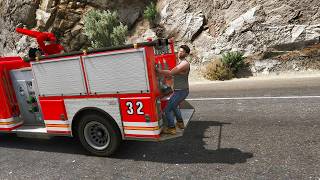
Hold "Reload + Enter Vehicle" (R + F) buttons to get on the closest extra seat like a "Granger"s side steps, a fire truck's back bars or a "Bison"s rear case.
Press "Handbrake + MoveLeft" (Space + A) buttons to set NPC driving speed to 125 kmph/mph on a passenger seat.
Press "Handbrake + Accelerate" (Space + W) buttons to set NPC driving speed to 90 kmph/mph on a passenger seat.
Press "Handbrake + MoveRight" (Space + D) buttons to set NPC driving speed to 60 kmph/mph on a passenger seat.
Press "Handbrake + Brake" (Space + S) buttons to tell NPC to stop the vehicle (for 2 seconds) on a passenger seat. Hold both buttons to keep the vehicle waiting.
These functions can simply be canceled by pressing any direction button (W/A/S/D); just like canceling default getting in action.
Additionally, if you have a place marker on your map; the NPC who is driving you, will take you to that marker's spot like a rushed taxi.
Script regularly checks marker's location so you can simply change your map marker as you like without requiring any further process.
You can make driver NPC stop the vehicle by pressing "Handbrake + Brake" (Space + S) buttons so that you can get off. Driver will move again in 2 seconds.
You can also shuffle seats while in a vehicle by holding "Interact" (E) button.
You can shuffle your seat if you are on driver's seat by holding "Hand Brake" and "Interact" buttons at the same time (Space + E). Horn will not honk as long as you hold "Hand Brake" button.
Moreover; in a vehicle, by pressing 1/2/3/4/5 (numeric, not numpad) you can quickly change to related weapon groups:
Press "1" button to change quickly to unarmed.
Press "2" button to change quickly to pistols.
Press "3" button to change quickly to SMGs.
Press "4" button to change quickly to shotguns.
Press "5" button to change quickly to thrown category.
Highly recommended to use with my "Simple Radio Off" mod.
The script will definitely require "ScriptHookVDotNet 3.7.0" and above.
INSTALLATION
1. Make sure you have ScriptHookVDotNet 3.7.0 or above.
2. Place "scripts" folder provided in .rar into -->
Grand Theft Auto V Legacy/Enhanced directory (where the PlayGTAV.exe file is).
_
A simple, light-weight, open source ".cs" script to make you be able to get also on passenger seats and extra seats of an NPC's vehicle.
08/05/2026 Update:
As "GLoryBoyNu" suggested; logic added to prevent NPCs in car from fleeing/getting scared when you drive by.
30/06/2026 Update:
Fixed an issue where players cannot get in/on to extra seats while holding "Reload + Enter Vehicle" (R + F) buttons.
05/09/2026 Update:
Added ability to make driver NPC stop the vehicle by pressing "Handbrake + Brake" (Space + S) buttons so that you can get off. Driver will move again in 2 seconds. Hold both buttons to keep the vehicle waiting.
Helicopters, planes and blimps driven by NPCs will now go at the top speed.
15/09/2026 Update:
Added ability to make driver NPC change driving speed.
Press "Handbrake + MoveLeft" (Space + A) buttons to set NPC driving speed to 125 kmph/mph.
Press "Handbrake + Accelerate" (Space + W) buttons to set NPC driving speed to 90 kmph/mph.
Press "Handbrake + MoveRight" (Space + D) buttons to set NPC driving speed to 60 kmph/mph.
MOD DETAILS
This script allows you to be able to get also on passenger seats AND extra seats of an NPC's vehicle.
Controls are:
Hold "Enter Vehicle" (F) button to get on the closest passenger seat:
Hold "Reload + Enter Vehicle" (R + F) buttons to get on the closest extra seat like a "Granger"s side steps, a fire truck's back bars or a "Bison"s rear case.
Press "Handbrake + MoveLeft" (Space + A) buttons to set NPC driving speed to 125 kmph/mph on a passenger seat.
Press "Handbrake + Accelerate" (Space + W) buttons to set NPC driving speed to 90 kmph/mph on a passenger seat.
Press "Handbrake + MoveRight" (Space + D) buttons to set NPC driving speed to 60 kmph/mph on a passenger seat.
Press "Handbrake + Brake" (Space + S) buttons to tell NPC to stop the vehicle (for 2 seconds) on a passenger seat. Hold both buttons to keep the vehicle waiting.
These functions can simply be canceled by pressing any direction button (W/A/S/D); just like canceling default getting in action.
Additionally, if you have a place marker on your map; the NPC who is driving you, will take you to that marker's spot like a rushed taxi.
Script regularly checks marker's location so you can simply change your map marker as you like without requiring any further process.
You can make driver NPC stop the vehicle by pressing "Handbrake + Brake" (Space + S) buttons so that you can get off. Driver will move again in 2 seconds.
You can also shuffle seats while in a vehicle by holding "Interact" (E) button.
You can shuffle your seat if you are on driver's seat by holding "Hand Brake" and "Interact" buttons at the same time (Space + E). Horn will not honk as long as you hold "Hand Brake" button.
Moreover; in a vehicle, by pressing 1/2/3/4/5 (numeric, not numpad) you can quickly change to related weapon groups:
Press "1" button to change quickly to unarmed.
Press "2" button to change quickly to pistols.
Press "3" button to change quickly to SMGs.
Press "4" button to change quickly to shotguns.
Press "5" button to change quickly to thrown category.
Highly recommended to use with my "Simple Radio Off" mod.
The script will definitely require "ScriptHookVDotNet 3.7.0" and above.
INSTALLATION
1. Make sure you have ScriptHookVDotNet 3.7.0 or above.
2. Place "scripts" folder provided in .rar into -->
Grand Theft Auto V Legacy/Enhanced directory (where the PlayGTAV.exe file is).
_
First Uploaded: May 05, 2026
Last Updated: September 15, 2026
Last Downloaded: 1 minute ago
28 Comments
More mods by The Majestic Noob:

- .Net
5.0
396
14
1.0 Hotfix
MOD INFO
A simple, light-weight, open source ".cs" script to make you be able to get also on passenger seats and extra seats of an NPC's vehicle.
08/05/2026 Update:
As "GLoryBoyNu" suggested; logic added to prevent NPCs in car from fleeing/getting scared when you drive by.
30/06/2026 Update:
Fixed an issue where players cannot get in/on to extra seats while holding "Reload + Enter Vehicle" (R + F) buttons.
05/09/2026 Update:
Added ability to make driver NPC stop the vehicle by pressing "Handbrake + Brake" (Space + S) buttons so that you can get off. Driver will move again in 2 seconds. Hold both buttons to keep the vehicle waiting.
Helicopters, planes and blimps driven by NPCs will now go at the top speed.
15/09/2026 Update:
Added ability to make driver NPC change driving speed.
Press "Handbrake + MoveLeft" (Space + A) buttons to set NPC driving speed to 125 kmph/mph.
Press "Handbrake + Accelerate" (Space + W) buttons to set NPC driving speed to 90 kmph/mph.
Press "Handbrake + MoveRight" (Space + D) buttons to set NPC driving speed to 60 kmph/mph.
MOD DETAILS
This script allows you to be able to get also on passenger seats AND extra seats of an NPC's vehicle.
Controls are:
Hold "Enter Vehicle" (F) button to get on the closest passenger seat:
Hold "Reload + Enter Vehicle" (R + F) buttons to get on the closest extra seat like a "Granger"s side steps, a fire truck's back bars or a "Bison"s rear case.
Press "Handbrake + MoveLeft" (Space + A) buttons to set NPC driving speed to 125 kmph/mph on a passenger seat.
Press "Handbrake + Accelerate" (Space + W) buttons to set NPC driving speed to 90 kmph/mph on a passenger seat.
Press "Handbrake + MoveRight" (Space + D) buttons to set NPC driving speed to 60 kmph/mph on a passenger seat.
Press "Handbrake + Brake" (Space + S) buttons to tell NPC to stop the vehicle (for 2 seconds) on a passenger seat. Hold both buttons to keep the vehicle waiting.
These functions can simply be canceled by pressing any direction button (W/A/S/D); just like canceling default getting in action.
Additionally, if you have a place marker on your map; the NPC who is driving you, will take you to that marker's spot like a rushed taxi.
Script regularly checks marker's location so you can simply change your map marker as you like without requiring any further process.
You can make driver NPC stop the vehicle by pressing "Handbrake + Brake" (Space + S) buttons so that you can get off. Driver will move again in 2 seconds.
You can also shuffle seats while in a vehicle by holding "Interact" (E) button.
You can shuffle your seat if you are on driver's seat by holding "Hand Brake" and "Interact" buttons at the same time (Space + E). Horn will not honk as long as you hold "Hand Brake" button.
Moreover; in a vehicle, by pressing 1/2/3/4/5 (numeric, not numpad) you can quickly change to related weapon groups:
Press "1" button to change quickly to unarmed.
Press "2" button to change quickly to pistols.
Press "3" button to change quickly to SMGs.
Press "4" button to change quickly to shotguns.
Press "5" button to change quickly to thrown category.
Highly recommended to use with my "Simple Radio Off" mod.
The script will definitely require "ScriptHookVDotNet 3.7.0" and above.
INSTALLATION
1. Make sure you have ScriptHookVDotNet 3.7.0 or above.
2. Place "scripts" folder provided in .rar into -->
Grand Theft Auto V Legacy/Enhanced directory (where the PlayGTAV.exe file is).
_
A simple, light-weight, open source ".cs" script to make you be able to get also on passenger seats and extra seats of an NPC's vehicle.
08/05/2026 Update:
As "GLoryBoyNu" suggested; logic added to prevent NPCs in car from fleeing/getting scared when you drive by.
30/06/2026 Update:
Fixed an issue where players cannot get in/on to extra seats while holding "Reload + Enter Vehicle" (R + F) buttons.
05/09/2026 Update:
Added ability to make driver NPC stop the vehicle by pressing "Handbrake + Brake" (Space + S) buttons so that you can get off. Driver will move again in 2 seconds. Hold both buttons to keep the vehicle waiting.
Helicopters, planes and blimps driven by NPCs will now go at the top speed.
15/09/2026 Update:
Added ability to make driver NPC change driving speed.
Press "Handbrake + MoveLeft" (Space + A) buttons to set NPC driving speed to 125 kmph/mph.
Press "Handbrake + Accelerate" (Space + W) buttons to set NPC driving speed to 90 kmph/mph.
Press "Handbrake + MoveRight" (Space + D) buttons to set NPC driving speed to 60 kmph/mph.
MOD DETAILS
This script allows you to be able to get also on passenger seats AND extra seats of an NPC's vehicle.
Controls are:
Hold "Enter Vehicle" (F) button to get on the closest passenger seat:
Hold "Reload + Enter Vehicle" (R + F) buttons to get on the closest extra seat like a "Granger"s side steps, a fire truck's back bars or a "Bison"s rear case.
Press "Handbrake + MoveLeft" (Space + A) buttons to set NPC driving speed to 125 kmph/mph on a passenger seat.
Press "Handbrake + Accelerate" (Space + W) buttons to set NPC driving speed to 90 kmph/mph on a passenger seat.
Press "Handbrake + MoveRight" (Space + D) buttons to set NPC driving speed to 60 kmph/mph on a passenger seat.
Press "Handbrake + Brake" (Space + S) buttons to tell NPC to stop the vehicle (for 2 seconds) on a passenger seat. Hold both buttons to keep the vehicle waiting.
These functions can simply be canceled by pressing any direction button (W/A/S/D); just like canceling default getting in action.
Additionally, if you have a place marker on your map; the NPC who is driving you, will take you to that marker's spot like a rushed taxi.
Script regularly checks marker's location so you can simply change your map marker as you like without requiring any further process.
You can make driver NPC stop the vehicle by pressing "Handbrake + Brake" (Space + S) buttons so that you can get off. Driver will move again in 2 seconds.
You can also shuffle seats while in a vehicle by holding "Interact" (E) button.
You can shuffle your seat if you are on driver's seat by holding "Hand Brake" and "Interact" buttons at the same time (Space + E). Horn will not honk as long as you hold "Hand Brake" button.
Moreover; in a vehicle, by pressing 1/2/3/4/5 (numeric, not numpad) you can quickly change to related weapon groups:
Press "1" button to change quickly to unarmed.
Press "2" button to change quickly to pistols.
Press "3" button to change quickly to SMGs.
Press "4" button to change quickly to shotguns.
Press "5" button to change quickly to thrown category.
Highly recommended to use with my "Simple Radio Off" mod.
The script will definitely require "ScriptHookVDotNet 3.7.0" and above.
INSTALLATION
1. Make sure you have ScriptHookVDotNet 3.7.0 or above.
2. Place "scripts" folder provided in .rar into -->
Grand Theft Auto V Legacy/Enhanced directory (where the PlayGTAV.exe file is).
_
First Uploaded: May 05, 2026
Last Updated: September 15, 2026
Last Downloaded: 1 minute ago
 5mods on Discord

@_TheDracarys_
Character will run ONLY if you are running, will walk if you are walking; just like default get in motion. You also said animations are sped up when you enter as a passenger; this may be there is a conflict with your other mods because the speed value is NOT altered / changed / touched at all. There is not a single line that alters character speed since nothing is related to character's animation speed.
Thus, there is nothing I can fix since I am not having such problems. Try this SHVDN version:
https://www.gta5-mods.com/tools/script-hook-v-net-enhanced
hell yeah i guess u heard my comments on the last passenger mod this one is functional! thanks.
Is there anyway to stop them from jumping out the car while im shooting?. Dope mod but seems like thats the ONLY flaw i could see
@GLoryBoyNu
This was a good suggestion to take into consideration. That logic was added on v1.1.
Thanks for support.
Is it possible to disable automatic travel to a selected point, or is there a way to assign a key to it? It conflicts with another mod.
Nice, but why use ai thumbnails? lol
Nice mod, but could you add the possibility to change the npc driving speed?
is this for gta 5 enhanced? becus i installed it, and its not working
@The Majestic Noob is it for legacy or enhanced
@The Majestic Noob oops mb i forgot to download the requirements thers no problem
My Guy The Mod Has An Issue With Me When I Hold Or Click R + F it doesnt get me to the Extra Seat. I dont know if its NativeUI or LemonUi Although I have the lastest verison Of The Scripthook and Scripthookdotnet Also I have Dashhook. If you can tell me what is the problem ill appreciate it + maybe problem is because i had mods like manual transmission or Jailbreak Or even menyoo
Bonus Question: I would like you to update it and fix it maybe or make it more stable. and i hope ill see more mods from you
@ImProGuyFromGTAVI
Fixed in v1.2. Thanks for reporting it clearly.
@The Majestic Noob Doesn't SHVDN have to compile raw .cs scripts, which would make them heavier?
@Michael21107
As far as I'm concerned, it is the other way around.
@The Majestic Noob DLL files are compiled. They are surely not getting compiled on runtime (when playing the game).
@The Majestic Noob Hey Can you add gta online vehicles also in the extra seats? because When i want to use the turret on technical or caracara 6x6. that will be very cool if you add it.
@ImProGuyFromGTAVI
Sorry, it's been 3 days and I still couldn't figure it out. I do this and some other function gets broken. I do that and some other function gets broken. I couldn't find a way to get onto seats other than turret. I'm doubtful whether I can do this.
Thank you so much, working, this is what i want
Doesn't work on Enhanced for me