Cinematic Driving 1.0


1,168
15
1,168
15
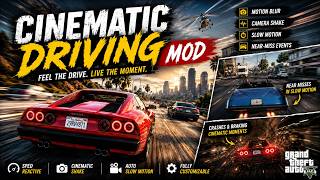
Ever feel like driving in GTA V just doesn't have any weight to it No blur, no shake, no drama you're just sliding around the map. This mod fixes that. It adds real motion blur, speed-reactive camera shake, and cinematic slow-motion moments that trigger when you brake hard, crash, or narrowly avoid smashing into another car. Basically: driving that actually feels like driving.
This is a passion project I built from the ground up (with a lot of trial and error along the way motion blur in GTA V is genuinely harder to get right than it sounds), and it's completely free.
Features
Real motion blur while driving, powered by actual per-pixel motion estimation (not a cheap screen-space fake) ramps up smoothly with speed and disappears completely when you're stationary
Speed-reactive camera shake that kicks in as you pick up speed
Automatic slow-motion "movie moments" triggered by:
Hard braking
Crashing into something
Narrowly passing another vehicle at speed without hitting it (a genuine near-miss detector, not just a random chance)
Everything is fully toggleable in-game and fades in/out smoothly no jarring snaps on or off
A built-in debug readout so you can see exactly what the mod is doing in real time
Zero impact on vehicle handling or physics this is purely visual/camera, your driving skill (or lack thereof) is unaffected
Requirements
GTA V, Legacy version (Steam/Rockstar/Epic)
ScriptHookV by Alexander Blade
ReShade, set up for GTA5.exe using the DirectX 10/11/12 API
Everything else needed for the motion blur (including the third-party shader that makes it look right) is bundled directly in the download no separate shader hunting required.
Installation
Make sure ScriptHookV and ReShade are both installed.
Copy CinematicDrivingMod.asi into your GTA V folder, next to GTA5.exe.
Copy the whole ReShade\Shaders folder from this download into your GTA V folder's reshade-shaders\Shaders\, merging with what's already there.
Copy CinematicDrivingMod.ini into your GTA V folder, next to GTA5.exe.
Launch the game, press Home to open the ReShade overlay, and select CinematicDrivingMod.ini from the preset dropdown.
Press Home again and go drive.
Full step-by-step instructions (plus a troubleshooting note if the blur doesn't show up right away) are in the included Readme.txt.
Controls
NUM7 - toggle the mod on/off in-game
F7 - toggle a debug readout (speed, shake state, slow-motion state)
Home - open/close the ReShade overlay to fine-tune the blur live
Credits
The core motion blur is powered by vort Shaders, an excellent motion-vector-based blur shader by Vortigern (MIT licensed, bundled with permission of that license). Everything else - the camera shake, slow-motion system, and the additional speed-line blur layered on top - is original work built specifically for this mod.
Want to take it further:
This mod is free and staying free. If you want the full cinematic package on top of it - ambient occlusion, depth of field, color grading, sharpening, and a letterbox bar look, all tuned together - check out the Antonio Montana Preset in our Discord:
https://discord.gg/UfWGqrCVph
Also recommended: pair this with my Drift Mod for GTA V Legacy - driving and drifting that both actually feel right:
https://www.gta5-mods.com/scripts/drift-mod-for-gta-5-legacy-version-2026
Questions, bug reports, or just want to share a clip Drop by the Discord above.
Enjoy the drive.
This is a passion project I built from the ground up (with a lot of trial and error along the way motion blur in GTA V is genuinely harder to get right than it sounds), and it's completely free.
Features
Real motion blur while driving, powered by actual per-pixel motion estimation (not a cheap screen-space fake) ramps up smoothly with speed and disappears completely when you're stationary
Speed-reactive camera shake that kicks in as you pick up speed
Automatic slow-motion "movie moments" triggered by:
Hard braking
Crashing into something
Narrowly passing another vehicle at speed without hitting it (a genuine near-miss detector, not just a random chance)
Everything is fully toggleable in-game and fades in/out smoothly no jarring snaps on or off
A built-in debug readout so you can see exactly what the mod is doing in real time
Zero impact on vehicle handling or physics this is purely visual/camera, your driving skill (or lack thereof) is unaffected
Requirements
GTA V, Legacy version (Steam/Rockstar/Epic)
ScriptHookV by Alexander Blade
ReShade, set up for GTA5.exe using the DirectX 10/11/12 API
Everything else needed for the motion blur (including the third-party shader that makes it look right) is bundled directly in the download no separate shader hunting required.
Installation
Make sure ScriptHookV and ReShade are both installed.
Copy CinematicDrivingMod.asi into your GTA V folder, next to GTA5.exe.
Copy the whole ReShade\Shaders folder from this download into your GTA V folder's reshade-shaders\Shaders\, merging with what's already there.
Copy CinematicDrivingMod.ini into your GTA V folder, next to GTA5.exe.
Launch the game, press Home to open the ReShade overlay, and select CinematicDrivingMod.ini from the preset dropdown.
Press Home again and go drive.
Full step-by-step instructions (plus a troubleshooting note if the blur doesn't show up right away) are in the included Readme.txt.
Controls
NUM7 - toggle the mod on/off in-game
F7 - toggle a debug readout (speed, shake state, slow-motion state)
Home - open/close the ReShade overlay to fine-tune the blur live
Credits
The core motion blur is powered by vort Shaders, an excellent motion-vector-based blur shader by Vortigern (MIT licensed, bundled with permission of that license). Everything else - the camera shake, slow-motion system, and the additional speed-line blur layered on top - is original work built specifically for this mod.
Want to take it further:
This mod is free and staying free. If you want the full cinematic package on top of it - ambient occlusion, depth of field, color grading, sharpening, and a letterbox bar look, all tuned together - check out the Antonio Montana Preset in our Discord:
https://discord.gg/UfWGqrCVph
Also recommended: pair this with my Drift Mod for GTA V Legacy - driving and drifting that both actually feel right:
https://www.gta5-mods.com/scripts/drift-mod-for-gta-5-legacy-version-2026
Questions, bug reports, or just want to share a clip Drop by the Discord above.
Enjoy the drive.
首次上传时间: 2026年07月15日
最后更新时间: 2026年07月16日
最后下载: 1小时前
17个评论
More mods by AntonioMontanaGTA:

- 游戏环境
- Asi
1.42
3,443
39
1.2 (No Watermark)
Ever feel like driving in GTA V just doesn't have any weight to it No blur, no shake, no drama you're just sliding around the map. This mod fixes that. It adds real motion blur, speed-reactive camera shake, and cinematic slow-motion moments that trigger when you brake hard, crash, or narrowly avoid smashing into another car. Basically: driving that actually feels like driving.
This is a passion project I built from the ground up (with a lot of trial and error along the way motion blur in GTA V is genuinely harder to get right than it sounds), and it's completely free.
Features
Real motion blur while driving, powered by actual per-pixel motion estimation (not a cheap screen-space fake) ramps up smoothly with speed and disappears completely when you're stationary
Speed-reactive camera shake that kicks in as you pick up speed
Automatic slow-motion "movie moments" triggered by:
Hard braking
Crashing into something
Narrowly passing another vehicle at speed without hitting it (a genuine near-miss detector, not just a random chance)
Everything is fully toggleable in-game and fades in/out smoothly no jarring snaps on or off
A built-in debug readout so you can see exactly what the mod is doing in real time
Zero impact on vehicle handling or physics this is purely visual/camera, your driving skill (or lack thereof) is unaffected
Requirements
GTA V, Legacy version (Steam/Rockstar/Epic)
ScriptHookV by Alexander Blade
ReShade, set up for GTA5.exe using the DirectX 10/11/12 API
Everything else needed for the motion blur (including the third-party shader that makes it look right) is bundled directly in the download no separate shader hunting required.
Installation
Make sure ScriptHookV and ReShade are both installed.
Copy CinematicDrivingMod.asi into your GTA V folder, next to GTA5.exe.
Copy the whole ReShade\Shaders folder from this download into your GTA V folder's reshade-shaders\Shaders\, merging with what's already there.
Copy CinematicDrivingMod.ini into your GTA V folder, next to GTA5.exe.
Launch the game, press Home to open the ReShade overlay, and select CinematicDrivingMod.ini from the preset dropdown.
Press Home again and go drive.
Full step-by-step instructions (plus a troubleshooting note if the blur doesn't show up right away) are in the included Readme.txt.
Controls
NUM7 - toggle the mod on/off in-game
F7 - toggle a debug readout (speed, shake state, slow-motion state)
Home - open/close the ReShade overlay to fine-tune the blur live
Credits
The core motion blur is powered by vort Shaders, an excellent motion-vector-based blur shader by Vortigern (MIT licensed, bundled with permission of that license). Everything else - the camera shake, slow-motion system, and the additional speed-line blur layered on top - is original work built specifically for this mod.
Want to take it further:
This mod is free and staying free. If you want the full cinematic package on top of it - ambient occlusion, depth of field, color grading, sharpening, and a letterbox bar look, all tuned together - check out the Antonio Montana Preset in our Discord:
https://discord.gg/UfWGqrCVph
Also recommended: pair this with my Drift Mod for GTA V Legacy - driving and drifting that both actually feel right:
https://www.gta5-mods.com/scripts/drift-mod-for-gta-5-legacy-version-2026
Questions, bug reports, or just want to share a clip Drop by the Discord above.
Enjoy the drive.
This is a passion project I built from the ground up (with a lot of trial and error along the way motion blur in GTA V is genuinely harder to get right than it sounds), and it's completely free.
Features
Real motion blur while driving, powered by actual per-pixel motion estimation (not a cheap screen-space fake) ramps up smoothly with speed and disappears completely when you're stationary
Speed-reactive camera shake that kicks in as you pick up speed
Automatic slow-motion "movie moments" triggered by:
Hard braking
Crashing into something
Narrowly passing another vehicle at speed without hitting it (a genuine near-miss detector, not just a random chance)
Everything is fully toggleable in-game and fades in/out smoothly no jarring snaps on or off
A built-in debug readout so you can see exactly what the mod is doing in real time
Zero impact on vehicle handling or physics this is purely visual/camera, your driving skill (or lack thereof) is unaffected
Requirements
GTA V, Legacy version (Steam/Rockstar/Epic)
ScriptHookV by Alexander Blade
ReShade, set up for GTA5.exe using the DirectX 10/11/12 API
Everything else needed for the motion blur (including the third-party shader that makes it look right) is bundled directly in the download no separate shader hunting required.
Installation
Make sure ScriptHookV and ReShade are both installed.
Copy CinematicDrivingMod.asi into your GTA V folder, next to GTA5.exe.
Copy the whole ReShade\Shaders folder from this download into your GTA V folder's reshade-shaders\Shaders\, merging with what's already there.
Copy CinematicDrivingMod.ini into your GTA V folder, next to GTA5.exe.
Launch the game, press Home to open the ReShade overlay, and select CinematicDrivingMod.ini from the preset dropdown.
Press Home again and go drive.
Full step-by-step instructions (plus a troubleshooting note if the blur doesn't show up right away) are in the included Readme.txt.
Controls
NUM7 - toggle the mod on/off in-game
F7 - toggle a debug readout (speed, shake state, slow-motion state)
Home - open/close the ReShade overlay to fine-tune the blur live
Credits
The core motion blur is powered by vort Shaders, an excellent motion-vector-based blur shader by Vortigern (MIT licensed, bundled with permission of that license). Everything else - the camera shake, slow-motion system, and the additional speed-line blur layered on top - is original work built specifically for this mod.
Want to take it further:
This mod is free and staying free. If you want the full cinematic package on top of it - ambient occlusion, depth of field, color grading, sharpening, and a letterbox bar look, all tuned together - check out the Antonio Montana Preset in our Discord:
https://discord.gg/UfWGqrCVph
Also recommended: pair this with my Drift Mod for GTA V Legacy - driving and drifting that both actually feel right:
https://www.gta5-mods.com/scripts/drift-mod-for-gta-5-legacy-version-2026
Questions, bug reports, or just want to share a clip Drop by the Discord above.
Enjoy the drive.
首次上传时间: 2026年07月15日
最后更新时间: 2026年07月16日
最后下载: 1小时前
 5mods on Discord

How to change the controls ? because it's conflict with my current mods
how do i turn off the slow motion crash
Orales "The World Is Yours" Montana, "She´s on Fire" would have been a good Rola for that video haha.. good mod BTW gonna try it out
@Sceptre_X_ There's something called Copyright bro, Thanks btw
Can you add a script to cancel the fast shots and slow motion, and just keep the cinematic car perspective script? I really like this mod. If you see this, can you respond to me? I hope the update won’t include the fast action and slow motion scripts. Thanks! Just keep the cinematic driving view, or maybe make two separate versions. Slow motion and fast!!! Thanks!!! Slow motion and fast!!! Thanks!!! Slow motion and fast!!! Thanks!!!
@Verzich I'll add a toggle for the slowmo so you can turn it off bro
@AntonioMontanaGTA Can this support one-click turning off comments? I only want cinematic driving. Its fast-motion and slow-motion are really annoying. Thanks, bro!!!
Bro, how do I turn this off? I can’t read English. Has this cinematic driving been updated? Can you update the fast motion and slow motion, keeping only cinematic driving? If possible, can it be done today? I really want it. Thanks so much, bro!!! Or maybe put the slow and fast motions into the accompanying settings. Thanks, bro, this script is really awesome!!!
@Verzich Join Discord we'll talk there
@AntonioMontanaGTA keep going u ate
@AntonioMontanaGTA What's your Discord chat?我现在加你
@AntonioMontanaGTA Great mod, small glitch with slowmo though, im not sure if its when i switch cars often but sometimes when i drive normally the game slows down, not extremely slow like the slowmo but noticeably slow, also when planes are taking off the slowmo activates, i like the feature but something needs to be fine tuned in it, nice wok overall
@Verzich u can give grok the asi and ask him to change the timescale to 1.0 so slowmo never activates
only ""problem"" is the slow motion that gets quite annoying after a while, other than that very good mod
@AntonioMontanaGTA Have you added it now, bro? I really want to try how it works after adding. Can I download a Chinese QQ? It will be easy to communicate well
Still waiting update for disable slow motion
This mod would be a 10/10 if there were a way to disable the slow-motion effect; anything triggers it, and it becomes annoying after just a minute of gameplay.