Smart Indicators & Hazards 1.0

![Flashing Headlights [LUA]](https://img.gta5-mods.com/q75-w500-h333-cfill/images/flashing-highlights-lua-v1-0/1b8a93-4.0V.jpg "Flashing Headlights [LUA]")


460
13
460
13
=================================
SMART INDICATORS & HAZARDS
=================================
Main .NET Mod by RockstarTesterMod (Alternative Standalone LUA Scripts Included)
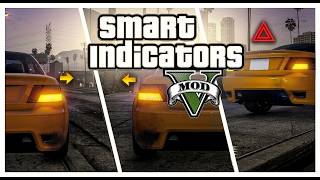
Smart Indicators & Hazards! This mod allows you to use the direction indicators on any vehicle, either manually or automatically, using the keyboard or a controller in Grand Theft Auto V.
=================================
1. MAIN VERSION: (.NET) WITH INTERACTIVE IN-GAME MENU
=================================
This is mod includes adaptive steering-based automation, full controller/keyboard support, custom in-game menu, automatic configuration saving, and persistent hazard lights when leaving the vehicle.
[CORE FEATURES]
- Interactive Menu: Press F1 (default) to toggle all script modules in real-time. Settings are automatically saved directly to the .ini file upon closing or changing a checkbox.
- Blinker Synchronization: Fully synchronized system allowing manual overrides over the automated steering logic.
- Auto-cancel function for manual driving added. You can now choose whether to enable or disable the turn signal deactivation during wheel alignment.
- Adaptive Vehicle Logic
The script automatically detects what vehicle class you are driving and scales
the turning sensitivity accordingly. Standard cars, medium trucks, and long
heavy goods vehicles (HGV) all have distinct, realistic steering responses
- Persistent Hazard Lights: A highly stable parking module. When leaving a vehicle with hazards active, the engine stays virtually on.
NOTE: Please beware of other active engine persistence mods, as they might interfere with this script's memory management.
[AUTOMATIC STEERING LOGIC (SMART HANDLING)]
- Controller Optimization: The automatic steering logic is strictly optimized for analog thumbsticks on Gamepads and Controllers. (Built for Gamepads only)
- Customizable Steering Sensitivity
Through the in-game menu, you can customize the steering activation
threshold for each vehicle category to match your driving style perfectly:
1) CARS: Applies to standard high-speed classes, sports cars, sedans, suvs, and compact vehicles.
2) TRUCKS: Applies to medium-sized utility vehicles, short commercial trucks, compact vans, and compact off-road vehicles.
3) HGV: Applies to long heavy goods vehicles, industrial machinery, buses, and massive trailers.
- Low-Speed Automation: The steering-based automatic system runs dynamically at low speeds to assist during urban navigation, junctions, and roundabouts.
- High-Speed Safety Bypass: At elevated speeds, the script automatically reduces sensitivity and disables blinkers.
- Static Traffic Navigation: When stopped at a red light or standstill traffic to set the direction, simply hold the analog stick fully to the left or right to pre-signal your intended direction. The blinker will stay active as long as you hold the position.
[REQUIREMENTS FOR .NET MOD]
- ScriptHookV (by Alexander Blade)
- ScriptHookVDotNet (v3.6.0 or higher) or Script Hook V .Net Enhanced
- LemonUI (v2.2)
[INSTALLATION STEPS]
1. Open your main GTA V game folder.
2. Open the "scripts" folder (If it does not exist, create it).
3. Copy all the files from "\Automatic&Manual IndicatorsMenu\scripts\" in this package:
- SmartIndicators.dll
- SmartIndicators.ini
- SmartIndicators.pdb
- LemonUI.SHVDN3.dll
- LemonUI.SHVDN3.pdb
- LemonUI.SHVDN3.xml
4. Paste them into your "scripts" folder.
5. DONE!
=================================
IN-GAME LEMONUI MENU
=================================
Main Menu (F1) while in-game to open the configuration menu. From there you can:
- Toggle Automatic and Manual modules completely on or off.
- Individually turn off Keyboard or Gamepad inputs if you prefer one over the other.
- Fine-tune your turn signal duration (make flashers last longer or shorter).
- Customize steering sensitivity of direction indicator modifiers for cars , Trucks, and HGVs (Customizable to the user's liking)
- Re-bind indicator buttons for both Keyboard and Controller layout and also customize the Menu key.
=================================
2. ALTERNATIVE VERSION: LIGHTWEIGHT LUA SCRIPTS
=================================
If you prefer an ultra-lightweight setup or you are running a custom LUA environment, standalone LUA scripts containing the standalone core features are included.
[REQUIREMENTS FOR LUA SCRIPTS]
-LUA Plugin for Script Hook V (V 10.1)
FILES INCLUDED]
- LUA Scripts\Manual Indicators [Keyboad]\manualindicators.lua
- LUA Scripts\Automatic Indicators [Controller only]\automaticindicators.lua
[INSTALLATION STEPS]
1. Locate the LUA script folder inside your main directory, usually at: "Grand Theft Auto V\scripts\addins\"
2. Depending on your preference, copy the .lua files into "\scripts\addins\" (Do NOT use them together or with the .NET version to avoid script conflicts):
- For keyboard manual turn signals, copy "manualindicators.lua".
- For controller automatic steering turn signals, copy "automaticindicators.lua".
3. Start the game. The LUA scripts will load automatically in the background.
[CONFIGURATION (LUA)]
You can configure the indicator keys to your liking in the "manualindicators.lua" file by opening it in any text editor and changing the variables:
'local LEFTINDICATORKEY = Keys.Left'
'local RIGHTINDICATORKEY = Keys.Right'
'local HAZARDLIGHTSKEY = Keys.U'
=====================================
CREDITS & NOTES
=====================================
- Mod created and compiled by RockstarTesterMod.
- LemonUI library credits go to its respective authors.
- Do not re-upload or distribute these files on other websites without explicit permission and proper credits.
Enjoy the ride and drive safely!
=====================================
RECOMMENDED TAGS & KEYWORDS FOR GTA5-MODS
=====================================
Tags: Script, Vehicle, Realistic, Handling
Keywords: Smart Indicators, Adaptive Blinkers, Turn Signals, Realism, Persistent Hazards, Controller Indicators, Frecce Automatiche, Gamepad Blinkers, Emergency Lights
SMART INDICATORS & HAZARDS
=================================
Main .NET Mod by RockstarTesterMod (Alternative Standalone LUA Scripts Included)
Smart Indicators & Hazards! This mod allows you to use the direction indicators on any vehicle, either manually or automatically, using the keyboard or a controller in Grand Theft Auto V.
=================================
1. MAIN VERSION: (.NET) WITH INTERACTIVE IN-GAME MENU
=================================
This is mod includes adaptive steering-based automation, full controller/keyboard support, custom in-game menu, automatic configuration saving, and persistent hazard lights when leaving the vehicle.
[CORE FEATURES]
- Interactive Menu: Press F1 (default) to toggle all script modules in real-time. Settings are automatically saved directly to the .ini file upon closing or changing a checkbox.
- Blinker Synchronization: Fully synchronized system allowing manual overrides over the automated steering logic.
- Auto-cancel function for manual driving added. You can now choose whether to enable or disable the turn signal deactivation during wheel alignment.
- Adaptive Vehicle Logic
The script automatically detects what vehicle class you are driving and scales
the turning sensitivity accordingly. Standard cars, medium trucks, and long
heavy goods vehicles (HGV) all have distinct, realistic steering responses
- Persistent Hazard Lights: A highly stable parking module. When leaving a vehicle with hazards active, the engine stays virtually on.
NOTE: Please beware of other active engine persistence mods, as they might interfere with this script's memory management.
[AUTOMATIC STEERING LOGIC (SMART HANDLING)]
- Controller Optimization: The automatic steering logic is strictly optimized for analog thumbsticks on Gamepads and Controllers. (Built for Gamepads only)
- Customizable Steering Sensitivity
Through the in-game menu, you can customize the steering activation
threshold for each vehicle category to match your driving style perfectly:
1) CARS: Applies to standard high-speed classes, sports cars, sedans, suvs, and compact vehicles.
2) TRUCKS: Applies to medium-sized utility vehicles, short commercial trucks, compact vans, and compact off-road vehicles.
3) HGV: Applies to long heavy goods vehicles, industrial machinery, buses, and massive trailers.
- Low-Speed Automation: The steering-based automatic system runs dynamically at low speeds to assist during urban navigation, junctions, and roundabouts.
- High-Speed Safety Bypass: At elevated speeds, the script automatically reduces sensitivity and disables blinkers.
- Static Traffic Navigation: When stopped at a red light or standstill traffic to set the direction, simply hold the analog stick fully to the left or right to pre-signal your intended direction. The blinker will stay active as long as you hold the position.
[REQUIREMENTS FOR .NET MOD]
- ScriptHookV (by Alexander Blade)
- ScriptHookVDotNet (v3.6.0 or higher) or Script Hook V .Net Enhanced
- LemonUI (v2.2)
[INSTALLATION STEPS]
1. Open your main GTA V game folder.
2. Open the "scripts" folder (If it does not exist, create it).
3. Copy all the files from "\Automatic&Manual IndicatorsMenu\scripts\" in this package:
- SmartIndicators.dll
- SmartIndicators.ini
- SmartIndicators.pdb
- LemonUI.SHVDN3.dll
- LemonUI.SHVDN3.pdb
- LemonUI.SHVDN3.xml
4. Paste them into your "scripts" folder.
5. DONE!
=================================
IN-GAME LEMONUI MENU
=================================
Main Menu (F1) while in-game to open the configuration menu. From there you can:
- Toggle Automatic and Manual modules completely on or off.
- Individually turn off Keyboard or Gamepad inputs if you prefer one over the other.
- Fine-tune your turn signal duration (make flashers last longer or shorter).
- Customize steering sensitivity of direction indicator modifiers for cars , Trucks, and HGVs (Customizable to the user's liking)
- Re-bind indicator buttons for both Keyboard and Controller layout and also customize the Menu key.
=================================
2. ALTERNATIVE VERSION: LIGHTWEIGHT LUA SCRIPTS
=================================
If you prefer an ultra-lightweight setup or you are running a custom LUA environment, standalone LUA scripts containing the standalone core features are included.
[REQUIREMENTS FOR LUA SCRIPTS]
-LUA Plugin for Script Hook V (V 10.1)
FILES INCLUDED]
- LUA Scripts\Manual Indicators [Keyboad]\manualindicators.lua
- LUA Scripts\Automatic Indicators [Controller only]\automaticindicators.lua
[INSTALLATION STEPS]
1. Locate the LUA script folder inside your main directory, usually at: "Grand Theft Auto V\scripts\addins\"
2. Depending on your preference, copy the .lua files into "\scripts\addins\" (Do NOT use them together or with the .NET version to avoid script conflicts):
- For keyboard manual turn signals, copy "manualindicators.lua".
- For controller automatic steering turn signals, copy "automaticindicators.lua".
3. Start the game. The LUA scripts will load automatically in the background.
[CONFIGURATION (LUA)]
You can configure the indicator keys to your liking in the "manualindicators.lua" file by opening it in any text editor and changing the variables:
'local LEFTINDICATORKEY = Keys.Left'
'local RIGHTINDICATORKEY = Keys.Right'
'local HAZARDLIGHTSKEY = Keys.U'
=====================================
CREDITS & NOTES
=====================================
- Mod created and compiled by RockstarTesterMod.
- LemonUI library credits go to its respective authors.
- Do not re-upload or distribute these files on other websites without explicit permission and proper credits.
Enjoy the ride and drive safely!
=====================================
RECOMMENDED TAGS & KEYWORDS FOR GTA5-MODS
=====================================
Tags: Script, Vehicle, Realistic, Handling
Keywords: Smart Indicators, Adaptive Blinkers, Turn Signals, Realism, Persistent Hazards, Controller Indicators, Frecce Automatiche, Gamepad Blinkers, Emergency Lights
Poprvé nahráno: před 8 dny
Poslední aktulizace: 7 hours ago
Last Downloaded: před 7 minutami
6 Komentářů
More mods by RockstarTesterMod:
=================================
SMART INDICATORS & HAZARDS
=================================
Main .NET Mod by RockstarTesterMod (Alternative Standalone LUA Scripts Included)
Smart Indicators & Hazards! This mod allows you to use the direction indicators on any vehicle, either manually or automatically, using the keyboard or a controller in Grand Theft Auto V.
=================================
1. MAIN VERSION: (.NET) WITH INTERACTIVE IN-GAME MENU
=================================
This is mod includes adaptive steering-based automation, full controller/keyboard support, custom in-game menu, automatic configuration saving, and persistent hazard lights when leaving the vehicle.
[CORE FEATURES]
- Interactive Menu: Press F1 (default) to toggle all script modules in real-time. Settings are automatically saved directly to the .ini file upon closing or changing a checkbox.
- Blinker Synchronization: Fully synchronized system allowing manual overrides over the automated steering logic.
- Auto-cancel function for manual driving added. You can now choose whether to enable or disable the turn signal deactivation during wheel alignment.
- Adaptive Vehicle Logic
The script automatically detects what vehicle class you are driving and scales
the turning sensitivity accordingly. Standard cars, medium trucks, and long
heavy goods vehicles (HGV) all have distinct, realistic steering responses
- Persistent Hazard Lights: A highly stable parking module. When leaving a vehicle with hazards active, the engine stays virtually on.
NOTE: Please beware of other active engine persistence mods, as they might interfere with this script's memory management.
[AUTOMATIC STEERING LOGIC (SMART HANDLING)]
- Controller Optimization: The automatic steering logic is strictly optimized for analog thumbsticks on Gamepads and Controllers. (Built for Gamepads only)
- Customizable Steering Sensitivity
Through the in-game menu, you can customize the steering activation
threshold for each vehicle category to match your driving style perfectly:
1) CARS: Applies to standard high-speed classes, sports cars, sedans, suvs, and compact vehicles.
2) TRUCKS: Applies to medium-sized utility vehicles, short commercial trucks, compact vans, and compact off-road vehicles.
3) HGV: Applies to long heavy goods vehicles, industrial machinery, buses, and massive trailers.
- Low-Speed Automation: The steering-based automatic system runs dynamically at low speeds to assist during urban navigation, junctions, and roundabouts.
- High-Speed Safety Bypass: At elevated speeds, the script automatically reduces sensitivity and disables blinkers.
- Static Traffic Navigation: When stopped at a red light or standstill traffic to set the direction, simply hold the analog stick fully to the left or right to pre-signal your intended direction. The blinker will stay active as long as you hold the position.
[REQUIREMENTS FOR .NET MOD]
- ScriptHookV (by Alexander Blade)
- ScriptHookVDotNet (v3.6.0 or higher) or Script Hook V .Net Enhanced
- LemonUI (v2.2)
[INSTALLATION STEPS]
1. Open your main GTA V game folder.
2. Open the "scripts" folder (If it does not exist, create it).
3. Copy all the files from "\Automatic&Manual IndicatorsMenu\scripts\" in this package:
- SmartIndicators.dll
- SmartIndicators.ini
- SmartIndicators.pdb
- LemonUI.SHVDN3.dll
- LemonUI.SHVDN3.pdb
- LemonUI.SHVDN3.xml
4. Paste them into your "scripts" folder.
5. DONE!
=================================
IN-GAME LEMONUI MENU
=================================
Main Menu (F1) while in-game to open the configuration menu. From there you can:
- Toggle Automatic and Manual modules completely on or off.
- Individually turn off Keyboard or Gamepad inputs if you prefer one over the other.
- Fine-tune your turn signal duration (make flashers last longer or shorter).
- Customize steering sensitivity of direction indicator modifiers for cars , Trucks, and HGVs (Customizable to the user's liking)
- Re-bind indicator buttons for both Keyboard and Controller layout and also customize the Menu key.
=================================
2. ALTERNATIVE VERSION: LIGHTWEIGHT LUA SCRIPTS
=================================
If you prefer an ultra-lightweight setup or you are running a custom LUA environment, standalone LUA scripts containing the standalone core features are included.
[REQUIREMENTS FOR LUA SCRIPTS]
-LUA Plugin for Script Hook V (V 10.1)
FILES INCLUDED]
- LUA Scripts\Manual Indicators [Keyboad]\manualindicators.lua
- LUA Scripts\Automatic Indicators [Controller only]\automaticindicators.lua
[INSTALLATION STEPS]
1. Locate the LUA script folder inside your main directory, usually at: "Grand Theft Auto V\scripts\addins\"
2. Depending on your preference, copy the .lua files into "\scripts\addins\" (Do NOT use them together or with the .NET version to avoid script conflicts):
- For keyboard manual turn signals, copy "manualindicators.lua".
- For controller automatic steering turn signals, copy "automaticindicators.lua".
3. Start the game. The LUA scripts will load automatically in the background.
[CONFIGURATION (LUA)]
You can configure the indicator keys to your liking in the "manualindicators.lua" file by opening it in any text editor and changing the variables:
'local LEFTINDICATORKEY = Keys.Left'
'local RIGHTINDICATORKEY = Keys.Right'
'local HAZARDLIGHTSKEY = Keys.U'
=====================================
CREDITS & NOTES
=====================================
- Mod created and compiled by RockstarTesterMod.
- LemonUI library credits go to its respective authors.
- Do not re-upload or distribute these files on other websites without explicit permission and proper credits.
Enjoy the ride and drive safely!
=====================================
RECOMMENDED TAGS & KEYWORDS FOR GTA5-MODS
=====================================
Tags: Script, Vehicle, Realistic, Handling
Keywords: Smart Indicators, Adaptive Blinkers, Turn Signals, Realism, Persistent Hazards, Controller Indicators, Frecce Automatiche, Gamepad Blinkers, Emergency Lights
SMART INDICATORS & HAZARDS
=================================
Main .NET Mod by RockstarTesterMod (Alternative Standalone LUA Scripts Included)
Smart Indicators & Hazards! This mod allows you to use the direction indicators on any vehicle, either manually or automatically, using the keyboard or a controller in Grand Theft Auto V.
=================================
1. MAIN VERSION: (.NET) WITH INTERACTIVE IN-GAME MENU
=================================
This is mod includes adaptive steering-based automation, full controller/keyboard support, custom in-game menu, automatic configuration saving, and persistent hazard lights when leaving the vehicle.
[CORE FEATURES]
- Interactive Menu: Press F1 (default) to toggle all script modules in real-time. Settings are automatically saved directly to the .ini file upon closing or changing a checkbox.
- Blinker Synchronization: Fully synchronized system allowing manual overrides over the automated steering logic.
- Auto-cancel function for manual driving added. You can now choose whether to enable or disable the turn signal deactivation during wheel alignment.
- Adaptive Vehicle Logic
The script automatically detects what vehicle class you are driving and scales
the turning sensitivity accordingly. Standard cars, medium trucks, and long
heavy goods vehicles (HGV) all have distinct, realistic steering responses
- Persistent Hazard Lights: A highly stable parking module. When leaving a vehicle with hazards active, the engine stays virtually on.
NOTE: Please beware of other active engine persistence mods, as they might interfere with this script's memory management.
[AUTOMATIC STEERING LOGIC (SMART HANDLING)]
- Controller Optimization: The automatic steering logic is strictly optimized for analog thumbsticks on Gamepads and Controllers. (Built for Gamepads only)
- Customizable Steering Sensitivity
Through the in-game menu, you can customize the steering activation
threshold for each vehicle category to match your driving style perfectly:
1) CARS: Applies to standard high-speed classes, sports cars, sedans, suvs, and compact vehicles.
2) TRUCKS: Applies to medium-sized utility vehicles, short commercial trucks, compact vans, and compact off-road vehicles.
3) HGV: Applies to long heavy goods vehicles, industrial machinery, buses, and massive trailers.
- Low-Speed Automation: The steering-based automatic system runs dynamically at low speeds to assist during urban navigation, junctions, and roundabouts.
- High-Speed Safety Bypass: At elevated speeds, the script automatically reduces sensitivity and disables blinkers.
- Static Traffic Navigation: When stopped at a red light or standstill traffic to set the direction, simply hold the analog stick fully to the left or right to pre-signal your intended direction. The blinker will stay active as long as you hold the position.
[REQUIREMENTS FOR .NET MOD]
- ScriptHookV (by Alexander Blade)
- ScriptHookVDotNet (v3.6.0 or higher) or Script Hook V .Net Enhanced
- LemonUI (v2.2)
[INSTALLATION STEPS]
1. Open your main GTA V game folder.
2. Open the "scripts" folder (If it does not exist, create it).
3. Copy all the files from "\Automatic&Manual IndicatorsMenu\scripts\" in this package:
- SmartIndicators.dll
- SmartIndicators.ini
- SmartIndicators.pdb
- LemonUI.SHVDN3.dll
- LemonUI.SHVDN3.pdb
- LemonUI.SHVDN3.xml
4. Paste them into your "scripts" folder.
5. DONE!
=================================
IN-GAME LEMONUI MENU
=================================
Main Menu (F1) while in-game to open the configuration menu. From there you can:
- Toggle Automatic and Manual modules completely on or off.
- Individually turn off Keyboard or Gamepad inputs if you prefer one over the other.
- Fine-tune your turn signal duration (make flashers last longer or shorter).
- Customize steering sensitivity of direction indicator modifiers for cars , Trucks, and HGVs (Customizable to the user's liking)
- Re-bind indicator buttons for both Keyboard and Controller layout and also customize the Menu key.
=================================
2. ALTERNATIVE VERSION: LIGHTWEIGHT LUA SCRIPTS
=================================
If you prefer an ultra-lightweight setup or you are running a custom LUA environment, standalone LUA scripts containing the standalone core features are included.
[REQUIREMENTS FOR LUA SCRIPTS]
-LUA Plugin for Script Hook V (V 10.1)
FILES INCLUDED]
- LUA Scripts\Manual Indicators [Keyboad]\manualindicators.lua
- LUA Scripts\Automatic Indicators [Controller only]\automaticindicators.lua
[INSTALLATION STEPS]
1. Locate the LUA script folder inside your main directory, usually at: "Grand Theft Auto V\scripts\addins\"
2. Depending on your preference, copy the .lua files into "\scripts\addins\" (Do NOT use them together or with the .NET version to avoid script conflicts):
- For keyboard manual turn signals, copy "manualindicators.lua".
- For controller automatic steering turn signals, copy "automaticindicators.lua".
3. Start the game. The LUA scripts will load automatically in the background.
[CONFIGURATION (LUA)]
You can configure the indicator keys to your liking in the "manualindicators.lua" file by opening it in any text editor and changing the variables:
'local LEFTINDICATORKEY = Keys.Left'
'local RIGHTINDICATORKEY = Keys.Right'
'local HAZARDLIGHTSKEY = Keys.U'
=====================================
CREDITS & NOTES
=====================================
- Mod created and compiled by RockstarTesterMod.
- LemonUI library credits go to its respective authors.
- Do not re-upload or distribute these files on other websites without explicit permission and proper credits.
Enjoy the ride and drive safely!
=====================================
RECOMMENDED TAGS & KEYWORDS FOR GTA5-MODS
=====================================
Tags: Script, Vehicle, Realistic, Handling
Keywords: Smart Indicators, Adaptive Blinkers, Turn Signals, Realism, Persistent Hazards, Controller Indicators, Frecce Automatiche, Gamepad Blinkers, Emergency Lights
Poprvé nahráno: před 8 dny
Poslední aktulizace: 7 hours ago
Last Downloaded: před 7 minutami
 5mods on Discord

@RockstarTesterMod Oh, awesome—yeah! Finally!
@Armin262 Thanks, there will soon be new improvements on the management of direction indicators and features.
@RockstarTesterMod you SHOULD introduce an auto-cancel blinker feature, just like how it works IRL, where if you turn towards the direction of your blinker, the blinker cancels automatically after turning about 60-70 degrees (not fully 90 degrees, IIRC)
It's a pretty easy job to do, so I believe you can do it effortlessly :D
Also I'd rly recommend this mod; you could add this to the description
https://www.gta5-mods.com/scripts/turn-signal-sounds-enhanced
I was planning to release a blinker mod myself, which would promote this mod and have auto-cancel feature (check my previous message), but if you add the auto-cancel feature, I don't really need to upload it anymore :D
@Eoin Gaming Thank you for your comment! The automatic function (developed for controllers) already has a feature to deactivate the indicator; I wanted to introduce the time variable so that it would provide a better way of indicating a direction than simply following the direction of the wheels, because in reality we move the wheels from left to right very quickly using a controller, so I opted to base the timing on speed.
@Eoin Gaming As for the manual function – precisely because it is manual, I wanted it to work entirely according to the user’s preferences – thank you for the suggestion; I’ll add an option to the menu to allow the indicator to switch off automatically. Thank you!