WebUI 0.3.0.0v [experimental SDK]

![LiveHudEditor [NUILight]](https://img.gta5-mods.com/q75-w500-h333-cfill/images/livehudeditor-nuilight/6f095f-1.png "LiveHudEditor [NUILight]")


![Script Hook V .Net Enhanced [Legacy + Enhanced]](https://img.gta5-mods.com/q75-w500-h333-cfill/images/script-hook-v-net-enhanced/008ea4-SHVDNE.jpg "Script Hook V .Net Enhanced [Legacy + Enhanced]")


1.018
19
1.018
19
"Special thanks to @Lelac14 for early-stage testing and pushing the engine to its limits."
Disclaimer : you may encounter some broken functions in the brand new 0.3.0.0 version. Check the ReadMe located in the developers folder for further details.
WebUI previously known as NUILight !
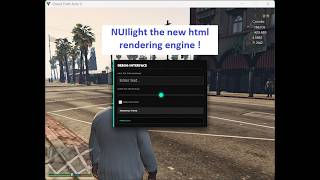
I implemented a web rendering engine in Gta V ( full HTML support -Latest version HTML5-, full CSS support -Latest version CSS3- and full support for JavaScript -Latest version ES6-)
Pros:
Integrating a web rendering engine like CEF (Chromium Embedded Framework available in the version 0.2) or Ultralight ( available in the version 0.1) directly into GTA V offers a massive leap in UI flexibility compared to standard game drawing methods. By leveraging HTML5, CSS3, and JavaScript, developers can create complex, modern interfaces such as interactive tablets, custom inventory systems, or animated HUDs with the same ease as building a website. This approach bypasses the rigid limitations of the game's native "Scaleform" (Flash-based) UI, allowing for high-performance hardware acceleration, full transparency support, and the ability to use powerful web libraries like React or Vue. Ultimately, it enables a "live" interface that can fetch real-time data from the internet or local scripts without causing the game to stutter or requiring a restart to update the visuals.
Installation instructions for version 0.1 and 0.2 are available in the zip files.
For developers : there is a developers folder that you might want to check out if you want to create web pages capable of interacting with the game .
Usage:
-Toggle the settings menu using F7 ( default ) to manage all the options and settings and you no longer need to edit the settings.ini file manually.
Known bugs:
-The version 0.2.4 isn't stable so it will probably contains multiple bugs, so let me know about them asap.
-important: if the url is correct but the browser says that it couldn't find it or load or showed any kinda of error, try reloading the page using F5 ( default can be changed in the settings menu)
Updated FAQ:
Why I switched from Ultralight to Cef
-Ultralight has problems and limitations
Why you need to use Ultralight version 0.1 instead of Cef version 0.2
-It's a light weight engine consuming around 10 to 20mb of ram without affecting the gameplay especially on low end devices like mine and it's capable of running 60fps.
Why you need to use Cef version 0.2 instead of Ultralight version 0.1
-It support the latest version of HTML, CSS and JavaScript but might cause performance issues on low end devices ( Note : I didn't update Ultralight Flavor of the project so old bugs are still there)
Update 0.3.0.0:
-Stripped the engine to bones and integrated CSharp and JS SDK for full control and easier embedding to other mods.
Update 0.2.4.2 :
-Patched a bug that cause a game crash due to repetitive resolution changing.
-Patched a major memory leak.
Update 0.2.4.1 :
-Did some small modifications so you no longer have to paste the binaries inside the game root folder. You have now to copy the settings.ini file, WebUI.asi file and the folder that contains the binaries cef-resources to the game root folder.
Important: MAKE SURE TO DELETE THE PREVIOUS INSTALLATION AND ESPECIALLY THE FILE CALLED "libcef.dll", it might cause a conflicts or crashes. If it prevents you from deleting it because another process is using it make sure to restart your computer and try deleting it again.
=> This patch was suggested by Lelac14 !
Update 0.2.4.0:
-Added countless engine tuning option so you can get the best performance.
-Added an in-game settings menu including new features : You can change the url and the keybindings live from the settings menu and apply them during runtime ( you will need to restart the game in order to apply all the other settings except the ones i mentioned early)
==>The rest of what i did is available in the settings menu with description.
Update 0.2.3:
- Added GPU Acceleration: New EnableGPU option in settings.ini (off by default). Turn on for better performance if you have a dedicated GPU.
- Rebranded the project: Now called WebUI (formerly NUILight) to avoid confusion between the real NUI and my tiny project :) .
Update 0.2.2:
- Full keyboard key support for ToggleVisibility and CaptureInput
- Graceful fallback if WebUI-Worker.exe is missing (no more worries from crashing or entering BSOD)
- Keyboard inputs now separate from mouse capture better for interactive demos
- Added ShowOnStart option in settings.ini
- License updated important changes for developers (see below)
Update 0.2.1:
- Fixed the known bugs seen in v0.1 and v0.2 ( browser visibility during the pause menu and the warning screens )
- Added a proper url fallback in case of the unavailability of the settings.ini file
- Added a proper freeze protocol to end the rendering when the game freezes
- Added EULA license to the project
Update 0.2:
- Using Chromium Embedded Framework (CEF) instead of Ultralight just like NUI used in FiveM.
- Fixed CSS and HTML limitations by the Cef upgrade.
What is next:
-I'll start working on a api to give the developers full control over the engine.
Legal:
WebUI is only available on GTA5-Mods. If you find it elsewhere, it's an unauthorized copy please download from the official page to ensure you have the correct, safe version. Thanks for supporting the original release.
Credits : ShadowOne
Note: WebUI is and always will be free. If you want to support development and help me upgrade from my potato laptop, donations are appreciated but never expected. : Ko-fi and Patreon
Note about Patreon: I added it lately if you want to support me, I'm not planning to publish any post through until i finish the API.
Disclaimer : you may encounter some broken functions in the brand new 0.3.0.0 version. Check the ReadMe located in the developers folder for further details.
WebUI previously known as NUILight !
I implemented a web rendering engine in Gta V ( full HTML support -Latest version HTML5-, full CSS support -Latest version CSS3- and full support for JavaScript -Latest version ES6-)
Pros:
Integrating a web rendering engine like CEF (Chromium Embedded Framework available in the version 0.2) or Ultralight ( available in the version 0.1) directly into GTA V offers a massive leap in UI flexibility compared to standard game drawing methods. By leveraging HTML5, CSS3, and JavaScript, developers can create complex, modern interfaces such as interactive tablets, custom inventory systems, or animated HUDs with the same ease as building a website. This approach bypasses the rigid limitations of the game's native "Scaleform" (Flash-based) UI, allowing for high-performance hardware acceleration, full transparency support, and the ability to use powerful web libraries like React or Vue. Ultimately, it enables a "live" interface that can fetch real-time data from the internet or local scripts without causing the game to stutter or requiring a restart to update the visuals.
Installation instructions for version 0.1 and 0.2 are available in the zip files.
For developers : there is a developers folder that you might want to check out if you want to create web pages capable of interacting with the game .
Usage:
-Toggle the settings menu using F7 ( default ) to manage all the options and settings and you no longer need to edit the settings.ini file manually.
Known bugs:
-The version 0.2.4 isn't stable so it will probably contains multiple bugs, so let me know about them asap.
-important: if the url is correct but the browser says that it couldn't find it or load or showed any kinda of error, try reloading the page using F5 ( default can be changed in the settings menu)
Updated FAQ:
Why I switched from Ultralight to Cef
-Ultralight has problems and limitations
Why you need to use Ultralight version 0.1 instead of Cef version 0.2
-It's a light weight engine consuming around 10 to 20mb of ram without affecting the gameplay especially on low end devices like mine and it's capable of running 60fps.
Why you need to use Cef version 0.2 instead of Ultralight version 0.1
-It support the latest version of HTML, CSS and JavaScript but might cause performance issues on low end devices ( Note : I didn't update Ultralight Flavor of the project so old bugs are still there)
Update 0.3.0.0:
-Stripped the engine to bones and integrated CSharp and JS SDK for full control and easier embedding to other mods.
Update 0.2.4.2 :
-Patched a bug that cause a game crash due to repetitive resolution changing.
-Patched a major memory leak.
Update 0.2.4.1 :
-Did some small modifications so you no longer have to paste the binaries inside the game root folder. You have now to copy the settings.ini file, WebUI.asi file and the folder that contains the binaries cef-resources to the game root folder.
Important: MAKE SURE TO DELETE THE PREVIOUS INSTALLATION AND ESPECIALLY THE FILE CALLED "libcef.dll", it might cause a conflicts or crashes. If it prevents you from deleting it because another process is using it make sure to restart your computer and try deleting it again.
=> This patch was suggested by Lelac14 !
Update 0.2.4.0:
-Added countless engine tuning option so you can get the best performance.
-Added an in-game settings menu including new features : You can change the url and the keybindings live from the settings menu and apply them during runtime ( you will need to restart the game in order to apply all the other settings except the ones i mentioned early)
==>The rest of what i did is available in the settings menu with description.
Update 0.2.3:
- Added GPU Acceleration: New EnableGPU option in settings.ini (off by default). Turn on for better performance if you have a dedicated GPU.
- Rebranded the project: Now called WebUI (formerly NUILight) to avoid confusion between the real NUI and my tiny project :) .
Update 0.2.2:
- Full keyboard key support for ToggleVisibility and CaptureInput
- Graceful fallback if WebUI-Worker.exe is missing (no more worries from crashing or entering BSOD)
- Keyboard inputs now separate from mouse capture better for interactive demos
- Added ShowOnStart option in settings.ini
- License updated important changes for developers (see below)
Update 0.2.1:
- Fixed the known bugs seen in v0.1 and v0.2 ( browser visibility during the pause menu and the warning screens )
- Added a proper url fallback in case of the unavailability of the settings.ini file
- Added a proper freeze protocol to end the rendering when the game freezes
- Added EULA license to the project
Update 0.2:
- Using Chromium Embedded Framework (CEF) instead of Ultralight just like NUI used in FiveM.
- Fixed CSS and HTML limitations by the Cef upgrade.
What is next:
-I'll start working on a api to give the developers full control over the engine.
Legal:
WebUI is only available on GTA5-Mods. If you find it elsewhere, it's an unauthorized copy please download from the official page to ensure you have the correct, safe version. Thanks for supporting the original release.
Credits : ShadowOne
Note: WebUI is and always will be free. If you want to support development and help me upgrade from my potato laptop, donations are appreciated but never expected. : Ko-fi and Patreon
Note about Patreon: I added it lately if you want to support me, I'm not planning to publish any post through until i finish the API.
Subido por primera vez: 15 de marzo de 2026
Última actualización: 22 de junio de 2026
Descarga más reciente: hace 14 horas
All Versions
41 Comentarios
More mods by ShadowOne:
- HUD
- .Net
5.0
524
11
1.1.0
By ShadowOne
"Special thanks to @Lelac14 for early-stage testing and pushing the engine to its limits."
Disclaimer : you may encounter some broken functions in the brand new 0.3.0.0 version. Check the ReadMe located in the developers folder for further details.
WebUI previously known as NUILight !
I implemented a web rendering engine in Gta V ( full HTML support -Latest version HTML5-, full CSS support -Latest version CSS3- and full support for JavaScript -Latest version ES6-)
Pros:
Integrating a web rendering engine like CEF (Chromium Embedded Framework available in the version 0.2) or Ultralight ( available in the version 0.1) directly into GTA V offers a massive leap in UI flexibility compared to standard game drawing methods. By leveraging HTML5, CSS3, and JavaScript, developers can create complex, modern interfaces such as interactive tablets, custom inventory systems, or animated HUDs with the same ease as building a website. This approach bypasses the rigid limitations of the game's native "Scaleform" (Flash-based) UI, allowing for high-performance hardware acceleration, full transparency support, and the ability to use powerful web libraries like React or Vue. Ultimately, it enables a "live" interface that can fetch real-time data from the internet or local scripts without causing the game to stutter or requiring a restart to update the visuals.
Installation instructions for version 0.1 and 0.2 are available in the zip files.
For developers : there is a developers folder that you might want to check out if you want to create web pages capable of interacting with the game .
Usage:
-Toggle the settings menu using F7 ( default ) to manage all the options and settings and you no longer need to edit the settings.ini file manually.
Known bugs:
-The version 0.2.4 isn't stable so it will probably contains multiple bugs, so let me know about them asap.
-important: if the url is correct but the browser says that it couldn't find it or load or showed any kinda of error, try reloading the page using F5 ( default can be changed in the settings menu)
Updated FAQ:
Why I switched from Ultralight to Cef
-Ultralight has problems and limitations
Why you need to use Ultralight version 0.1 instead of Cef version 0.2
-It's a light weight engine consuming around 10 to 20mb of ram without affecting the gameplay especially on low end devices like mine and it's capable of running 60fps.
Why you need to use Cef version 0.2 instead of Ultralight version 0.1
-It support the latest version of HTML, CSS and JavaScript but might cause performance issues on low end devices ( Note : I didn't update Ultralight Flavor of the project so old bugs are still there)
Update 0.3.0.0:
-Stripped the engine to bones and integrated CSharp and JS SDK for full control and easier embedding to other mods.
Update 0.2.4.2 :
-Patched a bug that cause a game crash due to repetitive resolution changing.
-Patched a major memory leak.
Update 0.2.4.1 :
-Did some small modifications so you no longer have to paste the binaries inside the game root folder. You have now to copy the settings.ini file, WebUI.asi file and the folder that contains the binaries cef-resources to the game root folder.
Important: MAKE SURE TO DELETE THE PREVIOUS INSTALLATION AND ESPECIALLY THE FILE CALLED "libcef.dll", it might cause a conflicts or crashes. If it prevents you from deleting it because another process is using it make sure to restart your computer and try deleting it again.
=> This patch was suggested by Lelac14 !
Update 0.2.4.0:
-Added countless engine tuning option so you can get the best performance.
-Added an in-game settings menu including new features : You can change the url and the keybindings live from the settings menu and apply them during runtime ( you will need to restart the game in order to apply all the other settings except the ones i mentioned early)
==>The rest of what i did is available in the settings menu with description.
Update 0.2.3:
- Added GPU Acceleration: New EnableGPU option in settings.ini (off by default). Turn on for better performance if you have a dedicated GPU.
- Rebranded the project: Now called WebUI (formerly NUILight) to avoid confusion between the real NUI and my tiny project :) .
Update 0.2.2:
- Full keyboard key support for ToggleVisibility and CaptureInput
- Graceful fallback if WebUI-Worker.exe is missing (no more worries from crashing or entering BSOD)
- Keyboard inputs now separate from mouse capture better for interactive demos
- Added ShowOnStart option in settings.ini
- License updated important changes for developers (see below)
Update 0.2.1:
- Fixed the known bugs seen in v0.1 and v0.2 ( browser visibility during the pause menu and the warning screens )
- Added a proper url fallback in case of the unavailability of the settings.ini file
- Added a proper freeze protocol to end the rendering when the game freezes
- Added EULA license to the project
Update 0.2:
- Using Chromium Embedded Framework (CEF) instead of Ultralight just like NUI used in FiveM.
- Fixed CSS and HTML limitations by the Cef upgrade.
What is next:
-I'll start working on a api to give the developers full control over the engine.
Legal:
WebUI is only available on GTA5-Mods. If you find it elsewhere, it's an unauthorized copy please download from the official page to ensure you have the correct, safe version. Thanks for supporting the original release.
Credits : ShadowOne
Note: WebUI is and always will be free. If you want to support development and help me upgrade from my potato laptop, donations are appreciated but never expected. : Ko-fi and Patreon
Note about Patreon: I added it lately if you want to support me, I'm not planning to publish any post through until i finish the API.
Disclaimer : you may encounter some broken functions in the brand new 0.3.0.0 version. Check the ReadMe located in the developers folder for further details.
WebUI previously known as NUILight !
I implemented a web rendering engine in Gta V ( full HTML support -Latest version HTML5-, full CSS support -Latest version CSS3- and full support for JavaScript -Latest version ES6-)
Pros:
Integrating a web rendering engine like CEF (Chromium Embedded Framework available in the version 0.2) or Ultralight ( available in the version 0.1) directly into GTA V offers a massive leap in UI flexibility compared to standard game drawing methods. By leveraging HTML5, CSS3, and JavaScript, developers can create complex, modern interfaces such as interactive tablets, custom inventory systems, or animated HUDs with the same ease as building a website. This approach bypasses the rigid limitations of the game's native "Scaleform" (Flash-based) UI, allowing for high-performance hardware acceleration, full transparency support, and the ability to use powerful web libraries like React or Vue. Ultimately, it enables a "live" interface that can fetch real-time data from the internet or local scripts without causing the game to stutter or requiring a restart to update the visuals.
Installation instructions for version 0.1 and 0.2 are available in the zip files.
For developers : there is a developers folder that you might want to check out if you want to create web pages capable of interacting with the game .
Usage:
-Toggle the settings menu using F7 ( default ) to manage all the options and settings and you no longer need to edit the settings.ini file manually.
Known bugs:
-The version 0.2.4 isn't stable so it will probably contains multiple bugs, so let me know about them asap.
-important: if the url is correct but the browser says that it couldn't find it or load or showed any kinda of error, try reloading the page using F5 ( default can be changed in the settings menu)
Updated FAQ:
Why I switched from Ultralight to Cef
-Ultralight has problems and limitations
Why you need to use Ultralight version 0.1 instead of Cef version 0.2
-It's a light weight engine consuming around 10 to 20mb of ram without affecting the gameplay especially on low end devices like mine and it's capable of running 60fps.
Why you need to use Cef version 0.2 instead of Ultralight version 0.1
-It support the latest version of HTML, CSS and JavaScript but might cause performance issues on low end devices ( Note : I didn't update Ultralight Flavor of the project so old bugs are still there)
Update 0.3.0.0:
-Stripped the engine to bones and integrated CSharp and JS SDK for full control and easier embedding to other mods.
Update 0.2.4.2 :
-Patched a bug that cause a game crash due to repetitive resolution changing.
-Patched a major memory leak.
Update 0.2.4.1 :
-Did some small modifications so you no longer have to paste the binaries inside the game root folder. You have now to copy the settings.ini file, WebUI.asi file and the folder that contains the binaries cef-resources to the game root folder.
Important: MAKE SURE TO DELETE THE PREVIOUS INSTALLATION AND ESPECIALLY THE FILE CALLED "libcef.dll", it might cause a conflicts or crashes. If it prevents you from deleting it because another process is using it make sure to restart your computer and try deleting it again.
=> This patch was suggested by Lelac14 !
Update 0.2.4.0:
-Added countless engine tuning option so you can get the best performance.
-Added an in-game settings menu including new features : You can change the url and the keybindings live from the settings menu and apply them during runtime ( you will need to restart the game in order to apply all the other settings except the ones i mentioned early)
==>The rest of what i did is available in the settings menu with description.
Update 0.2.3:
- Added GPU Acceleration: New EnableGPU option in settings.ini (off by default). Turn on for better performance if you have a dedicated GPU.
- Rebranded the project: Now called WebUI (formerly NUILight) to avoid confusion between the real NUI and my tiny project :) .
Update 0.2.2:
- Full keyboard key support for ToggleVisibility and CaptureInput
- Graceful fallback if WebUI-Worker.exe is missing (no more worries from crashing or entering BSOD)
- Keyboard inputs now separate from mouse capture better for interactive demos
- Added ShowOnStart option in settings.ini
- License updated important changes for developers (see below)
Update 0.2.1:
- Fixed the known bugs seen in v0.1 and v0.2 ( browser visibility during the pause menu and the warning screens )
- Added a proper url fallback in case of the unavailability of the settings.ini file
- Added a proper freeze protocol to end the rendering when the game freezes
- Added EULA license to the project
Update 0.2:
- Using Chromium Embedded Framework (CEF) instead of Ultralight just like NUI used in FiveM.
- Fixed CSS and HTML limitations by the Cef upgrade.
What is next:
-I'll start working on a api to give the developers full control over the engine.
Legal:
WebUI is only available on GTA5-Mods. If you find it elsewhere, it's an unauthorized copy please download from the official page to ensure you have the correct, safe version. Thanks for supporting the original release.
Credits : ShadowOne
Note: WebUI is and always will be free. If you want to support development and help me upgrade from my potato laptop, donations are appreciated but never expected. : Ko-fi and Patreon
Note about Patreon: I added it lately if you want to support me, I'm not planning to publish any post through until i finish the API.
Subido por primera vez: 15 de marzo de 2026
Última actualización: 22 de junio de 2026
Descarga más reciente: hace 14 horas
 5mods on Discord

If you encountered any crashes please downgrade to the previous stable version until I release a patch ASAP 🙏
@JoyLucien Yes, I am! It would require hooking into the existing DirectX device, identifying the target texture to swap, and converting the browser's pixel buffer into a texture — same approach as Hypnonema but with WebUI as the renderer. Definitely possible long-term, but not my current focus. Are you thinking of building something like that?
@lelac14 Hello, can you check the latest update ? let me know if you had bugs !
@ShadowOne Will test as soon as I have a chance. Also, as discussed, would be great if you could dump all your files in one folder which goes in root. Leave asi in with its ini,
@lelac14 Hello, i need to check the ability to doing that in Cef or I'll need to that indirectly. Don't expect any new updates until the end of this week because i'm a student and I just got back to the Uni !
@lelac14 Hello. It turned out to be a quick patch so i did it anyway, check the latest version 0.2.4.1. I appreciate your feedback, let me know if you have any other improvements ! ( The Api is still in work! )
Interested in adding in-game 3D html drawing?
@ShadowOne CORE: An exception occurred while executing 'WebUI.asi', id 6
Exception addr 0x00007FFBDB0A1E6E is dxgi.dll+0x00031E6E
@lelac14 I'm really sorry for the crash, can you downgrade to the previous version until I release a patch this weekend ? I'm really busy during the week !
your mod doesnt work when i create a local website on my pc
no instructions in the fresh installer too
@twelvemidnight12 Hello, can you share the url you used? also can you check the local website if he is really working by accessing it through you normal browser ? also make sure that your html script is named "index.html".
Also You can try pasting the file path directly in the url and you can load it locally.
@ShadowOne You can't share a local website url...whether it is standalone index.html or something more complex running on localhost, it is impossible. With respect to testing, I'll wait for your next update given the crash last time.
@lelac14 I am well aware that a localhost URL isn't globally accessible—I am asking for the string format to check for protocol mismatches (e.g., http:// vs file:///), port conflicts, or malformed syntax in the settings.ini. If you don't understand that basic troubleshooting involves verifying local endpoints and CORS headers, you shouldn't be lecturing me on what is 'impossible.'
Regarding the 'crash': I have already addressed the DirectX swap chain instability in 0.2.4.2. When you probably spam-switched resolutions during runtime, you are forcing a buffer re-initialization that exceeds standard WDDM (Windows Display Driver Model) recovery times. On my 'potato' laptop, I optimize for real-world gameplay stability, not for users trying to break the engine by stress-testing the graphics driver's limits.
@twelvemidnight12 Let me try again, Regarding 'not working': My engine supports standard http, https, absolute local paths C:\, and file:/// URIs. If you see a blank screen, it is a syntax error in your URL or a port conflict on your local host. Ensure ShowOnStart is true in your INI or you won't see anything until you hit the toggle key.
@ShadowOne did that
same issue
@ShadowOne good luck with your project.
@lelac14 I apologize for the harsh tone in my last reply. I’ve been under a lot of pressure balancing this project with my engineering exams. I appreciate you being here since the start, even when we didn't see eye-to-eye. I’ve pushed some stability fixes for the display resets, and I hope they work better for you. Take care.
Looking good!
oh wow this is a really cool project
Why is it stuttering when running a web page in full screen?