Water Bunker 1.1

![Trianon Palace [YMAP / XML]](https://img.gta5-mods.com/q75-w500-h333-cfill/images/trianon-palace/0ecb06-20230306132017_1.jpg "Trianon Palace [YMAP / XML]")
![North Beach Mansion [YMAP]](https://img.gta5-mods.com/q75-w500-h333-cfill/images/north-beach-mansion/e4b46c-20231212210012_1.jpg "North Beach Mansion [YMAP]")
![Motorcycle Showroom [Addon]](https://img.gta5-mods.com/q75-w500-h333-cfill/images/motorcycle-showroom-addon/2ee980-20250427192529_1.jpg "Motorcycle Showroom [Addon]")
![Car Dealer Store II [YMAP / Menyoo]](https://img.gta5-mods.com/q75-w500-h333-cfill/images/car-dealer-store-ii/851407-20221016121536_1.jpg "Car Dealer Store II [YMAP / Menyoo]")
![Architect Design House [YMAP]](https://img.gta5-mods.com/q75-w500-h333-cfill/images/architect-design-house/e5b8cb-20250319204514_1.jpg "Architect Design House [YMAP]")


330
7
330
7
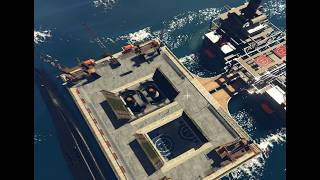
Water Bunker [Addon] Created by me.
Installation:
PLEASE READ IT CAREFULLY !
Download and install:
ScriptHook,
ScriptHook V.NET
OpenIV
MENYOO
And important to download before install the mod for missing props:
1 Panda Craft Mods (https://fr.gta5-mods.com/misc/dlc-panda-craft-add-on)
2 DNX Generic Add-On Props (https://fr.gta5-mods.com/misc/dnx-generic-add-on-props-add-on-props-for-your-custom-maps)
3 Map Builder 1.0 (https://fr.gta5-mods.com/tools/map-builder) for some grounds.
4 Increased Props [Add-on] 0.6 (https://fr.gta5-mods.com/tools/increased-props-add-on)
HOW TO INSTAL:
ADDON [Ymap] for Water Bunker
Installation for instal (OPEN IV needed for this)
0]Replace water :
Before opening the game, run OpenIV and go to edit mode,
Navigate to: common.rpf/data/level/gta5
BACKUP water.xml in case something went wrong.
And then replace it with the one included in the archive.
1] Copy and paste the dlc folder "wate bunker"
To: mods>update>x64>dlcpacks
2] Add "dlcpacks:/water bunker/" in dlclist.xml using OpenIV
To: mods >update.rpf >common >data>dlclist
3]Menyoo Vehicle
Copy: water bunker sub.xml
of my archive to GTAV menyooStuff Spooner.
Now launch in GTA5,
Press F8 to open Menyoo, select "ObjectSpooner", "SavedFiles",
And load in game: water bunker sub.xml
Good Game !!
Changes log :
v1.0 created the water bunker
v1.1 add the water.xml replace file
Installation:
PLEASE READ IT CAREFULLY !
Download and install:
ScriptHook,
ScriptHook V.NET
OpenIV
MENYOO
And important to download before install the mod for missing props:
1 Panda Craft Mods (https://fr.gta5-mods.com/misc/dlc-panda-craft-add-on)
2 DNX Generic Add-On Props (https://fr.gta5-mods.com/misc/dnx-generic-add-on-props-add-on-props-for-your-custom-maps)
3 Map Builder 1.0 (https://fr.gta5-mods.com/tools/map-builder) for some grounds.
4 Increased Props [Add-on] 0.6 (https://fr.gta5-mods.com/tools/increased-props-add-on)
HOW TO INSTAL:
ADDON [Ymap] for Water Bunker
Installation for instal (OPEN IV needed for this)
0]Replace water :
Before opening the game, run OpenIV and go to edit mode,
Navigate to: common.rpf/data/level/gta5
BACKUP water.xml in case something went wrong.
And then replace it with the one included in the archive.
1] Copy and paste the dlc folder "wate bunker"
To: mods>update>x64>dlcpacks
2] Add "dlcpacks:/water bunker/" in dlclist.xml using OpenIV
To: mods >update.rpf >common >data>dlclist
3]Menyoo Vehicle
Copy: water bunker sub.xml
of my archive to GTAV menyooStuff Spooner.
Now launch in GTA5,
Press F8 to open Menyoo, select "ObjectSpooner", "SavedFiles",
And load in game: water bunker sub.xml
Good Game !!
Changes log :
v1.0 created the water bunker
v1.1 add the water.xml replace file
Првпат Додадено: Септември 10, 2026
Последно Ажурирање: пред 9 дена
Последно Симнување: пред 3 саати
5 Коментари
More mods by zamalone:
Water Bunker [Addon] Created by me.
Installation:
PLEASE READ IT CAREFULLY !
Download and install:
ScriptHook,
ScriptHook V.NET
OpenIV
MENYOO
And important to download before install the mod for missing props:
1 Panda Craft Mods (https://fr.gta5-mods.com/misc/dlc-panda-craft-add-on)
2 DNX Generic Add-On Props (https://fr.gta5-mods.com/misc/dnx-generic-add-on-props-add-on-props-for-your-custom-maps)
3 Map Builder 1.0 (https://fr.gta5-mods.com/tools/map-builder) for some grounds.
4 Increased Props [Add-on] 0.6 (https://fr.gta5-mods.com/tools/increased-props-add-on)
HOW TO INSTAL:
ADDON [Ymap] for Water Bunker
Installation for instal (OPEN IV needed for this)
0]Replace water :
Before opening the game, run OpenIV and go to edit mode,
Navigate to: common.rpf/data/level/gta5
BACKUP water.xml in case something went wrong.
And then replace it with the one included in the archive.
1] Copy and paste the dlc folder "wate bunker"
To: mods>update>x64>dlcpacks
2] Add "dlcpacks:/water bunker/" in dlclist.xml using OpenIV
To: mods >update.rpf >common >data>dlclist
3]Menyoo Vehicle
Copy: water bunker sub.xml
of my archive to GTAV menyooStuff Spooner.
Now launch in GTA5,
Press F8 to open Menyoo, select "ObjectSpooner", "SavedFiles",
And load in game: water bunker sub.xml
Good Game !!
Changes log :
v1.0 created the water bunker
v1.1 add the water.xml replace file
Installation:
PLEASE READ IT CAREFULLY !
Download and install:
ScriptHook,
ScriptHook V.NET
OpenIV
MENYOO
And important to download before install the mod for missing props:
1 Panda Craft Mods (https://fr.gta5-mods.com/misc/dlc-panda-craft-add-on)
2 DNX Generic Add-On Props (https://fr.gta5-mods.com/misc/dnx-generic-add-on-props-add-on-props-for-your-custom-maps)
3 Map Builder 1.0 (https://fr.gta5-mods.com/tools/map-builder) for some grounds.
4 Increased Props [Add-on] 0.6 (https://fr.gta5-mods.com/tools/increased-props-add-on)
HOW TO INSTAL:
ADDON [Ymap] for Water Bunker
Installation for instal (OPEN IV needed for this)
0]Replace water :
Before opening the game, run OpenIV and go to edit mode,
Navigate to: common.rpf/data/level/gta5
BACKUP water.xml in case something went wrong.
And then replace it with the one included in the archive.
1] Copy and paste the dlc folder "wate bunker"
To: mods>update>x64>dlcpacks
2] Add "dlcpacks:/water bunker/" in dlclist.xml using OpenIV
To: mods >update.rpf >common >data>dlclist
3]Menyoo Vehicle
Copy: water bunker sub.xml
of my archive to GTAV menyooStuff Spooner.
Now launch in GTA5,
Press F8 to open Menyoo, select "ObjectSpooner", "SavedFiles",
And load in game: water bunker sub.xml
Good Game !!
Changes log :
v1.0 created the water bunker
v1.1 add the water.xml replace file
Првпат Додадено: Септември 10, 2026
Последно Ажурирање: пред 9 дена
Последно Симнување: пред 3 саати
 5mods on Discord

This file has been approved automatically. If you think this file should not be here for any reason please report it.
no file in replacee water???????
@Sarrano12 sorry for that a put it immediatly
i don`t find water xml i found weather xml
@tetor you need to copy the common file with menyoo and add water.xml at the adress : common.rpf/data/level/gta5 where you wind "water.xml" file