Water Bunker 1.1

![Deluxo Paragon [Replace]](https://img.gta5-mods.com/q75-w500-h333-cfill/images/deluxo-paragon-replace-ytd-yft/7e54d5-20241126215809_1.jpg "Deluxo Paragon [Replace]")
![Franklin Next Door [Addon]](https://img.gta5-mods.com/q75-w500-h333-cfill/images/franklin-next-door-addon/753698-20251207194200_1.jpg "Franklin Next Door [Addon]")


633
14
633
14
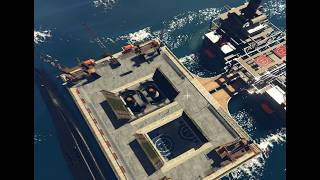
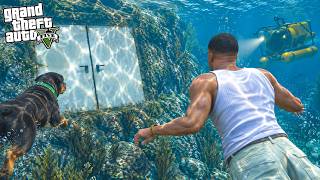
Water Bunker [Addon] Created by me.
Installation:
PLEASE READ IT CAREFULLY !
Download and install:
ScriptHook,
ScriptHook V.NET
OpenIV
MENYOO
And important to download before install the mod for missing props:
1 Panda Craft Mods (https://fr.gta5-mods.com/misc/dlc-panda-craft-add-on)
2 DNX Generic Add-On Props (https://fr.gta5-mods.com/misc/dnx-generic-add-on-props-add-on-props-for-your-custom-maps)
3 Map Builder 1.0 (https://fr.gta5-mods.com/tools/map-builder) for some grounds.
4 Increased Props [Add-on] 0.6 (https://fr.gta5-mods.com/tools/increased-props-add-on)
HOW TO INSTAL:
ADDON [Ymap] for Water Bunker
Installation for instal (OPEN IV needed for this)
0]Replace water :
Before opening the game, run OpenIV and go to edit mode,
Navigate to: common.rpf/data/level/gta5
BACKUP water.xml in case something went wrong.
And then replace it with the one included in the archive.
1] Copy and paste the dlc folder "wate bunker"
To: mods>update>x64>dlcpacks
2] Add "dlcpacks:/water bunker/" in dlclist.xml using OpenIV
To: mods >update.rpf >common >data>dlclist
3]Menyoo Vehicle
Copy: water bunker sub.xml
of my archive to GTAV menyooStuff Spooner.
Now launch in GTA5,
Press F8 to open Menyoo, select "ObjectSpooner", "SavedFiles",
And load in game: water bunker sub.xml
Good Game !!
Changes log :
v1.0 created the water bunker
v1.1 add the water.xml replace file
Installation:
PLEASE READ IT CAREFULLY !
Download and install:
ScriptHook,
ScriptHook V.NET
OpenIV
MENYOO
And important to download before install the mod for missing props:
1 Panda Craft Mods (https://fr.gta5-mods.com/misc/dlc-panda-craft-add-on)
2 DNX Generic Add-On Props (https://fr.gta5-mods.com/misc/dnx-generic-add-on-props-add-on-props-for-your-custom-maps)
3 Map Builder 1.0 (https://fr.gta5-mods.com/tools/map-builder) for some grounds.
4 Increased Props [Add-on] 0.6 (https://fr.gta5-mods.com/tools/increased-props-add-on)
HOW TO INSTAL:
ADDON [Ymap] for Water Bunker
Installation for instal (OPEN IV needed for this)
0]Replace water :
Before opening the game, run OpenIV and go to edit mode,
Navigate to: common.rpf/data/level/gta5
BACKUP water.xml in case something went wrong.
And then replace it with the one included in the archive.
1] Copy and paste the dlc folder "wate bunker"
To: mods>update>x64>dlcpacks
2] Add "dlcpacks:/water bunker/" in dlclist.xml using OpenIV
To: mods >update.rpf >common >data>dlclist
3]Menyoo Vehicle
Copy: water bunker sub.xml
of my archive to GTAV menyooStuff Spooner.
Now launch in GTA5,
Press F8 to open Menyoo, select "ObjectSpooner", "SavedFiles",
And load in game: water bunker sub.xml
Good Game !!
Changes log :
v1.0 created the water bunker
v1.1 add the water.xml replace file
First Uploaded: September 10, 2026
Last Updated: September 11, 2026
Last Downloaded: 3 hours ago
5 Comments
More mods by zamalone:
Water Bunker [Addon] Created by me.
Installation:
PLEASE READ IT CAREFULLY !
Download and install:
ScriptHook,
ScriptHook V.NET
OpenIV
MENYOO
And important to download before install the mod for missing props:
1 Panda Craft Mods (https://fr.gta5-mods.com/misc/dlc-panda-craft-add-on)
2 DNX Generic Add-On Props (https://fr.gta5-mods.com/misc/dnx-generic-add-on-props-add-on-props-for-your-custom-maps)
3 Map Builder 1.0 (https://fr.gta5-mods.com/tools/map-builder) for some grounds.
4 Increased Props [Add-on] 0.6 (https://fr.gta5-mods.com/tools/increased-props-add-on)
HOW TO INSTAL:
ADDON [Ymap] for Water Bunker
Installation for instal (OPEN IV needed for this)
0]Replace water :
Before opening the game, run OpenIV and go to edit mode,
Navigate to: common.rpf/data/level/gta5
BACKUP water.xml in case something went wrong.
And then replace it with the one included in the archive.
1] Copy and paste the dlc folder "wate bunker"
To: mods>update>x64>dlcpacks
2] Add "dlcpacks:/water bunker/" in dlclist.xml using OpenIV
To: mods >update.rpf >common >data>dlclist
3]Menyoo Vehicle
Copy: water bunker sub.xml
of my archive to GTAV menyooStuff Spooner.
Now launch in GTA5,
Press F8 to open Menyoo, select "ObjectSpooner", "SavedFiles",
And load in game: water bunker sub.xml
Good Game !!
Changes log :
v1.0 created the water bunker
v1.1 add the water.xml replace file
Installation:
PLEASE READ IT CAREFULLY !
Download and install:
ScriptHook,
ScriptHook V.NET
OpenIV
MENYOO
And important to download before install the mod for missing props:
1 Panda Craft Mods (https://fr.gta5-mods.com/misc/dlc-panda-craft-add-on)
2 DNX Generic Add-On Props (https://fr.gta5-mods.com/misc/dnx-generic-add-on-props-add-on-props-for-your-custom-maps)
3 Map Builder 1.0 (https://fr.gta5-mods.com/tools/map-builder) for some grounds.
4 Increased Props [Add-on] 0.6 (https://fr.gta5-mods.com/tools/increased-props-add-on)
HOW TO INSTAL:
ADDON [Ymap] for Water Bunker
Installation for instal (OPEN IV needed for this)
0]Replace water :
Before opening the game, run OpenIV and go to edit mode,
Navigate to: common.rpf/data/level/gta5
BACKUP water.xml in case something went wrong.
And then replace it with the one included in the archive.
1] Copy and paste the dlc folder "wate bunker"
To: mods>update>x64>dlcpacks
2] Add "dlcpacks:/water bunker/" in dlclist.xml using OpenIV
To: mods >update.rpf >common >data>dlclist
3]Menyoo Vehicle
Copy: water bunker sub.xml
of my archive to GTAV menyooStuff Spooner.
Now launch in GTA5,
Press F8 to open Menyoo, select "ObjectSpooner", "SavedFiles",
And load in game: water bunker sub.xml
Good Game !!
Changes log :
v1.0 created the water bunker
v1.1 add the water.xml replace file
First Uploaded: September 10, 2026
Last Updated: September 11, 2026
Last Downloaded: 3 hours ago
 5mods on Discord

This file has been approved automatically. If you think this file should not be here for any reason please report it.
no file in replacee water???????
@Sarrano12 sorry for that a put it immediatly
i don`t find water xml i found weather xml
@tetor you need to copy the common file with menyoo and add water.xml at the adress : common.rpf/data/level/gta5 where you wind "water.xml" file