Radio Station Favorites 1.6



2.673
95
2.673
95
Information:
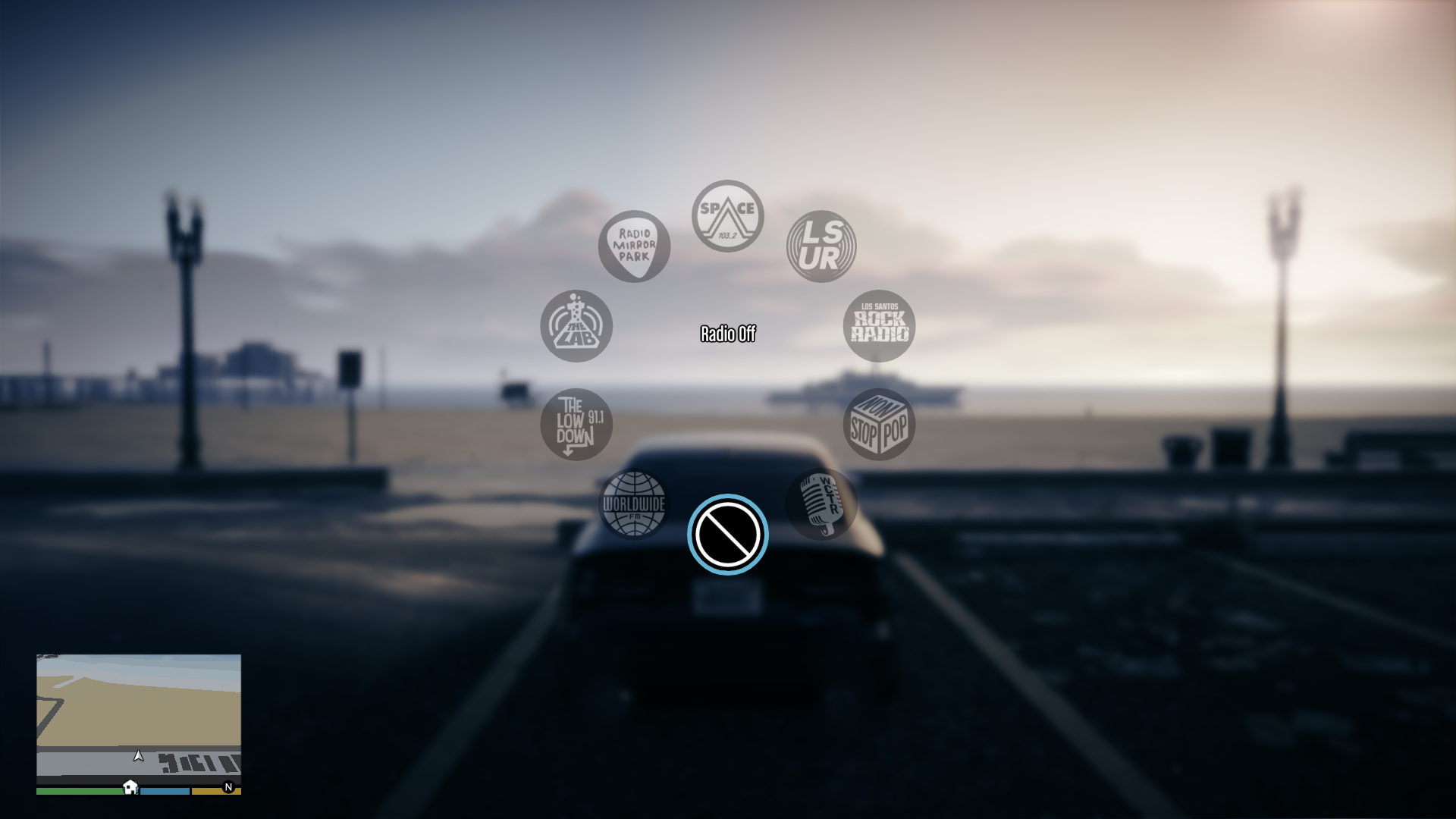
This script adds the ability to the hide the radio stations from the radio wheel
Notes:
- West Coast Talk Radio, Blaine County Radio and Los Santos Underground Radio can't be hidden (this is because the script uses a different native function compared to the one used for GTAO, which doesn't work in SP)
- On game builds prior to 2372, hiding more than 14 radio stations will result in the "Radio Off" icon to disappear and Los Santos Rock Radio will be shown again, even if hidden
- Do not install this script if using Simple Trainer, since it has the same feature and the two can conflcit
Requirements (Legacy):
- Community Script Hook V .NET or Script Hook V .Net Enhanced
Requirements (Enhanced):
- Script Hook V .Net Enhanced
Installation:
- Move RadioStationFavorites.3.cs and RadioStationFavorites.ini in the scripts folder
- Edit RadioStationFavorites.ini to choose the radio stations to disable
Special Thanks:
- alloc8or for the NativeDB
- Sainan for the decompiled scripts and the radio stations list
Changelog:
v1.6
- Removed the modified "dlcbattle_game.dat151.rel"
- Replaced the DLL with CS file so, if installed, delete "RadioStationFavorites.dll"
This script adds the ability to the hide the radio stations from the radio wheel
Notes:
- West Coast Talk Radio, Blaine County Radio and Los Santos Underground Radio can't be hidden (this is because the script uses a different native function compared to the one used for GTAO, which doesn't work in SP)
- On game builds prior to 2372, hiding more than 14 radio stations will result in the "Radio Off" icon to disappear and Los Santos Rock Radio will be shown again, even if hidden
- Do not install this script if using Simple Trainer, since it has the same feature and the two can conflcit
Requirements (Legacy):
- Community Script Hook V .NET or Script Hook V .Net Enhanced
Requirements (Enhanced):
- Script Hook V .Net Enhanced
Installation:
- Move RadioStationFavorites.3.cs and RadioStationFavorites.ini in the scripts folder
- Edit RadioStationFavorites.ini to choose the radio stations to disable
Special Thanks:
- alloc8or for the NativeDB
- Sainan for the decompiled scripts and the radio stations list
Changelog:
v1.6
- Removed the modified "dlcbattle_game.dat151.rel"
- Replaced the DLL with CS file so, if installed, delete "RadioStationFavorites.dll"
Eerste Upload: 22 juli 2021
Laatst bijgewerkt: 5 dagen geleden
Laatst Gedownload: 10 uur geleden
50 Reacties
More mods by Alex106:

- Kleding
- Enhanced
4.9
11.071
165
1.8 Legacy
By Alex106
Information:
This script adds the ability to the hide the radio stations from the radio wheel
Notes:
- West Coast Talk Radio, Blaine County Radio and Los Santos Underground Radio can't be hidden (this is because the script uses a different native function compared to the one used for GTAO, which doesn't work in SP)
- On game builds prior to 2372, hiding more than 14 radio stations will result in the "Radio Off" icon to disappear and Los Santos Rock Radio will be shown again, even if hidden
- Do not install this script if using Simple Trainer, since it has the same feature and the two can conflcit
Requirements (Legacy):
- Community Script Hook V .NET or Script Hook V .Net Enhanced
Requirements (Enhanced):
- Script Hook V .Net Enhanced
Installation:
- Move RadioStationFavorites.3.cs and RadioStationFavorites.ini in the scripts folder
- Edit RadioStationFavorites.ini to choose the radio stations to disable
Special Thanks:
- alloc8or for the NativeDB
- Sainan for the decompiled scripts and the radio stations list
Changelog:
v1.6
- Removed the modified "dlcbattle_game.dat151.rel"
- Replaced the DLL with CS file so, if installed, delete "RadioStationFavorites.dll"
This script adds the ability to the hide the radio stations from the radio wheel
Notes:
- West Coast Talk Radio, Blaine County Radio and Los Santos Underground Radio can't be hidden (this is because the script uses a different native function compared to the one used for GTAO, which doesn't work in SP)
- On game builds prior to 2372, hiding more than 14 radio stations will result in the "Radio Off" icon to disappear and Los Santos Rock Radio will be shown again, even if hidden
- Do not install this script if using Simple Trainer, since it has the same feature and the two can conflcit
Requirements (Legacy):
- Community Script Hook V .NET or Script Hook V .Net Enhanced
Requirements (Enhanced):
- Script Hook V .Net Enhanced
Installation:
- Move RadioStationFavorites.3.cs and RadioStationFavorites.ini in the scripts folder
- Edit RadioStationFavorites.ini to choose the radio stations to disable
Special Thanks:
- alloc8or for the NativeDB
- Sainan for the decompiled scripts and the radio stations list
Changelog:
v1.6
- Removed the modified "dlcbattle_game.dat151.rel"
- Replaced the DLL with CS file so, if installed, delete "RadioStationFavorites.dll"
Eerste Upload: 22 juli 2021
Laatst bijgewerkt: 5 dagen geleden
Laatst Gedownload: 10 uur geleden
 5mods on Discord

@zardoz_47 The mod works already in this way (in fact, there's even a 100ms wait before it's executed to possibly avoid this issue).
Anyway, I uploaded a new version with the wait time increased
@Alex106 Thank you
@Alex106, Sorry I Didn't Explain My Self Better, What I Meant To Say Was Was, When I Set Media Player To True And Start The Game It Don't Remove It From The Radio Wheel, So I Have To Push Insert To Remove It, Other Than That The Mod Works Fine, Thanks, Z.
@zardoz_47 Yeah, sorry I explained wrong myself in the previous comment.What I meant was that the mod works automatically (set true in the ini to hide the radio station, etc) and doesn't require to press "Insert" to work
What happens is that the script probably loads too early to take effect
Does it still happen with the new version as well?t
@Alex106, No Change, I Set Radio Mirror Park = true, Kult FM = true, Media Player = true, And No Change When I Start The Game, INI Has No Effect. Don't Know What's Wrong, Oh Well Still A Good Mod, Thanks Z.
MOTOMAMI, Media Player, Music Locker and Still Slipping still show up even when I set them to true, no idea why. Great mod though 👍
MOTOMAMI, Media Player, Music Locker and Still Slipping Los Santos are still showing up even though theyre set to true.
Thank you @Alex106 for this mod!
I've reworked my `RadioStationFavorites.ini`,
thought you might like it / might want to include it in your mod:
https://pastebin.com/X2VzqwBH
Changes I've done:
- Sorted stations alphabetically (A-Z), to make finding stations easier
- Added indentation to setting values, to improve configuration read-ability
- Added list of radio station genres, to make it easier to detect radio stations which you'd like to disable
@Rikj000 Thanks. If/when I might update the mod, I will remember to include those changes
can you add it https://vi.gta5-mods.com/scripts/default-radio-off plz because this mod is no longer working
Would anybody know of a way to hide LSUR (due to it being completely anachronistic to story mode), I know it is possible in GTA Online, what method did Rockstar Use? Wouldn't the mod do the same? Is this mod the only one that offers this solution for unwanted Radio Stations?
How to remove LS-UR from the radio station wheel?
Why do you need .NET and OpenRPF for something that other mods do just with natives?
@Unsearchably The first is required to use the script while the second to load the modded RPF where the optional is imported
Thank you so much for updating this mod and adding a way to disable LSUR!
Would be great if you can find a way to disable West Coast Talk Radio and Blaine County Radio as well.
@Alex106 is it possible to add more of the mixes from dlcbattle_game.dat151.rel to the radio station?
(assuming that some of the mixes only play in the club and not in the radio station in sp)
@KevinR2 It's possible, but I would need to update it after a new game update and also support at leastt some older versions. Plus, I think there cpiòd be some side effects
@MaxLuk I think it's possible, but I don't know to do it
why don't you just make a separate mod that allows us to disable blain county radio/west coast talk radio and los santos underground radio from the configuration file for when playing on the game build that the glitch isn't present?
So with this mod can I also make gta online radio stations play in story mode(enhanced edition. Also natural vision enhanced mod)? Stations like kult fm, still slipping?
The mod works lovely, its just the West Coast Talk Radio that is still there but isn't a big issue.