

![GTA VI Weapon Wheel & HUD [Enhanced & Legacy]](https://img.gta5-mods.com/q75-w500-h333-cfill/images/gta-vi-weapon-wheel-hud-enhanced/f28b64-NEW.jpg "GTA VI Weapon Wheel & HUD [Enhanced & Legacy]")
![Custom Camera Settings [Enhanced - Legacy]](https://img.gta5-mods.com/q75-w500-h333-cfill/images/custom-camera-settings-enhanced-legacy/b5f3d3-Screen6.jpg "Custom Camera Settings [Enhanced - Legacy]")

![GTA VI Styled Weapon Wheel [Legacy]](https://img.gta5-mods.com/q75-w500-h333-cfill/images/gta-vi-styled-weapon-wheel-v1-1-legacy/d23a58-Gemini_Generated_Image_v2rvuqv2rvuqv2rv.jfif "GTA VI Styled Weapon Wheel [Legacy]")
5,793
109
5,793
109
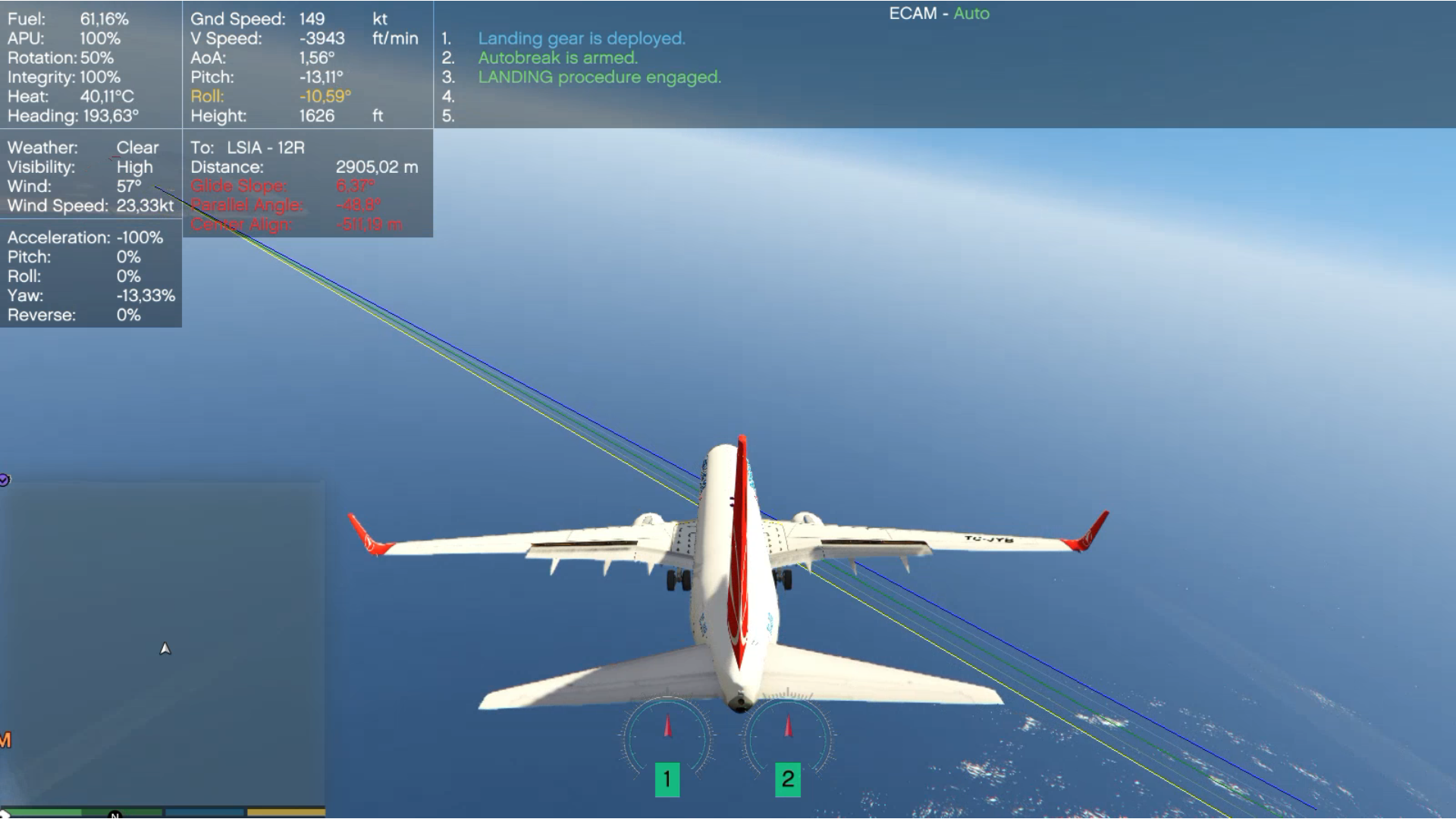
Welcome to Flight Assistant! This script aims to make flights more immersive with flexible configuration. This is not an autopilot script.
About Updates:
If changelog does not define any changes to any file inside Data folder, then you do not need to overwrite any file inside that folder whenever you update the script.
How do I...
Inside the file you just downloaded there's a Flight Assistant User Guide pdf giving details about the script.
Features of Beta v1.5:
Installation
Requirements
ScriptHookVDotNet3.dll v 3.1.0 and required files and distributions.
Changelog:
Beta 1.5 08/apr/2021:
New Feature:
Improvement:
Modified Files:
Fixes:
Beta 1.0 25/feb/2021:
Official release.
Special thanks to:
Heinrich Hans 16th for allowing the use of Boeing 737-900ER and Airbus A319 for the video.
Aquaphobic for allowing the use of Custom Aircraft Engine Sounds v1.2 for the video.
Eddlm to clarify the use and property of some native functions for the roll motion.
About Updates:
If changelog does not define any changes to any file inside Data folder, then you do not need to overwrite any file inside that folder whenever you update the script.
How do I...
Inside the file you just downloaded there's a Flight Assistant User Guide pdf giving details about the script.
Features of Beta v1.5:
- Improved Landing System.
- Improved Climb/Descent command.
- Controlable reverse / reverse effect.
- Reverse visually deploying retracting on models with functioning reverse.
- Alerts for Stall, sink rate, collisions, V1 and many others.
- Alarms: adjustable according to manufacturer and/or model (can create A319 warning sounds pack, another for A380 and so on).
- PA announcements according to company (default "NoCompany" and easyJet sample included). Check User Guide to see how it is possible.
- Instrument Landing System => PAPI Lights & Glide Slope & runway's start/end highlight.
- Memories and Event Action => Dynamic and automated use of commands.
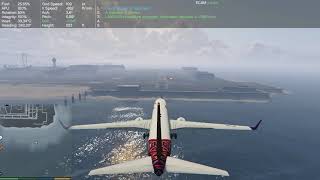
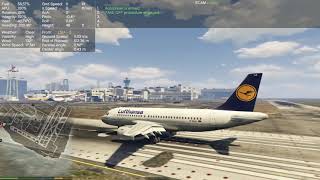
- ECAM
- Alert box
- System information display
- Weather report
- Applied Power display
- Fuel consumption based on throttle and engines, Refuel, Fuel Dump.
- Rain/Snow ground effect.
- Rain/Snow can make aircraft take longer to land (feature depends on parameters, check User Guide for further information)
- Adjustable engine idle rotation and increment values.
- No engine off when reducing speed while airborne.
- Envelope protection on auto mode (corrects stall, sink rate, collision, excess roll).
- Auto take off and landing helper.
- Rejected take off and Go-Around manoeuvre.
- Auto retract/deploy gear.
- Engine unbalance effect.
- Low hotkeys usage.
- Flight Management System: Takes input from user, check User Guide for a list of commands.
- Light / headlight auto control.
- Boarding gates.
- Runway specification: for landing / for take off / for both.
- And many other tiny funny things.
Installation
- Place FlightAssistant.dll and FlightAssistant.xml and Data folder in your scripts folder. It is located inside your game root folder. If you don't have such a folder, create one.
- If you need to rename the Data folder for something else, remember to update the FlightAssistant.xml file with the new renamed.
Requirements
ScriptHookVDotNet3.dll v 3.1.0 and required files and distributions.
Changelog:
Beta 1.5 08/apr/2021:
New Feature:
- Created Maintenance spot with respective reached/left event.
- New command "Repair".
Improvement:
- Refined Yaw control during auto landing
- Refined Yaw control during auto takeoff
- Refined Yaw control during auto takeoff rejection brake
Modified Files:
- ini file discontinued, FlightAssistant.xml works as ini file and should be placed same folder as dll file.
- aiports.xml: new field to store flare's descent ratio "flareRate".
- aiports.xml: new field to store maintenance location.
- aiports.xml: new field to set specific airport to load or not.
Fixes:
- Fixed an issue that caused the center align to be always positive when reference line was off before runway being selected.
- Fixed an issue that reset Landing state when climbing 100 metres above Landing Request height instead of transitioning to Flying state.
- Fixed an issue that prevented landing approach to automatically abort when runway was occupied.
- Fixed an issue that triggered "Left Gate" event when moving through selected gate without stopping.
- Fixed an issue that made nested elements be saved outside model's node in models.xml.
- Fixed an issue of powerbackCoef being applied on brakeCoef if model didn't have it set in models.xml.
Beta 1.0 25/feb/2021:
Official release.
Special thanks to:
Heinrich Hans 16th for allowing the use of Boeing 737-900ER and Airbus A319 for the video.
- Boeing 737-900ER can be at downloaded at https://www.gta5-mods.com/vehicles/boeing-737-ultimate-package-200-300-400-500-600-700-800-900-900er-8-9-7-10-add-on-liveries
- Airbus A319 can be at downloaded at https://pt.gta5-mods.com/vehicles/airbus-a319-111-a319neo
Aquaphobic for allowing the use of Custom Aircraft Engine Sounds v1.2 for the video.
- Custom Aircraft Engine Sounds can be downloaded at https://www.gta5-mods.com/vehicles/custom-aircraft-engine-sounds-oiv-add-on-sp-fivem-sounds
Eddlm to clarify the use and property of some native functions for the roll motion.
First Uploaded: February 25, 2021
Last Updated: April 08, 2021
Last Downloaded: 16 hours ago
All Versions
181 Comments
Welcome to Flight Assistant! This script aims to make flights more immersive with flexible configuration. This is not an autopilot script.
About Updates:
If changelog does not define any changes to any file inside Data folder, then you do not need to overwrite any file inside that folder whenever you update the script.
How do I...
Inside the file you just downloaded there's a Flight Assistant User Guide pdf giving details about the script.
Features of Beta v1.5:
Installation
Requirements
ScriptHookVDotNet3.dll v 3.1.0 and required files and distributions.
Changelog:
Beta 1.5 08/apr/2021:
New Feature:
Improvement:
Modified Files:
Fixes:
Beta 1.0 25/feb/2021:
Official release.
Special thanks to:
Heinrich Hans 16th for allowing the use of Boeing 737-900ER and Airbus A319 for the video.
Aquaphobic for allowing the use of Custom Aircraft Engine Sounds v1.2 for the video.
Eddlm to clarify the use and property of some native functions for the roll motion.
About Updates:
If changelog does not define any changes to any file inside Data folder, then you do not need to overwrite any file inside that folder whenever you update the script.
How do I...
Inside the file you just downloaded there's a Flight Assistant User Guide pdf giving details about the script.
Features of Beta v1.5:
- Improved Landing System.
- Improved Climb/Descent command.
- Controlable reverse / reverse effect.
- Reverse visually deploying retracting on models with functioning reverse.
- Alerts for Stall, sink rate, collisions, V1 and many others.
- Alarms: adjustable according to manufacturer and/or model (can create A319 warning sounds pack, another for A380 and so on).
- PA announcements according to company (default "NoCompany" and easyJet sample included). Check User Guide to see how it is possible.
- Instrument Landing System => PAPI Lights & Glide Slope & runway's start/end highlight.
- Memories and Event Action => Dynamic and automated use of commands.
- ECAM
- Alert box
- System information display
- Weather report
- Applied Power display
- Fuel consumption based on throttle and engines, Refuel, Fuel Dump.
- Rain/Snow ground effect.
- Rain/Snow can make aircraft take longer to land (feature depends on parameters, check User Guide for further information)
- Adjustable engine idle rotation and increment values.
- No engine off when reducing speed while airborne.
- Envelope protection on auto mode (corrects stall, sink rate, collision, excess roll).
- Auto take off and landing helper.
- Rejected take off and Go-Around manoeuvre.
- Auto retract/deploy gear.
- Engine unbalance effect.
- Low hotkeys usage.
- Flight Management System: Takes input from user, check User Guide for a list of commands.
- Light / headlight auto control.
- Boarding gates.
- Runway specification: for landing / for take off / for both.
- And many other tiny funny things.
Installation
- Place FlightAssistant.dll and FlightAssistant.xml and Data folder in your scripts folder. It is located inside your game root folder. If you don't have such a folder, create one.
- If you need to rename the Data folder for something else, remember to update the FlightAssistant.xml file with the new renamed.
Requirements
ScriptHookVDotNet3.dll v 3.1.0 and required files and distributions.
Changelog:
Beta 1.5 08/apr/2021:
New Feature:
- Created Maintenance spot with respective reached/left event.
- New command "Repair".
Improvement:
- Refined Yaw control during auto landing
- Refined Yaw control during auto takeoff
- Refined Yaw control during auto takeoff rejection brake
Modified Files:
- ini file discontinued, FlightAssistant.xml works as ini file and should be placed same folder as dll file.
- aiports.xml: new field to store flare's descent ratio "flareRate".
- aiports.xml: new field to store maintenance location.
- aiports.xml: new field to set specific airport to load or not.
Fixes:
- Fixed an issue that caused the center align to be always positive when reference line was off before runway being selected.
- Fixed an issue that reset Landing state when climbing 100 metres above Landing Request height instead of transitioning to Flying state.
- Fixed an issue that prevented landing approach to automatically abort when runway was occupied.
- Fixed an issue that triggered "Left Gate" event when moving through selected gate without stopping.
- Fixed an issue that made nested elements be saved outside model's node in models.xml.
- Fixed an issue of powerbackCoef being applied on brakeCoef if model didn't have it set in models.xml.
Beta 1.0 25/feb/2021:
Official release.
Special thanks to:
Heinrich Hans 16th for allowing the use of Boeing 737-900ER and Airbus A319 for the video.
- Boeing 737-900ER can be at downloaded at https://www.gta5-mods.com/vehicles/boeing-737-ultimate-package-200-300-400-500-600-700-800-900-900er-8-9-7-10-add-on-liveries
- Airbus A319 can be at downloaded at https://pt.gta5-mods.com/vehicles/airbus-a319-111-a319neo
Aquaphobic for allowing the use of Custom Aircraft Engine Sounds v1.2 for the video.
- Custom Aircraft Engine Sounds can be downloaded at https://www.gta5-mods.com/vehicles/custom-aircraft-engine-sounds-oiv-add-on-sp-fivem-sounds
Eddlm to clarify the use and property of some native functions for the roll motion.
First Uploaded: February 25, 2021
Last Updated: April 08, 2021
Last Downloaded: 16 hours ago
 5mods on Discord

When reporting a bug please give as much detail as possible. In case of a crash, after explaining when it happened post the ScriptHookVDotNet.log regarding the failure. Thank you.
Latest Documentation can be found at:
https://drive.google.com/drive/folders/1e0rKUwiuKrp7Osg17KmYJNGaTUGAbmFn?usp=sharing
@Degas can you help me
@Agent 3 can you give me further details of what is happening? like nothing happens at all, parts of it works, etc
@Degas the problem when I download it it doesn't show
When i add new airport then script is crashing, i add same as u show in tutorial
please add falcon 7x
engine not started
Hi Degas, how do I engage/disengage the automatic landing and takeoff features?
game crashing after update
game crashing after update enter in plane game crashed
it was working...but now, no matter what I do it doesn't seem to want to function at all.
I have removed all scripts from the scripts folder...still not working. I also removed all scripts from the main folder...same thing. 24 hours now ive been trying and getting nowhere. Any suggestions other than remove it from the game?
I found the solution. After I ran into some issue with my machine yesterday, I ran a system restore...this reverted the scripthookdotnet to an older version. I reinstalled the latest one and your awesome script is now working seamlessly :}
My only suggestion would be if you can add/create and startup sequence for starting the planes. In reality, the pilots go through a series of checks and balances prior to launch but then they also have to turn on all the relevant components...engines 1,2,3,4...etc, cabin pressurisation, flaps and ailerons etc.
It would be great to have those extra functions.
is there any chance for this mod to update ? i ran the script on older version scripthookdotnet like @akatek did, it still crashing the game. Any ideas ?
Please update
Can a crash landing function be updated? For example, when the engine stops, the AI automatically makes a forced landing on the road or on the water.
I really liked this mod, I confirm that it works with the current version.
how to turn on the engine?
still works in Nov 2023...just make sure you have everything updated (scripthook/GTA)
ive tried it with military aircraft and civil aircraft, just taxiing, taking off, flying, landing, so far...gonna keep messing around with it
def love it
My favorite mod
The best mod ever made, too bad it apparently stopped updating
I saw there's a flapbone set for the cuban 800, is there a way to set that for other aircraft? If so how?
this mod works for the current version so far. its very user friendly ( some adjustments on the configs for your personal settings). I hope this mod get updated soon.