Realistic Reverse Backup Camera & Dynamic Park Assist 1.2.0




1,505
44
-
 August 23, 2026
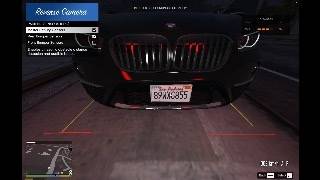
I made a backup camera mod for GTA V with working dynamic lines, multi-camera views (Rear, 360 Degree Bird's Eye, and Front Parking Camera), parking sensors, and advanced safety assists. Whenever you put your car in reverse, the camera turns on automatically with guide lines that turn as you steer, front and rear sensors that beep as you get close to obstacles, real-time steering angle display, plus Autonomous Emergency Braking (AEB) and a Reverse Speed Limiter for ultra-realistic parking.
Built and tested on the latest GTA V Build 3889 (v1.0.3889.0) using SHVDN v3.7.0 Nightly (fully compatible and confirmed working on the latest game update). Older builds like 3028 should work as well.
Notice: Please do not re-upload or redistribute this mod on other websites without permission.
FEATURES
- Turns on automatically when shifting into Reverse.
- Multi-Camera Perspectives: Seamlessly switch between Rear Backup Camera, Top-Down 360 Degree Bird's Eye View, and Front Bumper Parking Camera.
- Autonomous Emergency Braking (AEB): Automatically halts vehicle with emergency brakes when an obstacle is dangerously close while reversing or parking forward, complete with flashing warning banner and audible chime.
- Reverse Speed Limiter: Realistic speed limiter (Default: 15 km/h, adjustable per 5 km/h with Left/Right arrows or toggleable OFF) to prevent unrealistically fast arcade reverse speeds.
- Real-Time Steering Angle HUD: Optional badge displaying exact live steering wheel angle degrees on your screen.
- Dynamic yellow guide lines that bend with your steering wheel.
- Adaptive Terrain & Slope Tracking: Guidelines adapt to driveways and slopes to help reduce ground clipping (doesn't completely fix it, but helps in most spots).
- Static blue side rails and red stop line.
- Front and rear parking sensors with audio beeping and a small radar on the screen.
- Safety disclaimer banner at the top of the screen.
- Full Gamepad / Controller Support: Dedicated controller shortcuts for toggling camera, cycling camera views, and opening the in-game settings menu.
- In-Game Update Checker: Easily check for new updates directly from the settings menu or receive automatic notification banners above the minimap when a new version is released.
- In-game menu to toggle features on/off or rebind keys anytime.
- Works with both vanilla cars and add-on vehicles.
CONTROLS
- Shift into Reverse: Camera activates automatically.
- V / Controller Select: Cycle camera views while active (Rear -> 360 Degree Bird's Eye -> Front) (can be rebound in-game or in .ini).
- / (Slash) or Hold D-Pad Down and press D-Pad Right: Open in-game settings menu (can be rebound in-game or in .ini).
- B / Controller R3: Manual camera toggle key (can be rebound in-game, in .ini, or disabled).
INSTALLATION
- Make sure you have:
- Script Hook V
- Script Hook V .NET (tested on v3.7.0 Nightly, v3.6.0 might work as well, test and lmk!)
- LemonUI for SHVDN3 (already in the download)
- Put ReverseCamera.dll, ReverseCamera.ini, and LemonUI.SHVDN3.dll into your scripts/ folder.
- Done. Just get in a car and reverse.
SETTINGS & NOTES
- Open ReverseCamera.ini to change camera FOV, angle, colors, line thickness, AEB stop distance, reverse speed limit, or vehicle class whitelist.
- Note on Camera Views: Open the in-game settings menu (press /) and go into CAMERA VIEWS & 360 DEGREE to change your Default Camera View (Rear, 360 Degree Bird's Eye, or Front) when shifting into reverse, rebind the cycle hotkey, or toggle the Front Parking Camera.
- Note on Safety Assists: Go to PARKING SENSORS (PDC) in the in-game menu to toggle AEB emergency braking, adjust AEB stop distance threshold, or adjust the Reverse Speed Limiter cap.
- Note on Terrain: Guidelines try to adapt to slopes to reduce ground clipping, but some clipping can still happen in certain spots due to game engine limitations.
- Note: Commercial trucks, industrial vehicles, buses, and military are disabled by default in the .ini. You can still enable them manually if you want, but keep in mind camera angles might look a bit off on some of them since they haven't been tested yet.
- Note: Bikes, boats, planes, and helicopters are permanently ignored.
- Note: Built and tested on the latest GTA V Build 3889 (v1.0.3889.0) with SHVDN v3.7.0 Nightly.
PLANNED FEATURES & ROADMAP
- ✅ Autonomous Emergency Braking (AEB): Automatic braking if you get dangerously close to an obstacle while reversing. (Added in v1.2.0)
- ✅ Reverse Speed Limiter: Configurable reverse speed cap for realistic vehicle physics. (Added in v1.2.0)
- ✅ Steering Angle Degree Display: Live HUD badge showing exact steering angle degrees on screen. (Added in v1.2.0)
- 360 Degree Surround Side Sensors: Extra blind-spot sensor coverage for the left and right sides of the car.
- Per-Vehicle Custom Calibration: In-game menu to adjust and save camera positions individually for specific vehicle models.
- Community Ideas: Might be your requested features from the comments section!
Feel free to leave your ideas and suggestions for future updates in the comments section!
KNOWN BUGS & LIMITATIONS
- Guidelines may still clip into the ground or steps in some uneven spots and slopes. I tried to reduce it, but couldn't completely fix it yet due to game limitations.
- Tested and confirmed 100% working on the latest GTA V Build 3889 (v1.0.3889.0).
- If you find any other issues, feel free to report them in the comments!
VERSION HISTORY
- v1.2.0:
- Added Autonomous Emergency Braking (AEB)! Automatically halts vehicle with emergency brakes when an obstacle is dangerously close while reversing or parking forward.
- Added flashing red on-screen warning banner "[ ! ] EMERGENCY BRAKE APPLIED [ ! ]" and audible alarm chime during AEB triggers.
- Added configurable AEB Stop Distance threshold (0.50m Close / 0.65m Standard / 0.80m Early) and toggle in PARKING SENSORS menu.
- Added Reverse Speed Limiter! Configurable reverse top speed cap (Default: 15 km/h, adjustable per 5 km/h with Left/Right arrows or toggleable OFF) for ultra-realistic reversing and parking physics.
- Added real-time Steering Angle HUD badge displaying exact steering wheel angle degrees ([CENTER], < L XX.X°, R XX.X° >).
- Fixed keyboard S + D steering combo accidentally opening the menu when Gamepad Menu Shortcut was enabled.
- Fixed text collision and truncation on gamepad menu items in LemonUI.
- v1.1.5:
- Added full native Gamepad / Controller support!
- Added Gamepad Manual Camera Toggle button (Default: R3 / Right Stick Click / Look Behind).
- Added Gamepad Camera View Cycle button (Default: Select / Touchpad / Next Camera).
- Added Gamepad Menu Shortcut: Hold D-Pad Down + press D-Pad Right to open in-game settings menu.
- Added live Gamepad button listener when rebinding keys in-game (supports both Keyboard and Gamepad).
- Added dedicated GAMEPAD CONTROLS submenu in LemonUI.
- Added "Sensors Only When Camera Active" option in PARKING SENSORS (PDC) submenu.
- v1.1.2:
- Fixed default camera view (360 Degree Bird's Eye / Front / Rear) menu selection not saving properly after game restart.
- Added instant audio and on-screen save confirmation when selecting default camera view.
- Improved DefaultView INI parser to support all formats (Names, A/B/C, and numbers).
- v1.1.1:
- Added Master Enable/Disable mod switch directly at the top of the in-game main menu.
- Fixed reverse camera falsely triggering on wall collisions, hill rollback, or high-speed skidding/drifting (now strictly requires Reverse gear).
- Improved in-game update checker resilience against server rate limits and connection delays.
- v1.1.0:
- Added 360 Degree Top-Down Bird's Eye View and Front Parking Camera modes.
- Added camera view cycle hotkey (Press 'V' to switch perspectives).
- Added in-game 'Check for Updates' feature and above-minimap notification banners.
- Added terrain & slope tracking to help reduce guideline clipping on driveways and slopes.
- Added wall and obstacle checks to prevent guidelines from jumping onto garage roofs, shelves, or walls.
- Smoothed guideline movement to reduce jitter while reversing.
- Code cleanup and minor optimizations.
- v1.0.0: Initial release.
First Uploaded: August 16, 2026
Last Updated: September 03, 2026
Last Downloaded: 6 hours ago
46 Comments
More mods by lelelelelelele:
I made a backup camera mod for GTA V with working dynamic lines, multi-camera views (Rear, 360 Degree Bird's Eye, and Front Parking Camera), parking sensors, and advanced safety assists. Whenever you put your car in reverse, the camera turns on automatically with guide lines that turn as you steer, front and rear sensors that beep as you get close to obstacles, real-time steering angle display, plus Autonomous Emergency Braking (AEB) and a Reverse Speed Limiter for ultra-realistic parking.
Built and tested on the latest GTA V Build 3889 (v1.0.3889.0) using SHVDN v3.7.0 Nightly (fully compatible and confirmed working on the latest game update). Older builds like 3028 should work as well.
Notice: Please do not re-upload or redistribute this mod on other websites without permission.
FEATURES
- Turns on automatically when shifting into Reverse.
- Multi-Camera Perspectives: Seamlessly switch between Rear Backup Camera, Top-Down 360 Degree Bird's Eye View, and Front Bumper Parking Camera.
- Autonomous Emergency Braking (AEB): Automatically halts vehicle with emergency brakes when an obstacle is dangerously close while reversing or parking forward, complete with flashing warning banner and audible chime.
- Reverse Speed Limiter: Realistic speed limiter (Default: 15 km/h, adjustable per 5 km/h with Left/Right arrows or toggleable OFF) to prevent unrealistically fast arcade reverse speeds.
- Real-Time Steering Angle HUD: Optional badge displaying exact live steering wheel angle degrees on your screen.
- Dynamic yellow guide lines that bend with your steering wheel.
- Adaptive Terrain & Slope Tracking: Guidelines adapt to driveways and slopes to help reduce ground clipping (doesn't completely fix it, but helps in most spots).
- Static blue side rails and red stop line.
- Front and rear parking sensors with audio beeping and a small radar on the screen.
- Safety disclaimer banner at the top of the screen.
- Full Gamepad / Controller Support: Dedicated controller shortcuts for toggling camera, cycling camera views, and opening the in-game settings menu.
- In-Game Update Checker: Easily check for new updates directly from the settings menu or receive automatic notification banners above the minimap when a new version is released.
- In-game menu to toggle features on/off or rebind keys anytime.
- Works with both vanilla cars and add-on vehicles.
CONTROLS
- Shift into Reverse: Camera activates automatically.
- V / Controller Select: Cycle camera views while active (Rear -> 360 Degree Bird's Eye -> Front) (can be rebound in-game or in .ini).
- / (Slash) or Hold D-Pad Down and press D-Pad Right: Open in-game settings menu (can be rebound in-game or in .ini).
- B / Controller R3: Manual camera toggle key (can be rebound in-game, in .ini, or disabled).
INSTALLATION
- Make sure you have:
- Script Hook V
- Script Hook V .NET (tested on v3.7.0 Nightly, v3.6.0 might work as well, test and lmk!)
- LemonUI for SHVDN3 (already in the download)
- Put ReverseCamera.dll, ReverseCamera.ini, and LemonUI.SHVDN3.dll into your scripts/ folder.
- Done. Just get in a car and reverse.
SETTINGS & NOTES
- Open ReverseCamera.ini to change camera FOV, angle, colors, line thickness, AEB stop distance, reverse speed limit, or vehicle class whitelist.
- Note on Camera Views: Open the in-game settings menu (press /) and go into CAMERA VIEWS & 360 DEGREE to change your Default Camera View (Rear, 360 Degree Bird's Eye, or Front) when shifting into reverse, rebind the cycle hotkey, or toggle the Front Parking Camera.
- Note on Safety Assists: Go to PARKING SENSORS (PDC) in the in-game menu to toggle AEB emergency braking, adjust AEB stop distance threshold, or adjust the Reverse Speed Limiter cap.
- Note on Terrain: Guidelines try to adapt to slopes to reduce ground clipping, but some clipping can still happen in certain spots due to game engine limitations.
- Note: Commercial trucks, industrial vehicles, buses, and military are disabled by default in the .ini. You can still enable them manually if you want, but keep in mind camera angles might look a bit off on some of them since they haven't been tested yet.
- Note: Bikes, boats, planes, and helicopters are permanently ignored.
- Note: Built and tested on the latest GTA V Build 3889 (v1.0.3889.0) with SHVDN v3.7.0 Nightly.
PLANNED FEATURES & ROADMAP
- ✅ Autonomous Emergency Braking (AEB): Automatic braking if you get dangerously close to an obstacle while reversing. (Added in v1.2.0)
- ✅ Reverse Speed Limiter: Configurable reverse speed cap for realistic vehicle physics. (Added in v1.2.0)
- ✅ Steering Angle Degree Display: Live HUD badge showing exact steering angle degrees on screen. (Added in v1.2.0)
- 360 Degree Surround Side Sensors: Extra blind-spot sensor coverage for the left and right sides of the car.
- Per-Vehicle Custom Calibration: In-game menu to adjust and save camera positions individually for specific vehicle models.
- Community Ideas: Might be your requested features from the comments section!
Feel free to leave your ideas and suggestions for future updates in the comments section!
KNOWN BUGS & LIMITATIONS
- Guidelines may still clip into the ground or steps in some uneven spots and slopes. I tried to reduce it, but couldn't completely fix it yet due to game limitations.
- Tested and confirmed 100% working on the latest GTA V Build 3889 (v1.0.3889.0).
- If you find any other issues, feel free to report them in the comments!
VERSION HISTORY
- v1.2.0:
- Added Autonomous Emergency Braking (AEB)! Automatically halts vehicle with emergency brakes when an obstacle is dangerously close while reversing or parking forward.
- Added flashing red on-screen warning banner "[ ! ] EMERGENCY BRAKE APPLIED [ ! ]" and audible alarm chime during AEB triggers.
- Added configurable AEB Stop Distance threshold (0.50m Close / 0.65m Standard / 0.80m Early) and toggle in PARKING SENSORS menu.
- Added Reverse Speed Limiter! Configurable reverse top speed cap (Default: 15 km/h, adjustable per 5 km/h with Left/Right arrows or toggleable OFF) for ultra-realistic reversing and parking physics.
- Added real-time Steering Angle HUD badge displaying exact steering wheel angle degrees ([CENTER], < L XX.X°, R XX.X° >).
- Fixed keyboard S + D steering combo accidentally opening the menu when Gamepad Menu Shortcut was enabled.
- Fixed text collision and truncation on gamepad menu items in LemonUI.
- v1.1.5:
- Added full native Gamepad / Controller support!
- Added Gamepad Manual Camera Toggle button (Default: R3 / Right Stick Click / Look Behind).
- Added Gamepad Camera View Cycle button (Default: Select / Touchpad / Next Camera).
- Added Gamepad Menu Shortcut: Hold D-Pad Down + press D-Pad Right to open in-game settings menu.
- Added live Gamepad button listener when rebinding keys in-game (supports both Keyboard and Gamepad).
- Added dedicated GAMEPAD CONTROLS submenu in LemonUI.
- Added "Sensors Only When Camera Active" option in PARKING SENSORS (PDC) submenu.
- v1.1.2:
- Fixed default camera view (360 Degree Bird's Eye / Front / Rear) menu selection not saving properly after game restart.
- Added instant audio and on-screen save confirmation when selecting default camera view.
- Improved DefaultView INI parser to support all formats (Names, A/B/C, and numbers).
- v1.1.1:
- Added Master Enable/Disable mod switch directly at the top of the in-game main menu.
- Fixed reverse camera falsely triggering on wall collisions, hill rollback, or high-speed skidding/drifting (now strictly requires Reverse gear).
- Improved in-game update checker resilience against server rate limits and connection delays.
- v1.1.0:
- Added 360 Degree Top-Down Bird's Eye View and Front Parking Camera modes.
- Added camera view cycle hotkey (Press 'V' to switch perspectives).
- Added in-game 'Check for Updates' feature and above-minimap notification banners.
- Added terrain & slope tracking to help reduce guideline clipping on driveways and slopes.
- Added wall and obstacle checks to prevent guidelines from jumping onto garage roofs, shelves, or walls.
- Smoothed guideline movement to reduce jitter while reversing.
- Code cleanup and minor optimizations.
- v1.0.0: Initial release.
First Uploaded: August 16, 2026
Last Updated: September 03, 2026
Last Downloaded: 6 hours ago
-
@AliG_15 by design, when you shift into Reverse gear, the PDC activates automatically to prevent collisions even if the camera display is turned off (just like in real cars wheere the sensors still beep even with the screen off). Front sensors are active too, but they will only beep if an obstacle is within 2.5m in front of the bumper (they also have a different beep tone). If you prefer no sensor beeps at all when the camera is off, you can simply turn off "Master Parking Sensors" in the PARKING SENSORS (PDC) in-game menu. Also in the upcoming v1.1.5 update along with controller support, ill add an option to choose whether sensors should only beep when the camera display is active or not. (Sensors Only When Camera Active checkbox). Appreciate for your feedback!
August 23, 2026 -

-
@AliG_15 will be fixed in the next update. For now, you can disable the Gamepad Menu Shortcut in the GAMEPAD CONTROLS menu. Thanks for letting me know!
August 23, 2026 -
quick note for v1.1.5: if you play on keyboard with the default Gamepad Menu Shortcut enabled, pressing S + D together while steering/reversing might accidentally open the menu.
simply disable "Gamepad Menu Shortcut" in the GAMEPAD CONTROLS menu (press /) if you only play on keyboard. This will be fixed in the next update.
August 23, 2026 -
Hi, whenever I go into a car it crashes the game, do you know how to fix this problem? Im using GTA V Enhanced. Thank you!
August 26, 2026 -
@Aflook heyy im not really sure about enhanced version, are you on the latest version tho? (also my script itself only tested on GTA V Legacy Build 3028 (v1.0.3028.0) using SHVDN v3.7.0 Nightly)
August 27, 2026 -
-
@SIDKnowsBetter the mod itself doesnt alter vehicle speed at all, thats basically just vanilla GTA V vehicle handling physics. However, im planning to add an optional Reverse Speed Limiter in the next update (configurable in the in-game settings menu) so reversing feels much more realistic and controllable. Thanks for the feedback!
September 02, 2026 -
Np, I've got some modded handling so it could totally come from that too
September 02, 2026 -
@SIDKnowsBetter it could be the problem, anyways I've added Reverse Speed Limiter on v1.2.0 (pending approval). You can cap it at 15 km/h (or customize it in the in-game menu) so it stays realistic regardless of handling setups
September 03, 2026 -
-
-
@sS4imti8b
- Rear (Default)
- BirdEye360 (Top-Down 360° Bird's Eye View)
- Front
you can also change this directly in-game from the settings menu by pressing "/" -> CAMERA VIEWS & 360 DEGREE -> Default Camera ViewSeptember 06, 2026 -
-
-
you should totally add a feature where we can input our own audio files for the beeping
September 19, 2026 -

I’d like to ask if there is another way to activate the mod, as it didn't work for me—even though I followed all the requirements listed in the description.
September 22, 2026 -
The problem was resolved because the version of the "Script Hook V .NET" file I had was outdated,, I updated it, and the file worked correctly. It's a fantastic mod—much respect, bro.
September 22, 2026 -
@Kednyside hey, some day in the future! Since i'm not playing GTA V on windows version and not be able to make it directly on it
@JIX_COOL appreciate it! Thanks man, enjoy!10 days ago
 5mods on Discord

really appreciate the support on my first script mod guys! feel free to drop any ideas, bug reports, or feature requests in the comment section. always happy to help and open to suggestions for the next update ;)